Single Sign-On Configure SSO and Import Users in ObserveOps
ObserveOps (formerly known as AIOps) supports Single Sign-On (SSO) with Okta, OneLogin, Azure AD, 1Kosmos, and Other. Configure SSO to authenticate users through your identity provider. Use the built-in User Import to pull IDP users into ObserveOps with field mapping and automated sync.
Navigation
Go to Menu. Select Settings  . Select User Settings
  . Select Single Sign-On.
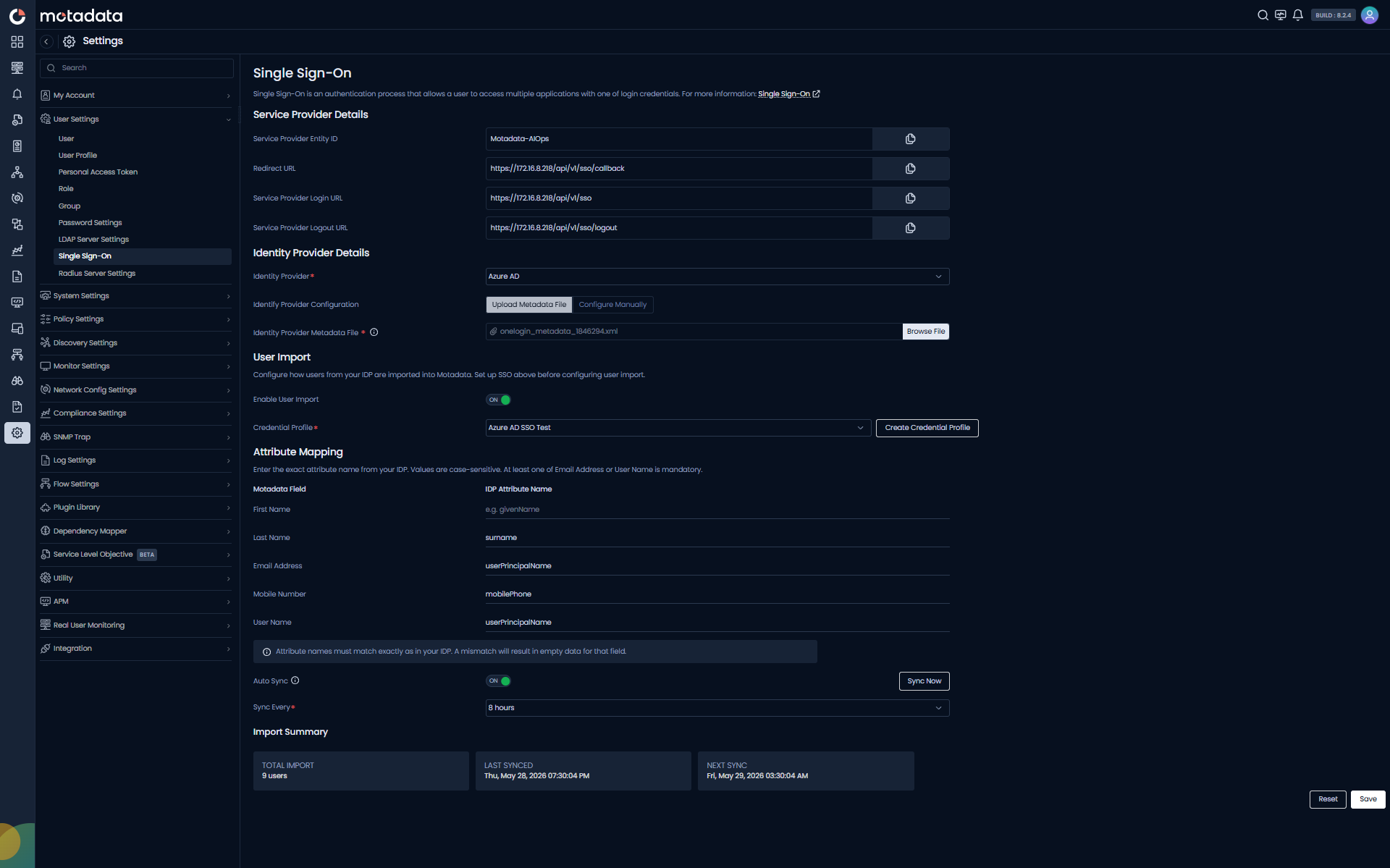
Service Provider Details
The service provider (SP) represents ObserveOps in the SSO process. Configure these values inside your identity provider's platform.
| Field | Description |
|---|---|
| Service Provider Entity ID | Uniquely identifies ObserveOps to the identity provider. Maps to the EntityID field in OneLogin. Editable. Default value: motadata-sp. |
| Redirect URL | Redirects users to the ObserveOps login page. Maps to the ACS (Consumer) URL in OneLogin. Read-only. |
| Service Provider Login URL | The URL ObserveOps uses for authentication. Maps to the Login URL in OneLogin. Read-only. |
| Service Provider Logout URL | Handles sign-out requests from ObserveOps. Maps to the Single Logout URL in OneLogin. Read-only. |
Identity Provider Details
ObserveOps supports the following identity providers:
Okta, OneLogin, Azure AD, 1Kosmos, Other
Select your identity provider from the Identity Provider dropdown. Then choose how to provide IdP metadata:
- Upload Metadata File upload the XML metadata file from your IdP. ObserveOps auto-populates all IdP fields.
- Configure Manually enter each IdP field value by hand.
If Uploading a Metadata File
| Field | Description |
|---|---|
| Identity Provider Metadata File | Upload the XML metadata file from your identity provider to auto-populate all IdP configuration fields. |
If Configuring Manually
| Field | Description |
|---|---|
| Identity Provider Entity ID | Verifies SAML responses from the IdP. Maps to the Issuer URL in OneLogin. |
| Identity Provider Login URL | Directs users to the IdP login page. Maps to the SAML 2.0 Endpoint (HTTP) in OneLogin. |
| Identity Provider Logout URL | Handles logout requests from ObserveOps. Maps to the Single Logout (SLO) Endpoint (HTTP) in OneLogin. |
| NameID Format | Defines how the subject (user) is identified between SP and IdP. Both SP and IdP must use the same format. Supported values: Email, Persistent, Transient, Unspecified. |
| IdP X.509 Certificate | Validates the IdP's digital signature. Upload the certificate file or enter the value manually. |
| Identity Provider Fingerprint | Found in the metadata XML inside <ds:X509Certificate> tags. Upload the certificate directly if available. |
Saving and Testing the Connection
After filling in the required fields, click Save. A notification confirms the result.
- Success:
"An integration with identity provider: <IdP> for Single Sign-On is completed successfully." - Failure:
"An integration with identity provider: <IdP> for Single Sign-On failed!"
Once the connection succeeds, ObserveOps activates SSO and users can authenticate through the configured IdP.
Authentication Process with Single Sign-On
When a user logs in with SSO, ObserveOps runs this sequence:
- ObserveOps checks whether the user already exists in User Settings.
- If not found, ObserveOps verifies the user with the configured identity provider.
- If the IdP authenticates the user successfully, ObserveOps grants access and adds the user to User Settings for future logins.
How Do I Import Users from My Identity Provider?
The User Import feature lets you pull users directly from your configured SSO identity provider into ObserveOps. You control which IDP fields map to ObserveOps fields and can schedule automatic synchronization.
Configure your SSO identity provider (above) before setting up User Import. User Import requires an active SSO connection.
Enable User Import
Use the Enable User Import toggle to turn the import pipeline on or off. When enabled, ObserveOps can fetch users from the connected IdP based on the credential profile and attribute mapping you define.
Credential Profile
The Credential Profile dropdown lists all SSO credential profiles you have created for your identity provider. Select the profile that matches your IdP (for example, an Azure AD or Okta API profile).
Click Create Credential Profile to open the credential profile creation screen and build a new profile without leaving this page. See Creating an SSO Credential Profile below.
Attribute Mapping
Attribute Mapping tells ObserveOps which field names your IdP uses for each ObserveOps user attribute.
Values in the IDP Attribute Name column are case-sensitive. Enter them exactly as they appear in your IdP's user schema.
Map the following ObserveOps fields:
| Motadata Field | IDP Attribute Name | Required? |
|---|---|---|
| First Name | Your IdP's first name field (e.g., givenName for Azure AD) | Optional |
| Last Name | Your IdP's last name field (e.g., surname for Azure AD) | Optional |
| Email Address | Your IdP's email field (e.g., userPrincipalName for Azure AD) | Mandatory* |
| Mobile Number | Your IdP's mobile field (e.g., mobilePhone for Azure AD) | Optional |
| User Name | Your IdP's username field (e.g., userPrincipalName for Azure AD) | Mandatory* |
*At least one of Email Address or User Name must be mapped.
Common IDP Attribute Names by Provider
| ObserveOps Field | Azure AD | Okta | OneLogin |
|---|---|---|---|
| First Name | givenName | firstName | firstname |
| Last Name | surname | lastName | lastname |
| Email Address | userPrincipalName | email | email |
| Mobile Number | mobilePhone | mobilePhone | phone |
| User Name | userPrincipalName | login | username |
Auto Sync
Enable Auto Sync to let ObserveOps automatically fetch and import users from your IdP on a recurring schedule.
Use the Sync Every field to set the interval. For example, set 8 hours to sync every 8 hours.
When Auto Sync runs, ObserveOps applies the same normalization and validation rules as a manual import. It skips users with invalid or missing mandatory fields and reports them in the Import Summary.
Import Summary
The Import Summary panel shows the results of the most recent import run.
| Field | Description |
|---|---|
| Total Import | Total number of users successfully imported in the last run. |
| Last Synced | Date and time of the most recent successful sync. |
| Next Sync | Scheduled date and time for the next automatic sync. |
Creating an SSO Credential Profile
An SSO Credential Profile stores the OAuth 2.0 credentials ObserveOps uses to connect to your identity provider and fetch users for import.
How to Create an SSO Credential Profile
- On the Single Sign-On screen, scroll to User Import.
- Click Create next to the Credential Profile dropdown.
- The Create Credential Profile panel opens on the right.
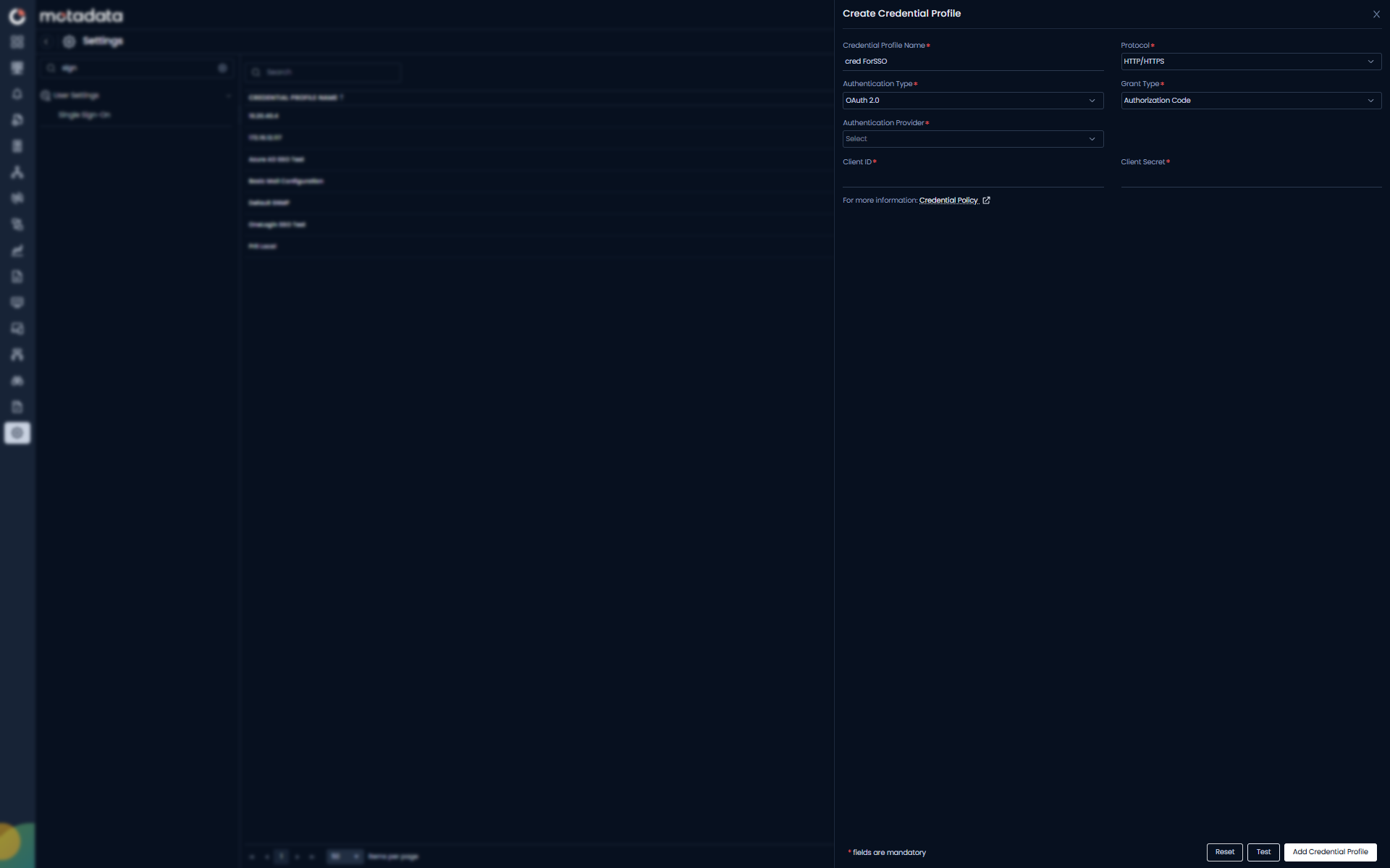
- Fill in the required fields:
| Field | Description |
|---|---|
| Credential Profile Name | Enter a unique name for this profile. Use a name that identifies both the provider and environment, for example Azure AD - Production or Okta - EMEA. |
| Protocol | Fixed to HTTP/HTTPS. |
| Authentication Type | Fixed to OAuth 2.0. |
| Grant Type | Fixed to Authorization Code. |
| Authentication Provider | Select your identity provider from the dropdown. |
| Client ID | Enter the Client ID from your identity provider's OAuth application. |
| Client Secret | Enter the Client Secret from your identity provider's OAuth application. |
- Select your Authentication Provider from the dropdown. ObserveOps supports these providers:
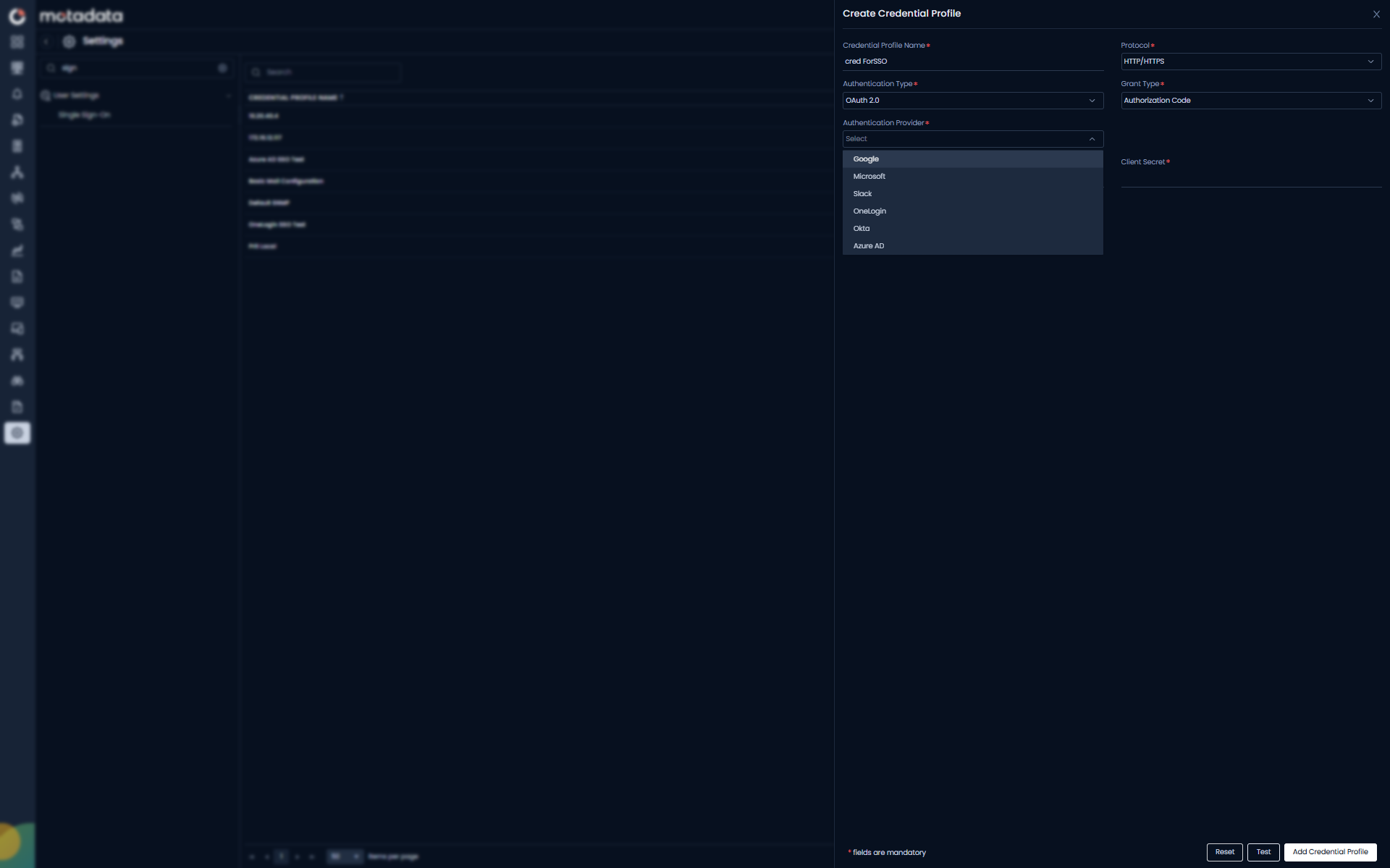
| Authentication Provider | Where to Get Client ID and Client Secret |
|---|---|
| OneLogin | OneLogin Admin Console → Applications → your app → SSO tab |
| Okta | Okta Admin Console → Applications → your app → General tab |
| Azure AD | Azure Portal → App Registrations → your app → Overview + Certificates & Secrets |
| Google Cloud Console → APIs & Services → Credentials | |
| Microsoft | Azure Portal → App Registrations → your app |
| Slack | Slack API → Your Apps → your app → OAuth & Permissions |
- Enter the Client ID and Client Secret for your selected provider.
- Click Add Credential Profile to save.
The new credential profile appears in the Credential Profile dropdown on the User Import screen.
Click Test before saving to confirm ObserveOps can connect to your identity provider with the credentials you entered.
How the Import Pipeline Works
When you click Sync Now or when Auto Sync triggers, ObserveOps runs this sequence:
- Connects to the IdP using the selected credential profile.
- Fetches the full user list, handling pagination and rate limits automatically.
- Retries on transient failures (timeouts, rate-limit responses).
- Applies data normalization to each user:
- Trims whitespace from all field values.
- Converts email addresses to lowercase.
- Validates email format.
- Marks users with missing mandatory fields as Invalid and skips them during import.
- Creates new users or updates existing ones in ObserveOps.
- Updates the Import Summary with the results.
ObserveOps does not auto-assign roles during import. Assign roles to imported users manually or through a User Profile.
Example
Your organization uses Azure AD with 800 users. You configure an Azure AD credential profile and map givenName, surname, userPrincipalName, and mobilePhone. You enable Auto Sync every 8 hours. ObserveOps imports all valid users on the first sync. It keeps the list current as your team grows no manual steps needed.
Troubleshooting
Import fails with "Authentication Error"
Cause: The credential profile credentials are incorrect or expired. Fix: Open the credential profile, re-enter the API token or client secret, save, and run Sync Now again.
Users appear as "Invalid" in the Import Summary
Cause: Mandatory IDP Attribute Name fields are blank or mistyped (values are case-sensitive). Fix: Check the Attribute Mapping section. Confirm the attribute names match your IdP's user schema exactly. Fix any typos, save, and re-run the import.
Auto Sync ran but no new users appeared
Cause: All fetched users already exist in ObserveOps, or all new users failed validation. Fix: Check the Import Summary for failure counts. Review attribute mapping and confirm your IdP returns populated fields for those users.
SSO login works but User Import fails
Cause: SSO login and User Import use separate authentication mechanisms. SSO uses SAML; User Import uses the IdP REST API via the credential profile. Fix: Confirm the credential profile has the correct API token or OAuth credentials, separate from your SAML metadata configuration.