Manage Baselines
A baseline is a recorded state of information or attributes of a product at a specific point in time, serving as a basis for defining and managing changes. It provides a fixed reference point for change management. Baselines are used to identify the working state of a product and offer comprehensive views of current baselines against historical ones, illustrating how product attributes have evolved over time and under various working conditions.
When a historical baseline is retrieved, understanding the product's state becomes significant due to its change history. This allows configuration managers to compare and identify individual items that lag or lead in progressing toward better functionality or performance. Additionally, establishing a baseline is useful for backing out and restoring the original configuration after implementing any change, or if it is necessary to rebuild a specific version of a configuration at a later stage. The current implementation supports asset baselining for computers and servers.
To view the Manage Baselines page, navigate to Admin > Asset Management > Manage Baselines. The list page will then appear.
List Page
The list page displays created baselines along with their details.
Users with the Manage Asset Management role can access Baseline CRUD operations (Create, Read, Update, Delete).

Here, you have the following options:
- Search: Search for baselines using predefined filters such as ID, Name, Asset Type, and Status.
- Variance Detection Settings: Configure variance detection.
- Create Baseline: Create a baseline.
- Re-Order: Reorder baselines using drag and drop.
- View: View baseline details.
- Delete: Delete a baseline if it is no longer required. A confirmation message appears. Click Yes to continue or Cancel to stop the process.
Visible Columns
| Column Name | Description |
|---|---|
| ID | It is the unique number of the baseline. |
| Name | It is the name of baseline. |
| Asset Type | The type of the asset. |
| Status | The status of the asset. |
| Created Date | The creation date of the asset baseline. |
| Last Updated Date | The date when the baseline was last updated. |
| Actions | Available options for the baseline, including editing with the Edit icon or deleting with the Delete icon. |
Create Baseline
To create a baseline, follow these steps:
- Click the Create Baseline button in the top-right corner of the page. The following page will then appear.
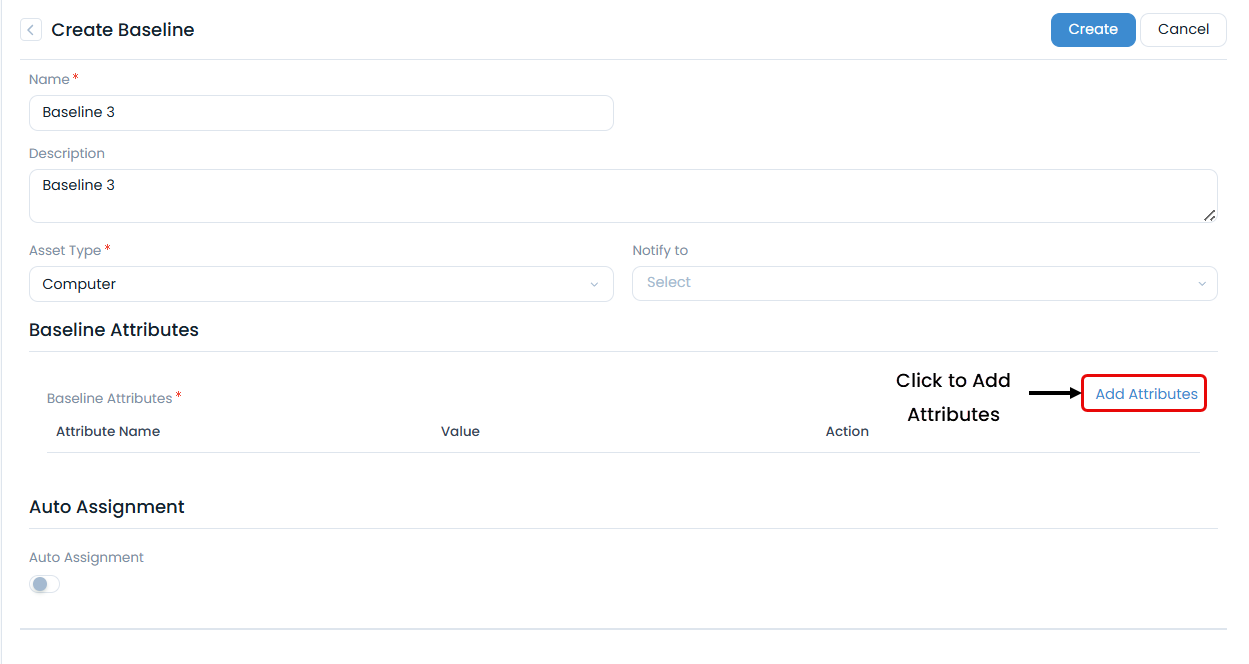
- Enter the following details:
- Name: Enter the name of the baseline.
- Description: Add a brief description of the baseline.
- Asset Type: Select the type of asset.
- Notify to: Select the relevant requester or technician to notify.
- Baseline Attributes: Add required attributes using the Add Attributes link. These are additional fields corresponding to the created baseline.

- Once added, enter values for the attributes in their respective fields, as shown below.

- Auto Assignment: Automatically assign the baseline to assets based on conditions. By default, this is disabled. If enabled, the following fields will appear. Conditions: Select the conditions based on which the baseline should be applied. Excluded Assets: Add the assets you want to exclude from automatic assignment.


- Once all details are entered, click Create to generate the baseline. By default, the baseline is created in Draft status.
- From the list view, click the baseline name to edit its attributes and publish it using the Publish Baseline button located in the top-right corner.
Alternatively, you can publish a baseline directly from the list view by clicking the View icon. This opens the baseline details page, where you can review its information and access the publish option, as shown below:

- For baselines with 'Draft' status, attribute details can be updated. For baselines with 'Published' status, attribute details cannot be updated, and they can be associated with assets.