Discovery
Discover assets and configuration items across your entire IT environment using network scans, cloud integrations, domain scans, and more.
ServiceOps Discovery supports both agentless and agent-based discovery for on-premises and SaaS deployments. You can scan IP ranges, connect to AWS or Azure cloud accounts, query Active Directory domains, and import data from SCCM, all from the same module. Each scan type has its own configuration, scheduler, and set of available actions.
To access Discovery, navigate to Admin > Discovery and Agents > Discovery.
Supported Operating Systems
Linux
| Distribution | Supported Versions |
|---|---|
| Ubuntu | 26.04 LTS, 24.10, 24.04 LTS, 23.04, 22.10, 22.04, 21.04, 20.04, 20.10, 18.04, 16.04 |
| CentOS | 9 and 10 (Stream) |
| RedHat | 10, 9.6, 9.5, Core, 8, 7 |
| Mint | 22, 22.1, 21, 21.1, 21.2, 21.3, 20, 19 |
| openSUSE | 15.6, 15.5 |
| SUSE | 15.6, 15.7, 16 Server; 15.6 and 15.7 Desktop |
| Debian | 13, 12, 11 |
| Oracle Linux | 9, 8, 7 |
| Fedora | 44, 40 |
| SunOS | All supported versions |
| VMware | All supported versions |
| VMware Photon | All supported versions |
| Solaris | All supported versions |
| IBM | AIX, VIO |
| Rocky Linux | 9.5, 9.6, 9.7, 9.8, 10, 10.1, 10.2 |
| AlmaLinux | 9.5, 9.6, 9.7, 9.8, 10, 10.1, 10.2 |
macOS
macOS 10.15 (Catalina), 10.16, 12, 13, 14, 15, 26
Windows Server
Windows Server 2008, 2012, 2016, 2019, 2022, 2025
Windows
Windows 7, Windows 10 and above
Prerequisites
Windows Agentless Discovery
For Windows 7 and Windows Server 2008 machines, install .NET Framework 4 before running discovery.
To enable agentless discovery on Windows, run the following commands in PowerShell v3.0 or above with Run as Administrator rights:
Set-WSManQuickConfig -Force
Enable-PSRemoting -SkipNetworkProfileCheck -Force
Set-Item -Force WSMan:\localhost\Client\TrustedHosts -value {ServiceOps IP or hostname/Poller IP}
Set-Item -Force WSMan:\localhost\Service\AllowUnencrypted -value 'true'
Set-Item -Force WSMan:\localhost\Service\Auth\Basic -value 'true'
Set-Item -Force WSMan:\localhost\Service\MaxConnections -value '100'
Set-Item -Force WSMan:\localhost\Service\MaxConcurrentOperationsPerUser -value '4294967295'
Set-Item -Force WSMan:\localhost\Service\MaxConcurrentOperations -value '4294967295'
Set-Item -Force WSMan:\localhost\Shell\MaxMemoryPerShellMB -value '1024'
Set-Item -Force WSMan:\localhost\Shell\MaxProcessesPerShell -value '2147483647'
Set-Item -Force WSMan:\localhost\Shell\MaxConcurrentUsers -value '100'
Set-Item -Force WSMan:\localhost\Shell\MaxShellsPerUser -value '2147483647'
Set-Item -Force WSMan:\localhost\MaxEnvelopeSizeKb -value '8192'
net stop winrm
net start winrm
| Command | Description |
|---|---|
Set-WSManQuickConfig -Force | Configures the WinRM service to enable remote management. The |
Enable-PSRemoting -SkipNetworkProfileCheck -Force | Enables PowerShell remoting, which allows remote management of Windows endpoints using PowerShell commands. The The |
Set-Item -Force WSMan:\localhost\Client\TrustedHosts -Value (ServiceOps IP or hostname/Poller IP) | Sets the list of trusted hosts for the WinRM client. Replace |
Set-Item -Force WSMan:\localhost\Service\AllowUnencrypted -value 'true' | Allows unencrypted WinRM connections. |
Set-Item -Force WSMan:\localhost\Service\Auth\Basic -value 'true' | Enables basic authentication for WinRM connections, providing a simple authentication mechanism for remote management. |
If PowerShell remoting is disabled, configure the following instead:
Enable UAC by setting
LocalAccountTokenFilterPolicyto1. Do this in one of two ways:In Registry Editor, navigate to
Computer\HKEY_LOCAL_MACHINE\SOFTWARE\Microsoft\Windows\CurrentVersion\Policies\Systemand set the value ofLocalAccountTokenFilterPolicyto1.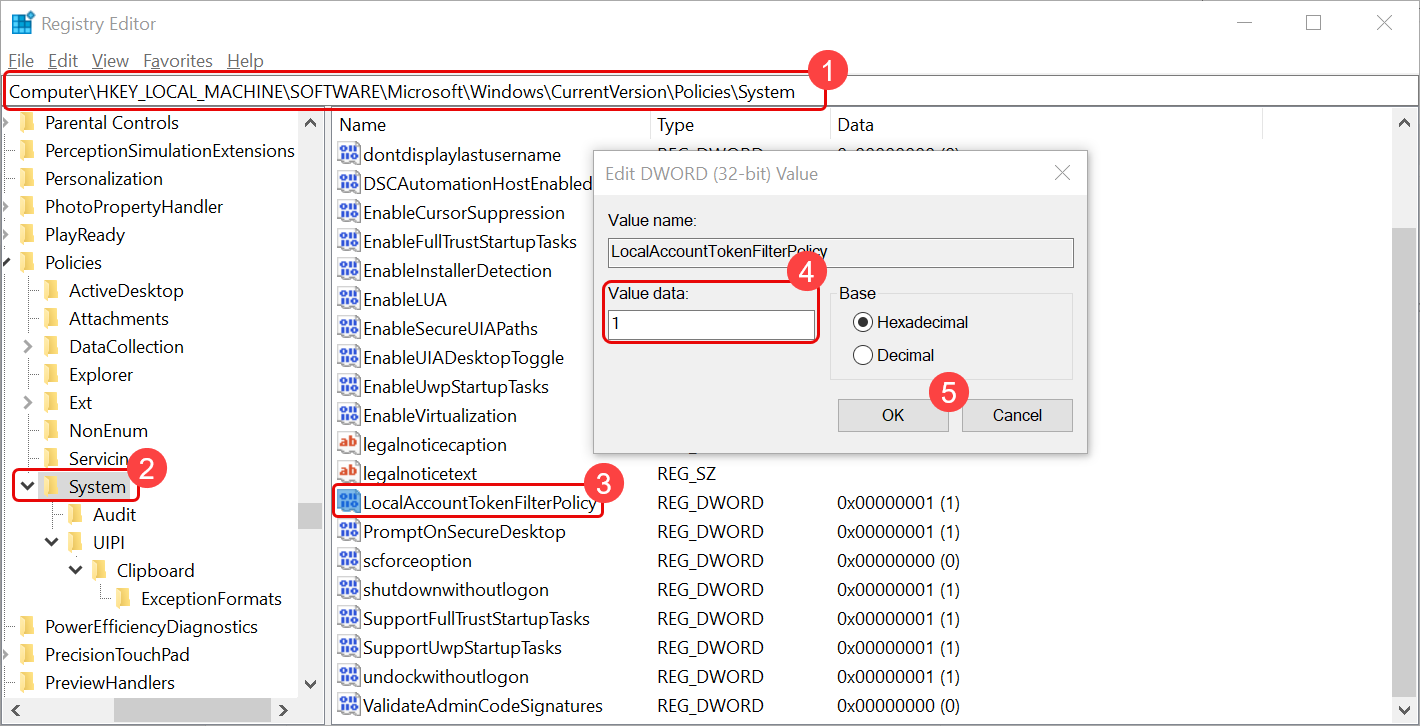
Reboot the machine after making this change.
Run the following command in Command Prompt with Run As Administrator rights:
HKLM\SOFTWARE\Microsoft\Windows\CurrentVersion\Policies\system /v LocalAccountTokenFilterPolicy /t REG_DWORD /d 1 /f
If the Windows Firewall is ON, allow the following Inbound Rules:
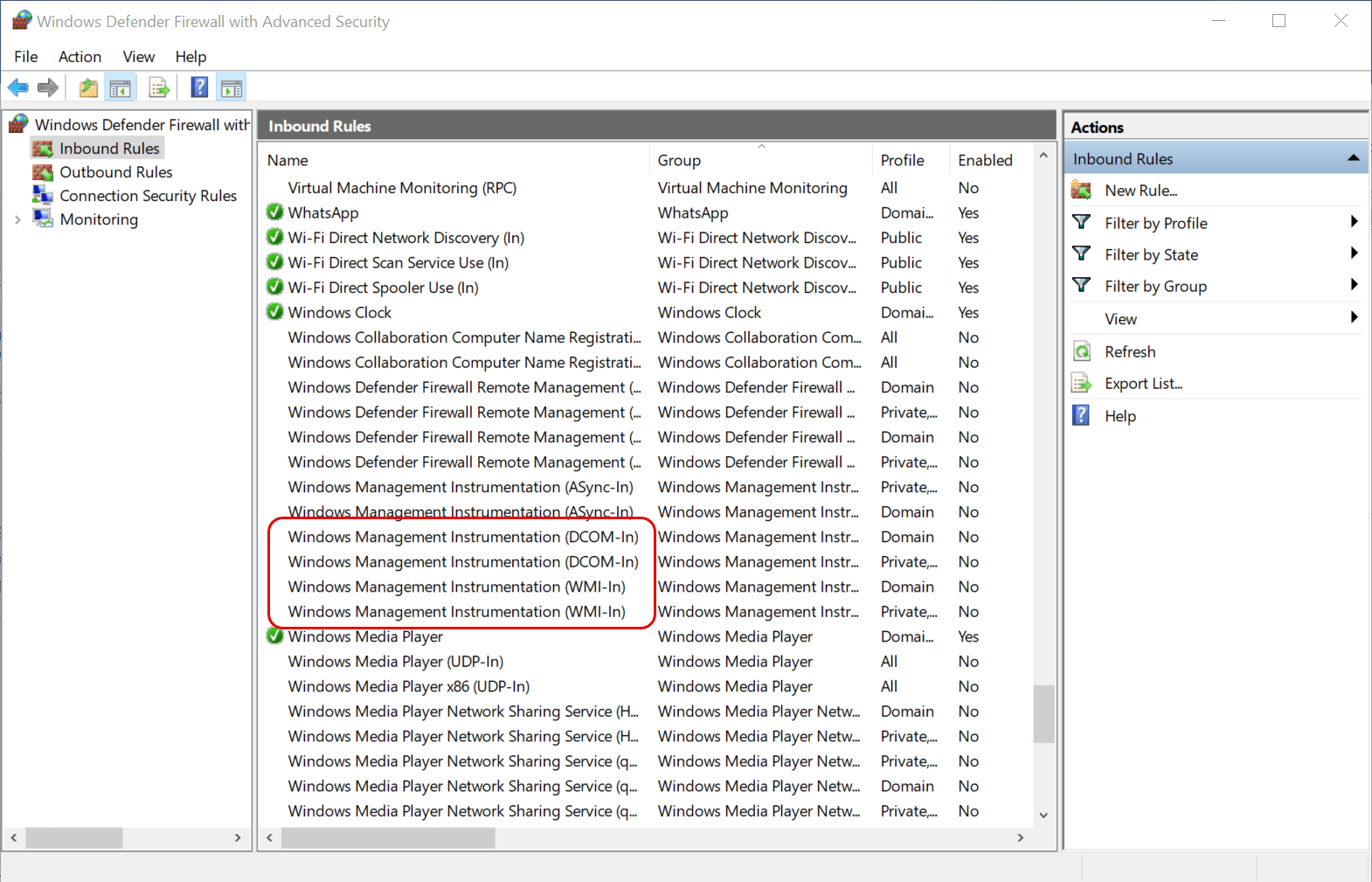
- Windows Management Instrumentation (DCOM-In) (Private, Public)
- Windows Management Instrumentation (DCOM-In) (Domain)
- Windows Management Instrumentation (WMI-In) (Private, Public)
- Windows Management Instrumentation (WMI-In) (Domain)
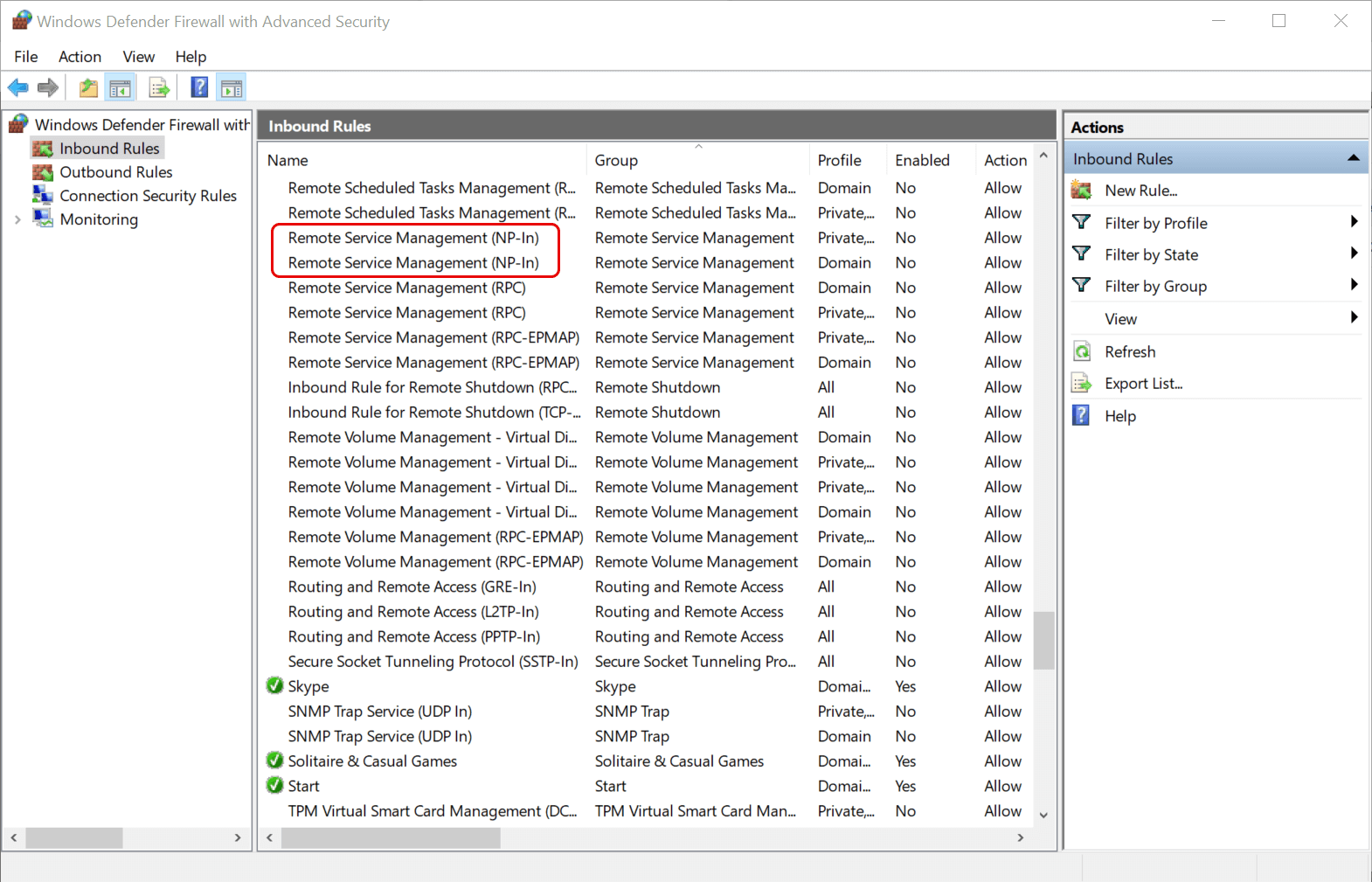
- Remote Service Management (NP-In) (Private, Public)
- Remote Service Management (NP-In) (Domain)
To verify that the ServiceOps server can communicate with the agent, run:
python3 /opt/flotomate/main-server/config/impacket/examples/wmiexec.py {user_name}:{password}@{ip} "wmic os get Name"
Verifying Windows Discovery Prerequisites
Run the following checks on the target Windows machine using PowerShell as Administrator before running a discovery scan.
1. .NET Framework 4.x
Open Registry Editor (regedit) and navigate to HKEY_LOCAL_MACHINE\SOFTWARE\Microsoft\NET Framework Setup\NDP\v4\Full. Confirm the Version value is 4.x or later. If missing, install .NET Framework 4.x on the device.
2. WinRM Service
winrm enumerate winrm/config/listener
Expected: Transport = HTTP, Port = 5985, Enabled = true. If not present, run Set-WSManQuickConfig -Force and Enable-PSRemoting -SkipNetworkProfileCheck -Force.
3. PowerShell Remoting
Get-PSSessionConfiguration
Expected: A list of session configurations. If none appear, run Enable-PSRemoting -SkipNetworkProfileCheck -Force.
4. Trusted Hosts
Get-Item WSMan:\localhost\Client\TrustedHosts
Expected: The ServiceOps server IP or hostname is listed. If missing, run Set-Item WSMan:\localhost\Client\TrustedHosts -Value "<ServiceOps Server IP>" -Force.
5. Basic Authentication
Get-Item WSMan:\localhost\Service\Auth\Basic
Expected: Value: True. If False, run Set-Item WSMan:\localhost\Service\Auth\Basic -Value $true -Force.
6. Allow Unencrypted
Get-Item WSMan:\localhost\Service\AllowUnencrypted
Expected: Value: True. If False, run Set-Item WSMan:\localhost\Service\AllowUnencrypted -Value $true -Force.
7. WinRM Limits
Get-Item WSMan:\localhost\Service\MaxConnections
Get-Item WSMan:\localhost\Service\MaxConcurrentOperationsPerUser
Get-Item WSMan:\localhost\Service\MaxConcurrentOperations
Get-Item WSMan:\localhost\Shell\MaxMemoryPerShellMB
Get-Item WSMan:\localhost\Shell\MaxProcessesPerShell
Get-Item WSMan:\localhost\Shell\MaxConcurrentUsers
Get-Item WSMan:\localhost\Shell\MaxShellsPerUser
Expected: All values should be present and configured. If any are missing, run:
Set-Item WSMan:\localhost\Service\MaxConnections 100
Set-Item WSMan:\localhost\Service\MaxConcurrentOperationsPerUser 4294967295
Set-Item WSMan:\localhost\Service\MaxConcurrentOperations 4294967295
Set-Item WSMan:\localhost\Shell\MaxMemoryPerShellMB 1024
Set-Item WSMan:\localhost\Shell\MaxProcessesPerShell 2147483647
Set-Item WSMan:\localhost\Shell\MaxConcurrentUsers 100
Set-Item WSMan:\localhost\Shell\MaxShellsPerUser 2147483647
8. LocalAccountTokenFilterPolicy
reg query "HKLM\SOFTWARE\Microsoft\Windows\CurrentVersion\Policies\System" /v LocalAccountTokenFilterPolicy
Expected: REG_DWORD 0x1. If missing, run:
reg add "HKLM\SOFTWARE\Microsoft\Windows\CurrentVersion\Policies\System" /v LocalAccountTokenFilterPolicy /t REG_DWORD /d 1 /f
Restart the Windows device after making this change.
9. Windows Firewall Rules
Get-NetFirewallRule -DisplayGroup "Windows Management Instrumentation (WMI)" | Select DisplayName, Enabled
Get-NetFirewallRule -DisplayGroup "Remote Service Management" | Select DisplayName, Enabled
Expected: All rules show Enabled: True. If disabled, run Enable-NetFirewallRule -DisplayGroup "Windows Management Instrumentation (WMI)" and Enable-NetFirewallRule -DisplayGroup "Remote Service Management".
Device Type Prerequisites and Port Requirements
| Device Type | Prerequisites | Required Ports |
|---|---|---|
| Windows |
| TCP 135, 445, 5000-6000, 49152 |
| Linux / Unix |
| TCP 22 |
| SNMP devices (routers, switches, printers, storage) |
| UDP 161 |
| SNMP v3 network devices |
| UDP 161 |
| VMware (VMs and hosts) |
| TCP 443 |
| AWS (S3, EC2, RDS, and other resources) |
| HTTPS TCP 443 |
| Azure (VMs, storage, and other resources) |
| HTTPS TCP 443 |
| Nutanix (VMs and clusters) |
| HTTPS TCP 9440 |
| APIs and cloud services (OAuth) |
| HTTPS TCP 443 |