Change Category
Categories enable you to group similar changes under a single category. This helps technicians filter the required changes quickly from a large list. The system provides the following categories by default:
- General
- Software
- Hardware
- Network
- IT Administration
To view the Change Category page, navigate to Admin > Change Management > Change Categories > Change tab.
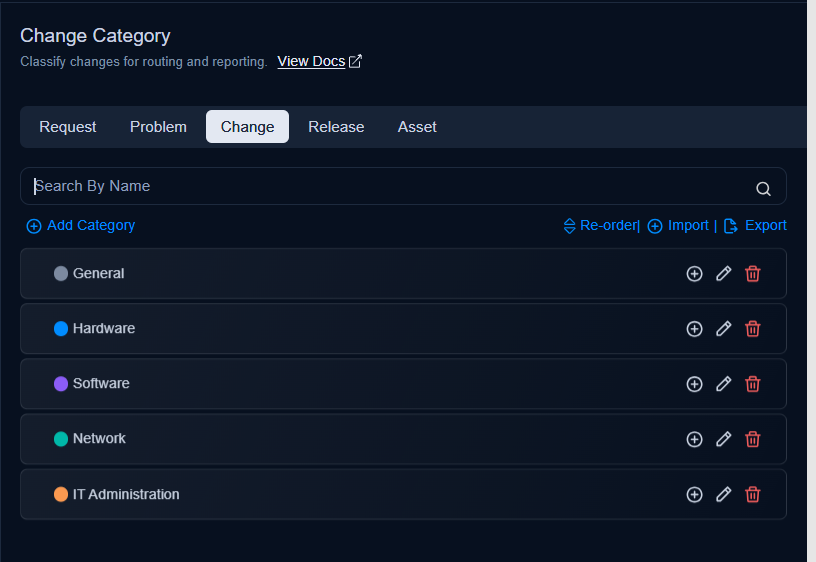
Here, you have the following options. All these options are available onthe Request, Problem, Change, and Release tabs.
- Search: You can search for the required category by name from the list of categories.
- Add Category: You can add a category. For more details, refer to the link Request Category.
- Import Categories: You can import a list of categories in bulk. For more details, see Request Category.
- Export Categories: You can export the list of categories. For more details, see Request Category.
- Re-order: You can rearrange the order of categories in the list using drag-and-drop. You can also re-order sub categories.
- Category Configurations: You can configure settings for creating changes. For more details, see Request Category.
- Add Sub Category: You can add a sub-category. For more details, see Request Category.
- Edit: You can edit the category name.
- Delete: You can delete the category if it is not required. A confirmation message appears. Click Yes to continue or Cancel to stop the process.