Configuring SSL Certificates in Nginx
SSL (Secure Sockets Layer) certificates are essential for securing the Nginx web server, which acts as a reverse proxy for the ServiceOps platform. This guide provides detailed instructions on how to configure SSL to encrypt traffic, protect sensitive data, and ensure secure communication between clients and your ServiceOps instance.
In the ServiceOps architecture, Nginx is a critical component that manages incoming web traffic. By implementing SSL, you enable HTTPS, which authenticates the server's identity and encrypts all data in transit, a fundamental requirement for enterprise security and user trust.
SSL Certificate Overview
What are SSL Certificates?
SSL certificates are digital certificates that provide authentication and encryption for secure communication over the internet. They establish a secure connection between a client (browser) and a server, ensuring that data transmitted between them is encrypted and protected from interception.
Why SSL is Important for ServiceOps
- Data Protection: Encrypts sensitive information like login credentials and personal data
- Authentication: Verifies the identity of the server to prevent man-in-the-middle attacks
- Compliance: Meets security compliance requirements for enterprise environments
- Trust: Builds user confidence with secure, encrypted connections
- Integration: Required for secure integration with external systems and APIs
SSL Certificate Types
- Self-Signed Certificates: For internal testing and development
- Wildcard Certificates: Cover multiple subdomains (e.g., *.motadataserviceops.com)
- Domain Validated (DV): Basic validation for single domains
- Organization Validated (OV): Enhanced validation with organization details
- Extended Validation (EV): Highest level of validation and trust
Prerequisites and Requirements
Certificate Requirements
- Valid SSL Certificate: Properly signed certificate from a trusted Certificate Authority (CA)
- Private Key: Corresponding private key file
- Certificate Chain: Intermediate certificates if required
- Domain Validation: Certificate must match the domain name being used
System Requirements
- HTTPS Port Access: Port 443 must be accessible through firewalls
- Administrative Access: Root or sudo privileges for configuration changes
- File Permissions: Proper permissions for certificate files
- Backup Strategy: Backup of existing configurations before changes
Network Requirements
- Firewall Configuration: Allow HTTPS traffic on port 443
- DNS Configuration: Proper DNS resolution for domain names
- Network Security: Secure network access to certificate files
Step-by-Step Nginx SSL Configuration
Nginx serves as the web server and reverse proxy for ServiceOps. Configuring SSL in Nginx provides secure access to the ServiceOps application.
Step 1: Prepare SSL Files
Copy SSL certificate and key files to Nginx SSL directory:
cp example.crt /etc/ssl/certs/nginx.crt
cp example.key /etc/ssl/private/nginx.key
Set proper permissions:
chmod 644 /etc/ssl/certs/nginx.crt
chmod 600 /etc/ssl/private/nginx.key
chown root:root /etc/ssl/certs/nginx.crt
chown root:root /etc/ssl/private/nginx.key
Step 2: Configure Nginx SSL
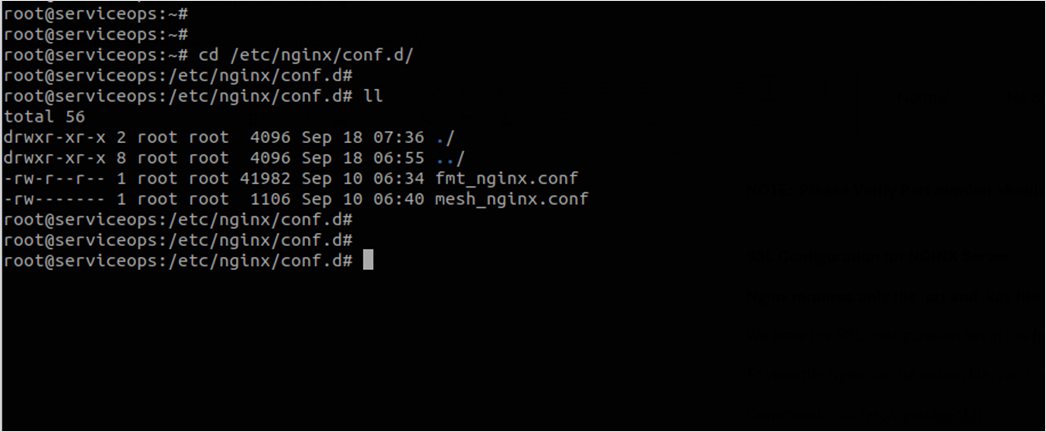
Access Nginx configuration file:
vi /etc/nginx/conf.d/fmt_nginx.conf
# or
nano /etc/nginx/conf.d/fmt_nginx.conf
Add SSL configuration with HTTP to HTTPS redirection:
# HTTP to HTTPS redirection
server {
    listen 80;
    server_name localhost;
    return 301 https://$host$request_uri;
}

# HTTPS server configuration
server {
    listen 443 ssl;
    server_name localhost;

    # SSL configuration
    ssl_certificate /etc/ssl/certs/nginx.crt;
    ssl_certificate_key /etc/ssl/private/nginx.key;

    # SSL security settings
    ssl_protocols TLSv1.2 TLSv1.3;
    ssl_ciphers ECDHE-RSA-AES128-GCM-SHA256:ECDHE-RSA-AES256-GCM-SHA384;
    ssl_prefer_server_ciphers off;
    ssl_session_cache shared:SSL:10m;
    ssl_session_timeout 10m;

    # Your existing location blocks and proxy configurations
    location / {
        proxy_pass http://localhost:8080;
        proxy_set_header Host $host;
        proxy_set_header X-Real-IP $remote_addr;
        proxy_set_header X-Forwarded-For $proxy_add_x_forwarded_for;
        proxy_set_header X-Forwarded-Proto $scheme;
    }
}
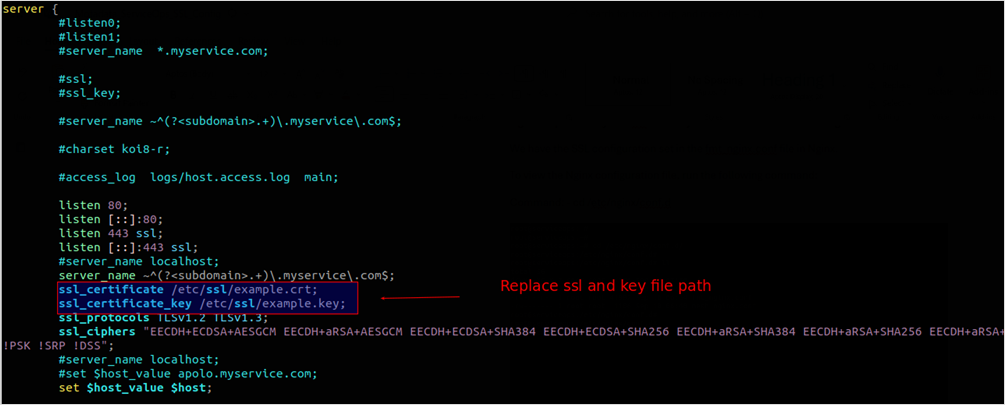
The above figure sets the SSL certificate path to /root/ssl on the server. The example.crt and example.key files are located at /root/ssl.
Alternative: HTTPS-only configuration (without HTTP redirection):
server {
    listen 443 ssl;
    listen [::]:443 ssl;
    server_name localhost;

    ssl_certificate /etc/ssl/certs/nginx.crt;
    ssl_certificate_key /etc/ssl/private/nginx.key;

    # SSL security settings
    ssl_protocols TLSv1.2 TLSv1.3;
    ssl_ciphers ECDHE-RSA-AES128-GCM-SHA256:ECDHE-RSA-AES256-GCM-SHA384;
    ssl_prefer_server_ciphers off;

    location / {
        proxy_pass http://localhost:8080;
        proxy_set_header Host $host;
        proxy_set_header X-Real-IP $remote_addr;
        proxy_set_header X-Forwarded-For $proxy_add_x_forwarded_for;
        proxy_set_header X-Forwarded-Proto $scheme;
    }
}
Once the necessary changes are done, save the file.
Step 3: Verify and Apply Configuration
Test Nginx configuration syntax:
nginx -t
Restart Nginx service:
systemctl restart nginx.serviceVerify service status:
systemctl status nginx.serviceTest SSL connectivity:
curl -I https://localhost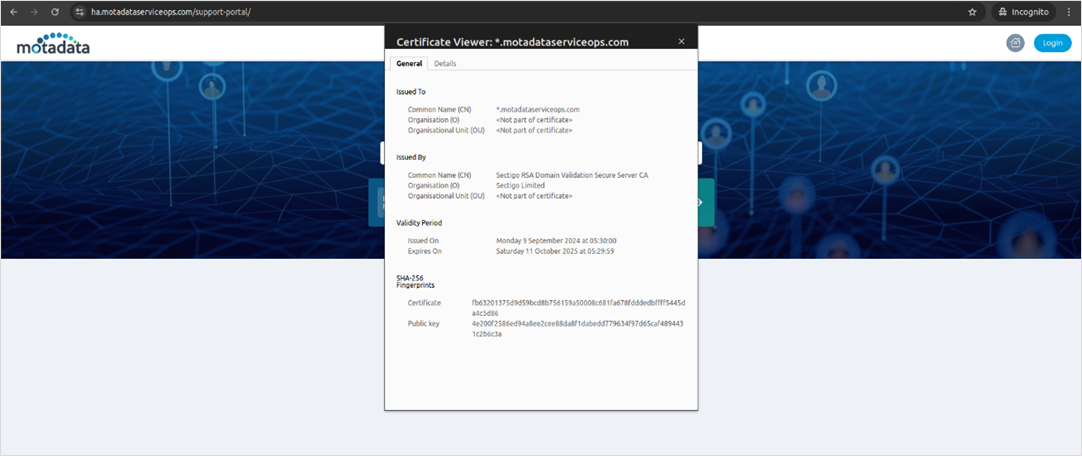
Certificate Management and Maintenance
Certificate Renewal
SSL certificates have expiration dates and must be renewed before expiration:
- Obtain New Certificate: Get a new certificate from your CA
- Backup Current Configuration: Backup existing certificate files
- Update Certificate Files: Replace old certificates with new ones
- Update Nginx Configuration: Ensure your Nginx configuration points to the new certificate files.
- Restart Nginx: Restart the Nginx service to apply the changes.
- Verify Configuration: Test HTTPS access and certificate validity
Certificate Validation
Regular certificate validation ensures continued security:
- Check Expiration: Monitor certificate expiration dates
- Verify Domain Match: Ensure certificates match domain names
- Test HTTPS Access: Verify secure access to all components
- Monitor Logs: Check for SSL-related errors in service logs
Wildcard Certificates
For environments with multiple subdomains, wildcard certificates are recommended:
- Format: *.motadataserviceops.com
- Coverage: Covers all subdomains (serviceops, rdp, etc.)
- Consistency: Ensures same certificate across all components
- Management: Simplifies certificate management
Troubleshooting and Diagnostics
Common SSL Issues
Certificate Mismatch
Problem: Certificate domain doesn't match server domain
Solution:
- Verify certificate domain matches server domain
- Update certificate with correct domain
- Ensure DNS resolution is correct
Permission Issues
Problem: Certificate files have incorrect permissions
Solution:
# Set correct permissions
sudo chmod 644 /etc/ssl/certs/nginx.crt
sudo chmod 600 /etc/ssl/private/nginx.key
sudo chown root:root /etc/ssl/certs/nginx.crt
sudo chown root:root /etc/ssl/private/nginx.key
Service Restart Issues
Problem: Services fail to restart after certificate changes
Solution:
- Check configuration syntax
- Verify certificate file paths
- Check service logs for errors
- Ensure proper file permissions
Diagnostic Commands
Check Certificate Validity
openssl x5op -in /etc/ssl/certs/nginx.crt -text -noout
Verify Certificate Chain
openssl verify /etc/ssl/certs/nginx.crt
Test SSL Connection
openssl s_client -connect localhost:443 -servername localhost
Check Service Status
# Nginx
sudo systemctl status nginx
View Service Logs
# Nginx logs
sudo tail -f /var/log/nginx/error.log
Security and Best Practices
Certificate Security
- Strong Private Keys: Use 2048-bit or higher RSA keys
- Secure Storage: Store private keys securely with restricted access
- Regular Updates: Keep certificates updated and renewed
- Monitoring: Monitor certificate expiration and validity
Configuration Security
- TLS Protocols: Use TLS 1.2 or higher
- Strong Ciphers: Configure strong cipher suites
- HSTS: Enable HTTP Strict Transport Security
- OCSP Stapling: Enable OCSP stapling for better performance
Operational Security
- Access Control: Restrict access to certificate files
- Backup Strategy: Regular backup of certificates and configurations
- Incident Response: Have procedures for certificate compromise
- Documentation: Maintain detailed certificate inventory
Monitoring and Maintenance
- Expiration Tracking: Monitor certificate expiration dates
- Validity Checks: Regular certificate validity verification
- Security Alerts: Set up alerts for certificate issues
- Performance Monitoring: Monitor SSL handshake performance
- Configuration Reviews: Regular SSL configuration reviews
- Security Updates: Apply security updates to SSL components
- Performance Tuning: Optimize SSL configuration for performance
- Documentation Updates: Keep SSL configuration documentation current
Related Topics
- System Requirements: For detailed system requirements and port configurations.
- Pre-Installation Checklist: For pre-installation requirements and checks.
Next Steps
After successfully configuring SSL certificates for Nginx:
- Verify HTTPS Access: Ensure you can access your ServiceOps instance via HTTPS without any browser warnings.
- Monitor Performance: Set up monitoring for SSL performance and watch for any certificate-related errors in your Nginx logs.
- Document Configuration: Create detailed documentation of your SSL setup, including certificate expiration dates.
- Plan Renewal: Set up calendar reminders or automated alerts for certificate renewal to avoid service interruptions.
- Security Audit: Conduct regular security audits of your Nginx and SSL configuration to ensure it remains secure.