Security Best Practices
Comprehensive security guidelines to protect your ServiceOps deployment from threats, ensure data privacy, and maintain compliance with industry standards.
Overview
ServiceOps provides robust security features to protect your ITSM environment from internal and external threats. This guide outlines essential security best practices covering authentication, access control, data protection, network security, and compliance requirements.
Implementing these security measures helps safeguard sensitive information, prevent unauthorized access, and maintain the integrity of your ServiceOps deployment.
Authentication and Access Control
Password Policy Configuration
Implement strong password policies to prevent unauthorized access:
Password Policy Settings
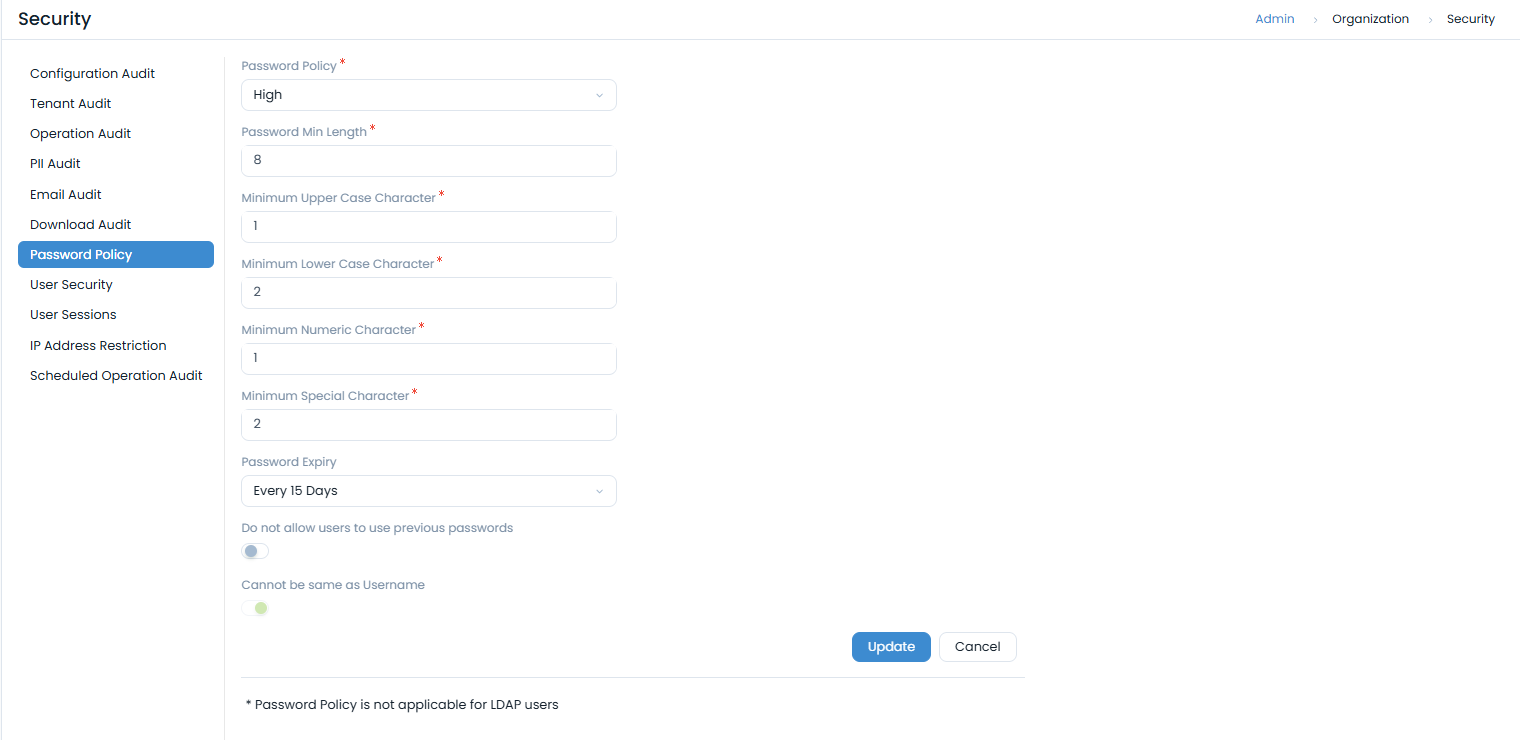
Navigate to Admin > Organization > Security > Password Policy to configure:
- Password Policy Type: Choose from Custom, High, Medium, or Low security levels
- Minimum Length: Set minimum password length (recommended: 12+ characters)
- Character Requirements:
- Minimum uppercase characters
- Minimum lowercase characters
- Minimum numeric characters
- Minimum special characters
- Password Expiry: Configure password expiration (recommended: 90 days)
- Password History: Prevent reuse of previous passwords
- Username Restriction: Prevent passwords from matching usernames
Recommended Password Policy
For high-security environments:
- Policy Type: Custom
- Minimum Length: 12 characters
- Character Mix: 2 uppercase, 2 lowercase, 2 numeric, 2 special
- Expiry: Every 90 days
- History: Prevent last 5 passwords
- Username Restriction: Enabled
Two-Factor Authentication (2FA)
Enable two-factor authentication for enhanced security:
Email-Based 2FA
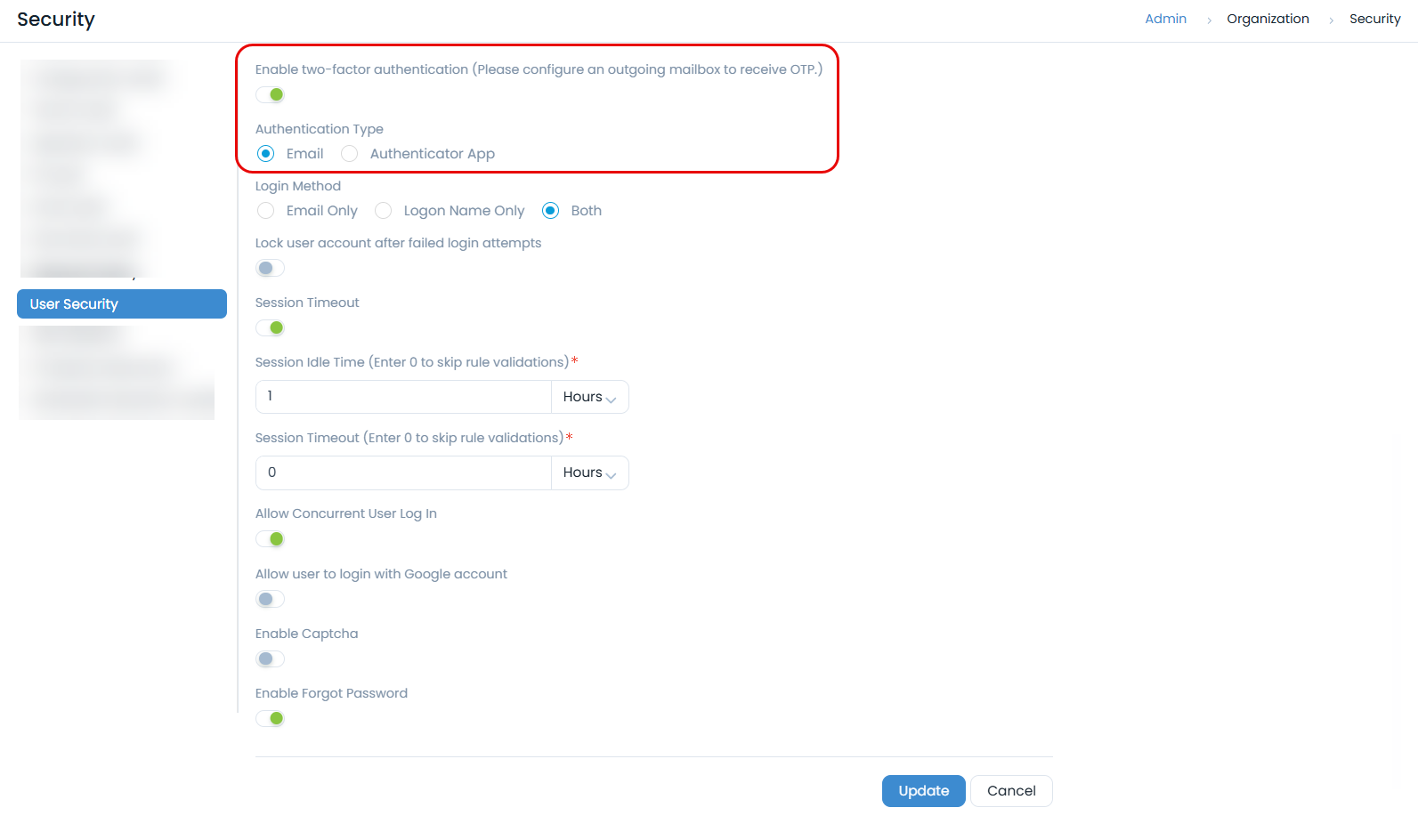
- Navigate to Admin > Organization > Security > User Security
- Enable Two-Factor Authentication
- Select Email as authentication type
- Configure outgoing email server for OTP delivery
Authenticator App 2FA
- Enable Two-Factor Authentication in User Security
- Select Authenticator App as authentication type
- Users scan QR code with authenticator app
- Configure recovery codes for backup access
Session Management
Configure session timeout and concurrent login policies:
Session Timeout Settings
- Session Idle Time: 30 minutes (recommended)
- Session Timeout: 8 hours (recommended)
- Concurrent Logins: Disable for high-security environments
User Session Monitoring
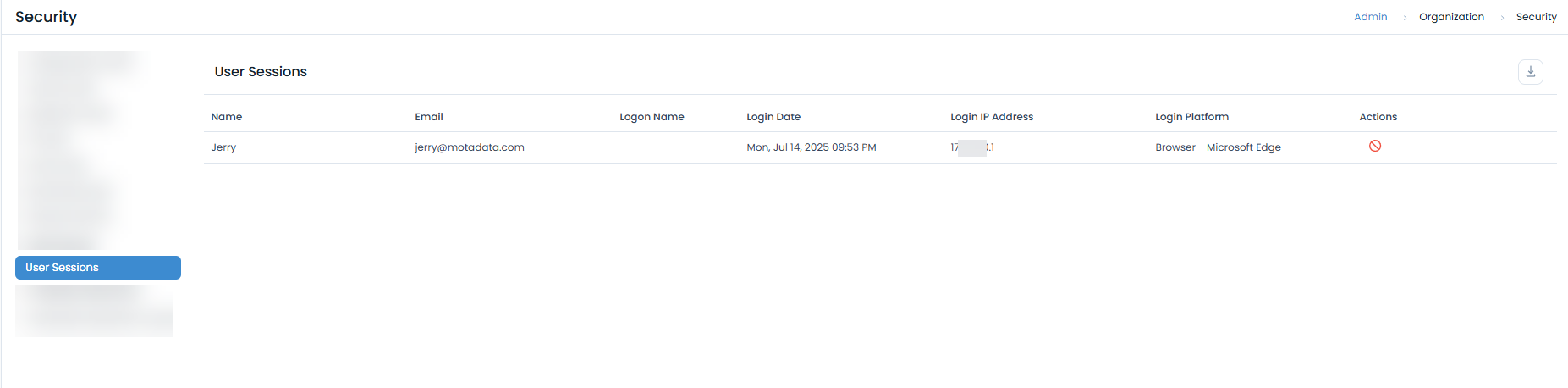
Monitor active sessions through Admin > Organization > Security > User Sessions:
- View active user sessions
- Track login IP addresses and platforms
- Terminate suspicious sessions
- Download session audit logs
Network Security
IP Address Restrictions
Implement IP-based access controls:
IP Restriction Configuration
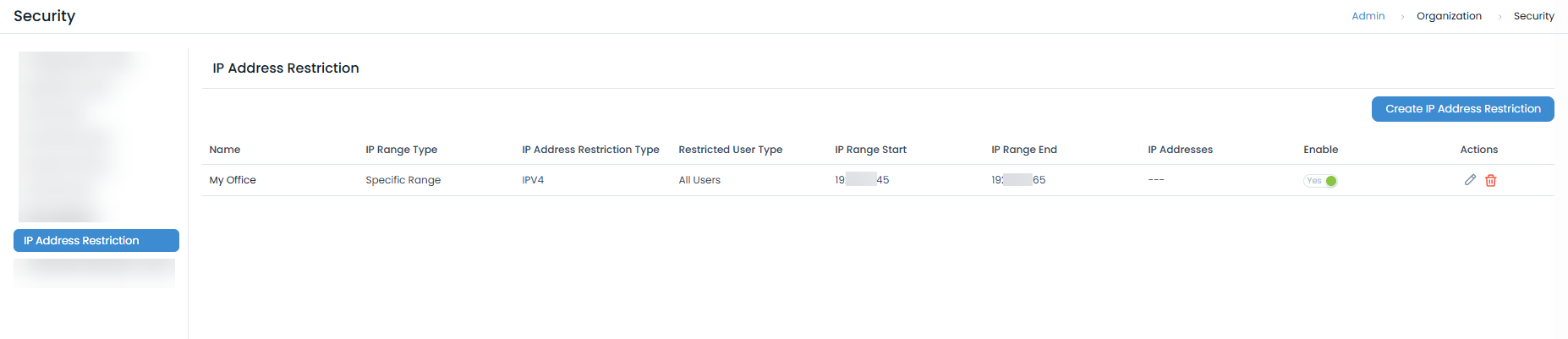
- Navigate to Admin > Organization > Security > IP Address Restriction
- Create IP restriction rules:
- Specific Range: Define start and end IP addresses
- Single IP: Restrict to specific IP addresses
- Subnet: Configure network ranges
Recommended IP Restrictions
- Office Networks: Allow access from corporate IP ranges
- VPN Access: Restrict to VPN gateway IPs
- Admin Access: Limit administrative access to specific IPs
- Mobile Access: Configure secure mobile access policies
SSL/TLS Configuration
Secure communications with proper SSL/TLS configuration:
SSL Certificate Management
For Nginx Server:
server {
    listen 443 ssl;
    server_name your-domain.com;
    ssl_certificate /etc/ssl/certs/your-cert.crt;
    ssl_certificate_key /etc/ssl/private/your-key.key;
    ssl_protocols TLSv1.2 TLSv1.3;
    ssl_ciphers "EECDH+ECDSA+AESGCM EECDH+aRSA+AESGCM EECDH+ECDSA+SHA384 EECDH+ECDSA+SHA256 EECDH+aRSA+SHA384 EECDH+aRSA+SHA256 EECDH+aRSA+RC4 EECDH EDH+aRSA HIGH !RC4 !aNULL !eNULL !LOW !3DES !MD5 !EXP !PSK !SRP !DSS";
    ssl_prefer_server_ciphers on;
}
Headers:
Add the following headers to the Nginx configuration file:
proxy_hide_header 'X-Frame-Options';
   add_header X-Frame-Options 'SAMEORIGIN';
   add_header Strict-Transport-Security "max-age=31536000; includeSubDomains" always;
   add_header X-Content-Type-Options "nosniff" always;
   #add_header X-XSS-Protection "1; mode=block";
   add_header Cache-Control "private, max-age=120";
   #add_header Set-Cookie SameSite=Strict;
   #add_header Referrer-Policy "strict-origin";
   add_header 'Access-Control-Allow-Origin' '*' always;
   add_header 'Access-Control-Allow-Methods' 'DELETE, POST, GET, PATCH' always;
   add_header 'Access-Control-Allow-Headers' 'DNT,User-Agent,X-Requested-With,If-Modified-Since,Cache-Control,Content-Type,Range' always;
   #add_header Content-Security-Policy "default-src 'self'; font-src 'self' data:;img-src * data:; script-src 'self' 'unsafe-inline' 'unsafe-eval'; style-src * 'unsafe-inline'";
   add_header Content-Security-Policy "base-uri 'self' default-src 'self'";
   add_header Clear-Site-Data '*';
   add_header Permissions-Policy "geolocation=(),midi=(),sync-xhr=(),microphone=(),camera=(),magnetometer=(),gyroscope=(),fullscreen=(self),payment=()";
   add_header Set-Cookie "Path=/; HttpOnly; Secure";
   proxy_cookie_path / "/; secure; HttpOnly; SameSite=none";
For example:
In the add_header 'Access-Control-Allow-Origin' '*' always; command, replace * with the FQDN URL of the ServiceOps instance. Also, add Integration API URL to the list of allowed origins.
**Syntax**:
add_header 'Access-Control-Allow-Origin' 'https://your-serviceops-instance.com,https://your-integration-api-url.com' always;

Example:
add_header 'Access-Control-Allow-Origin' 'https://demo.serviceops.com,https://teams.microsoft.com' always;
For HAProxy:
# Create combined certificate file
cat your-cert.crt your-key.key > your-cert.pem

# Configure HAProxy
bind *:443 ssl crt /etc/ssl/your-cert.pem
The HAProxy and Nginx should use the same SSL certificate.
SSL Security Best Practices
- Use strong SSL/TLS protocols (TLS 1.2+)
- Implement secure cipher suites
- Enable HSTS (HTTP Strict Transport Security)
- Regular certificate renewal and monitoring
- Disable weak SSL/TLS versions
Firewall Configuration
Proper firewall configuration is crucial for controlling network traffic and protecting your ServiceOps instance from unauthorized access. Only allow necessary ports to be open.
Essential Firewall Rules
Here are examples of configuring firewall rules for common operating systems. Always ensure you only open ports required for ServiceOps operation.
For Ubuntu (using UFW):
# Enable UFW
sudo ufw enable

# Set default policies to deny incoming and allow outgoing
sudo ufw default deny incoming
sudo ufw default allow outgoing

# Allow SSH access (consider restricting to specific IPs for enhanced security)
sudo ufw allow ssh

# Allow HTTP (port 80) for redirection to HTTPS
sudo ufw allow http

# Allow HTTPS (port 443) for secure web access
sudo ufw allow https

# Allow application-specific ports for ServiceOps components (e.g., 8443, 4430)
sudo ufw allow 8443/tcp
sudo ufw allow 4430/tcp
For RedHat (using firewall-cmd):
# Open necessary ports for ServiceOps
sudo firewall-cmd --zone=public --add-port=80/tcp --permanent   # HTTP
sudo firewall-cmd --zone=public --add-port=443/tcp --permanent  # HTTPS
sudo firewall-cmd --zone=public --add-port=8443/tcp --permanent # ServiceOps Application Port


# Reload firewall to apply changes
sudo firewall-cmd --reload
Always follow the principle of least privilege: only open the ports absolutely necessary for your ServiceOps deployment to function. Consult your network architecture for specific port requirements.
Data Protection and Privacy
Data Retention and Archiving
Configure data retention policies:
Automated Archiving
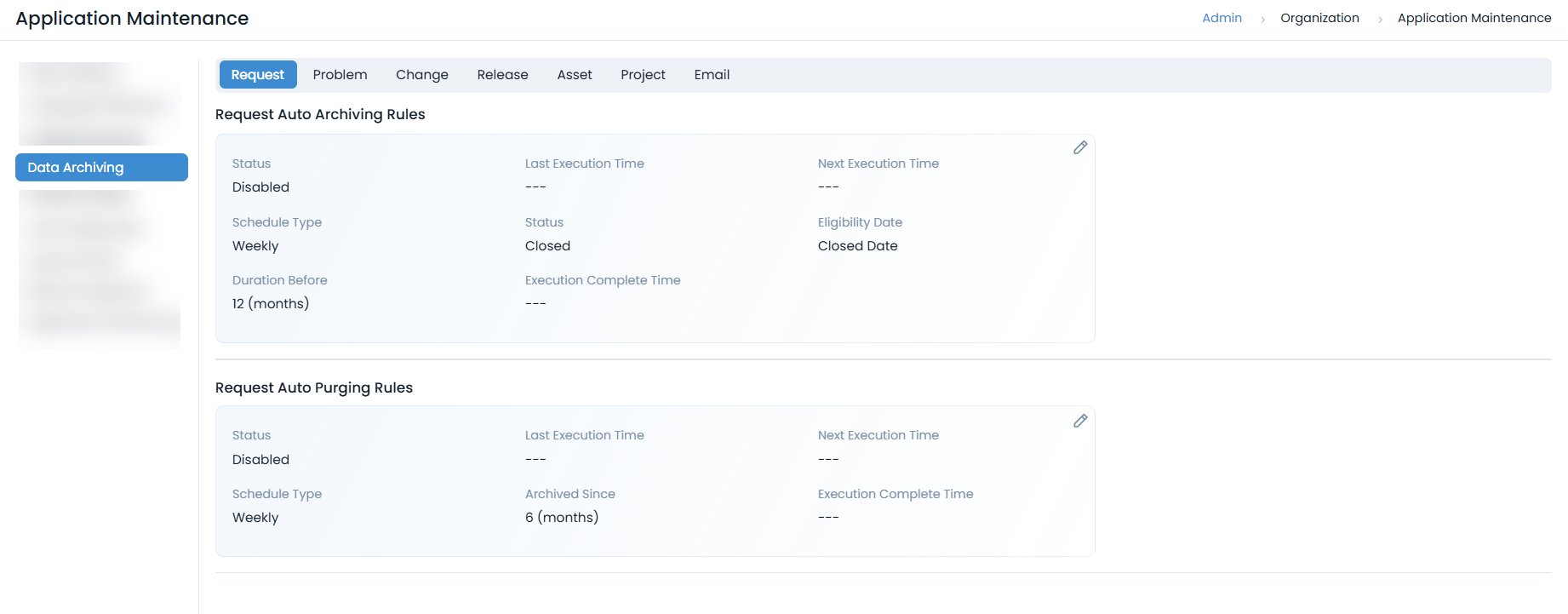
- Navigate to Admin > Organization > Application Maintenance > Data Archiving tab.
- Configure archiving rules for:
- Requests, Problems, Changes, Releases
- Assets, Projects, Email data
- Set appropriate retention periods
- Enable automated purging of old data
PII Data Protection
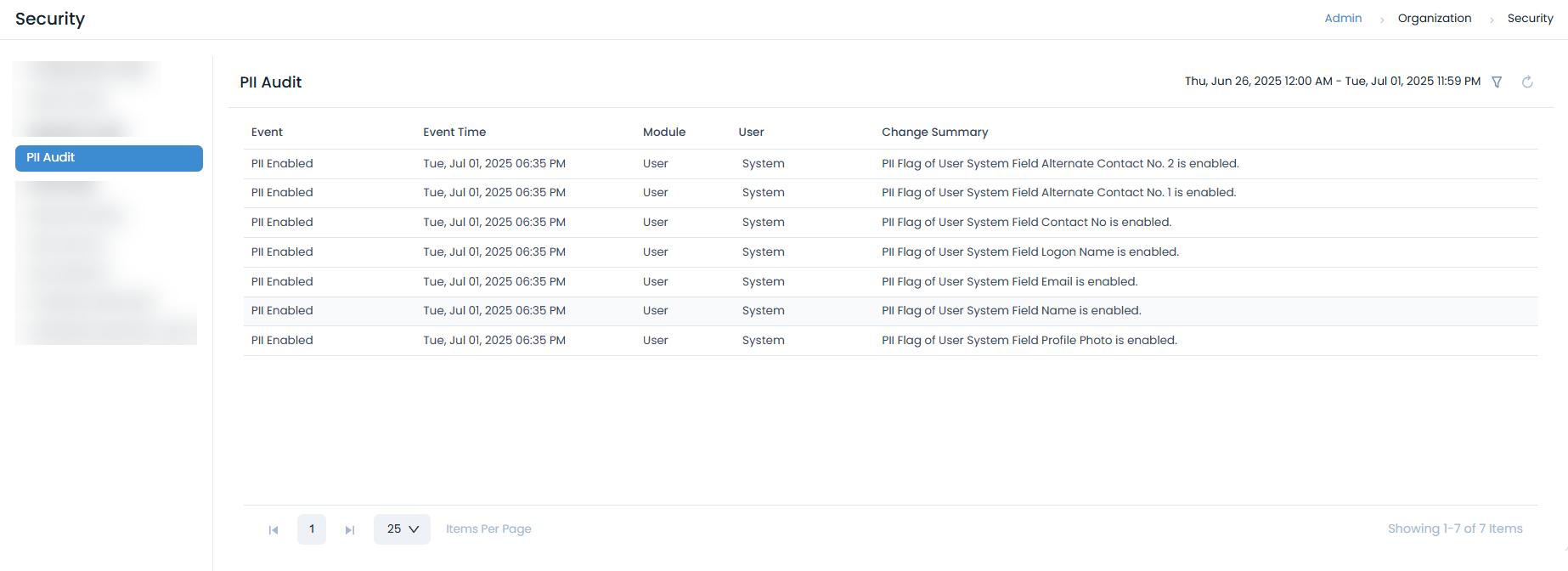
- Enable Privacy Regulations for PII compliance from Admin > Organization > Privacy Settings page.
- Configure PII Audit logging
- Implement data anonymization for sensitive information
- Regular PII data reviews and cleanup
Compliance and Governance
Regulatory Compliance
Ensure compliance with industry standards:
Data Privacy Regulations
- GDPR Compliance: Implement data protection measures
- Consent Management: Track user consent for data processing
Industry Standards
- ISO 27001: Information security management
- ISO 27034: Application security guidelines.
- SOC 2: Security, availability, and confidentiality
- SOC 3: Security, availability, processing integrity, confidentiality, and privacy for a general audience.
Security Policies
Develop and implement security policies:
Access Control Policies
- Role-Based Access Control (RBAC): Implement least privilege access
- User Provisioning: Formal user onboarding/offboarding processes
- Privileged Access Management: Control administrative access
- Regular Access Reviews: Periodic access rights audits
Data Handling Policies
- Data Classification: Categorize data by sensitivity
- Data Handling Procedures: Define how to handle different data types
- Business Continuity: Plan for security-related disruptions
Security Hardening
System Hardening
Implement system-level security measures:
Operating System Hardening
# Disable unnecessary services
systemctl disable telnet
systemctl disable ftp

# Configure secure SSH settings
sed -i 's/#PermitRootLogin yes/PermitRootLogin no/' /etc/ssh/sshd_config
sed -i 's/#PasswordAuthentication yes/PasswordAuthentication no/' /etc/ssh/sshd_config

# Enable firewall
ufw enable
ufw default deny incoming
ufw allow ssh
ufw allow https
Application Hardening
- Secure Defaults: Change default passwords and configurations
- Session Security: Use secure session management
Database Security
Implement database security measures:
PostgreSQL Encryption:
-- Enable SSL connections
ssl = on
ssl_cert_file = '/etc/ssl/certs/server.crt'
ssl_key_file = '/etc/ssl/private/server.key'
Database Monitoring
- Monitor database access patterns
- Track privileged database operations
- Implement database backup encryption
- Regular database security assessments
Related Topics
- SSL Certificate Configuration - SSL/TLS setup
- Data Protection & Privacy - Privacy compliance