Data Protection & Privacy
Comprehensive guidelines for implementing data protection measures, ensuring privacy compliance, and managing personal data in accordance with regulations like GDPR.
Data protection and privacy are critical components of your ServiceOps deployment, ensuring compliance with regulations like GDPR (General Data Protection Regulation) and protecting sensitive personal information. This guide provides comprehensive procedures for implementing data protection measures, managing personally identifiable information (PII), and ensuring privacy compliance.
ServiceOps provides built-in privacy and data protection features that help organizations maintain compliance while protecting user data and ensuring transparency in data handling practices.
Privacy Regulations Framework
GDPR Compliance
The General Data Protection Regulation (GDPR) sets the standard for data protection and privacy in the European Union and affects organizations worldwide.
Key GDPR Principles
- Lawfulness, Fairness, and Transparency: Process data lawfully, fairly, and transparently
- Purpose Limitation: Collect data for specified, explicit, and legitimate purposes
- Data Minimization: Collect only necessary data for the intended purpose
- Accuracy: Ensure data is accurate and kept up to date
- Storage Limitation: Retain data only as long as necessary
- Integrity and Confidentiality: Process data securely
- Accountability: Demonstrate compliance with GDPR principles
ServiceOps GDPR Features
ServiceOps provides comprehensive GDPR compliance features:
- Privacy Regulations: Enable data protection features
- PII Field Management: Mark and manage personally identifiable information
- User Consent Management: Implement consent collection and tracking
- Data Anonymization: Remove identifying information from data
- PII Audit Logging: Track PII-related activities
Privacy Regulations Configuration
Enabling Privacy Regulations
- Navigate to: Admin > Organization > Privacy Settings
- Enable Privacy Regulations: Activate data protection features
- Confirmation: Confirm the permanent activation of privacy features
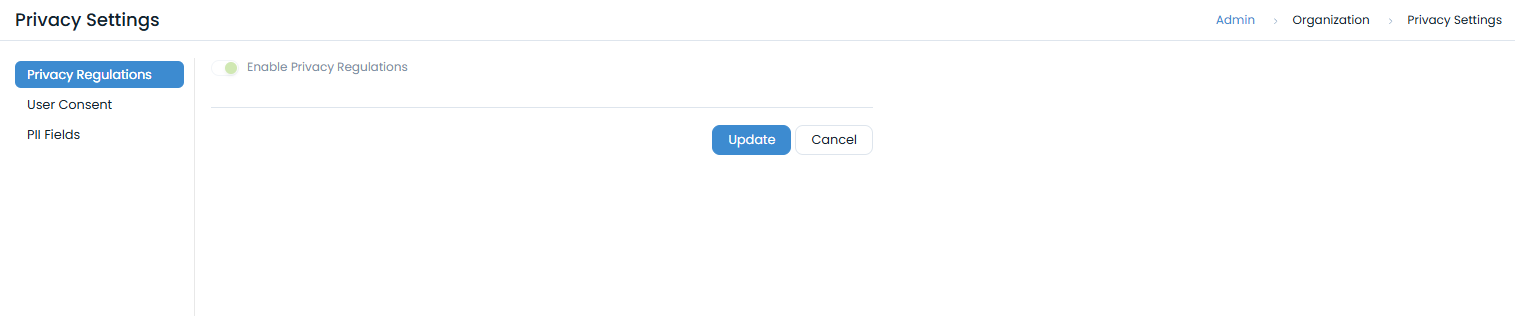
Privacy Features Activation
Once enabled, the following features become available:
- PII Fields Tab: Manage personally identifiable information fields
- User Consent Management: Configure consent collection
- PII Audit Logging: Track PII-related activities
- Data Anonymization: Remove identifying information
Important: Privacy Regulations activation is permanent and cannot be reversed once enabled.
Personally Identifiable Information (PII) Management
PII Field Identification
Automatic PII Fields
When Privacy Regulations are enabled, the following system fields are automatically marked as PII:
- Name: User's full name
- Email ID: User's email address
- Contact No.: Primary contact number
- Alternate Contact No. 1: Secondary contact number
- Alternate Contact No. 2: Tertiary contact number
- Profile Image: User's profile picture
- Logon Name: User's login identifier
Custom PII Fields
Administrators can mark additional fields as PII:
- Navigate to: Admin > Organization > Privacy Settings > PII Fields
- Select Fields: Choose fields to mark as PII
- Confirmation: Confirm PII field designation
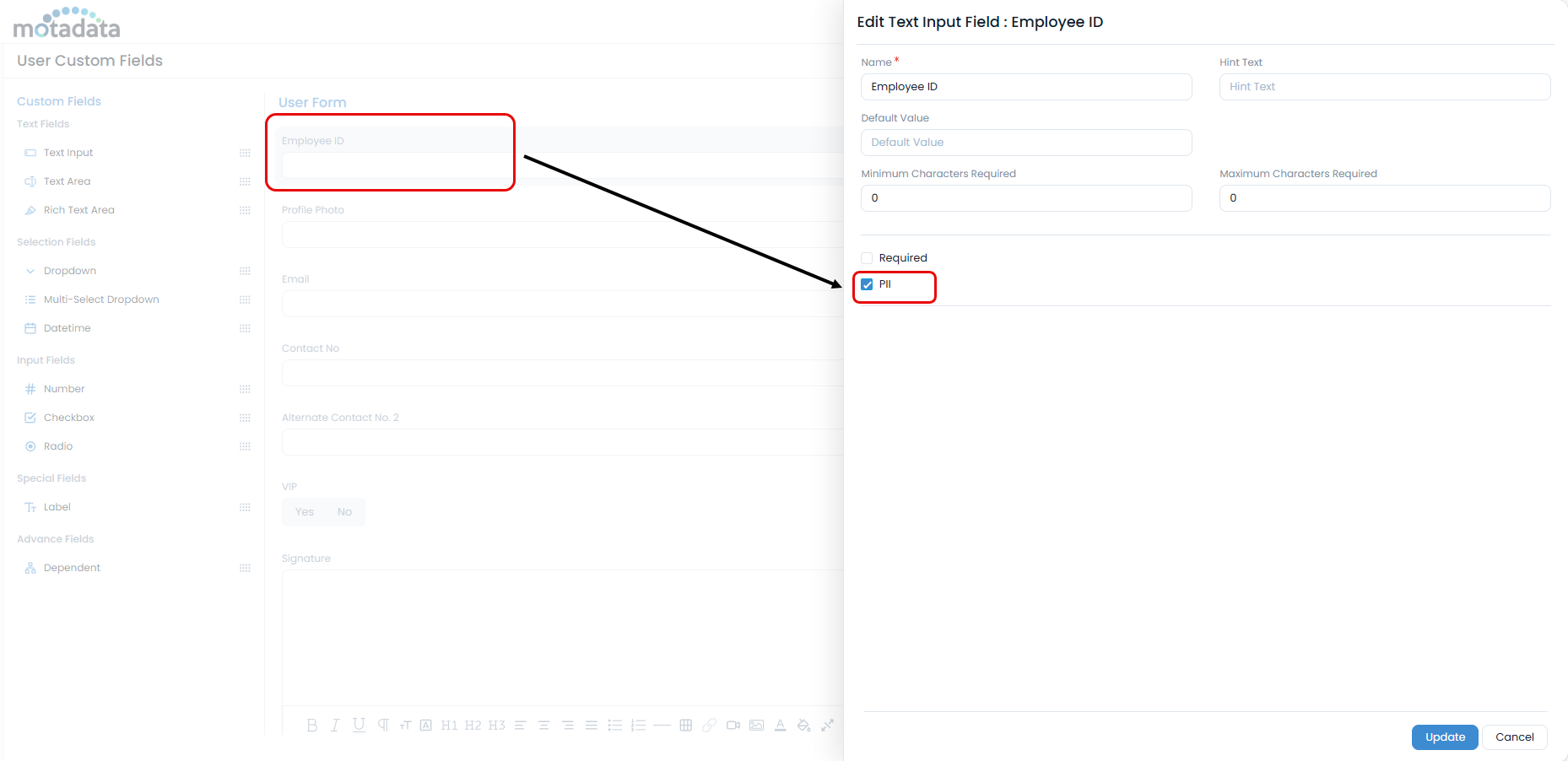
Once a field is marked as PII, it cannot be disabled. This ensures consistent data protection.
PII Field Management
User Form PII Fields
Manage PII fields in user forms:
- Navigate to Admin > Users > User Form. The User Custom Fields page appears.
- PII Marking: Mark fields as PII where appropriate
- Field Configuration: Configure PII field properties
- Validation: Ensure proper data validation
Request Form PII Fields
Manage PII fields in request forms:
- Navigate to: Admin > Request Management > Request Form
- PII Identification: Identify fields containing personal data
- PII Marking: Mark appropriate fields as PII
- Data Protection: Implement data protection measures
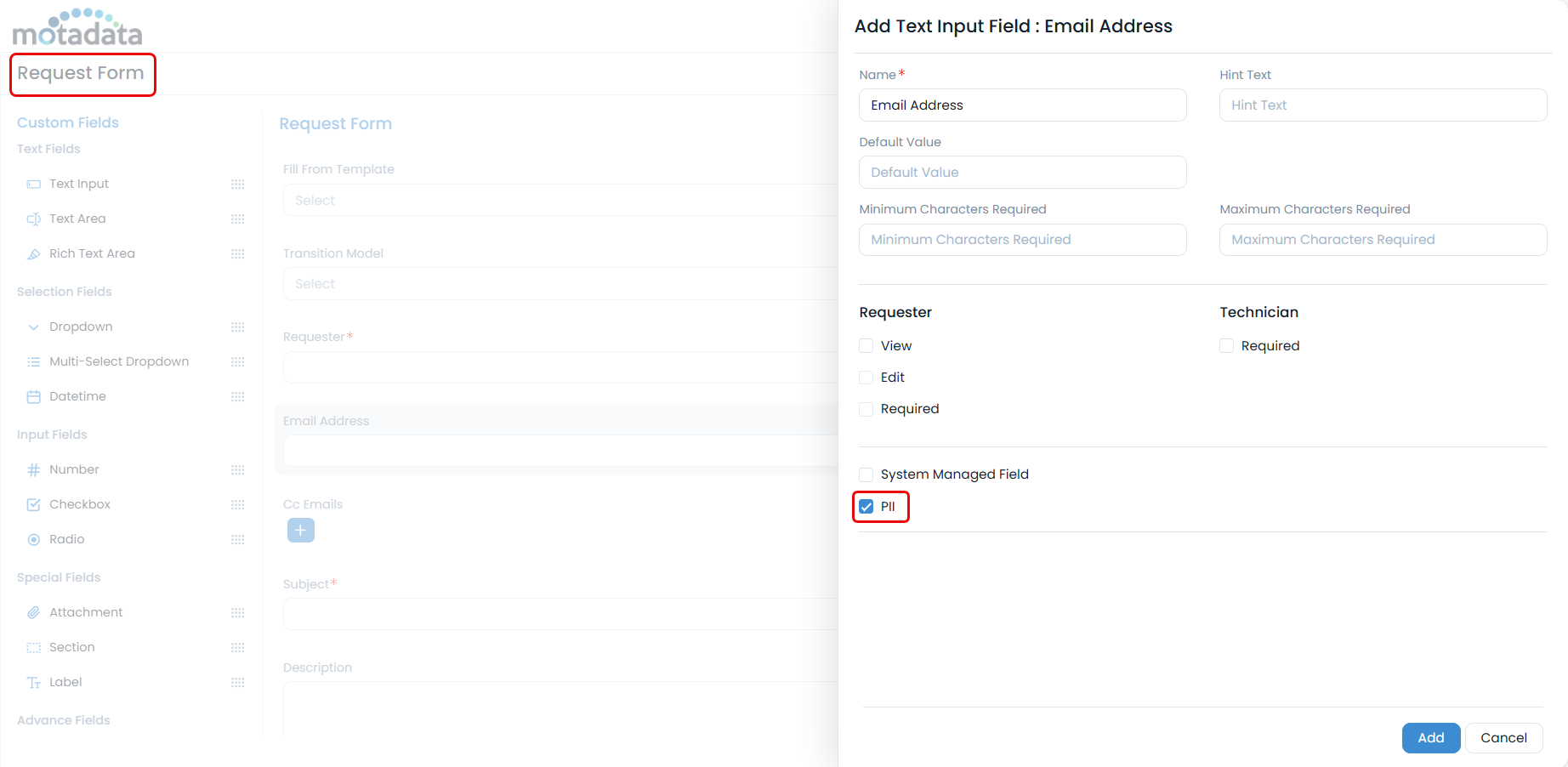
PII Audit and Monitoring
PII Audit Logging
Monitor PII-related activities:
- Navigate to Admin > Organization > Security > PII Audit tab.
- Filter Options: Filter by date range and event type
- Audit Review: Review PII-related activities
- Compliance Reporting: Generate compliance reports
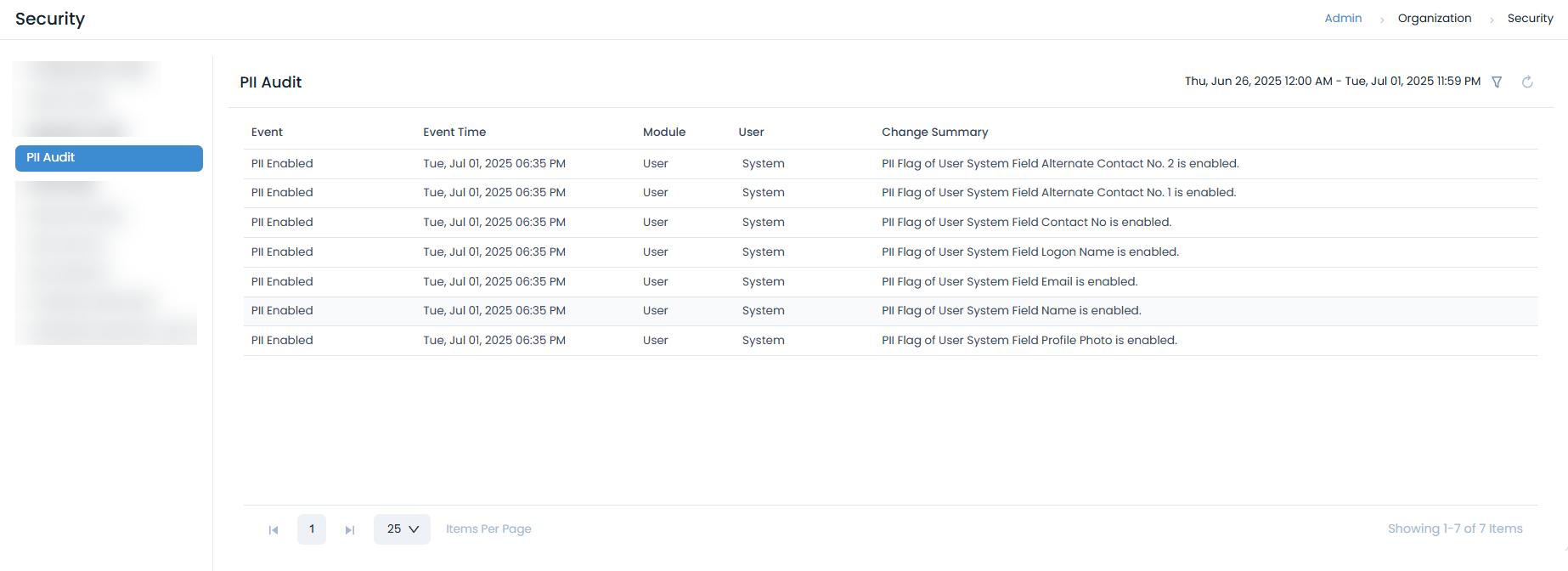
PII Event Tracking
Track the following PII-related events:
- Data Access: When PII data is accessed
- Data Modification: When PII data is modified
- Data Export: When PII data is exported
- Data Deletion: When PII data is deleted
- Consent Changes: When user consent is modified
User Consent Management
Consent Framework
Implement comprehensive user consent management:
Consent Collection
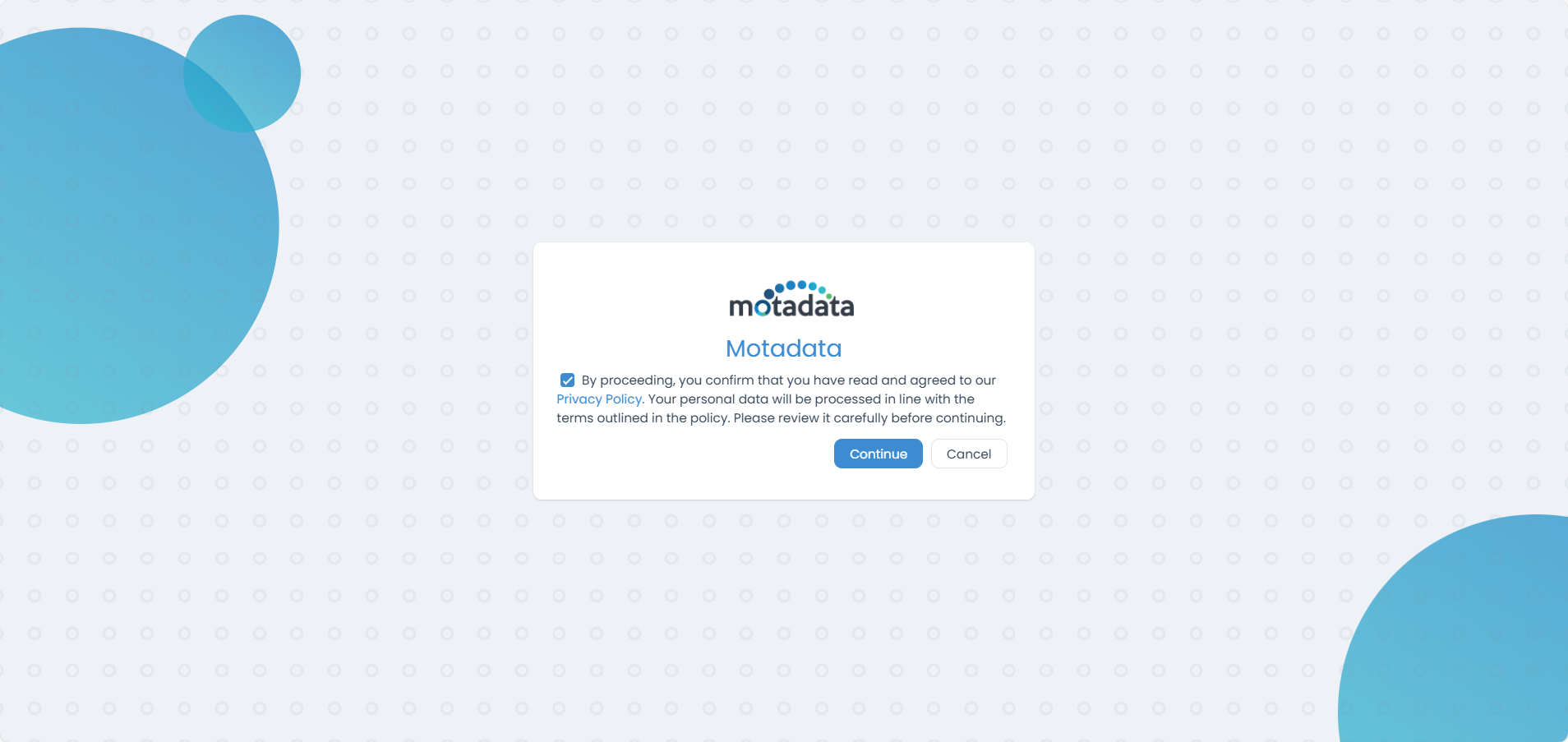
- Enable User Consent: Activate consent collection features
- Privacy Policy: Provide privacy policy URL or attachment
- Consent Points: Configure consent collection points
- Consent Tracking: Track user consent status
Consent Collection Points
Configure consent collection at various points:
- User Sign-up: Collect consent during user registration
- Guest Request Creation: Collect consent for guest users
- First-time Login: Collect consent for new users
- SSO/LDAP Login: Collect consent for external authentication
Privacy Policy Management
Privacy Policy Configuration
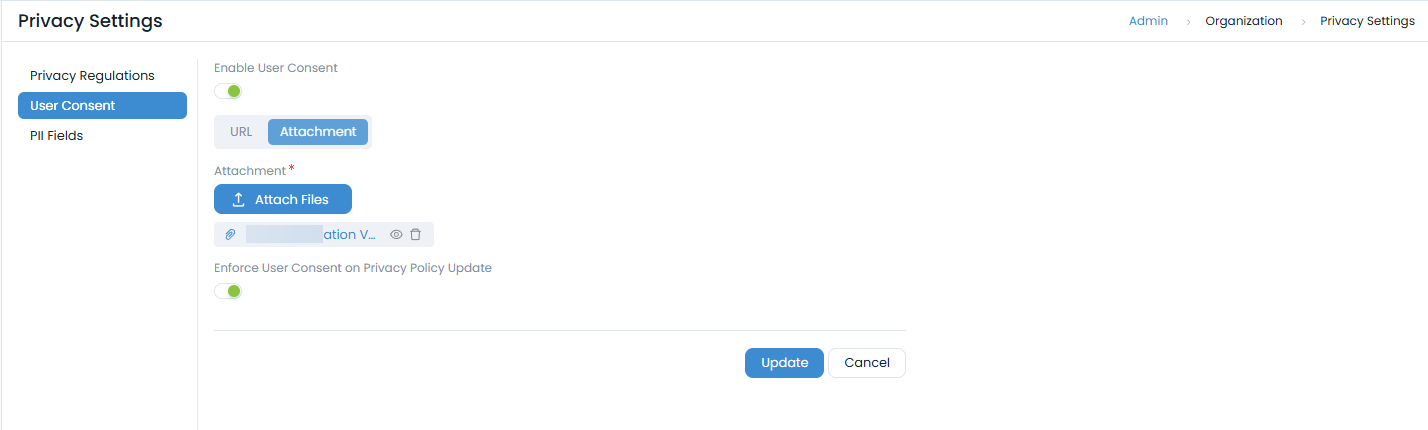
- Policy URL: Provide privacy policy URL
- Policy Attachment: Upload privacy policy document
- Policy Updates: Handle privacy policy changes
- Consent Renewal: Re-collect consent when policy changes
Policy Update Handling
Configure policy update behavior:
- Enforce Re-consent: Require new consent when policy changes
- Notification: Notify users of policy changes
- Grace Period: Provide time for users to review changes
- Consent Tracking: Track consent renewal status
Consent Workflow
User Consent Process
- Consent Display: Show consent dialog to users
- Policy Review: Allow users to review privacy policy
- Consent Collection: Collect user consent
- Consent Storage: Store consent records securely
- Consent Tracking: Track consent status and history
Consent Management
- Consent Status: Track current consent status
- Consent History: Maintain consent history
- Consent Withdrawal: Handle consent withdrawal
- Consent Renewal: Manage consent renewal processes
Data Anonymization
Anonymization Process
Implement data anonymization for privacy protection:
User Anonymization
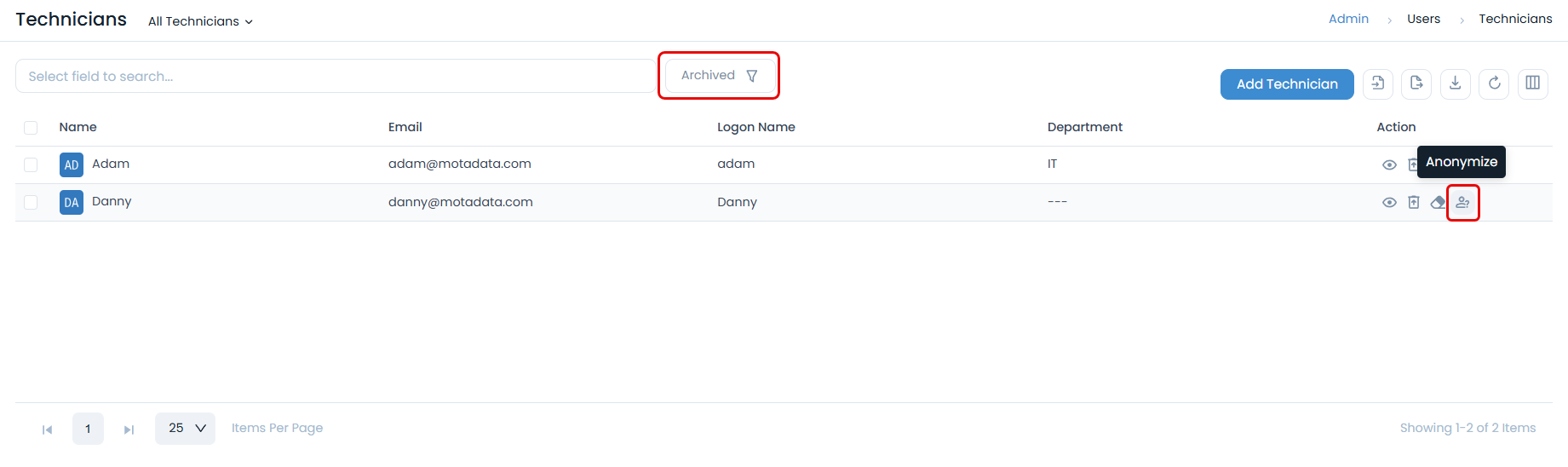
- Navigate to Admin > Users > Technicians
- Archive Technician: Archive the required technician, or set the filter to Archived if already archived.
- Anonymization Process: Click the Anonymize icon in the Action column and confirm in the pop-up.
- Data Cleanup: The user is moved to the Anonymized list, and related PII data is deleted.
Anonymization Features
- PII Data Removal: Remove identifying information
- Request Data Cleanup: Clean PII from related requests
- Audit Trail: Maintain anonymization audit trail
- Irreversible Process: Ensure anonymization cannot be reversed
Anonymization Workflow
Pre-Anonymization Steps
- User Archiving: Archive user before anonymization
- Data Backup: Create backup of user data
- Impact Assessment: Assess impact on related data
- Approval Process: Obtain necessary approvals
Anonymization Execution
- User Selection: Select archived user for anonymization
- Confirmation: Confirm anonymization process
- Data Processing: Remove PII data from system
- Verification: Verify anonymization completion
Post-Anonymization
- Status Update: Update user status to anonymized
- Audit Logging: Log anonymization activities
- Data Verification: Verify PII data removal
- Documentation: Document anonymization process
Data Retention and Deletion
Data Retention Policies
Implement appropriate data retention policies:
Retention Categories
- Active Data: Data for active users and requests
- Archived Data: Data for archived users and requests
- Anonymized Data: Data with PII removed
- Audit Data: System audit and compliance data
Retention Periods
Configure retention periods based on:
- Regulatory Requirements: Comply with legal requirements
- Business Needs: Meet operational requirements
- Data Sensitivity: Consider data sensitivity levels
- Storage Costs: Balance retention with storage costs
Data Protection Measures
Access Controls
Access Controls
User Access Management
- Role-Based Access: Implement role-based access control
- Least Privilege: Grant minimum necessary permissions
- Access Reviews: Regular access rights reviews
- Access Logging: Log all access activities
Data Access Monitoring
- Access Logging: Log all data access activities
- Anomaly Detection: Monitor for unusual access patterns
- Access Alerts: Configure access violation alerts
- Audit Reviews: Regular access audit reviews
Data Backup and Recovery
Secure Backup Procedures
- Encrypted Backups: Use encryption for backup data
- Secure Storage: Store backups in secure locations
- Access Controls: Implement backup access controls
- Regular Testing: Test backup and recovery procedures
Data Recovery Considerations
- Privacy Compliance: Ensure recovery maintains privacy
- Data Minimization: Recover only necessary data
- Audit Requirements: Maintain recovery audit trails
- User Notification: Notify users of data recovery
Compliance Monitoring
Privacy Compliance Monitoring
Regular Assessments
- Privacy Audits: Conduct regular privacy audits
- Compliance Reviews: Review compliance status
- Risk Assessments: Assess privacy risks
- Gap Analysis: Identify compliance gaps
Compliance Reporting
- Regulatory Reports: Generate required compliance reports
- Executive Summaries: Provide high-level compliance summaries
- Trend Analysis: Analyze compliance trends
- Improvement Plans: Develop compliance improvement plans
Incident Response
Privacy Incident Management
- Incident Detection: Detect privacy incidents
- Assessment: Assess incident impact and scope
- Response: Implement appropriate response measures
- Notification: Notify affected individuals and authorities
- Documentation: Document incident and response
- Lessons Learned: Apply lessons learned
Breach Notification
- Timeline Requirements: Meet notification timeline requirements
- Notification Content: Include required notification content
- Authority Notification: Notify appropriate authorities
- Individual Notification: Notify affected individuals
Best Practices
Privacy by Design
Design Principles
- Proactive Approach: Implement privacy measures proactively
- Privacy as Default: Set privacy as the default option
- Privacy Embedded: Embed privacy into system design
- Full Functionality: Maintain full system functionality
- End-to-End Security: Ensure security throughout data lifecycle
- Visibility and Transparency: Maintain transparency
- User-Centric Approach: Respect user privacy
Implementation Guidelines
- Data Minimization: Collect only necessary data
- Purpose Limitation: Use data only for intended purposes
- Consent Management: Implement proper consent management
- Access Controls: Implement appropriate access controls
- Audit Logging: Maintain comprehensive audit logs
Training and Awareness
Privacy Training
- Staff Training: Provide privacy training to staff
- Awareness Programs: Implement privacy awareness programs
- Regular Updates: Provide regular privacy updates
- Testing: Test privacy knowledge and procedures
Communication
- Privacy Policy: Maintain clear privacy policies
- User Communication: Communicate with users about privacy
- Stakeholder Updates: Keep stakeholders informed
- Transparency: Maintain transparency in data handling