NCCM Approval Workflow in ObserveOps
The NCCM Approval Workflow adds a maker-checker control on top of high-impact NCCM actions. A user without approval rights does not run the action directly. Instead, the system creates an approval request that an authorized approver reviews and clears before the action runs on the device.
This gives operational governance, reduces the risk of unauthorized configuration changes, and leaves a traceable record of every approval-based action, whether it targets a single device or hundreds of devices at once.
Roles
The workflow is governed by two roles.
| Role | Description |
|---|---|
| NCCM | The requester role. A user assigned only the NCCM role can start an approval-controlled action, but the system creates an approval request instead of running the action. |
| NCCM + NCCM Approval | The approver role. A user assigned both roles can review, approve, or reject approval requests. When this user starts an approval-controlled action, the system runs it directly with no approval request. |
A default NCCM user has approval rights by default. The approval request flow only kicks in when a user is explicitly assigned the NCCM role without the NCCM Approval role.
Approval-Controlled Actions
The following NCCM actions create an approval request when a requester starts them. They also support bulk mode, so the same action against many devices creates one bulk request instead of one request per device.
- Restore
- Sync
- Execute Runbook
- Firmware Upgrade
All other NCCM actions run directly and do not go through this workflow.
Approval Request Naming Convention
Every approval request is named automatically. Single-device requests carry the APR: prefix and bulk requests carry the BLK: prefix. The sequence number increases with each new request.
| Type | Format | Example |
|---|---|---|
| Single-device request | APR: <sequence_number> - <hostname> - <action> | APR: 01 - hb1.hb1.com - Restore |
| Bulk request | BLK: <sequence_number> - <action> | BLK: 05 - runbook |
| Child request inside a bulk | APR: <sequence_number> - <hostname> - <action> | APR: 14 - ospf2.ospf2.com - runbook |
How the Workflow Operates
The end-to-end flow moves through four steps: the requester starts the action, the approver sees the request, the approver reviews and acts on it, and the execution result is tracked back to the request.
1. Requester Initiates an Action
When a requester with the NCCM-only role starts an approval-controlled action, the system does the following.
- The action does not run on the device. The system holds it back.
- An approval request is created. For a single device the request name uses the
APR:prefix. For a multi-device operation the system creates one bulk request with theBLK:prefix, and one childAPR:inside it for every selected device. - A confirmation message shows that the request has been sent for approval.
- The requester can track the request from the approval list and, for bulk requests, drill into the device-level status.
2. Approver Sees the Request
An approver is alerted through two paths inside the product and one path outside it. All three paths fire together for every new request, single or bulk, so a pending item is never missed.
Through the Notification Bell
The bell icon in the top navigation bar shows a live count of unread alerts. Selecting it opens the Alerts & Notifications drawer. The drawer has two tabs: System Notification and Approval Notification. The Approval Notification tab groups every pending approval alert together and shows a count next to the tab name so approvers can spot new work without scrolling through system alerts.
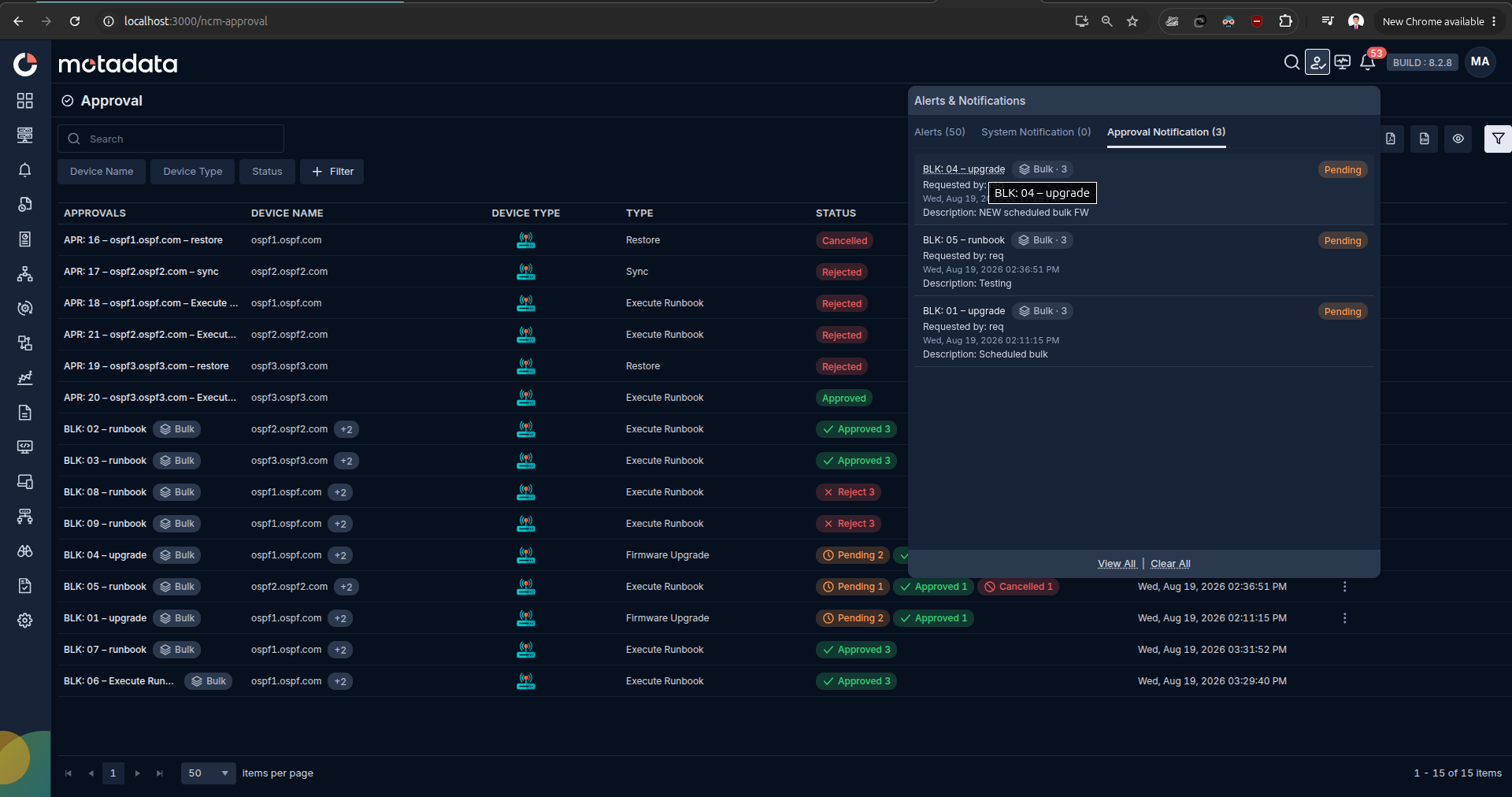
Each entry in the tab shows the following details.
| Field | Description |
|---|---|
| Request Name | The auto-generated request name, such as BLK: 04 - upgrade or APR: 05 - hb1.hb1.com - Restore. Use it to identify the scope and action at a glance. |
| Requested By | The user who submitted the request. Use it to follow up with the requester if the change is unclear. |
| Description | The short summary of the requested action, including the operation type and the affected device or bulk scope. |
| Status | The current state of the request, such as Pending, Approved, Rejected, or Cancelled. Pending items stay surfaced so approvers can act on them first. |
Select any entry in the drawer to jump straight to the approval request and take action.
Through the Approval Screen
Approvers can also open the Approval screen directly from the left navigation. The screen lists every request routed to them, single and bulk, in a single grid.
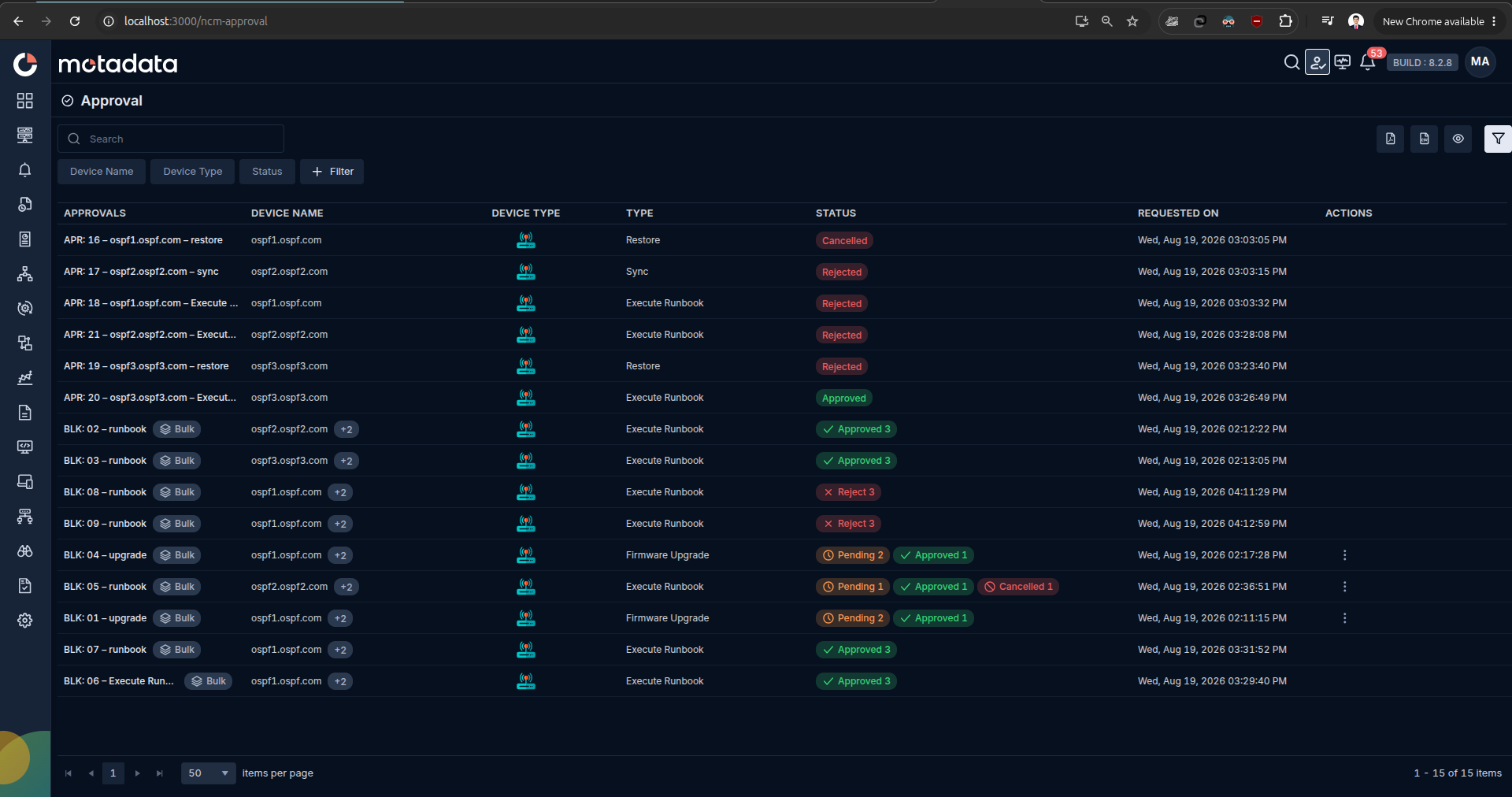
| Column | What It Shows |
|---|---|
| Approvals | The request name. Bulk requests are marked with a Bulk badge next to the BLK: name so they are easy to distinguish from single-device APR: requests. |
| Device Name | The target hostname for a single request, or the aggregated device count for a bulk request. |
| Device Type | The device category, such as router, switch, or firewall. |
| Type | The NCCM action that generated the request: Restore, Sync, Execute Runbook, or Firmware Upgrade. |
| Status | A colour-coded badge for Pending, Approved, Rejected, Cancelled, or Completed. Bulk parent rows also show aggregated counters, for example `Pending 20 |
| Requested On | The date and time the request was created. |
| Actions | The row-level menu to open, approve, reject, or (for the requester's own row) cancel or send a reminder. |
The toolbar above the grid includes Search, Device Name and Status quick filters, a Filter builder for advanced conditions, and column visibility controls on the right.
Email Notification
For approvers who are not signed in, ObserveOps also sends an email to the configured approver email address. Email acts as the backup channel so a pending request is still surfaced when the approver is offline.
Email notifications need the mail service configured in System Settings > Mail Server Settings, and each approver's user profile must have a valid email address.
3. Approver Reviews the Request
How the approver acts depends on whether the request is a single-device APR: or a bulk BLK:. In both cases the reviewer opens a detail drawer that carries the full context of the change, adds a mandatory comment, and takes a decision.
Single-Device Request Detail
Select a request in the notification drawer or the Approval screen to open its detail drawer. The drawer collects every field the approver needs across three groups.
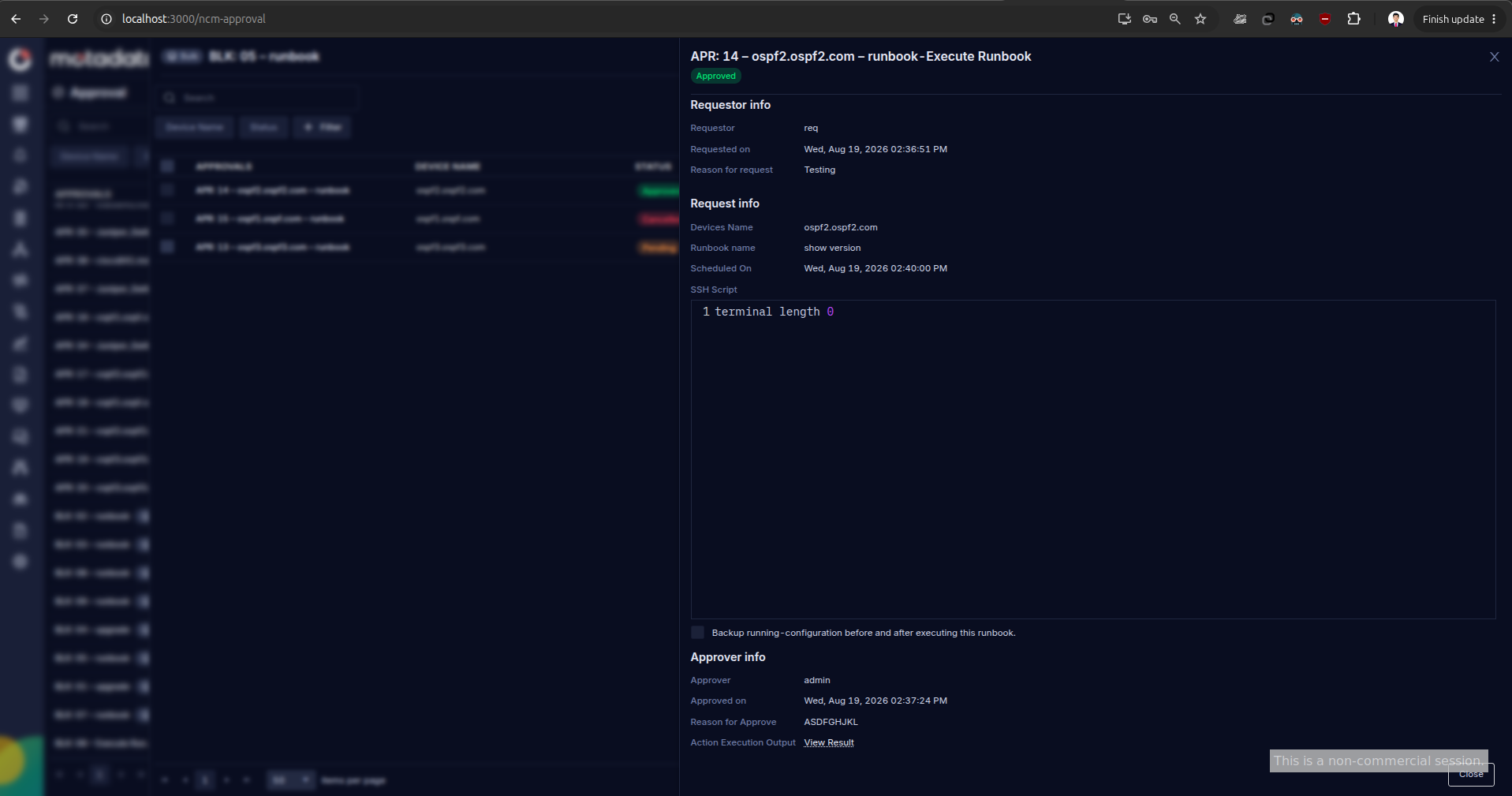
| Section | Fields | Why It Matters |
|---|---|---|
| Requestor info | Requestor, Requested on, Reason for request. | Confirms who submitted the change and why. Use the reason to sanity-check the operation before you act. |
| Request info | Devices Name, Runbook name, Scheduled On, SSH Script preview, and the Backup running-configuration before and after executing this runbook checkbox for Execute Runbook. Firmware Upgrade, Sync, and Restore show the fields that match their action. | Shows the exact change that will run on the device. Read it end to end before you approve. |
| Approver info | Approver, Approved on, Reason for Approve, and Action Execution Output with a View Result link once the action has run. | Populated after the request is actioned. Use the Reason for Approve and the linked execution output to close the loop for audit. |
From this drawer the approver can:
- Approve the request. The action runs on the device as originally requested and the execution status is recorded.
- Reject the request. The action never runs and the requester is notified.
If more than one user holds the NCCM Approval role, the request is visible to all of them and any authorised approver can act on it. Once the request is Approved, Rejected, or Cancelled, no further action can be taken on it.
Approve or Reject Dialog
Approve and Reject both open a modal that asks for a mandatory note. The note is stored on the request and shows up in the audit trail alongside the approver name and timestamp.
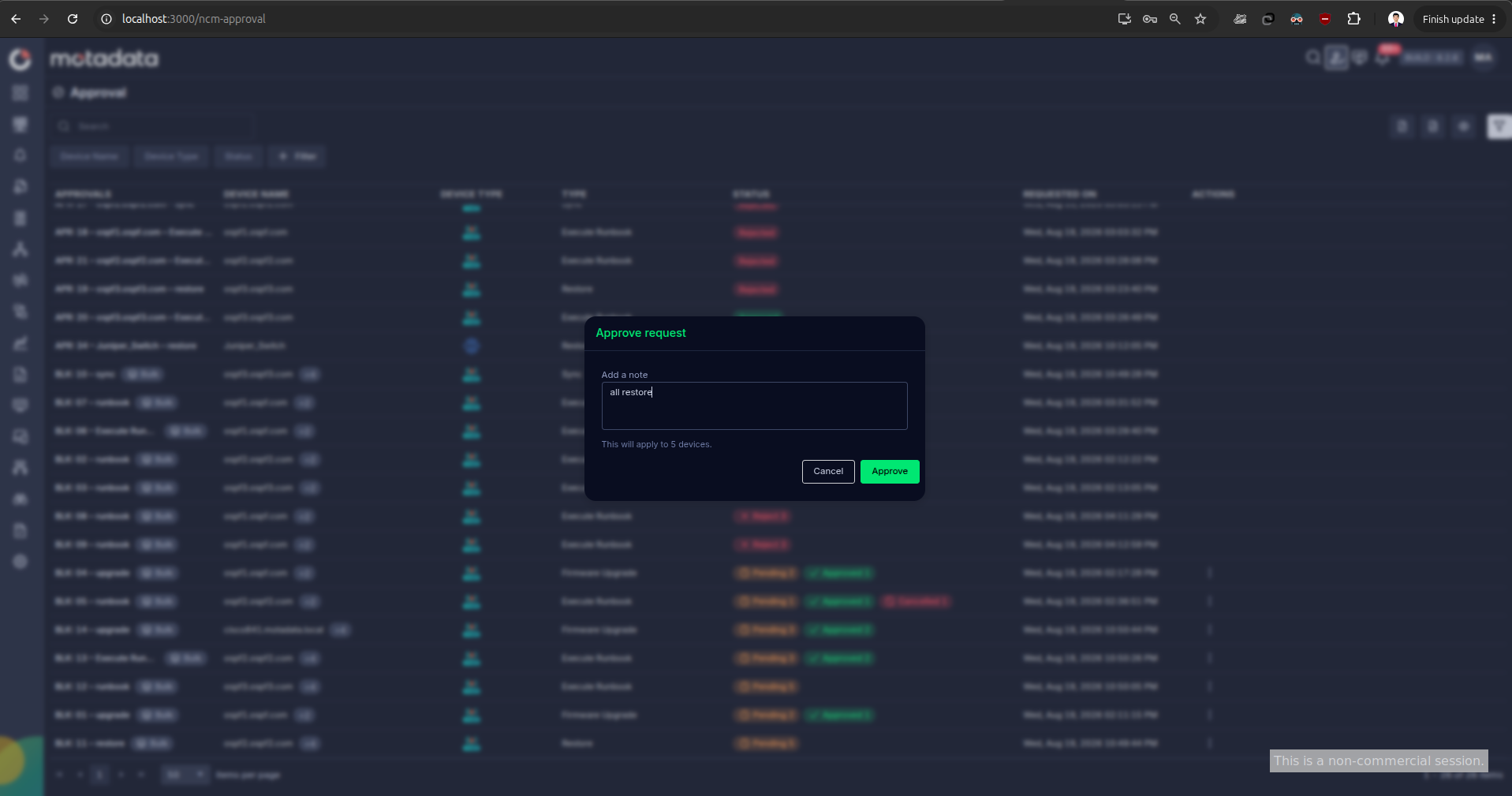
- Add a note is required. The Approve or Reject button stays disabled until a note is entered.
- The character count under the text area shows how many more characters are allowed.
- Select Cancel to close the modal without taking any action.
- Select Approve (or Reject) to save the decision. The request status updates on the Approval screen and in the notification drawer immediately.
Bulk Request Device Drawer
Selecting a bulk request on the Approval screen opens the device drawer. The drawer lists every device tied to the parent BLK: request as its own child APR: row, along with the current per-device status.
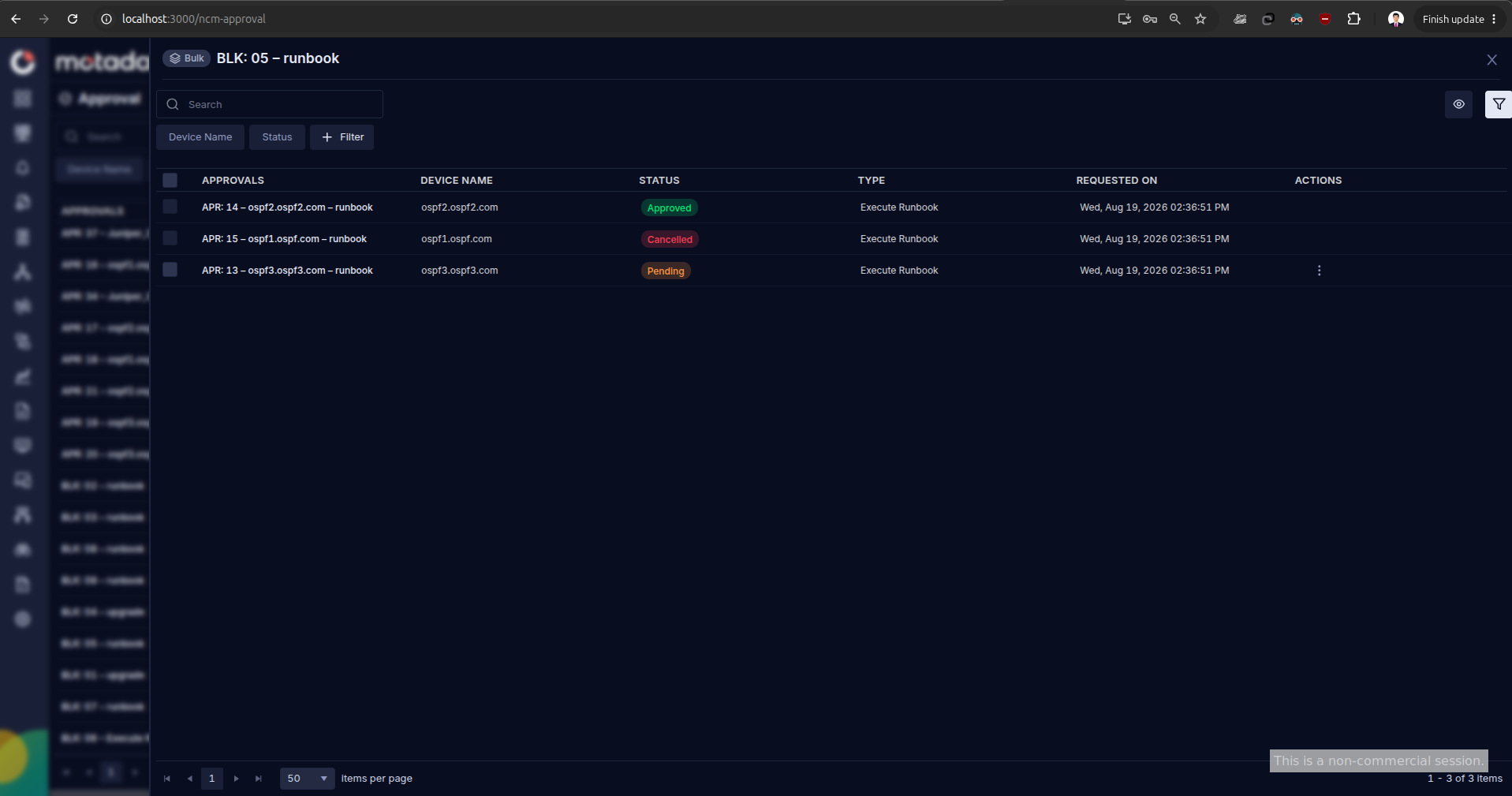
From the drawer the approver can take the following actions.
| Action | Description |
|---|---|
| Select devices | Pick one device, several devices, or use Select All Pending Devices to act on every pending row at once. Only pending devices are selectable. Approved, rejected, and cancelled devices stay visible but are disabled. |
| Review the change | Select a device name to open the same request detail drawer described above. Use it to verify the requested change before you approve. |
| Approve selected devices | Approve the selected pending devices. An approval comment is mandatory. Approved devices run the requested task automatically and the execution status is recorded. |
| Reject selected devices | Reject the selected pending devices. A rejection comment is mandatory. Rejected devices never run the requested task. |
The approver can revisit the same bulk request as many times as needed to work through the remaining pending devices in stages. This supports risk-based approval where a subset is cleared first and the rest is held back for further verification.
Parent Status Calculation
The parent bulk request status is calculated from the state of every child device inside it.
| Condition | Parent Status |
|---|---|
| At least one device pending | Pending |
| All devices approved, none pending | Approved |
| All devices rejected, none pending | Rejected |
| Mixed approved and rejected, none pending | Completed |
The bulk request stays on the pending approval view until every device reaches either Approved or Rejected state. The counters on the parent row and the tab badge update immediately after each action, with no page refresh needed.
4. Track Execution Status
Every approved request that runs on a device is tracked back to the approval record. This closes the loop from request to result and keeps audit evidence in one place.
Action Execution Output
Once the action has run, the Action Execution Output field on the request detail drawer becomes active. Selecting View Result opens the execution pane.
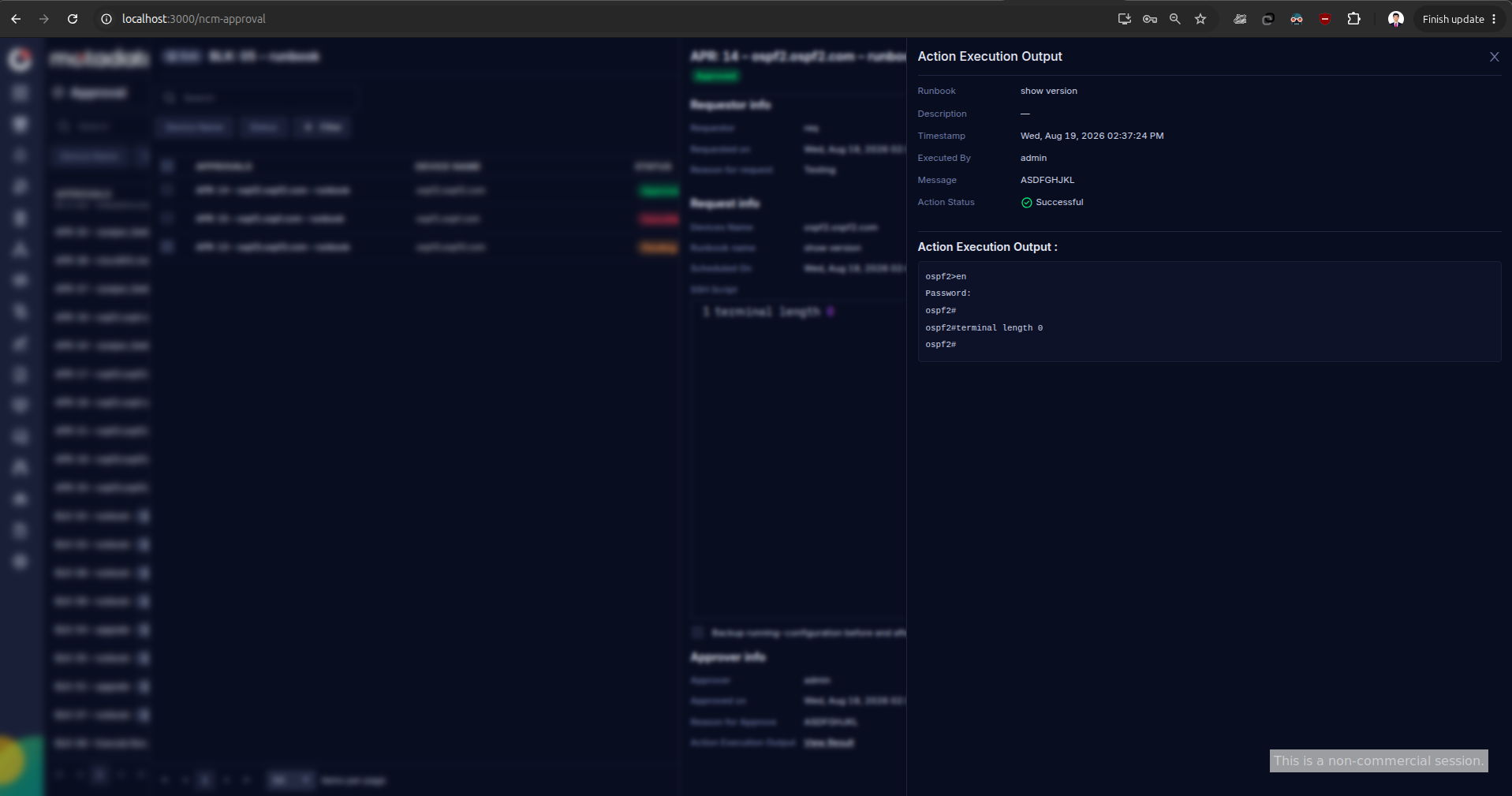
| Field | Description |
|---|---|
| Runbook | The runbook that ran on the device, for Execute Runbook actions. |
| Description | The runbook description if it was set at creation time, blank if none. |
| Timestamp | The date and time the action ran on the device. |
| Executed By | The user identity the platform used to run the action, typically the approver or the system account. |
| Message | The approver's Reason for Approve captured in the approve dialog. |
| Action Status | Successful or Failed, with a status icon. |
| Action Execution Output | The raw output the device returned, for example the terminal transcript from an SSH runbook. Use it to confirm the change landed and to attach evidence to change records. |
For a bulk request, every child device gets its own execution output entry, so an audit can be traced device by device even when the request covered hundreds of targets.
Requester View
A requester sees only the requests they submitted, both single and bulk. Selecting a bulk request opens the same device drawer used by approvers, scoped to the requester's own request.
| Action | Description |
|---|---|
| View requests | See every approval request created by the requester, along with the current status. |
| View approval details | Access the metadata of any single or bulk request, and after execution, the Action Execution Output. |
| Send reminders | Send a reminder notification to approvers for a pending request. For a bulk request the reminder can be scoped to selected pending devices. |
| Cancel devices | Cancel a pending single request, or cancel one or more pending devices inside a bulk request. Cancelled devices never run the requested task and cannot be re-activated. |
Reminder and Cancel are only available while a device is in the Pending state. Both actions are hidden once the device is Approved, Rejected, or Cancelled.
Approver View
A user with both NCCM and NCCM Approval roles gets a wider view of the approval screen.
| View | Description |
|---|---|
| Current Requests | Every pending approval request awaiting action, single and bulk. |
| Historical Requests | Every previously actioned request, including Approved, Rejected, Cancelled, and Completed bulk requests. |
Open any request from either view to see full metadata and, for actioned requests, the Action Execution Output. An approver cannot act on a request that has already been Approved, Rejected, or Cancelled.
Device-Level Approval Visibility
Every approval request tied to a device is also accessible from the device information screen. A dedicated Approval tab in the device details view lists every approval entry for that device, whether it came from a single APR: or from a bulk BLK: parent. A count next to the tab label shows how many entries the device has.
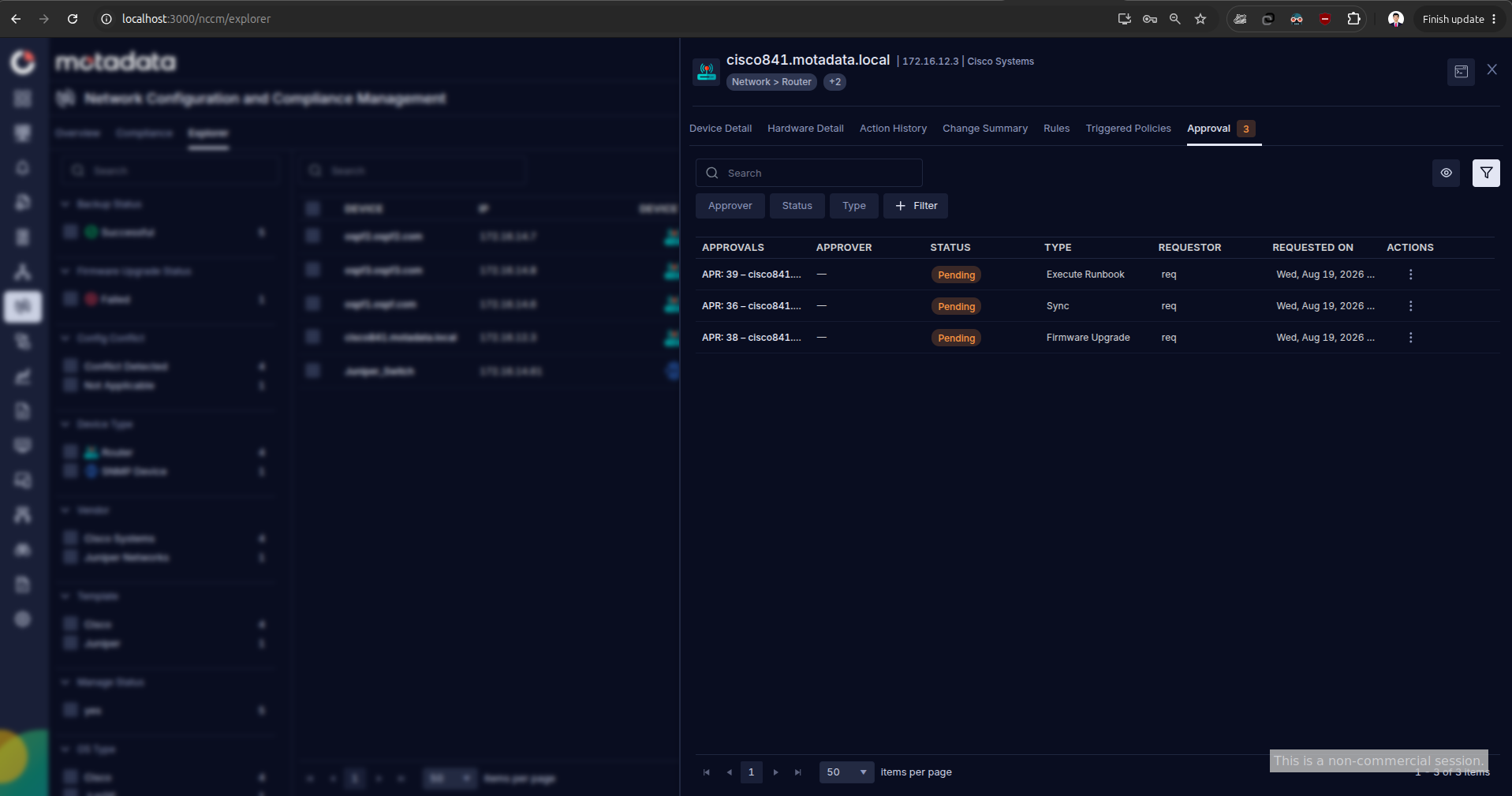
The tab uses the same grid as the main Approval screen with per-device columns.
| Column | What It Shows |
|---|---|
| Approvals | The APR: request name for the entry on this device. |
| Approver | The approver who actioned the request, or a dash if the request is still pending. |
| Status | Pending, Approved, Rejected, Cancelled, or Completed. |
| Type | The NCCM action that generated the request. |
| Requestor | The user who submitted the request. |
| Requested On | The date and time the request was created. |
| Actions | The row-level menu to open the request detail drawer. |
Quick filters for Approver, Status, and Type, plus a Filter builder, let a device owner narrow the view to the entries that matter. This gives both requesters and approvers full approval history in the context of a specific device without navigating away.
Device-Level Audit Trail
Every device inside a bulk request carries its own audit record. This keeps compliance evidence at the device level even when the bulk request covers hundreds of devices.
| Field | Description |
|---|---|
| Requester | The user who submitted the bulk approval request. |
| Approver | The approver who acted on this specific device. |
| Approval Comment | The mandatory comment captured when the device was approved. |
| Rejection Comment | The mandatory comment captured when the device was rejected. |
| Approval Time | The timestamp when the device was approved. |
| Rejection Time | The timestamp when the device was rejected. |
| Execution Time | The timestamp when the approved task ran on the device. |
| Operation Type | The NCCM action that generated the request, such as Firmware Upgrade or Restore. |
| Action Status | Successful or Failed, mirrored from the Action Execution Output. |
The parent bulk request also keeps an aggregated audit history that rolls up every device-level entry, including the execution status of each child.