Module Specific Actions
Workflow actions are the operational heart of your automation, designed to perform specific tasks within ServiceOps or integrate with external systems. They translate your workflow's logic into tangible operations, interacting with records, users, and external services.
For an understanding of why workflow actions are essential for automation, refer to Why are Workflow Actions Required?.
Core Actions: Create, Update, and Archive
These actions are fundamental for managing records and driving core ITSM processes, allowing for dynamic and intelligent automation. This support cross-module operations where based on the module selected, the action will be executed in the respective module.
Create Record
The Create Record action is used to generate new records in any supported module, such as creating a new incident, problem, change, release, asset, or CI. This enables workflows to initiate new processes or document events automatically.
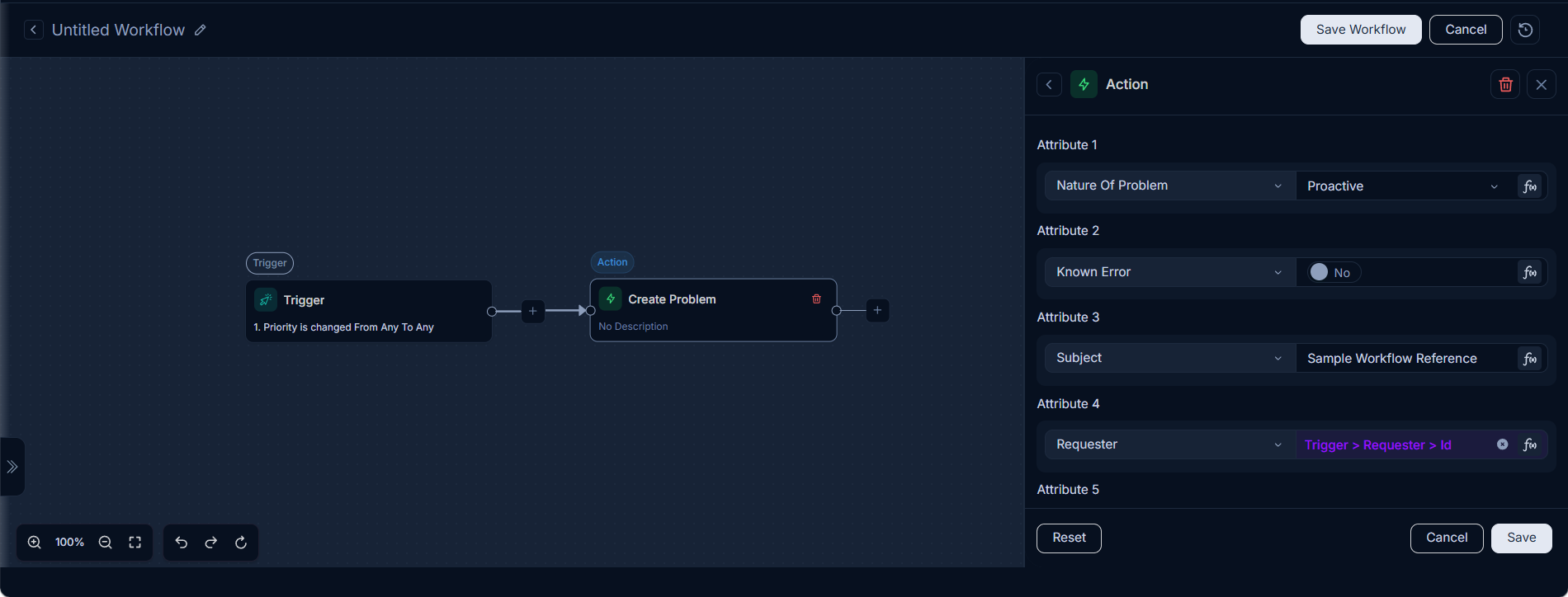
Example: Creating a Problem Record from an Incident Escalation
This example demonstrates how to automatically create a new problem record when an incident's priority is escalated, populating the new problem with relevant details from the triggering incident.
Workflow Configuration (Create Problem Node):
- Title:
Create Problem - Description:
- Set Requester To Reference (
Trigger > requesterId > id) - Set Subject To
Sample Workflow Reference Ticket
- Set Requester To Reference (
- Field-Value Mapping:
Requester: ValueTrigger > requesterId > id(Dynamically sets the problem requester to the ID of the incident's requester.)Subject: Value# Sample Workflow Reference Ticket(Sets a predefined subject for the new problem record.)Due By: ValueTrigger > updatedTime(Sets the problem's due date to the updated time of the triggering incident.)Nature Of Problem: Value# Proactive(Categorizes the problem as 'Proactive'.)Known Error: Value# Yes(Marks the problem as a 'Known Error'.)
Similarly, you can create a new Change, Release, or other module records from an existing module record. For example, you can create a new Change record from a Problem record, or a new Release record from a Change record.
Update Record
The Update Record action modifies existing records across various modules, including Request, Problem, Change, Release, Asset, CI, Task, User, and Asset Movement. This action is critical for dynamically adjusting record details as a workflow progresses.
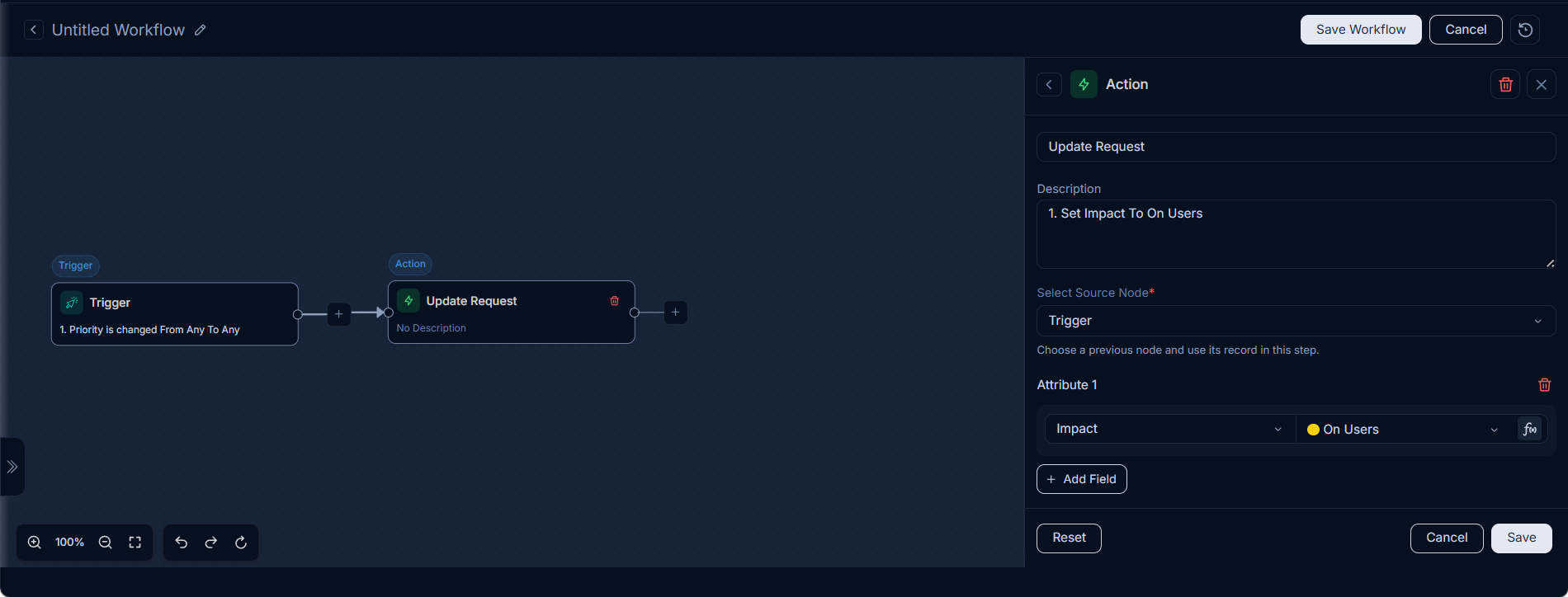
Configurations:
- Title: (Mandatory) The name or title for the new record.
- Description: (Mandatory) A detailed description for the new record.
- Select Source Node: Choose the upstream node from which this action receives its input data (e.g.,
Loop,Trigger, orGet Requests). - Field-Value Pair: Define new values for record fields. These can be set directly, referenced from previous node outputs, or determined via expressions.
Archive Record
The Archive Record action moves records to an archived state. This is typically used for historical purposes, to maintain data integrity, or to declutter active views by removing outdated or completed records without permanently deleting them.
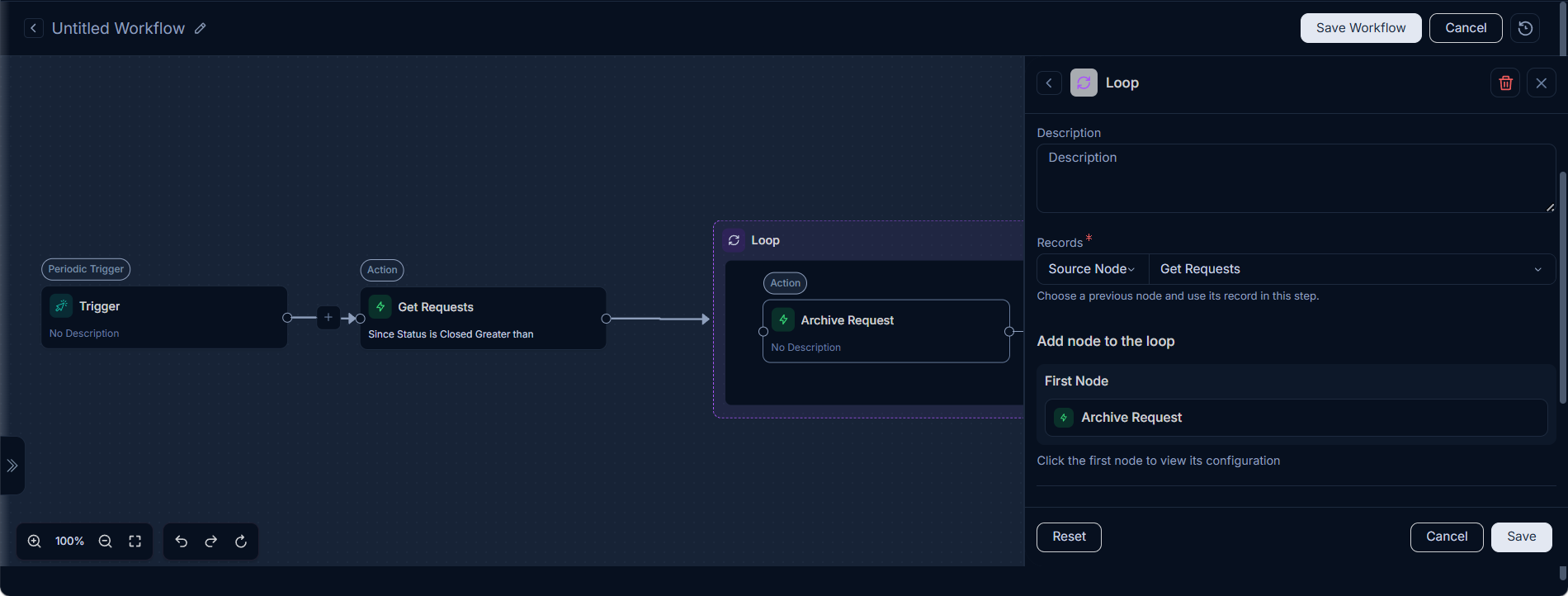
Configurations:
- Name: (Mandatory) The name of the record to be archived.
- Description: (Mandatory) A description for the archival action, providing context for why the record is being archived.
- Select Source Node: Choose the upstream node from which this action receives its input data (e.g.,
Loop,Trigger, orGet Requests).
Module-Specific Actions:
Building upon the foundational create, update, and archive operations, ServiceOps provides a rich set of module-specific actions. These actions are tailored to the unique requirements of different ITSM modules, allowing for fine-grained control and automation within each area.
Common categories of these specialized action nodes and their typical actions include:
Request Actions:
| Action Name | Description | Use Case/Relevance |
|---|---|---|
| Create Incident | Creates a new incident ticket. | Automate incident creation based on specific triggers (e.g., email, monitoring alert). Also, it can be used to create an incident from a Service Request. |
| Create Service Request | Creates a new service request ticket. | Initiate a service request for a new employee onboarding or software access. |
| Update Request | Modifies an existing request. | Automatically update status or assign technician based on specific or dynamic criteria. |
| Archive Request | Archives an existing request. | Automatically archive old or resolved requests after a certain period. |
| Get Request | Retrieves details of a specific request. | Fetch request details to use in conditional logic or for external system integration. |
| Get Requests | Retrieves multiple request records. | Retrieve a list of related requests for reporting or bulk operations. |
| Get Service Request | Retrieves details of a specific service request. | Obtain specific service request data for further processing. |
| Get Service Requests | Retrieves multiple service request records. | Gather multiple service requests for review or mass updates. |
| Add Tasks | Adds one or more tasks to a request. | Automatically add a checklist of tasks to a new incident or service request. |
| Set Priority as per Priority Matrix | Sets the priority of a request based on a predefined matrix. | Dynamically adjust request priority based on impact and urgency. |
| Set Auto Assignment | Automatically assigns a request to a technician or group. | Assign incoming requests to the appropriate technician or group based on category or type. |
| Set Suggested Field by Smart Suggestion | Populates a field based on smart suggestions. | Auto-populate fields like 'category' or 'sub-category' based on keyword analysis in the request description. |
| Add Relation | Establishes a relationship between requests or other modules. | Link an incident to a problem, or a service request to a change. |
| Execute App Integration | Triggers an action in an integrated Microsoft Active Directory application. For detailed configurations, refer to Integration Actions. | Automate user and group management operations within Microsoft Active Directory. |
| Send Notification | Sends a unified notification via email, SMS, WhatsApp, or Teams. For detailed configurations, refer to Communication Actions. | Notify a technician when a new request is assigned, or a requester of status updates. |
Problem Actions:
| Action Name | Description | Use Case/Relevance |
|---|---|---|
| Create Problem | Creates a new problem record. | Automate problem creation based on specific triggers (e.g., recurring incidents, monitoring alerts). Also, it can be used to create a problem from an Incident Request. |
| Update Problem | Modifies an existing problem record. | Automatically update status or assign technician based on specific criteria. |
| Archive Problem | Archives an existing problem. | Automatically archive old or resolved problems after a certain period. |
| Get Problem | Retrieves details of a specific problem. | Fetch problem details for analysis or to link with other records. |
| Get Problems | Retrieves multiple problem records. | Retrieve a list of related problems for reporting or bulk operations. |
| Closed All Related Requests | Closes all requests related to a problem. | Close all associated incidents once a problem is resolved. |
| Add Tasks | Adds one or more tasks to a problem. | Automatically add a checklist of tasks to a new problem record. |
| Set Auto Assignment | Automatically assigns a problem to a technician or group. | Assign new problems to the appropriate problem management team. |
| Add Relation | Establishes a relationship between problems or other modules. | Link a problem to a change or a knowledge base article. |
| Execute App Integration | Triggers an action in an integrated Microsoft Active Directory application. For detailed configurations, refer to Integration Actions. | Automate user and group management operations within Microsoft Active Directory. |
| Send Notification | Sends a unified notification via email, SMS, WhatsApp, or Teams. For detailed configurations, refer to Communication Actions. | Notify a problem manager of a new problem or status changes. |
Change Actions:
| Action Name | Description | Use Case/Relevance |
|---|---|---|
| Create Change | Creates a new change request. | Automate change creation based on specific triggers (e.g., approval of a new feature, infrastructure upgrade). |
| Update Change | Modifies an existing change request. | Automatically update status or assign change manager based on specific criteria. |
| Archive Change | Archives an existing change request. | Automatically archive old or completed change requests after a certain period. |
| Get Change | Retrieves details of a specific change request. | Fetch change details for approval processes or impact analysis. |
| Get Changes | Retrieves multiple change request records. | Retrieve a list of related changes for reporting or bulk operations. |
| Closed All Related Requests | Closes all requests related to a change. | Close all linked incidents and service requests once a change is implemented. |
| Closed All Related Problems | Closes all problems related to a change. | Close all associated problems once a change resolves the root cause. |
| Add Tasks | Adds one or more tasks to a change request. | Automatically add a checklist of tasks to a new change request. |
| Set Auto Assignment | Automatically assigns a change to a technician or group. | Assign new changes to the appropriate change management team. |
| Add Relation | Establishes a relationship between change requests or other modules. | Link a change to affected configuration items or a release. |
| Execute App Integration | Triggers an action in an integrated Microsoft Active Directory application. For detailed configurations, refer to Integration Actions. | Automate user and group management operations within Microsoft Active Directory. |
| Send Notification | Sends a unified notification via email, SMS, WhatsApp, or Teams. For detailed configurations, refer to Communication Actions. | Notify a change manager of a new change or status changes. |
Release Actions:
| Action Name | Description | Use Case/Relevance |
|---|---|---|
| Create Release | Creates a new release record. | Initiate a release record for new software versions or significant updates. |
| Update Release | Modifies an existing release record. | Update release status, add deployment notes, or modify target dates. |
| Archive Release | Archives an existing release record. | Archive completed or canceled release records. |
| Get Release | Retrieves details of a specific release. | Fetch release details for reporting or linking to other records. |
| Get Releases | Retrieves multiple release records. | Retrieve a list of upcoming or past releases for planning or audit. |
| Add Tasks | Adds one or more tasks to a release. | Add tasks for testing, deployment, and post-release verification. |
| Set Auto Assignment | Automatically assigns a release to a technician or group. | Assign release tasks to the appropriate release team. |
| Add Relation | Establishes a relationship between release records or other modules. | Link a release to affected configuration items, changes, or projects. |
| Execute App Integration | Triggers an action in an integrated Microsoft Active Directory application. For detailed configurations, refer to Integration Actions. | Automate user and group management operations within Microsoft Active Directory. |
| Send Notification | Sends a unified notification via email, SMS, WhatsApp, or Teams. For detailed configurations, refer to Communication Actions. | Notify release engineer of a new release task or update, or stakeholders about upcoming releases. |
Hardware Asset Actions:
| Action Name | Description | Use Case/Relevance |
|---|---|---|
| Create Hardware Asset | Creates a new hardware asset record. | Initiate a hardware asset record for new equipment or upgrades. |
| Update Hardware Asset | Modifies an existing hardware asset record. | Update asset details, add maintenance logs, or change its status. |
| Archive Hardware Asset | Archives a hardware asset record. | Archive old or retired hardware assets for inventory or compliance. |
| Get Hardware Asset | Retrieves details of a specific hardware asset. | Fetch specific hardware asset data for inspection or verification. |
| Get Hardware Assets | Retrieves multiple hardware asset records. | Retrieve a list of all hardware assets for inventory or audit. |
| Execute Sync Rule Action | Executes a synchronization rule for hardware assets. | Synchronize hardware asset data with external systems (e.g., CMDB, inventory management). |
| Add Barcode | Adds a barcode to a hardware asset. | Track assets uniquely for inventory or asset tracking. |
| Execute App Integration | Triggers an action in an integrated Microsoft Active Directory application for hardware assets. For detailed configurations, refer to Integration Actions. | Automate user and group management operations within Microsoft Active Directory. |
| Execute Warranty Sync | Synchronizes warranty information for hardware assets. | Manage warranty claims or track asset lifecycles. |
| Send Notification | Sends a unified notification via email, SMS, WhatsApp, or Teams. For detailed configurations, refer to Communication Actions. | Notify asset owners of maintenance needs, or management about asset issues. |
Software Asset Actions:
| Action Name | Description | Use Case/Relevance |
|---|---|---|
| Create Software Asset | Creates a new software asset record. | Initiate a software asset record for new software installations or updates. |
| Update Software Asset | Modifies an existing software asset record. | Update software version, add license details, or change its status. |
| Archive Software Asset | Archives a software asset record. | Archive old or expired software licenses or versions. |
| Get Software Asset | Retrieves details of a specific software asset. | Fetch specific software asset data for compliance or licensing. |
| Get Software Assets | Retrieves multiple software asset records. | Retrieve a list of all software assets for inventory or audit. |
| Add Barcode | Adds a barcode to a software asset. | Track software uniquely for licensing or inventory. |
| Execute App Integration | Triggers an action in an integrated Microsoft Active Directory application for software assets. For detailed configurations, refer to Integration Actions. | Automate user and group management operations within Microsoft Active Directory. |
| Send Notification | Sends a unified notification via email, SMS, WhatsApp, or Teams. For detailed configurations, refer to Communication Actions. | Notify software asset owners of updates, or management about critical issues. |
Non-IT Asset Actions:
| Action Name | Description | Use Case/Relevance |
|---|---|---|
| Create Non-IT Asset | Creates a new non-IT asset record. | Initiate a non-IT asset record for new furniture, equipment, or supplies. |
| Update Non-IT Asset | Modifies an existing non-IT asset record. | Update asset details, add maintenance logs, or change its status. |
| Archive Non-IT Asset | Archives a non-IT asset record. | Archive old or retired non-IT assets for inventory or compliance. |
| Get Non-IT Asset | Retrieves details of a specific non-IT asset. | Fetch specific non-IT asset data for inspection or verification. |
| Get Non-IT Assets | Retrieves multiple non-IT asset records. | Retrieve a list of all non-IT assets for inventory or audit. |
| Add Barcode | Adds a barcode to a non-IT asset. | Track non-IT assets uniquely for inventory or asset tracking. |
| Execute App Integration | Triggers an action in an integrated Microsoft Active Directory application for non-IT assets. For detailed configurations, refer to Integration Actions. | Automate user and group management operations within Microsoft Active Directory. |
| Send Notification | Sends a unified notification via email, SMS, WhatsApp, or Teams. For detailed configurations, refer to Communication Actions. | Notify non-IT asset owners of maintenance needs, or users about asset availability. |
CMDB Actions:
| Action Name | Description | Use Case/Relevance |
|---|---|---|
| Create CI | Creates a new Configuration Item (CI). | Initiate a CI for new hardware, software, or network devices. |
| Update CI | Updates an existing Configuration Item (CI). | Update CI details, add configuration data, or change its status. |
| Archive CI | Archives a Configuration Item (CI). | Archive old or retired CIs for inventory or compliance. |
| Get CI | Retrieves a specific Configuration Item (CI). | Fetch specific CI data for inspection or verification. |
| Get CIs | Retrieves multiple Configuration Items (CIs). | Retrieve a list of all CIs for inventory or audit. |
| Execute Sync Rule Action | Executes a synchronization rule for CIs. | Synchronize CI data with external systems (e.g., CMDB, inventory management). |
| Execute App Integration | Triggers an action in an integrated Microsoft Active Directory application for CMDB. For detailed configurations, refer to Integration Actions. | Automate user and group management operations within Microsoft Active Directory. |
| Execute Warranty Sync | Synchronizes warranty information for CIs. | Manage warranty claims or track asset lifecycles. |
| Send Notification | Sends a unified notification via email, SMS, WhatsApp, or Teams. For detailed configurations, refer to Communication Actions. | Notify CI owners of maintenance, or management about critical CI issues. |
Asset Movement Actions:
| Action Name | Description | Use Case/Relevance |
|---|---|---|
| Update Asset Movement | Updates an existing asset movement record. | Initiate an asset movement record for transferring assets between locations or departments. |
| Get Asset Movement | Retrieves a specific asset movement record. | Fetch specific asset movement data for tracking or audit. |
| Get Asset Movements | Retrieves multiple asset movement records. | Retrieve a list of all asset movements for inventory or audit. |
| Send Notification | Sends a unified notification via email, SMS, WhatsApp, or Teams. For detailed configurations, refer to Communication Actions. | Confirm receipt of asset movement or inform the requester of its status. |
User Actions:
| Action Name | Description | Use Case/Relevance |
|---|---|---|
| Update User | Updates an existing user record. | Initiate a user update for profile changes, role adjustments, or access management. |
| Get User | Retrieves details of a specific user. | Fetch specific user data for authentication, authorization, or user management. |
| Get Users | Retrieves multiple user records. | Retrieve a list of all users for user management or audit. |
| Execute App Integration | Triggers an action in an integrated Microsoft Active Directory application for user management. For detailed configurations, refer to Integration Actions. | Automate user and group management operations within Microsoft Active Directory. |
| Block User | Blocks a user account. | Temporarily or permanently disable user access. |
| Unblock User | Unblocks a user account. | Re-enable user access after a block. |
| Archive User | Archives a user account. | Archive user accounts that are no longer active or have been removed. |
| Restore User | Restores an archived user account. | Restore user accounts that were previously archived. |
| Convert to Requester | Changes a user's role to Requester. | Assign a user to the Requester role for specific request creation. |
| Convert to Technician | Changes a user's role to Technician. | Assign a user to the Technician role for incident or problem resolution. |
| Send Notification | Sends a unified notification via email, SMS, WhatsApp, or Teams. For detailed configurations, refer to Communication Actions. | Notify users about system updates, alerts, or important messages. |
Task Actions:
| Action Name | Description | Use Case/Relevance |
|---|---|---|
| Create Task | Creates a new task. | Initiate a new task for work assignment or project tracking. |
| Update Task | Updates an existing task. | Modify task details, update status, or re-assign. |
| Archive Task | Archives a task. | Archive completed or canceled tasks. |
| Get Task | Retrieves details of a specific task. | Fetch specific task data for tracking or reporting. |
| Get Tasks | Retrieves multiple task records. | Retrieve a list of all tasks for project or workflow management. |
| Send Notification | Sends a unified notification via email, SMS, WhatsApp, or Teams. For detailed configurations, refer to Communication Actions. | Notify the assignee of a new task or update. |
Approval Actions:
| Action Name | Description | Use Case/Relevance |
|---|---|---|
| Run Approval Workflow | Triggers a predefined approval workflow. | Initiate a workflow for formal approval of changes, requests, or releases. |
| Ask For Approval | Asks for approval from a specific user or group. | Ask for approval from a specific user or group for a specific request. |
Plugin Actions:
| Action Name | Description | Use Case/Relevance |
|---|---|---|
| Execute Plugin | Executes a specific plugin action. For detailed configurations, refer to Integration Actions. | Trigger specific plugin functionality within the workflow. |
Announcement Actions:
| Action Name | Description | Use Case/Relevance |
|---|---|---|
| Create Announcement | Creates a new announcement. | Initiate an announcement for important information or updates. |
| Enable Announcement | Activates an existing announcement. Target the announcement using a searchable dropdown or by referencing the output of a Create Announcement node in the same workflow. | Turn on an announcement automatically when an incident or event begins, keeping it in sync with the actual status without manual steps. |
| Disable Announcement | Deactivates an existing announcement. Target the announcement using a searchable dropdown or by referencing the output of a Create Announcement node in the same workflow. | Turn off an announcement automatically when an incident or event is resolved, ensuring the announcement lifecycle stays aligned with the workflow execution. |
Deployment Actions:
| Action Name | Description | Use Case/Relevance |
|---|---|---|
| Create Deployment | Creates a new deployment record. | Initiate a deployment record for new software or configuration changes. |