Understanding Expression Fundamentals
The Expression Builder in ServiceOps is a powerful visual tool that enables administrators to define dynamic conditions and set or update values within workflows. It provides a flexible way to configure precise automation logic across various modules, moving beyond static configurations to intelligent, context-aware actions.
What is the Expression Builder?
The Expression Builder allows users to construct free-form expressions using a combination of functions, variables, and operators. This capability transforms simple workflows into sophisticated automation sequences that can adapt to specific data points and scenarios. By leveraging expressions, you can create highly customized and efficient automation rules that respond dynamically to changes and conditions within your ITSM environment.
Key Components of the Expression Builder:
The Expression Builder is comprised of several integral components that facilitate the creation of robust and dynamic workflow logic. It appears on clicking the Expression field.
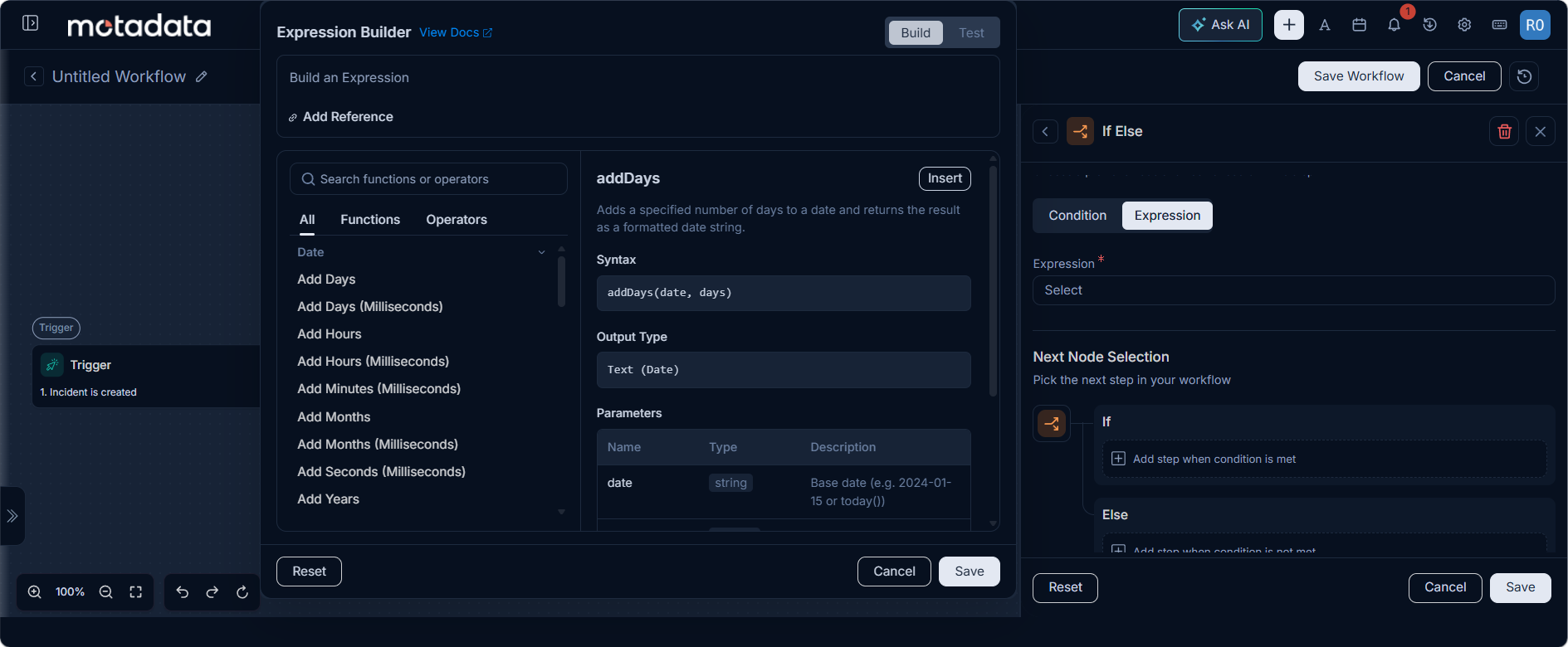
Functions:
These are pre-defined operations that can be applied to data within your expressions. The Expression Builder categorizes functions for ease of use:
String Functions:
| Function Name | Description | Use Case/Relevance |
|---|---|---|
charAt(value, index) | Returns the character at the specified index in a string. | Extract a specific character from a string, e.g., for parsing an ID. |
compareTo(value1, value2) | Compares two strings lexicographically. | Sort strings alphabetically or check the order of two text values. |
compareToIgnoreCase(value1, value2) | Compares two strings lexicographically, ignoring case differences. | Case-insensitive sorting or ordering of text. |
concat(value1, value2) | Concatenates two strings together. | Combine first name and last name into a full name, or build dynamic titles. |
contains(value1, value2) | Tests if a string contains a specified substring. | Check if a description contains a keyword like "urgent" or "critical". |
endsWith(value1, value2) | Tests if a string ends with the specified suffix. | Validate file extensions or check if a ticket ID ends with a specific sequence. |
equals(value1, value2) | Compares two strings for equality. | Exact matching of two text values, e.g., status comparison. |
equalsIgnoreCase(value1, value2) | Compares two strings for equality, ignoring case differences. | Case-insensitive matching of two text values, e.g., user input. |
indexOf(value1, value2) | Returns the index of the first occurrence of a substring. | Find the starting position of a keyword or phrase within a larger text. |
lastIndexOf(value1, value2) | Returns the index of the last occurrence of a substring. | Find the last occurrence of a delimiter to extract specific data. |
length(value) | Returns the length of a string. | Validate input field lengths or count characters in a message. |
regexMatch(value1, value2) | Tests if a string matches a regular expression pattern. | Validate email formats, phone numbers, or other structured data. |
regexReplace(value1, value2, value3) | Replaces all occurrences matching a regular expression with a replacement string. | Sanitize input, mask sensitive data, or reformat text based on patterns. |
replace(value1, value2, value3) | Replaces all occurrences of a substring with another string. | Replace specific words or characters in a text, e.g., replace "old" with "new". |
startsWith(value1, value2) | Tests if a string starts with the specified prefix. | Check if a ticket ID starts with "INC" for incident tickets. |
substring(value, start, end) | Returns a substring from start index to end index. | Extract a portion of a string, e.g., a specific part of a code. |
toLowerCase(value) | Converts a string to lowercase. | Normalize text for case-insensitive comparisons or storage. |
toUpperCase(value) | Converts a string to uppercase. | Format text for display or database consistency. |
trim(value) | Removes leading and trailing whitespace from a string. | Clean up user input, remove accidental spaces. |
Date Functions:
| Function Name | Description | Use Case/Relevance |
|---|---|---|
addMonths(value, n) | Adds the specified number of months to a date string. | Calculate a future date for a recurring task or contract renewal. |
addMonthsMillis(value, n) | Adds the specified number of minutes to a timestamp. | Adjust timestamps for events occurring after a set duration. |
addSecondsMillis(value, n) | Adds the specified number of seconds to a timestamp. | Add a buffer to a timestamp for system processing or delays. |
addYears(value, n) | Adds the specified number of years to a timestamp. | Calculate expiration dates for assets or licenses. |
addYearsMillis(value, n) | Adds the specified number of years to a timestamp. | Calculate expiration dates for assets or licenses, in milliseconds. |
date(value) | Formats a date string to the system's standard date format. | Standardize date displays across different reports or UI elements. |
dateTime(value) | Formats a datetime string to the system's standard datetime format. | Standardize datetime displays across different reports or UI elements. |
dateTimeToMillis(value) | Converts a datetime string to milliseconds timestamp. | Convert human-readable datetime into a machine-readable timestamp for calculations. |
dateTimeValue(value) | Converts a datetime string to a LocalDateTime object. | Convert datetime strings for advanced date and time manipulations within workflows. |
dateToMillis(value) | Converts a date string to milliseconds timestamp. | Convert human-readable date into a machine-readable timestamp for calculations. |
dateValue(value) | Converts a date string to a LocalDate object. | Convert date strings for advanced date manipulations within workflows. |
day(value) | Extracts the day of month from a date string. | Filter records by the day of the month, e.g., monthly reports. |
dayMillis(value) | Extracts the day of month from a timestamp. | Filter records by the day of the month from a timestamp. |
diffInDays(value1, value2) | Calculates the difference in days between two date strings. | Determine the age of a ticket, calculate SLA breaches in days. |
diffInDaysMillis(value1, value2) | Calculates the difference in days between two timestamps. | Determine the age of a ticket, calculate SLA breaches in days, using timestamps. |
diffInHours(value1, value2) | Calculates the difference in hours between two datetime strings. | Calculate time spent on a task, determine OLA breaches in hours. |
diffInHoursMillis(value1, value2) | Calculates the difference in hours between two timestamps. | Calculate time spent on a task, determine OLA breaches in hours, using timestamps. |
diffInMinutesMillis(value1, value2) | Calculates the difference in minutes between two timestamps. | Measure short durations between events in milliseconds. |
diffInSecondsMillis(value1, value2) | Calculates the difference in seconds between two timestamps. | Measure very short durations between events in milliseconds. |
diffInWeeks(value1, value2) | Calculates the difference in weeks between two date strings. | Track weekly progress or recurring events. |
diffInWeeksMillis(value1, value2) | Calculates the difference in weeks between two timestamps. | Track weekly progress or recurring events, using timestamps. |
endOfDayMillis(value) | Returns the end of day (23:59:59.999) for the given timestamp. | Define a cutoff time for daily reports or tasks. |
hourMillis(value) | Extracts the hour from a timestamp. | Schedule actions based on the hour of the day. |
millisToDate() | Converts a milliseconds timestamp to date string. | Convert system timestamps back to readable date formats. |
millisToDateTime() | Converts a milliseconds timestamp to datetime string. | Convert system timestamps back to readable datetime formats. |
minuteMillis(value) | Extracts the minute from a timestamp. | Trigger actions based on specific minute marks within an hour. |
month(value) | Extracts the month from a date string. | Filter reports by month or categorize tasks by monthly cycles. |
monthMillis(value) | Extracts the month from a timestamp. | Filter reports by month from a timestamp. |
now() | Returns the current date and time as a formatted string. | Record the exact time a workflow action was performed. |
startOfDayMillis(value) | Returns the start of day (00:00:00) for the given timestamp. | Define a starting point for daily calculations or event logs. |
secondMillis() | Returns today's date as a formatted string. | Get the current date for logging or comparison. |
today() | Returns today's date as a formatted string. | Get the current date for logging or comparison. |
weekday(value) | Returns the day of week for a date string. | Schedule actions on specific days of the week. |
weekdayMillis(value) | Returns the day of week for a timestamp. | Schedule actions on specific days of the week, using timestamps. |
year(value) | Extracts the year from a date string. | Filter data by year or categorize historical records. |
yearMillis(value) | Extracts the year from a timestamp. | Filter data by year from a timestamp. |
Math Functions:
| Function Name | Description | Use Case/Relevance |
|---|---|---|
abs(param1) | Returns the absolute value of a number. | Calculate deviations or differences where direction doesn't matter, e.g., magnitude of change. |
ceil(param1) | Returns the smallest integer greater than or equal to the argument. | Round up a calculated value to the next whole number, e.g., for quantities. |
exp(param1) | Returns Euler's number e raised to the power of the argument. | Advanced scientific or financial calculations. |
floor(param1) | Returns the largest integer less than or equal to the argument. | Round down a calculated value to the nearest whole number. |
log(param1) | Returns the natural logarithm (base e) of the argument. | Advanced scientific or statistical analysis within workflows. |
max(param1, param2) | Returns the greater of two numbers. | Determine the highest priority, the latest date, or the maximum value between two metrics. |
min(param1, param2) | Returns the smaller of two numbers. | Determine the lowest cost, the earliest date, or the minimum value between two metrics. |
round(param1) | Returns the closest long value to the argument. | Round numerical results to the nearest whole number for display or further calculation. |
sqrt(param1) | Returns the square root of the argument. | Specialized calculations requiring square root, e.g., in geometry or statistics. |
When building expressions, clicking a function from the panel will auto-insert its syntax template into the expression field, simplifying the construction process. You can also add or remove individual functions from an existing expression without rebuilding it, and copy-paste expressions for reuse or modification.
Operators:
These are symbols that represent specific logical or comparison operations used to combine or evaluate values and variables within an expression. The Expression Builder provides a clear list of operators:
Logical Operators:
| Operator | Description | Use Case/Relevance |
|---|---|---|
&& | Logical AND operator for boolean operations | Combine multiple conditions, e.g., "High priority AND Network category". |
\|\| (double pipe) | Logical OR operator for boolean operations | Fulfill at least one of several conditions, e.g., "Status is Open OR Pending". |
! | Logical NOT operator for boolean negation | Invert a condition, e.g., "NOT (Status is Closed)". |
Comparison Operators:
| Operator | Description | Use Case/Relevance |
|---|---|---|
== | Equality operator for comparing values | Check if two values are identical, e.g., "Priority is High". |
!= | Inequality operator for comparing values | Check if two values are different, e.g., "Status is NOT Closed". |
< | Less than operator for numeric comparison | Evaluate if a numerical value is below a threshold, e.g., "Cost < 1000". |
<= | Less than or equal operator for numeric comparison | Evaluate if a numerical value is at or below a threshold. |
> | Greater than operator for numeric comparison | Evaluate if a numerical value is above a threshold. |
>= | Greater than or equal operator for numeric comparison | Evaluate if a numerical value is at or above a threshold. |
Arithmetic Operators:
| Operator | Description | Use Case/Relevance |
|---|---|---|
+ | Addition operator for arithmetic operations | Sum quantities, add durations, or combine numerical values. |
- | Subtraction operator for arithmetic operations | Calculate differences, remaining values, or deduct quantities. |
* | Multiplication operator for arithmetic operations | Scale values, calculate total costs based on unit price and quantity. |
/ | Division operator for arithmetic operations | Distribute quantities, calculate averages, or ratios. |
% | Modulo operator for remainder calculation | Check for divisibility, cyclical patterns, or distribute items evenly. |
^ | Exponentiation operator for power calculation | Perform calculations involving powers, e.g., compound interest. |
Similar to functions, operators can be clicked to be inserted directly into the expression.*
- Variables: These are placeholders that represent dynamic data from previous nodes or the current record within a workflow. When constructing expressions, you can access and insert available variables, which allows your automation logic to react to real-time information.
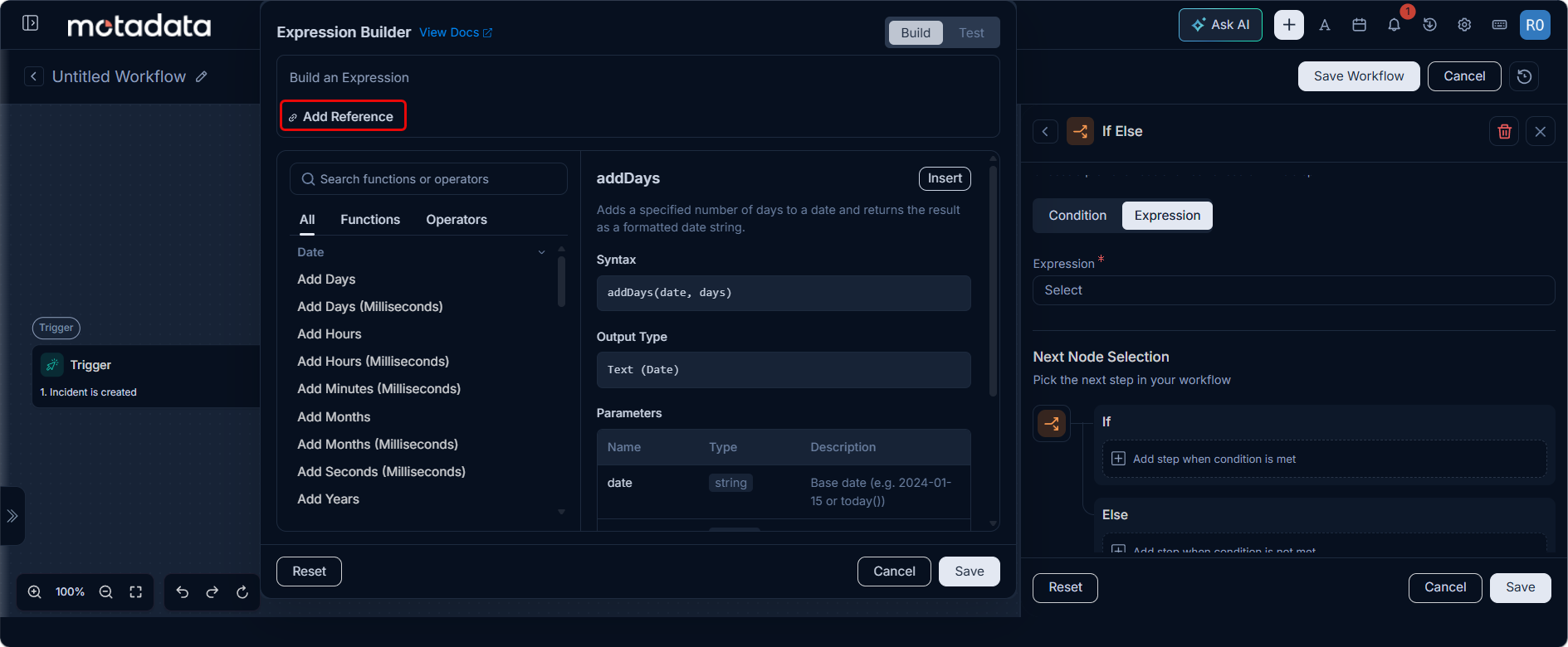
Clicking on "Select Variable for Expression" opens a drawer displaying reference attributes from preceding workflow nodes, and variables can be inserted with a single click.
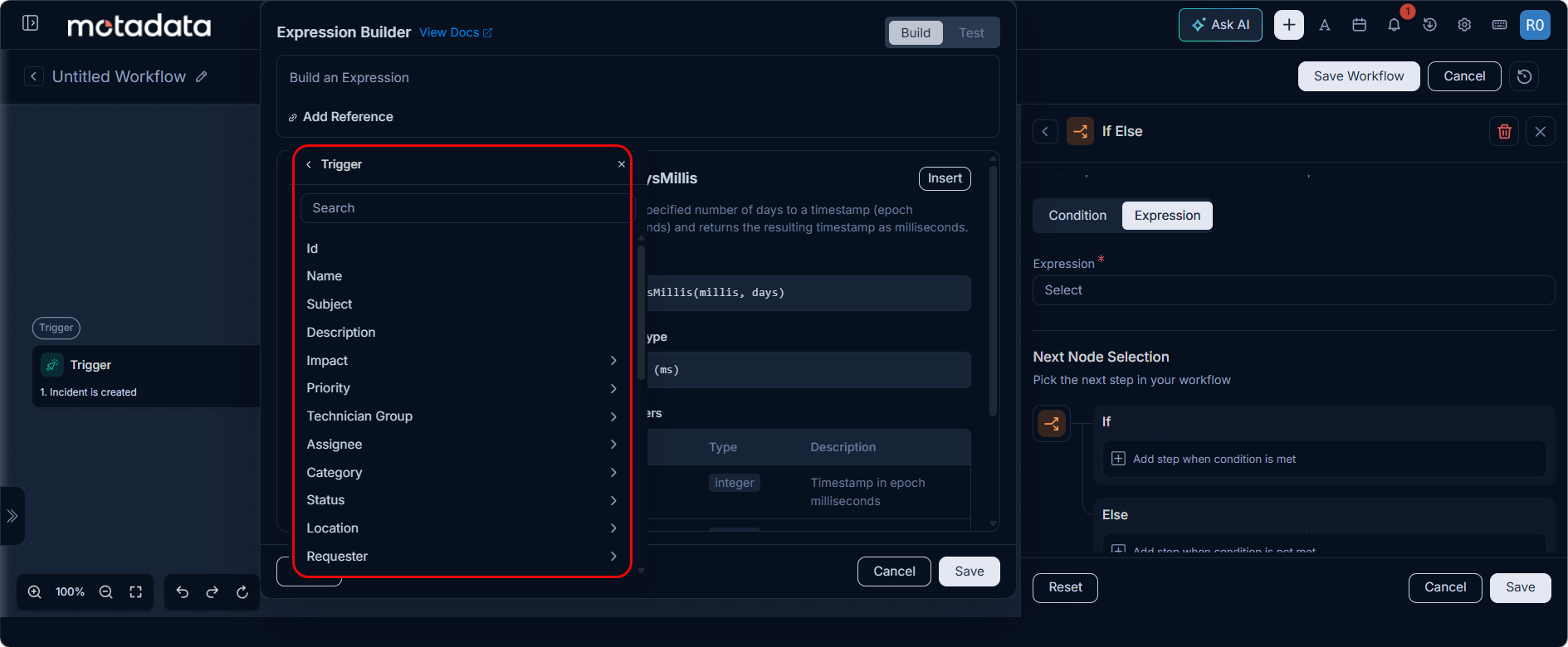
- Placeholders: While not explicitly listed as a separate component in the same way as functions, operators, and variables, placeholders are implicitly used when inserting variables (e.g.,
{{ticket.createdDate}}). These curly brace notations signify where dynamic data will be injected into the expression during workflow execution.
These components work in concert to enable administrators to create highly specific and effective automation rules, from simple conditional checks to complex multi-layered data manipulations.