Event-Based Workflows
Automate real-time responses to critical events across your ITSM modules, ensuring immediate action and seamless process execution.
Event-based workflows automate real-time responses to specific actions or changes across ITSM modules (Request, Problem, Change, Release, Asset, CMDB, Asset Movement, Task, User, and User Leave), reducing manual effort and ensuring consistent service delivery.
Key Configuration Aspects for Event-Based Triggers
Configuring event-based triggers involves defining the specific event that will initiate the automation and any conditions that must be met. The general steps include:
- Module Selection: Choose the ITSM module (e.g., Request, Problem, Asset) that the workflow's trigger will observe for changes or actions.
- Workflow Type Selection: When creating a new workflow, select Event as the Workflow Type to configure an event-driven automation.
- Define the Trigger (Event): Select the precise event that should trigger the workflow (e.g., "Request is created," "Status is changed," "Approval Status is changed"). A comprehensive list of available events for each module can be found in List of Triggering Events.
- Add Flow Logic/Action Nodes: Add flow logic or action nodes to the canvas and configure it as per your requirements. You can configure conditions using either the Condition tab (for straightforward criteria) or the Expression tab (for advanced logic). When using the Condition tab, values for criteria can be defined Directly or by Referencing data from previous nodes/triggers. When using the Expression tab, you can use the Expression Builder to construct complex logic using operators, functions, and variables.
- Execution Order: If multiple workflows are configured to trigger from the same event, define their execution order to ensure logical processing and prevent conflicts.
Event-Based Workflow Examples
To illustrate the practical application of event-based workflows, let's explore a few common scenarios:
Example 1: Automated Incident Assignment on Creation
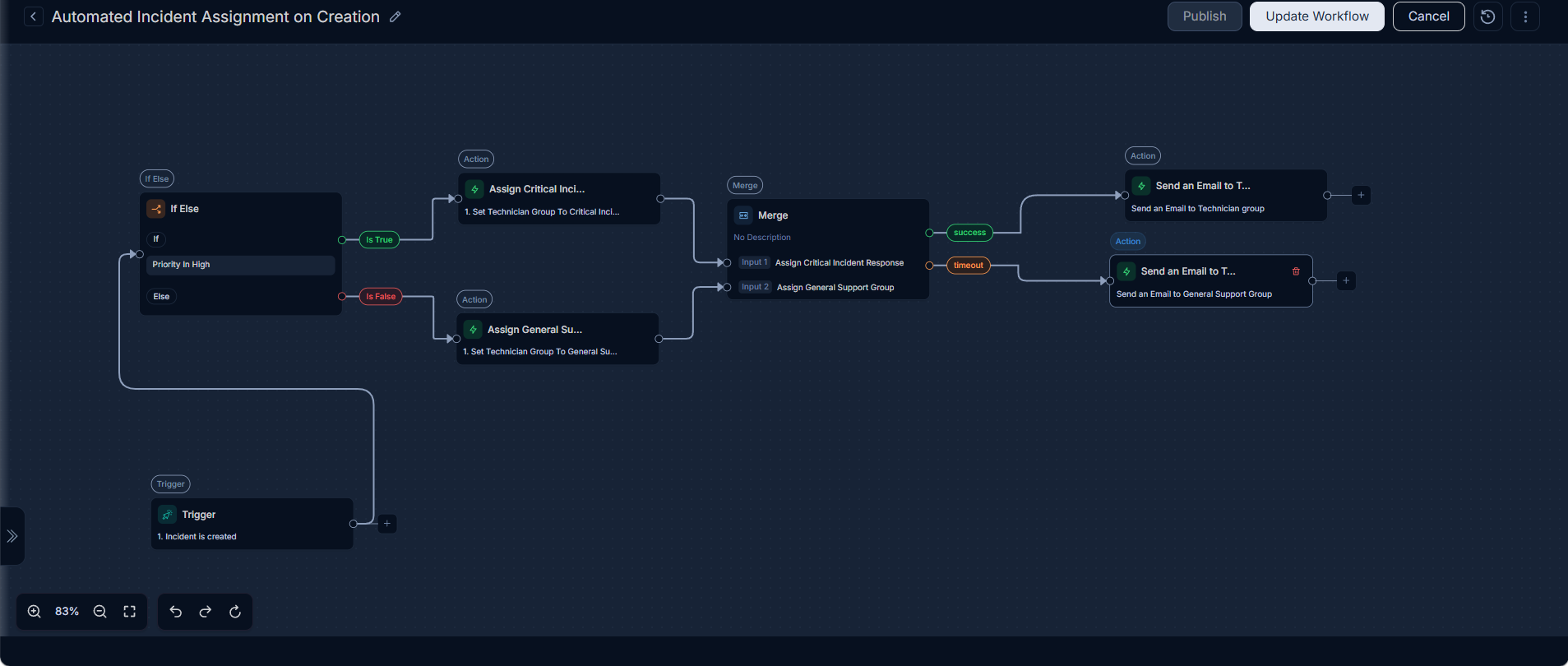
Scenario: Upon the creation of any new incident, the system automatically checks its priority. If the incident is categorized as "High" priority, it is immediately assigned to the "Critical Incident Response" technician group. Incidents of lower priority are routed to the "General Support Group." After either assignment, the workflow merges, and a notification email is dispatched to the relevant technician group to ensure rapid attention and appropriate follow-up.
Prerequisites:
- Ensure that the "Critical Incident Response" and "General Support Group" Technician Groups are configured in ServiceOps.
- Ensure that the "High" priority level is configured for incidents.
Configuration Steps:
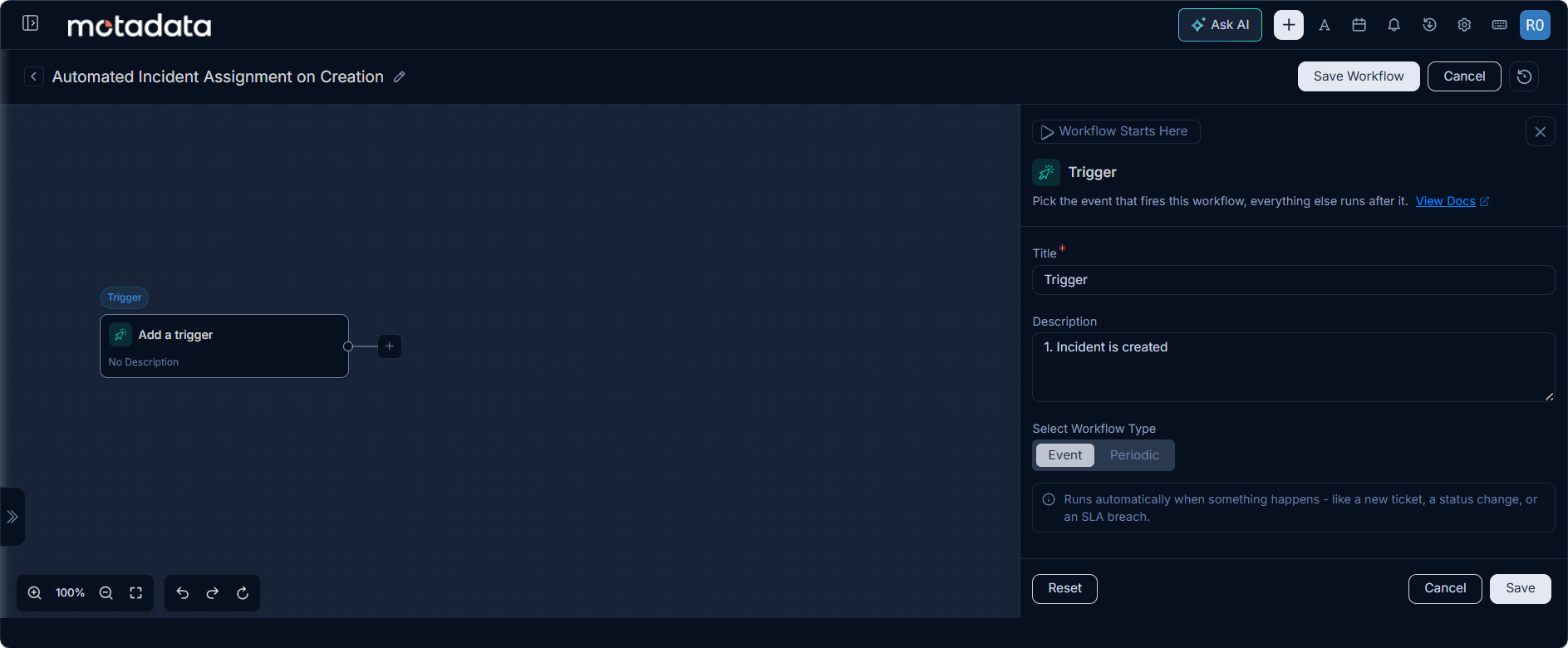
- Module: Select
Request. - Event Type (Trigger Node): Configure a trigger for
Incident is created. This trigger will initiate the workflow for every new incident.
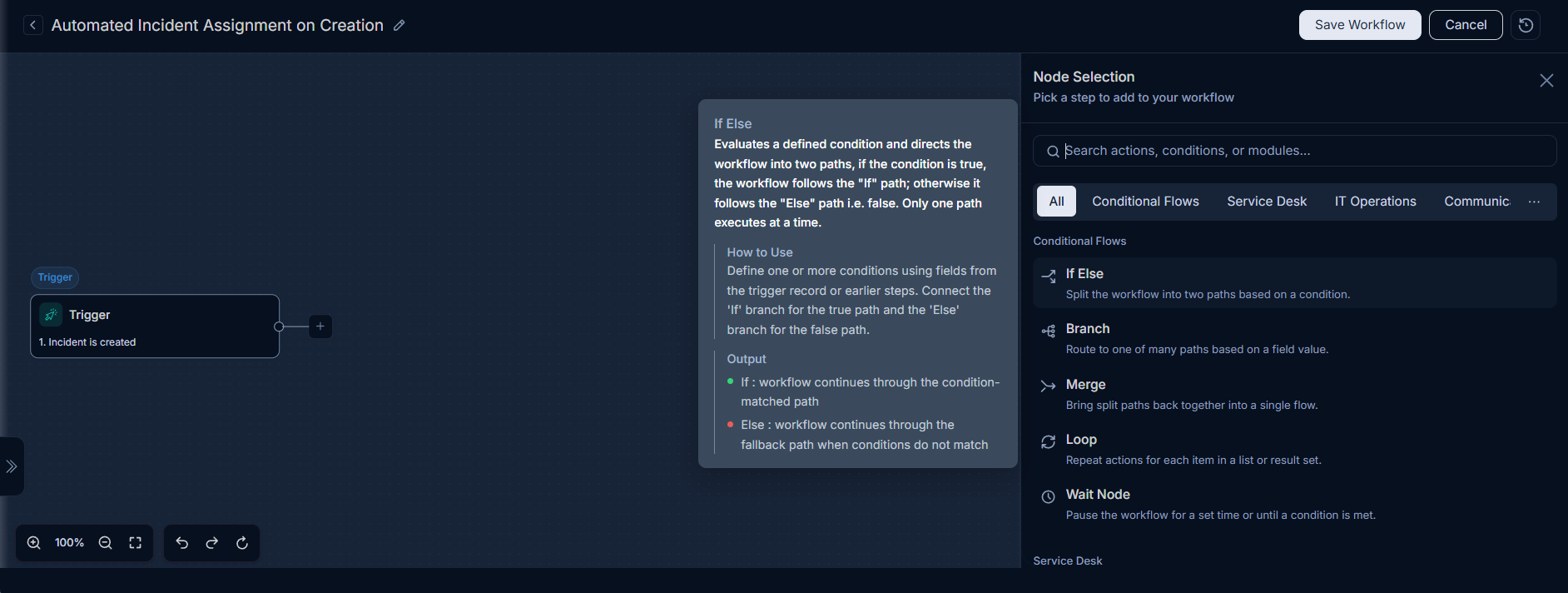
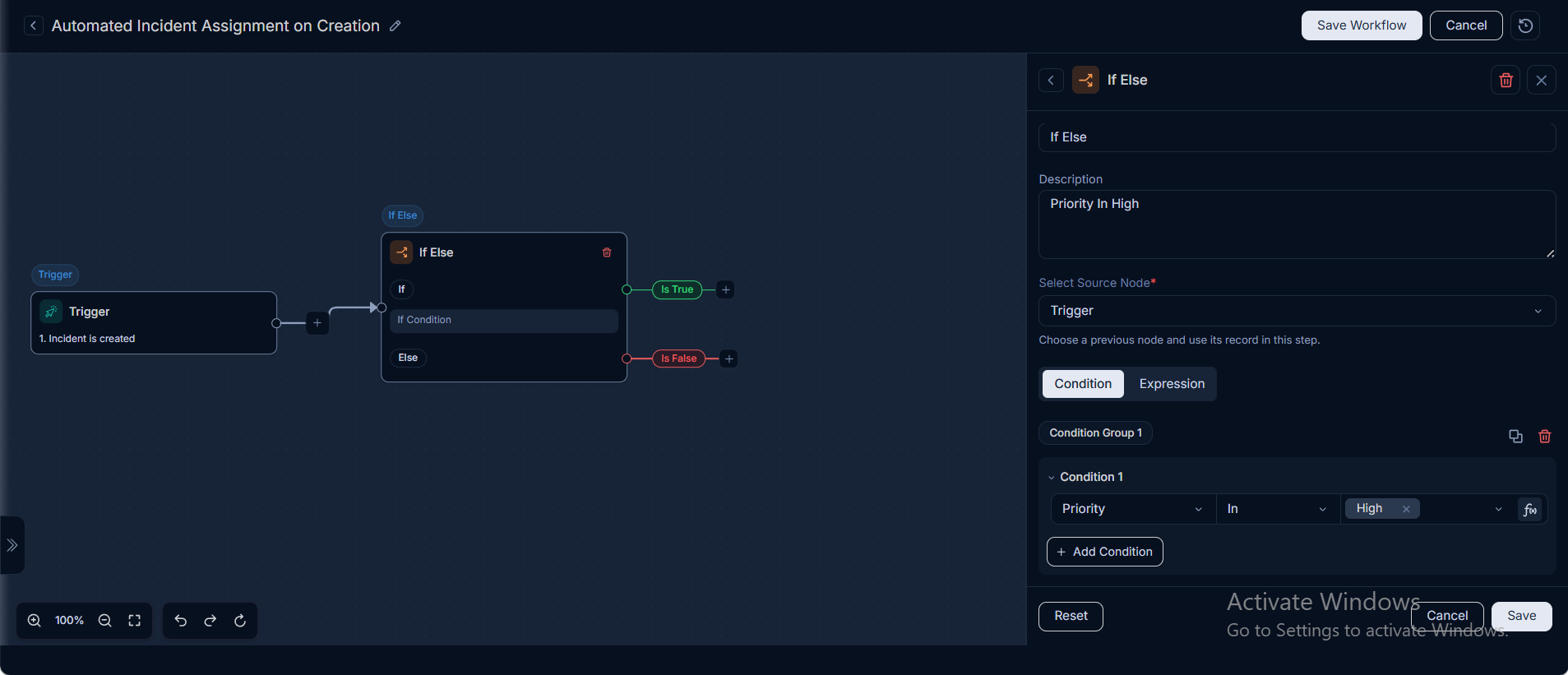
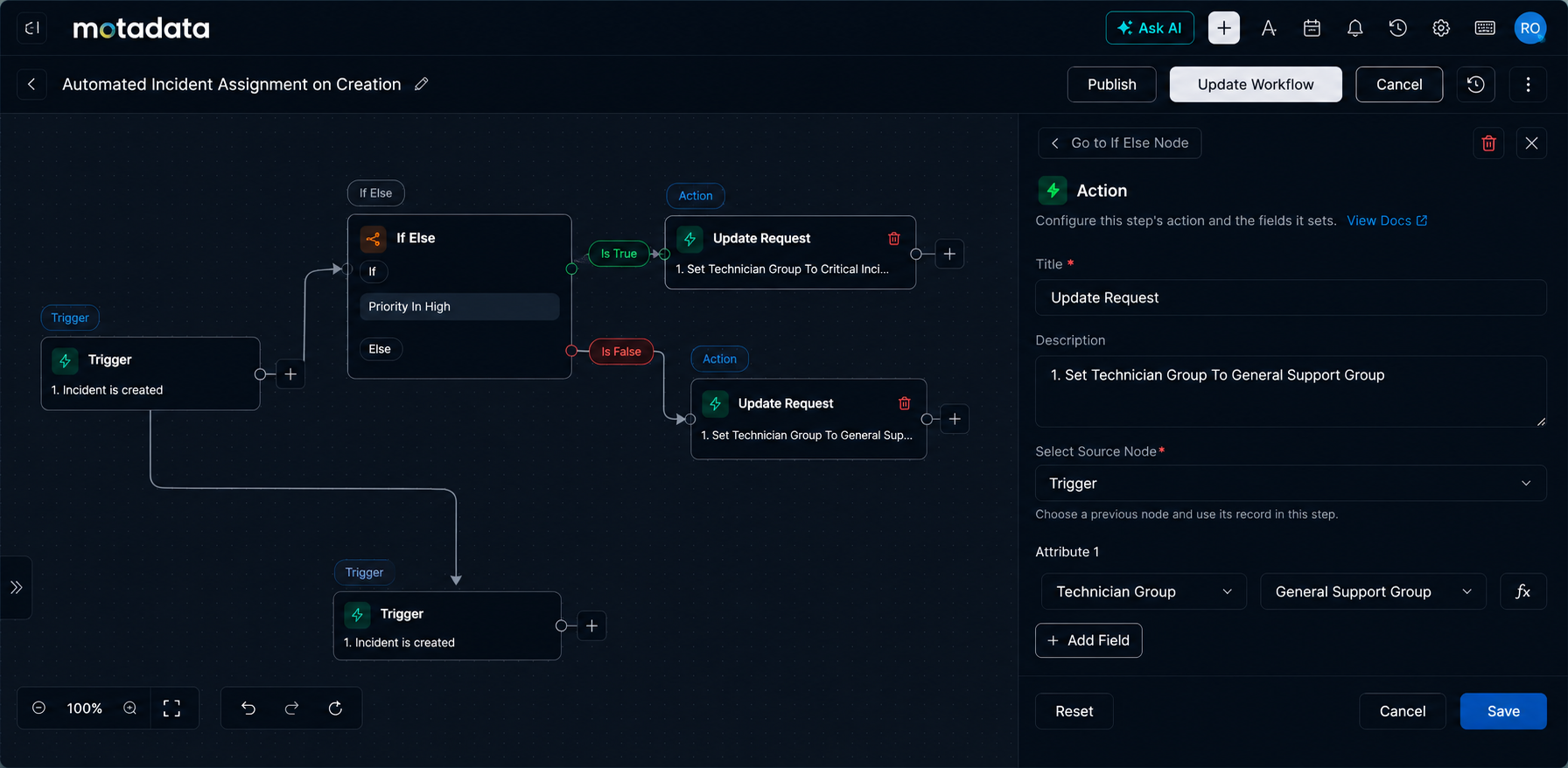
- Flow Node (If/Else): Add an "If/Else" node to evaluate the incident's priority. Set the condition either directly:
Priority is "High"or using a reference:Trigger > priorityId > id.
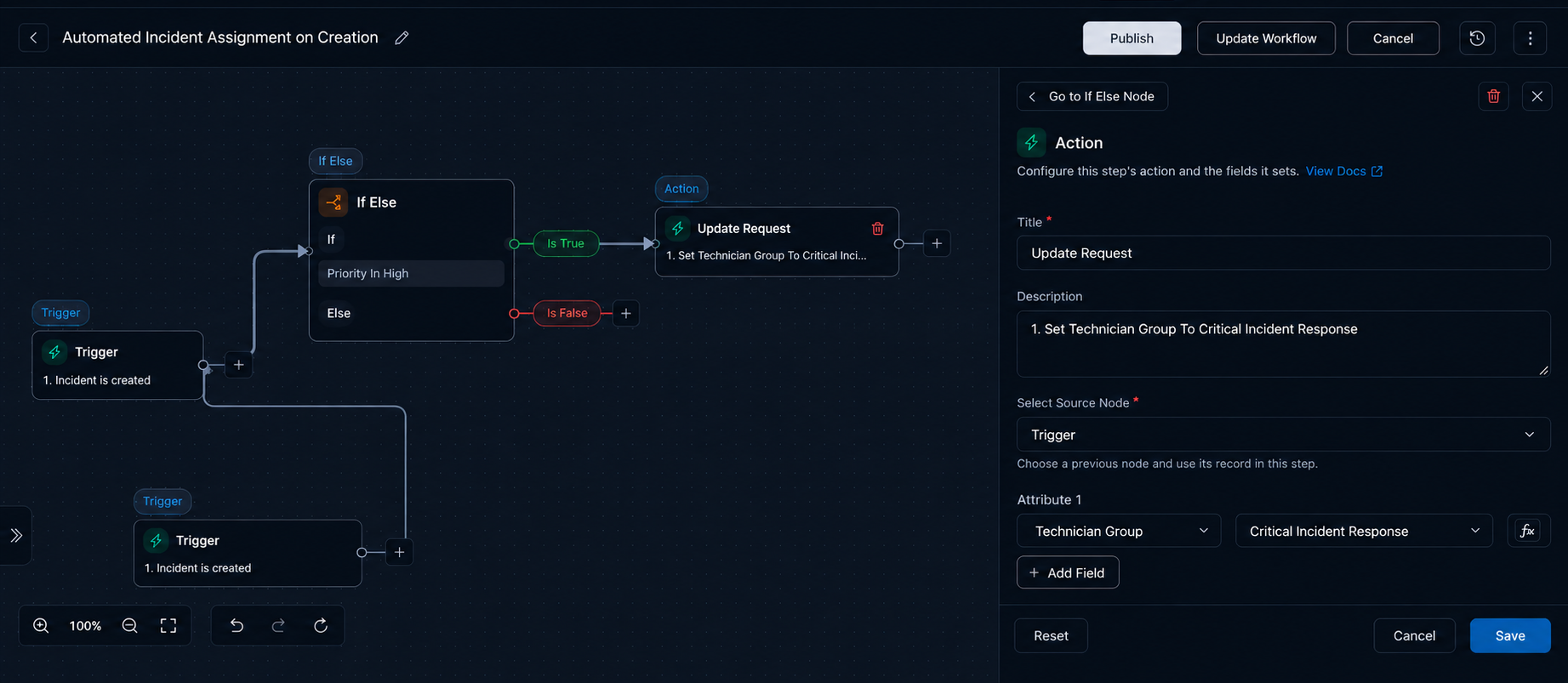
Actions (post-trigger) - True Path (High Priority Incident):
- Add an "Update Request" action. Set the
Technician Groupto "Critical Incident Response".
- Add an "Update Request" action. Set the
Actions (post-trigger) - False Path (Other Priorities):
- Add an "Update Request" action. Set the
Technician Groupto "General Support Group"
- Add an "Update Request" action. Set the
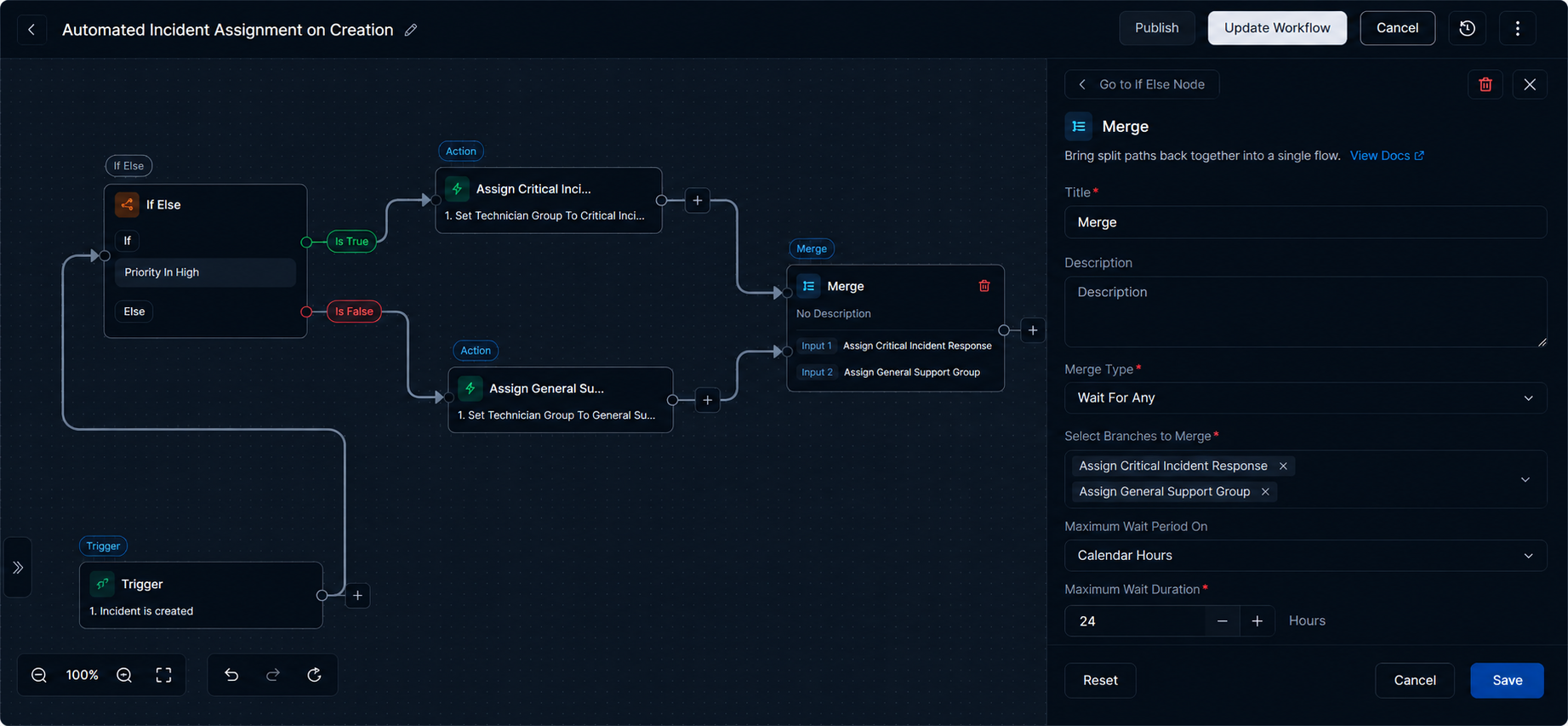
Add a Merge Node to consolidate the two workflow paths. Configure the node as follows:
- Title: Merge
- Description: Merge All Nodes
- Merge Type: Select
Wait For Any. - Select Branches to Merge: Once the "Assign Critical Incid..." and "Assign General Su..." branches are connected to the Merge node, they will automatically appear in this dropdown.
- Maximum Wait Based On: Select
Calendar Hours. - Maximum Wait Duration: Set to
1 Hour.
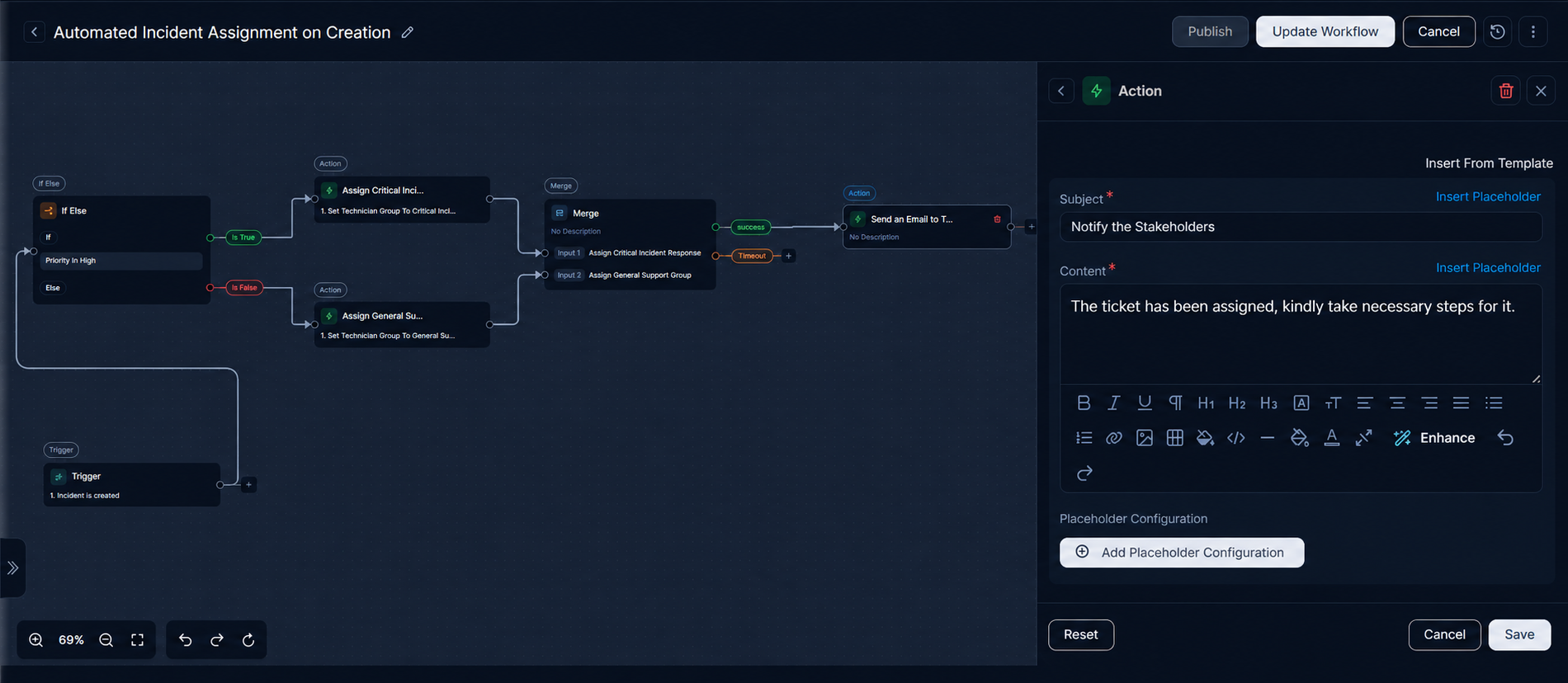
For the Success output of the Merge node, add a "Send an Email to Technician group" action node and configure it as follows:
- Title: Send an Email to Technician group
- Description: Send an Email to Technician group
- Select Source Node: Trigger
- Subject: Notify the Stakeholders
- Content: The ticket has been assigned, kindly take necessary steps for it.
The complete workflow will look like below:
Now, once the workflow is ready, save, and publish it by clicking the Publish button and ensure it is active (enabled) mode.
Verify the automated assignment by creating new incidents with different priorities:
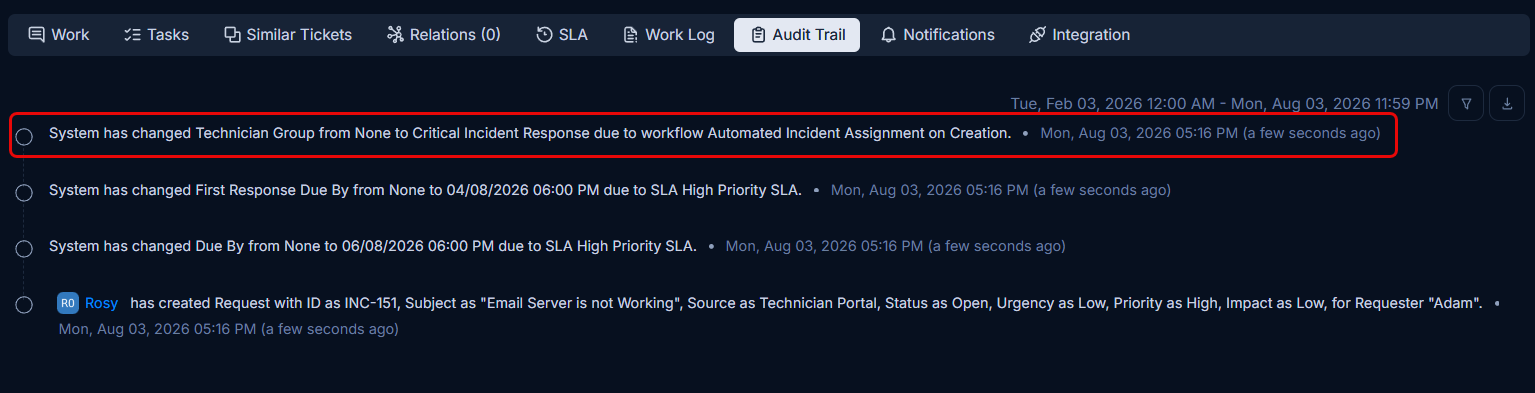
High Priority Incident: When a new incident with High priority is created, it will be assigned to the Critical Incident Response Technician Group, and an email notification will be sent.
Medium Priority Incident: When a new incident with Medium (or any other non-High) priority is created, it will be assigned to the General Support Group Technician Group, and an email notification will be sent.
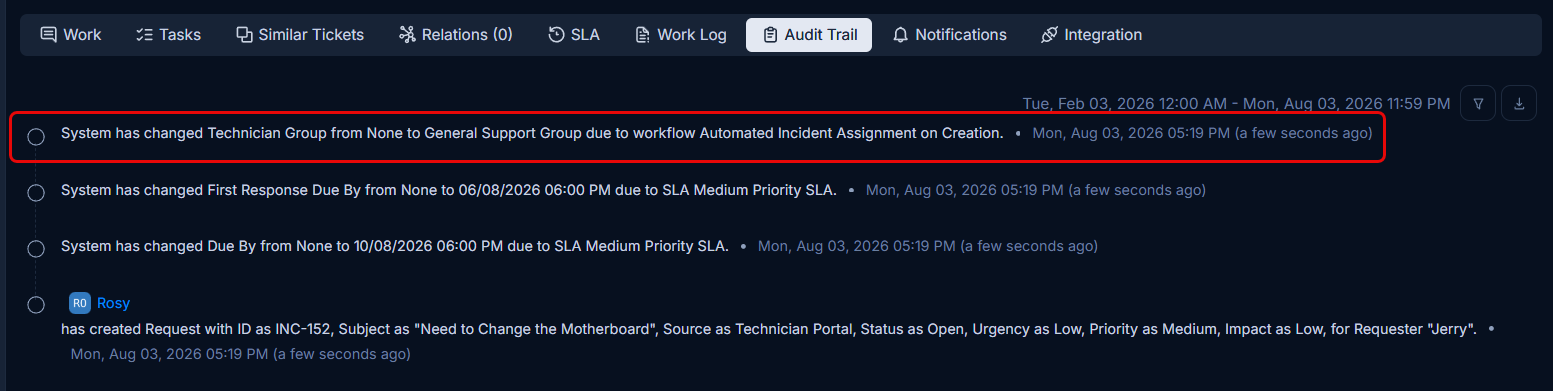
You can check these assignments and notifications in the Audit Trail of the respective incidents.
Example 2: Asset Decommissioning Approval
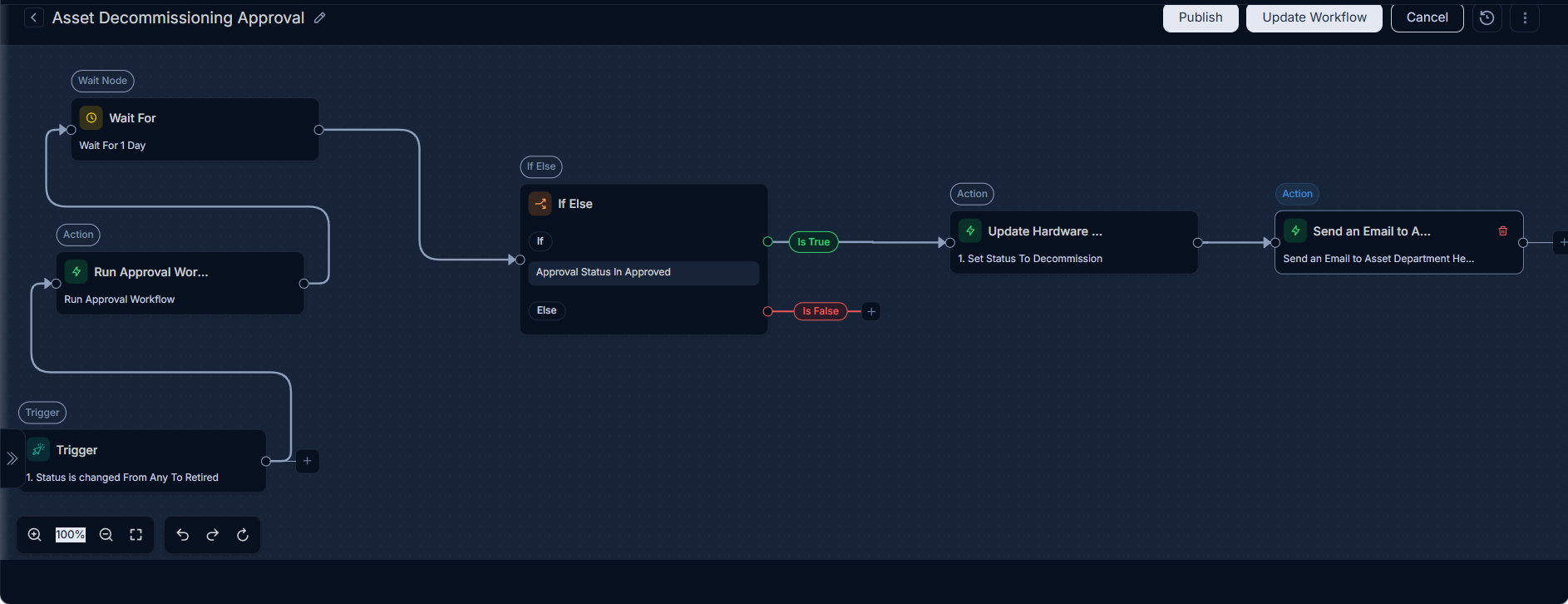
Scenario: When a hardware asset's status is changed to "Retired," this change triggers an approval workflow. The workflow then waits for a specified period (e.g., until a particular date and time) before proceeding to confirm its final decommissioning. If the decommissioning is approved, an email notification is sent to the Asset Department Head.
Prerequisites:
- Ensure a custom
Statuscalled "Decommission" is configured in ServiceOps. - An
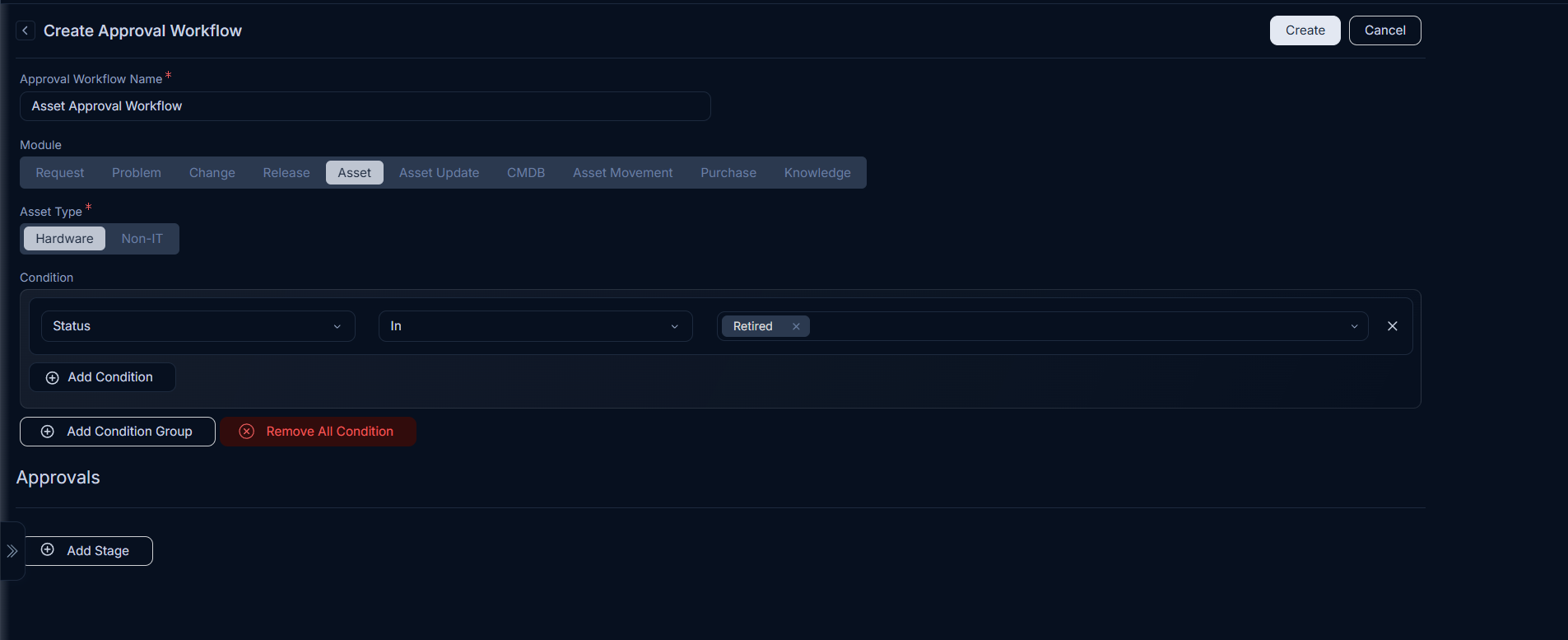
Approval Workflowmust be created and configured for the Asset module with the condition "Status is changed From Any To Retired."
Configuration Steps:
- Module: Select
Asset(as indicated in the screenshot). - Event Type (Trigger Node): Configure a trigger where
Status is changed From Any To Retired. This initiates the workflow when someone attempts to mark an asset belonging to the asset department same as Asset Department Head as "Retired." - Action Node: Add a "Run Approval Workflow" action, assigning it to the appropriate approver (e.g., Asset Manager, IT Lead). Note, the approver can be set from the Approval Workflow Details page. The Approval Workflow must be configured to run on the Asset module with condition "Status is changed From Any To Retired" as shown below:
- Flow Node: Add a "Wait For" node and configure it to
Wait For 1 Day.
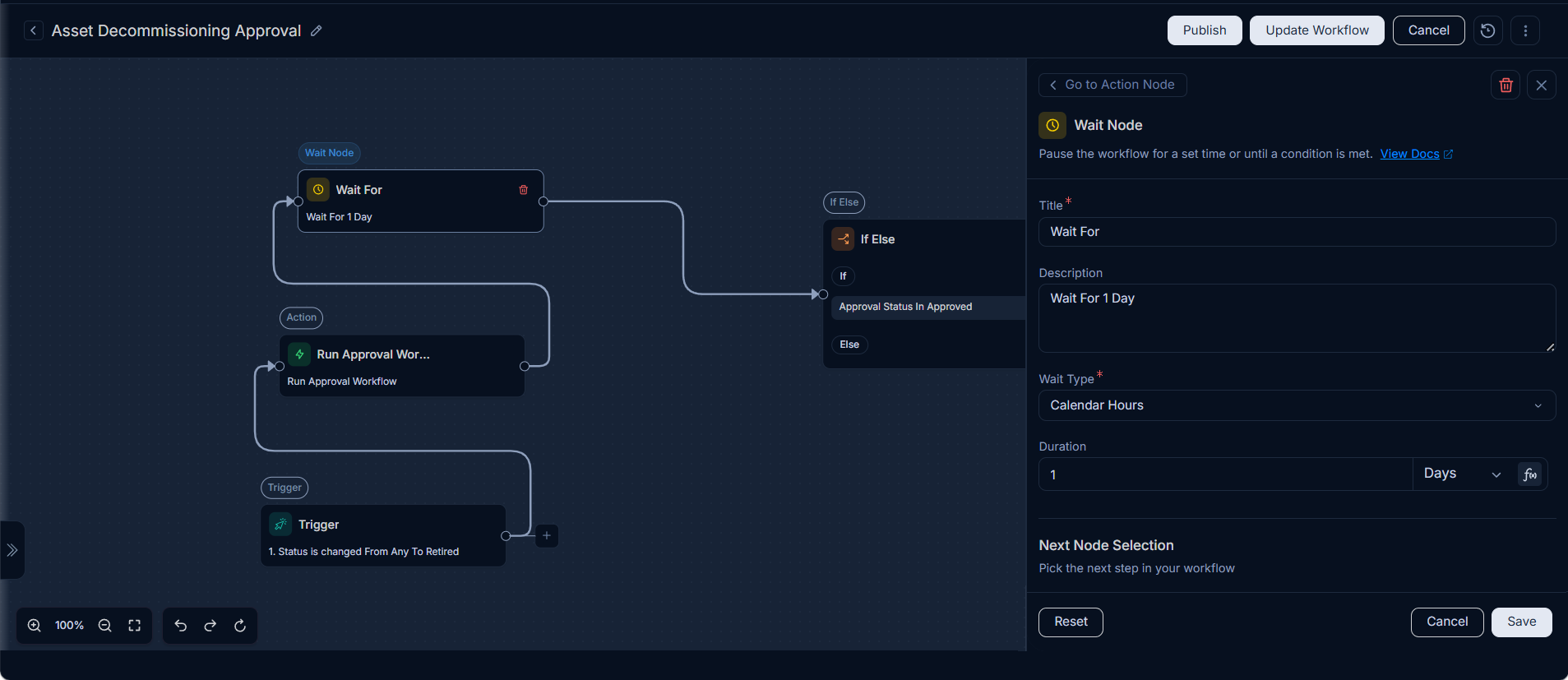
Flow Node (If/Else): Add an "If/Else" node with the condition:
Approval Status is Approved.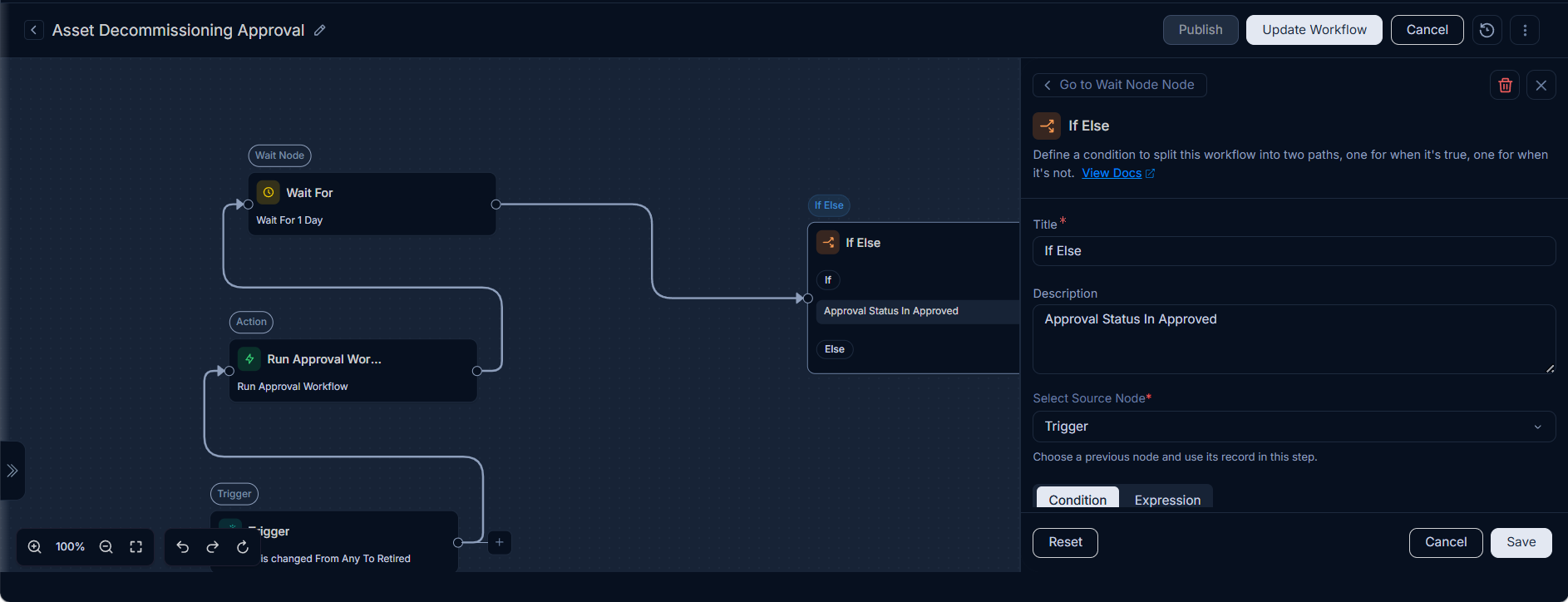
- True Path (Approved):
- Add an "Update Hardware Asset" action. Set the
Statusto "Decommission". - Add a "Send Notification" action. Configure it to send an email to the Asset Department Head.
- Add an "Update Hardware Asset" action. Set the
- True Path (Approved):
List of Triggering Events
Workflows can be configured to listen for various events across different modules. Each module provides a unique set of triggers that you can leverage for automation. The following sections detail these event types, their descriptions, and typical use cases:
Request Triggers
| Trigger Name | Description | Use Case/Relevance |
|---|---|---|
| Category is changed | Triggered when the category of a request is changed. | Automate re-routing or notification based on new category. |
| Subject is changed | Triggered when the subject of a request is changed. | Update related records or notify technicians of intent change. |
| Description is changed | Triggered when the description of a request is changed. | Review changes for compliance or initiate further analysis. |
| Impact is changed | Triggered when the impact level of a request is changed. | Escalate or de-escalate tickets based on impact severity. |
| Priority is changed | Triggered when the priority of a request is changed. | Trigger emergency procedures for high-priority items. |
| Urgency is changed | Triggered when the urgency level of a request is changed. | Adjust resource allocation or response times. |
| Assignee is changed | Triggered when the assignee of a request is changed. | Notify the new assignee or log assignment history. |
| Technician Group is changed | Triggered when the technician group of a request is changed. | Update group-specific dashboards or reassign tasks. |
| Tags updated | Triggered when tags associated with a request are updated. | Classify requests for reporting or trigger specific tag-based actions. |
| Approval Status is changed | Triggered when the approval status of a request is changed. | Proceed with next steps (e.g., implement change) or send rejections. |
| Status is changed | Triggered when the status of a request is changed. | Update stakeholders on progress or close related tasks. |
| Marked as Secondary Merged Request | Triggered when a request is marked as a secondary merged request. | Update primary request or archive secondary. |
| Spam is changed | Triggered when a request is marked/unmarked as spam. | Filter out unwanted requests or review false positives. |
| Solution is added | Triggered when a solution is added to a request. | Close the request, notify requester, or update knowledge base. |
| Location is changed | Triggered when the location associated with a request is changed. | Update asset location or assign location-specific technicians. |
| Vendor is changed | Triggered when the vendor associated with a request is changed. | Notify new vendor or update procurement records. |
| Company is changed | Triggered when the company associated with the request is changed. | Update company-specific request routing or notification policies. |
| Department is changed | Triggered when the department associated with a request is changed. | Reroute requests to correct departmental queues. |
| Source is changed | Triggered when the source (e.g., Email, Portal) of a request is changed. | Analyze input channels or apply source-specific routing. |
| Support Level is changed | Triggered when the support level of a request is changed. | Adjust SLA, reassign, or escalate to higher support tiers. |
| Response Escalation Level is changed | Triggered when the response escalation level changes. | Prioritize technician response or notify management. |
| Resolution Escalation Level is changed | Triggered when the resolution escalation level changes. | Expedite resolution efforts or involve higher-tier support. |
| When reply is sent by Technician | Triggered when a technician sends a reply to a request. | Update status, notify requester, or log communication. |
| When reply is sent by Requester | Triggered when the requester sends a reply to a request. | Reopen ticket, update status, or assign to technician. |
| Diagnosis is added | Triggered when a diagnosis is added to a request. | Initiate problem resolution, search for known errors. |
| When Reply is sent by CC User | Triggered when a CC user sends a reply to a request. | Log communication or notify relevant parties. |
| Marked as Primary Merged Request | Triggered when a request is marked as a primary merged request. | Consolidate information from secondary requests. |
| Request is created | Triggered when a new request is created. Note: Requests created via Import from Technician or Support Portal will not trigger any workflow. | Initiate standard onboarding, initial assignment, or welcome email. |
| Request is archived | Triggered when a request is archived. | Update related records or trigger data retention policies. |
| Collaboration is added | Triggered when a new collaboration is added to a request. | Notify collaborators or relevant teams. |
| Note is added | Triggered when a note is added to a request. | Log internal communication or trigger updates. |
| Incident is created | Triggered when a new incident record is created. | Initial assignment, send acknowledgment, or create problem. |
| Incident is archived | Triggered when an incident record is archived. | Data retention, reporting. |
| Converted To Incident | Triggered when a request is converted to an incident. | Apply incident-specific workflows, update status. |
| Service Request is created | Triggered when a new service request is created. | Initiate service fulfillment, approvals, or task creation. |
| Service Request is archived | Triggered when a service request is archived. | Data retention, reporting. |
| Converted To Service Request | Triggered when a request is converted to a service request. | Apply service-specific workflows, update status. |
Problem Triggers
| Trigger Name | Description | Use Case/Relevance |
|---|---|---|
| Category is changed | Triggered when the category of a problem is changed. | Automate re-routing or notification based on new category. |
| Subject is changed | Triggered when the subject of a problem is changed. | Update related records or notify technicians of intent change. |
| Description is changed | Triggered when the description of a problem is changed. | Review changes for compliance or initiate further analysis. |
| Impact is changed | Triggered when the impact level of a problem is changed. | Escalate or de-escalate problems based on impact severity. |
| Priority is changed | Triggered when the priority of a problem is changed. | Trigger emergency procedures for high-priority problems. |
| Urgency is changed | Triggered when the urgency level of a problem is changed. | Adjust resource allocation or response times for problems. |
| Assignee is changed | Triggered when the assignee of a problem is changed. | Notify the new assignee or log assignment history for problems. |
| Technician Group is changed | Triggered when the technician group of a problem is changed. | Update group-specific dashboards or reassign tasks for problems. |
| Tags updated | Triggered when tags associated with a problem are updated. | Classify problems for reporting or trigger specific tag-based actions. |
| Approval Status is changed | Triggered when the approval status of a problem is changed. | Proceed with next steps (e.g., implement workaround) or send rejections. |
| Status is changed | Triggered when the status of a problem is changed. | Update stakeholders on progress or close related tasks. |
| Investigation-Impact is updated | Triggered when the investigation impact of a problem is updated. | Re-evaluate problem severity or notify relevant teams. |
| Symptoms is updated | Triggered when the symptoms of a problem are updated. | Refine problem diagnosis or search for similar issues. |
| Workaround is updated | Triggered when the workaround for a problem is updated. | Communicate new workarounds to affected users. |
| Solution is added | Triggered when a solution is added to a problem. | Close the problem, notify affected users, or update knowledge base. |
| Root Cause is updated | Triggered when the root cause of a problem is updated. | Verify problem resolution or trigger preventive actions. |
| Location is changed | Triggered when the location associated with a problem is changed. | Update asset location or assign location-specific technicians for problems. |
| Vendor is changed | Triggered when the vendor associated with a problem is changed. | Notify new vendor or update procurement records for problems. |
| Business Service is changed | Triggered when the business service affected by a problem is changed. | Update service impact analysis or notify service owners. |
| Company is changed | Triggered when the company associated with a problem is changed. | Update company-specific problem routing or notification policies. |
| Department is changed | Triggered when the department associated with a problem is changed. | Reroute problems to correct departmental queues. |
| Nature Of Problem is changed | Triggered when the nature of a problem is changed. | Reclassify problem or trigger specialized problem management. |
| Known Error is changed | Triggered when a known error is associated/disassociated with a problem. | Update known error database or link to existing solutions. |
| Resolution Escalation Level is changed | Triggered when the resolution escalation level changes. | Expedite resolution efforts or involve higher-tier support. |
| Problem is created | Triggered when a new problem record is created. | Initiate problem investigation, assign problem manager. |
| Problem is archived | Triggered when a problem record is archived. | Data retention, reporting. |
| Collaboration is added | Triggered when a new collaboration is added to a problem. | Notify collaborators or relevant teams. |
| Note is added | Triggered when a note is added to a problem. | Log internal communication or trigger updates. |
Change Triggers
| Trigger Name | Description | Use Case/Relevance |
|---|---|---|
| Category is changed | Triggered when the category of a change is changed. | Automate re-routing or notification based on new category. |
| Subject is changed | Triggered when the subject of a change is changed. | Update related records or notify technicians of intent change. |
| Description is changed | Triggered when the description of a change is changed. | Review changes for compliance or initiate further analysis. |
| Impact is changed | Triggered when the impact level of a change is changed. | Escalate or de-escalate changes based on impact severity. |
| Priority is changed | Triggered when the priority of a change is changed. | Trigger emergency procedures for high-priority changes. |
| Urgency is changed | Triggered when the urgency level of a change is changed. | Adjust resource allocation or response times for changes. |
| Assignee is changed | Triggered when the assignee of a change is changed. | Notify the new assignee or log assignment history for changes. |
| Technician Group is changed | Triggered when the technician group of a change is changed. | Update group-specific dashboards or reassign tasks for changes. |
| Tags updated | Triggered when tags associated with a change are updated. | Classify changes for reporting or trigger specific tag-based actions. |
| Approval Status is changed | Triggered when the approval status of a change is changed. | Proceed with next steps (e.g., implement change) or send rejections. |
| Status is changed | Triggered when the status of a change is changed. | Update stakeholders on progress or close related tasks. |
| Change Risk is changed | Triggered when the risk level of a change is changed. | Re-evaluate change impact or trigger additional approvals. |
| Change Type is changed | Triggered when the type of change (e.g., Standard, Normal, Emergency) is changed. | Apply type-specific workflows or update related documentation. |
| Rollout Plan is updated | Triggered when the rollout plan for a change is updated. | Notify implementation teams or adjust schedule. |
| Backout Plan is updated | Triggered when the backout plan for a change is updated. | Notify teams of contingency plans or update documentation. |
| Planning-Impact is updated | Triggered when the planning impact of a change is updated. | Re-evaluate resource allocation or notify affected parties. |
| Target Environment is changed | Triggered when the target environment for a change is changed. | Update deployment procedures or notify environment owners. |
| Schedule Start Date is changed | Triggered when the schedule start date of a change is changed. | Adjust project timelines or notify affected users. |
| Schedule End Date is changed | Triggered when the schedule end date of a change is changed. | Adjust project timelines or notify affected users. |
| Location is changed | Triggered when the location associated with a change is changed. | Update asset location or assign location-specific technicians for changes. |
| Vendor is changed | Triggered when the vendor associated with a change is changed. | Notify new vendor or update procurement records for changes. |
| Department is changed | Triggered when the department associated with a change is changed. | Reroute changes to correct departmental queues. |
| Company is changed | Triggered when the company associated with a change is changed. | Update company-specific change routing or notification policies. |
| Change Reason is changed | Triggered when the reason for a change is changed. | Reclassify change or trigger specialized change management. |
| Change Implementor is changed | Triggered when the change implementor is changed. | Notify the new implementor or update task assignments. |
| Change Manager is changed | Triggered when the change manager is changed. | Notify the new change manager or update oversight. |
| Change Reviewer is changed | Triggered when the change reviewer is changed. | Notify the new reviewer or re-initiate review process. |
| Rollout Start Date is changed | Triggered when the rollout start date of a change is changed. | Adjust deployment schedules or notify affected users. |
| Rollout End Date is changed | Triggered when the rollout end date of a change is changed. | Adjust deployment schedules or notify affected users. |
| Resolution Escalation Level is changed | Triggered when the resolution escalation level changes. | Expedite resolution efforts or involve higher-tier support. |
| Change is created | Triggered when a new change record is created. | Initiate change approval workflow, assign change manager. |
| Change is archived | Triggered when a change record is archived. | Data retention, reporting. |
| Collaboration is added | Triggered when a new collaboration is added to a change. | Notify collaborators or relevant teams. |
| Note is added | Triggered when a note is added to a change. | Log internal communication or trigger updates. |
Release Triggers
| Trigger Name | Description | Use Case/Relevance |
|---|---|---|
| Category is changed | Triggered when the category of a release is changed. | Automate re-routing of tasks/approvals, update related documentation, or notify specific teams based on the new release category (e.g., 'Major Update', 'Security Patch'). |
| Subject is changed | Triggered when the subject of a release is changed. | Update linked project tasks, synchronize with external project management tools, or alert stakeholders about a significant change in the release's core objective. |
| Description is changed | Triggered when the description of a release is changed. | Trigger an automated review process for compliance with release policies, initiate documentation updates, or notify QA for re-evaluation of testing scope if the release description changes significantly. |
| Impact is changed | Triggered when the impact level of a release is changed. | Automatically trigger emergency change procedures, adjust communication plans to stakeholders, or re-prioritize resource allocation based on the updated release impact. |
| Priority is changed | Triggered when the priority of a release is changed. | Trigger emergency procedures for high-priority changes. |
| Urgency is changed | Triggered when the urgency level of a release is changed. | Adjust resource allocation or response times for changes. |
| Assignee is changed | Triggered when the assignee of a release is changed. | Notify the new assignee or log assignment history for changes. |
| Technician Group is changed | Triggered when the technician group of a release is changed. | Update group-specific dashboards or reassign tasks for changes. |
| Tags updated | Triggered when tags associated with a release are updated. | Classify changes for reporting or trigger specific tag-based actions. |
| Approval Status is changed | Triggered when the approval status of a release is changed. | Automate progression to the next release phase (e.g., 'Approved for Build' to 'Approved for Deployment'), trigger notifications to development/operations teams, or initiate rollback procedures upon rejection. |
| Status is changed | Triggered when the status of a release is changed. | Update release dashboards, automatically close associated tasks/stories in project management systems, or send broad communications to affected end-users upon release completion. |
| Release Risk is changed | Triggered when the risk level of a release is changed. | Re-evaluate release impact or trigger additional approvals. |
| Location is changed | Triggered when the location associated with a release is changed. | Update asset location or assign location-specific technicians for releases. |
| Vendor is changed | Triggered when the vendor associated with a release is changed. | Notify new vendor or update procurement records for releases. |
| Release Type is changed | Triggered when the type of release (e.g., Major, Minor, Emergency) is changed. | Apply type-specific workflows or update related documentation. |
| Business Services updated | Triggered when the associated business services for a release are updated. | Notify service owners or update impact analysis. |
| Department is changed | Triggered when the department associated with a release is changed. | Reroute releases to correct departmental queues. |
| Company is changed | Triggered when the company associated with a release is changed. | Update related records or notify relevant stakeholders. |
| Schedule Start Date is changed | Triggered when the schedule start date of a release is changed. | Adjust project timelines or notify affected users. |
| Schedule End Date is changed | Triggered when the schedule end date of a release is changed. | Adjust project timelines or notify affected users. |
| Rollout Plan is updated | Triggered when the rollout plan for a release is updated. | Notify implementation teams or adjust schedule. |
| Backout Plan is updated | Triggered when the backout plan for a release is updated. | Notify teams of contingency plans or update documentation. |
| Test Plan is updated | Triggered when the test plan for a release is updated. | Initiate re-testing or notify QA teams. |
| Build Plan is updated | Triggered when the build plan for a release is updated. | Trigger new builds or update development teams. |
| Planning-Impact is updated | Triggered when the planning impact of a release is updated. | Re-evaluate resource allocation or notify affected parties. |
| Release Engineer is changed | Triggered when the release engineer is changed. | Notify the new engineer or update task assignments. |
| Release Manager is changed | Triggered when the release manager is changed. | Notify the new release manager or update oversight. |
| QA Manager is changed | Triggered when the QA manager for a release is changed. | Notify the new QA manager or re-initiate review process. |
| Release Reviewer is changed | Triggered when the release reviewer is changed. | Notify the new reviewer or re-initiate review process. |
| Release Reason is changed | Triggered when the reason for a release is changed. | Reclassify release or trigger specialized release management. |
| Rollout Start Date is changed | Triggered when the rollout start date of a release is changed. | Adjust deployment schedules or notify affected users. |
| Rollout End Date is changed | Triggered when the rollout end date of a release is changed. | Adjust deployment schedules or notify affected users. |
| Resolution Escalation Level is changed | Triggered when the resolution escalation level changes. | Expedite resolution efforts or involve higher-tier support. |
| Release is created | Triggered when a new release record is created. | Automatically initiate the release approval workflow, assign a default release manager, create initial planning tasks, and generate a baseline communication plan. |
| Release is archived | Triggered when a release record is archived. | Data retention, reporting. |
| Collaboration is added | Triggered when a new collaboration is added to a release. | Notify collaborators or relevant teams. |
| Note is added | Triggered when a note is added to a release. | Log internal communication or trigger updates. |
Hardware Asset Triggers
| Trigger Name | Description | Use Case/Relevance |
|---|---|---|
| Category is changed | Triggered when the category of a hardware asset is changed. | Automate re-categorization or re-assignment for hardware assets. |
| Impact is changed | Triggered when the impact level of a hardware asset is changed. | Update related CIs or re-evaluate service impact for hardware assets. |
| Approval Status is changed | Triggered when the approval status of a hardware asset is changed. | Proceed with asset provisioning or procurement for hardware assets. |
| Checker Approval Status is changed | Triggered when the checker approval status of a hardware asset is changed. | Expedite or halt asset verification processes for hardware assets. |
| Status is changed | Triggered when the status of a hardware asset is changed. | Update hardware inventory, trigger deployment, or initiate decommissioning. |
| Asset Type is changed | Triggered when the type of a hardware asset is changed. | Reclassify hardware asset or update hardware asset-specific workflows. |
| Used By updated | Triggered when the user associated with a hardware asset is updated. | Update user-asset assignments or notify new user for hardware assets. |
| Managed By is changed | Triggered when the individual managing the hardware asset is changed. | Update responsibility or notify new manager for hardware assets. |
| Managed By Group is changed | Triggered when the group managing the hardware asset is changed. | Update group responsibility or re-assign tasks for hardware assets. |
| Location is changed | Triggered when the location of a hardware asset is changed. | Update physical inventory and location-based assignments for hardware assets. |
| Asset Condition is changed | Triggered when the condition of a hardware asset is changed. | Trigger maintenance, repair, or replacement workflows for hardware assets. |
| Movement Status is changed | Triggered when the movement status of a hardware asset changes. | Track hardware asset transfers or update logistical records. |
| Department is changed | Triggered when the department associated with a hardware asset is changed. | Update departmental cost centers or re-assign for hardware assets. |
| Product is changed | Triggered when the product associated with a hardware asset is changed. | Update product-specific configurations or support for hardware assets. |
| Asset Group is changed | Triggered when the asset group of a hardware asset is changed. | Reorganize hardware assets for reporting or group-specific actions. |
| Vendor is changed | Triggered when the vendor of a hardware asset is changed. | Update vendor contracts or initiate support requests for hardware assets. |
| Business Service is changed | Triggered when the business service linked to a hardware asset is changed. | Update service impact analysis or notify service owners for hardware assets. |
| IP Address is changed | Triggered when the IP address of a hardware asset is changed. | Update network configurations or security policies for hardware assets. |
| MAC Address is changed | Triggered when the MAC address of a hardware asset is changed. | Update network configurations or security policies for hardware assets. |
| Host Name is changed | Triggered when the host name of a hardware asset is changed. | Update DNS records or system configurations for hardware assets. |
| Last Barcode / QR Code Scan By is changed | Triggered when the last scan user for a hardware asset changes. | Track audit trails or physical inventory for hardware assets. |
| Last Barcode / QR Code Scan Date is changed | Triggered when the last scan date for a hardware asset changes. | Monitor physical inventory or compliance for hardware assets. |
| Company is changed | Triggered when the company associated with a hardware asset is changed. | Update company-specific hardware asset policies. |
| Enable Geolocation is changed | Triggered when geolocation is enabled/disabled for a hardware asset. | Activate/deactivate location tracking or geofencing for hardware assets. |
| Geo Location Preference Type is changed | Triggered when the geolocation preference type of a hardware asset is changed. | Adjust precision or method of location tracking for hardware assets. |
| Serial Number is changed | Triggered when the serial number of a hardware asset is changed. | Update hardware asset identification or warranty information. |
| Manufacturer is changed | Triggered when the manufacturer of a hardware asset is changed. | Update vendor information or support contacts for hardware assets. |
| Warranty Expiration Date is changed | Triggered when the warranty expiration date of a hardware asset is changed. | Trigger warranty renewal or replacement planning for hardware assets. |
| Warranty Sync Last Date is changed | Triggered when the last warranty sync date changes for a hardware asset. | Monitor integration health or data freshness for hardware assets. |
| Asset is created | Triggered when a new hardware asset is created. | Initiate onboarding, assign to user/location, or set up monitoring for hardware assets. |
| Asset is archived | Triggered when a hardware asset is archived. | Update inventory, trigger decommissioning process for hardware assets. |
| New Serial Number is changed | Triggered when a new serial number is assigned to a hardware asset. | Update asset identification or re-verify warranty. |
Software Asset Triggers
| Trigger Name | Description | Use Case/Relevance |
|---|---|---|
| Category is changed | Triggered when the category of a software asset is changed. | Automate re-categorization or re-assignment for software. |
| Impact is changed | Triggered when the impact level of a software asset is changed. | Update related CIs or re-evaluate service impact for software. |
| Status is changed | Triggered when the status of a software asset is changed. | Update software inventory, trigger deployment, or initiate decommissioning. |
| Asset Type is changed | Triggered when the type of a software asset is changed. | Reclassify software asset or update software-specific workflows. |
| Managed By is changed | Triggered when the individual managing the software asset is changed. | Update responsibility or notify new manager for software. |
| Managed By Group is changed | Triggered when the group managing the software asset is changed. | Update group responsibility or re-assign tasks for software. |
| Department is changed | Triggered when the department associated with a software asset is changed. | Update departmental cost centers or re-assign for software. |
| Product is changed | Triggered when the product associated with a software asset is changed. | Update product-specific configurations or support for software. |
| Asset Group is changed | Triggered when the asset group of a software asset is changed. | Reorganize software assets for reporting or group-specific actions. |
| Vendor is changed | Triggered when the vendor of a software asset is changed. | Update vendor contracts or initiate support requests for software. |
| Business Service is changed | Triggered when the business service linked to a software asset is changed. | Update service impact analysis or notify service owners for software. |
| Software Type is changed | Triggered when the software type is changed. | Reclassify software or update software-specific workflows. |
| Software Category is changed | Triggered when the software category is changed. | Reclassify software category or update related processes. |
| Last Barcode / QR Code Scan By is changed | Triggered when the last scan user for a software asset changes. | Track audit trails or physical inventory for software. |
| Last Barcode / QR Code Scan Date is changed | Triggered when the last scan date for a software asset changes. | Monitor physical inventory or compliance for software. |
| Company is changed | Triggered when the company associated with a software asset is changed. | Update company-specific software policies. |
| Asset is created | Triggered when a new software asset is created. | Initiate onboarding, assign to user/location, or set up monitoring. |
| Asset is archived | Triggered when a software asset is archived. | Update inventory, trigger decommissioning process for software. |
| Support Status is changed | Triggered when the support status of a software asset is changed. | Update software asset support status or trigger support related workflows. |
| End of Active Support Date is changed | Triggered when the end of active support date of a software asset is changed. | Update software asset end of active support status or trigger end of active support related workflows. |
| End of Extended Support Date is changed | Triggered when the end of extended support date of a software asset is changed. | Update software asset end of extended support status or trigger end of extended support related workflows. |
| Long Term Support Date is changed | Triggered when the long term support date of a software asset is changed. | Update software asset long term support status or trigger long term support related workflows. |
| Note is Added | Triggered when a note is added to a software asset. | Log communication or trigger updates related to the software asset. |
Non-IT Asset Triggers
| Trigger Name | Description | Use Case/Relevance |
|---|---|---|
| Category is changed | Triggered when the category of a non-IT asset is changed. | Automate re-categorization or re-assignment for non-IT assets. |
| Impact is changed | Triggered when the impact level of a non-IT asset is changed. | Update related CIs or re-evaluate service impact for non-IT assets. |
| Approval Status is changed | Triggered when the approval status of a non-IT asset is changed. | Proceed with asset provisioning or procurement for non-IT assets. |
| Checker Approval Status is changed | Triggered when the checker approval status of a non-IT asset is changed. | Expedite or halt asset verification processes for non-IT assets. |
| Status is changed | Triggered when the status of a non-IT asset is changed. | Update non-IT asset inventory, trigger deployment, or initiate decommissioning. |
| Asset Type is changed | Triggered when the type of a non-IT asset is changed. | Reclassify non-IT asset or update non-IT asset-specific workflows. |
| Used By updated | Triggered when the user associated with a non-IT asset is updated. | Update user-asset assignments or notify new user for non-IT assets. |
| Managed By is changed | Triggered when the individual managing the non-IT asset is changed. | Update responsibility or notify new manager for non-IT assets. |
| Managed By Group is changed | Triggered when the group managing the non-IT asset is changed. | Update group responsibility or re-assign tasks for non-IT assets. |
| Location is changed | Triggered when the location of a non-IT asset is changed. | Update physical inventory and location-based assignments for non-IT assets. |
| Asset Condition is changed | Triggered when the condition of a non-IT asset is changed. | Trigger maintenance, repair, or replacement workflows for non-IT assets. |
| Movement Status is changed | Triggered when the movement status of a non-IT asset changes. | Track non-IT asset transfers or update logistical records. |
| Department is changed | Triggered when the department associated with a non-IT asset is changed. | Update departmental cost centers or re-assign for non-IT assets. |
| Product is changed | Triggered when the product associated with a non-IT asset is changed. | Update product-specific configurations or support for non-IT assets. |
| Asset Group is changed | Triggered when the asset group of a non-IT asset is changed. | Reorganize non-IT assets for reporting or group-specific actions. |
| Vendor is changed | Triggered when the vendor of a non-IT asset is changed. | Update vendor contracts or initiate support requests for non-IT assets. |
| Business Service is changed | Triggered when the business service linked to a non-IT asset is changed. | Update service impact analysis or notify service owners for non-IT assets. |
| Last Barcode / QR Code Scan By is changed | Triggered when the last scan user for a non-IT asset changes. | Track audit trails or physical inventory for non-IT assets. |
| Last Barcode / QR Code Scan Date is changed | Triggered when the last scan date for a non-IT asset changes. | Monitor physical inventory or compliance for non-IT assets. |
| Company is changed | Triggered when the company associated with a non-IT asset is changed. | Update company-specific non-IT asset policies. |
| Asset is created | Triggered when a new non-IT asset is created. | Initiate onboarding, assign to user/location, or set up monitoring. |
| Asset is archived | Triggered when a non-IT asset is archived. | Update inventory, trigger decommissioning process for non-IT assets. |
CMDB Triggers
| Trigger Name | Description | Use Case/Relevance |
|---|---|---|
| Impact is changed | Triggered when the impact level of a CI is changed. | Re-evaluate service impact or notify affected parties. |
| Used By updated | Triggered when the user associated with a CI is updated. | Update user-CI assignments or notify new user. |
| Managed By is changed | Triggered when the individual managing the CI is changed. | Update responsibility or notify new manager. |
| Managed By Group is changed | Triggered when the group managing the CI is changed. | Update group responsibility or re-assign tasks. |
| Location is changed | Triggered when the location of a CI is changed. | Update physical inventory and location-based assignments. |
| Department is changed | Triggered when the department associated with a CI is changed. | Update departmental cost centers or re-assign. |
| Product is changed | Triggered when the product associated with a CI is changed. | Update product-specific configurations or support. |
| Vendor is changed | Triggered when the vendor of a CI is changed. | Update vendor contracts or initiate support requests. |
| Business Service is changed | Triggered when the business service linked to a CI is changed. | Update service impact analysis or notify service owners. |
| IP Address is changed | Triggered when the IP address of a CI is changed. | Update network configurations or security policies. |
| MAC Address is changed | Triggered when the MAC address of a CI is changed. | Update network configurations or security policies. |
| Host Name is changed | Triggered when the host name of a CI is changed. | Update DNS records or system configurations. |
| Company is changed | Triggered when the company associated with a CI is changed. | Update company-specific CI policies. |
| Status is changed | Triggered when the status of a CI is changed. | Update CMDB, trigger deployment, or initiate decommissioning. |
| Approval Status is changed | Triggered when the approval status of a CI is changed. | Proceed with CI provisioning or procurement. |
| CI Type is changed | Triggered when the type of a CI is changed. | Reclassify CI or update CI-specific workflows. |
| CI Group is changed | Triggered when the CI group of a CI is changed. | Reorganize CIs for reporting or group-specific actions. |
| Name is changed | Triggered when the name of a CI is changed. | Update CI identification or related documentation. |
| Serial Number is changed | Triggered when the serial number of a CI is changed. | Update CI identification or warranty information. |
| Manufacturer is changed | Triggered when the manufacturer of a CI is changed. | Update vendor information or support contacts. |
| Warranty Expiration Date is changed | Triggered when the warranty expiration date of a CI is changed. | Trigger warranty renewal or replacement planning. |
| Warranty Sync Last Date is changed | Triggered when the last warranty sync date changes. | Monitor integration health or data freshness. |
| CI is created | Triggered when a new CI is created. | Initiate onboarding, assign to user/location, or set up monitoring. |
| CI is archived | Triggered when a Configuration Item (CI) record is archived. | Update CMDB, trigger related asset actions. |
Asset Movement Triggers
| Trigger Name | Description | Use Case/Relevance |
|---|---|---|
| Approval Status is changed | Triggered when the approval status of an asset movement changes. | Proceed with or halt asset transfer. |
| Status is changed | Triggered when the status of an asset movement changes. | Update asset location records or notify stakeholders. |
| To Location is changed | Triggered when the destination location for an asset movement is changed. | Update logistical plans or notify new location custodians. |
| From Location is changed | Triggered when the origin location for an asset movement is changed. | Update source inventory or historical movement data. |
| To Department is changed | Triggered when the destination department for an asset movement is changed. | Update departmental ownership or budgeting. |
| From Department is changed | Triggered when the origin department for an asset movement is changed. | Update source departmental records. |
| Asset Movement is created | Triggered when a new asset movement record is created. | Initiate asset transfer process, approvals, or notifications. |
| Note is added | Triggered when a note is added to an asset movement. | Log communication or trigger updates related to the movement. |
Task Triggers
| Trigger Name | Description | Use Case/Relevance |
|---|---|---|
| Subject is changed | Triggered when the subject of a task is changed. | Update related records or notify assignee of intent change. |
| Description is changed | Triggered when the description of a task is changed. | Review changes for compliance or initiate further analysis. |
| Task Priority is changed | Triggered when the priority of a task is changed. | Escalate or de-escalate tasks based on priority. |
| User Group is changed | Triggered when the user group associated with a task is changed. | Re-assign task to a different group or update group-specific dashboards. |
| Assignee is changed | Triggered when the assignee of a task is changed. | Notify the new assignee or log assignment history. |
| Task Status is changed | Triggered when the status of a task is changed. | Update stakeholders on progress or close related items. |
| Task Type is changed | Triggered when the type of task is changed. | Apply type-specific workflows or update related documentation. |
| Task Start Date is changed | Triggered when the start date of a task is changed. | Adjust project timelines or notify affected users. |
| Task End Date is changed | Triggered when the end date of a task is changed. | Adjust project timelines or notify affected users. |
| Task is created | Triggered when a new task is created. | Initiate task assignment, set due date, or send notifications. |
| Task is archived | Triggered when a task record is archived. | Data retention, reporting for tasks. |
User Triggers
| Trigger Name | Description | Use Case/Relevance |
|---|---|---|
| Marked as Verified User | Triggered when a user is marked as verified. | Grant access to specific resources or initiate verification workflows. |
| Name is changed | Triggered when a user's name is changed. | Update user directories or integrated systems. |
| Availability Status is changed | Triggered when a user's availability status changes (e.g., Available, Away). | Update presence in communication tools or re-route tasks. |
| Blocked Reason is changed | Triggered when the reason for a user being blocked is changed. | Update audit logs or compliance records. |
| Logon Name is changed | Triggered when a user's logon name is changed. | Update authentication systems or notify the user. |
| Contact No. is changed | Triggered when a user's contact number is changed. | Update contact directories or emergency contact lists. |
| Location is changed | Triggered when a user's location is changed. | Update physical location records or assign location-specific resources. |
| Department is changed | Triggered when a user's department is changed. | Update departmental reporting or access permissions. |
| Do Not Disturb is changed | Triggered when a user's 'Do Not Disturb' status changes. | Adjust notification preferences or communication routing. |
| Converted to Technician | Triggered when a user's role is converted to a technician. | Initiate technician onboarding, grant tools access. |
| Converted to Requester | Triggered when a user's role is converted to a requester. | Adjust access rights or service catalog views. |
| User Login | Triggered when a user successfully logs into the system. | Log access, initiate session-based workflows, or security monitoring. |
| User Logout | Triggered when a user logs out of the system. | Log session end, trigger data cleanup, or security monitoring. |
| User is Blocked | Triggered when a user account is blocked. | Revoke access, trigger security alerts, or compliance actions. |
| User is Unblocked | Triggered when a user account is unblocked. | Restore access, notify user, or remove security alerts. |
| User is Restored | Triggered when a user account is restored. | Re-enable access, re-assign resources, or update directories. |
| User is created | Triggered when a new user is created. | Initiate user onboarding, send welcome emails, or provision access. |
| User is archived | Triggered when a user record is archived. | Initiate offboarding, revoke access, or archive related data. |
User Leave Triggers
| Trigger Name | Description | Use Case/Relevance |
|---|---|---|
| Leave is Edited | Triggered when a user's leave request is edited. | Re-evaluate leave details, trigger re-approval. |
| Leave is Applied | Triggered when a user's leave is applied (approved and active). | Update calendars, notify teams of absence. |
| Leave is Cancelled | Triggered when a user's leave request is cancelled. | Update calendars, stop any related automated tasks. |