SSH Security Settings
Overview
The SSH Security Settings in Motadata ObserveOps (formerly known as AIOps) allow administrators to explicitly control the cryptographic algorithms used by the system for SSH communication. This feature provides visibility and configuration control over SSH Ciphers, Key Exchange (KEX) algorithms, Host Keys, and HMACs used during SSH negotiation.
With SSH Security Settings, administrators can enable or disable supported algorithms individually to align with security hardening standards and compliance requirements.
These settings apply to SSH access and SCP/SFTP services (where applicable). A server restart is required for changes to take effect.
Navigation
Go to Menu, select Settings  . Then, under System Settings, select SSH Security Settings.
The SSH Security Settings screen is displayed.
SSH Security Settings Screen
The SSH Security Settings screen allows you to manage supported cryptographic algorithms under four categories:
- Allowed Key Exchanges
- Allowed Host Keys
- Allowed Ciphers
- Allowed HMACs
Each category provides a selectable list with:
- Multi-select checkboxes
- Security classification labels: Secure, Legacy, and Weak
- Search support
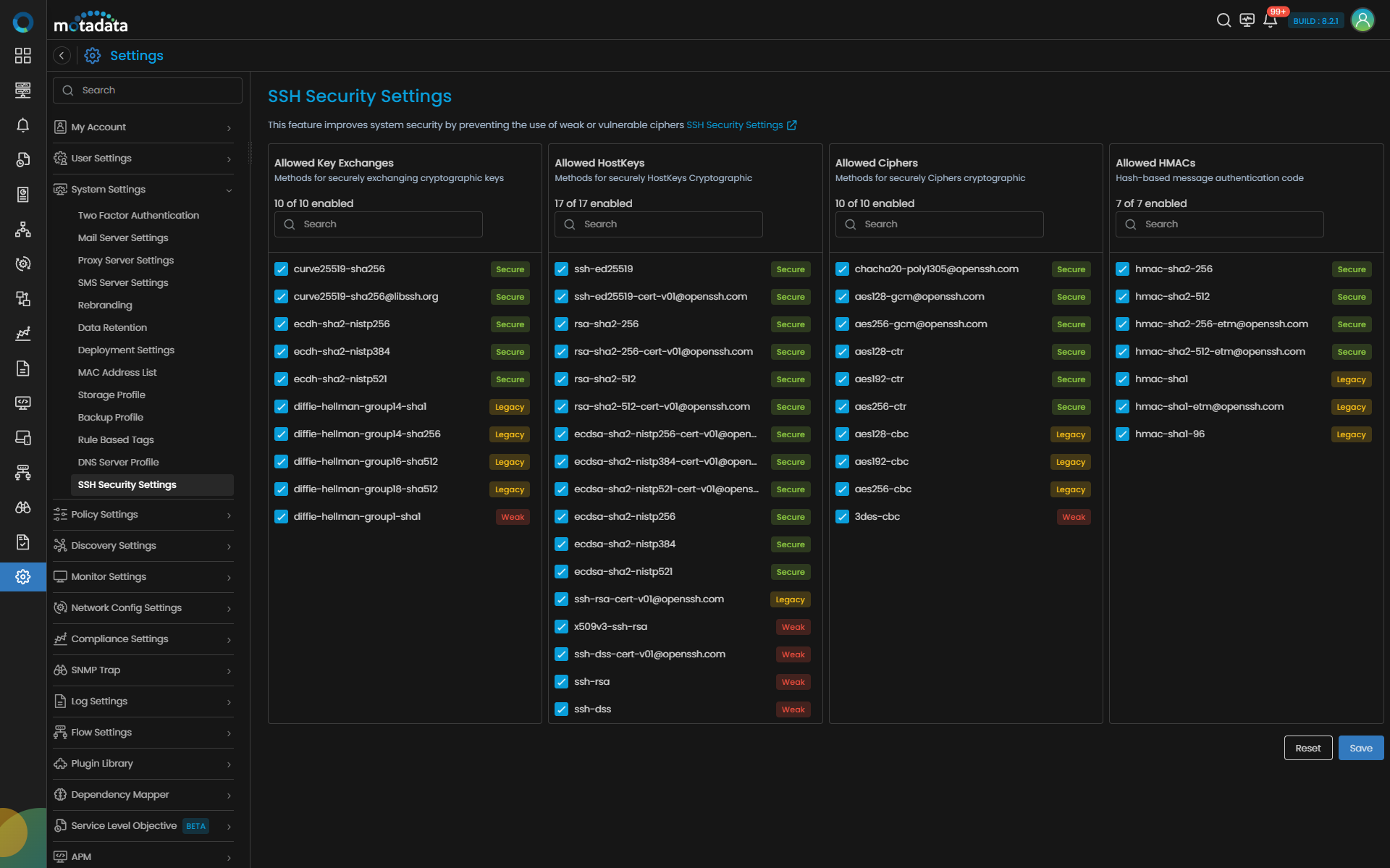
The screen includes the following sections:
| Section | Description |
|---|---|
| Allowed Key Exchanges | Choose how NCCM and devices securely agree on encryption keys. If a key exchange method is not selected, communication with devices using that method may fail. |
| Allowed Host Keys | Choose how NCCM and devices securely verify the SSH server identity. If a host key algorithm is not selected, connections to devices using that algorithm may fail. |
| Allowed Ciphers | Choose which encryption methods NCCM can use to talk to your devices. If a cipher is not selected, NCCM won't be able to communicate with devices that rely on it.bg-neutral-darkest rounded. |
| Allowed HMACs | Choose how message integrity is verified between NCCM and devices. If an HMAC is not selected, NCCM may not be able to securely communicate with those devices. |
| Reset | Reverts changes made on the screen before saving. |
| Save | Saves the selected configuration. A restart warning is displayed before applying changes. |
Algorithm Classification
Each algorithm is categorized based on security strength:
- Secure – Recommended modern cryptographic algorithms.
- Legacy – Older algorithms that may be supported for backward compatibility.
- Weak – Algorithms considered insecure and not recommended.
By default, all the algorithms are enabled.
How to Configure SSH Security Settings
Once you navigate to SSH Security Settings, enable or disable individual algorithms using the checkboxes. Then, select Save button and a Secure Communication Settings message pops up. Clicking ok button you can apply the changes.
After this, only the selected algorithms will be used during SSH negotiation.