Overview
Motadata APM supports Ruby trace ingestion using custom agent. Ruby applications must run on a supported runtime (CRuby MRI ≥ 3.2 recommended), and trace ingestion is agent-based with runtime instrumentation via the motadata-apm gem.
Make sure it is supported by Linux Host/ VM agents only.
Navigation
Go to Menu > Settings > APM > Application Registration. Clicking the Application Registration button, you can register a new application. From the application registration screen, select the instrumentation type Host/VM.
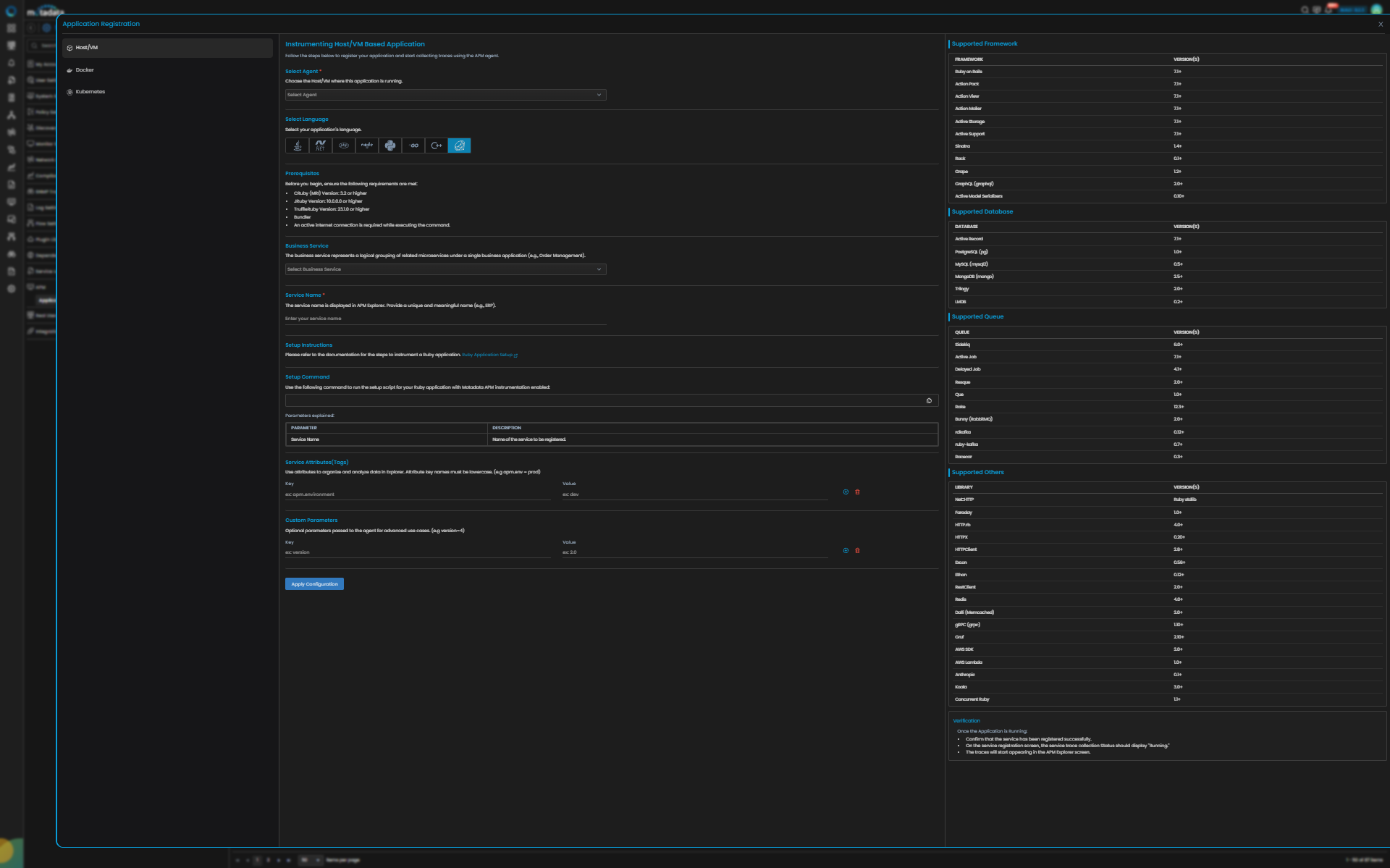
- Host/VM
Ruby Trace Configuration
| Field | Description |
|---|---|
| Select Agent | Select the Host/VM where this application is running. You can configure Ruby application service for Linux type agent. |
| Language | Select Ruby from the language icons. |
| Business Service | The Business Service represents a logical grouping of related microservices under a single business application (e.g., order-management). |
| Service Name | Provide a unique and meaningful name (e.g., order_service). |
| Service Attributes (Tags) | Add key–value tags to your application for better filtering and organizing data in Explorer. Attribute key names must be lowercase (for example, apm.env = prod). To add multiple Key-Value pairs, click the add icon. |
| Add Custom Parameters | Allows you to define custom sampling or tagging parameters for advanced use cases. These optional parameters are passed to the agent (for example, version=4). |
Clicking the Apply Configuration button, the ingestion gets started. The screen displays the Setup Command to instrument your Ruby application.
You can configure trace ingestion according to the framework used to build the application. The following are the supported frameworks.
Supported Frameworks
| Framework | Version |
|---|---|
| Ruby on Rails | 7.1+ |
| Action Pack | 7.1+ |
| Action View | 7.1+ |
| Action Mailer | 7.1+ |
| Active Storage | 7.1+ |
| Active Support | 7.1+ |
| Sinatra | 1.4+ |
| Rack | 0.1+ |
| Grape | 1.2+ |
GraphQL (graphql) | 2.0+ |
| Active Model Serializers | 0.10+ |
Supported Database
| Database / ORM | Version |
|---|---|
| Active Record | 7.1+ |
PostgreSQL (pg) | 1.0+ |
MySQL (mysql2) | 0.5+ |
MongoDB (mongo) | 2.5+ |
| Trilogy | 2.0+ |
| LMDB | 0.2+ |
Supported Queue
| Queue / System | Version |
|---|---|
| Sidekiq | 6.0+ |
| Active Job | 7.1+ |
| Delayed Job | 4.1+ |
| Resque | 2.0+ |
| Que | 1.0+ |
| Rake | 12.3+ |
| Bunny (RabbitMQ) | 2.0+ |
| rdkafka | 0.12+ |
| ruby-kafka | 0.7+ |
| Racecar | 0.3+ |
Supported Others
| Library / System | Version |
|---|---|
| Net::HTTP | Ruby stdlib |
| Faraday | 1.0+ |
| HTTP.rb | 4.0+ |
| HTTPX | 0.20+ |
| HTTPClient | 2.8+ |
| Excon | 0.56+ |
| Ethon | 0.12+ |
| RestClient | 2.0+ |
| Redis | 4.0+ |
| Dalli (Memcached) | 3.0+ |
gRPC (grpc) | 1.10+ |
| Gruf | 2.10+ |
| AWS SDK | 3.0+ |
| AWS Lambda | 1.0+ |
| Anthropic | 0.1+ |
| Koala | 3.0+ |
| Concurrent Ruby | 1.1+ |
Once the application is running, you need to verify the below points:
- Confirm that the service has been registered successfully.
- On the service registration screen, the Service Trace Collection Status should display "Running."
- The traces will start appearing in the APM Explorer screen.