Error Tracker
The Error Tracker in APM provides a unified, real-time view of all errors and exceptions across your registered applications. It eliminates the need to investigate failures service-by-service and enables faster identification of critical issues affecting system reliability.
This screen is designed to give immediate visibility into error trends, failing services, and recurring exceptions, allowing teams to prioritize and resolve issues efficiently.
Understanding Error Tracker
The Error Tracker aggregates error data across all monitored services and presents it through visual trends and a detailed issue table.
It helps you answer key operational questions:
- Which services are failing the most?
- Are failures driven by client-side (4xx) or server-side (5xx) issues?
- What are the most frequent exceptions?
- Which traces are impacted by these failures?
Error Trend Visualization
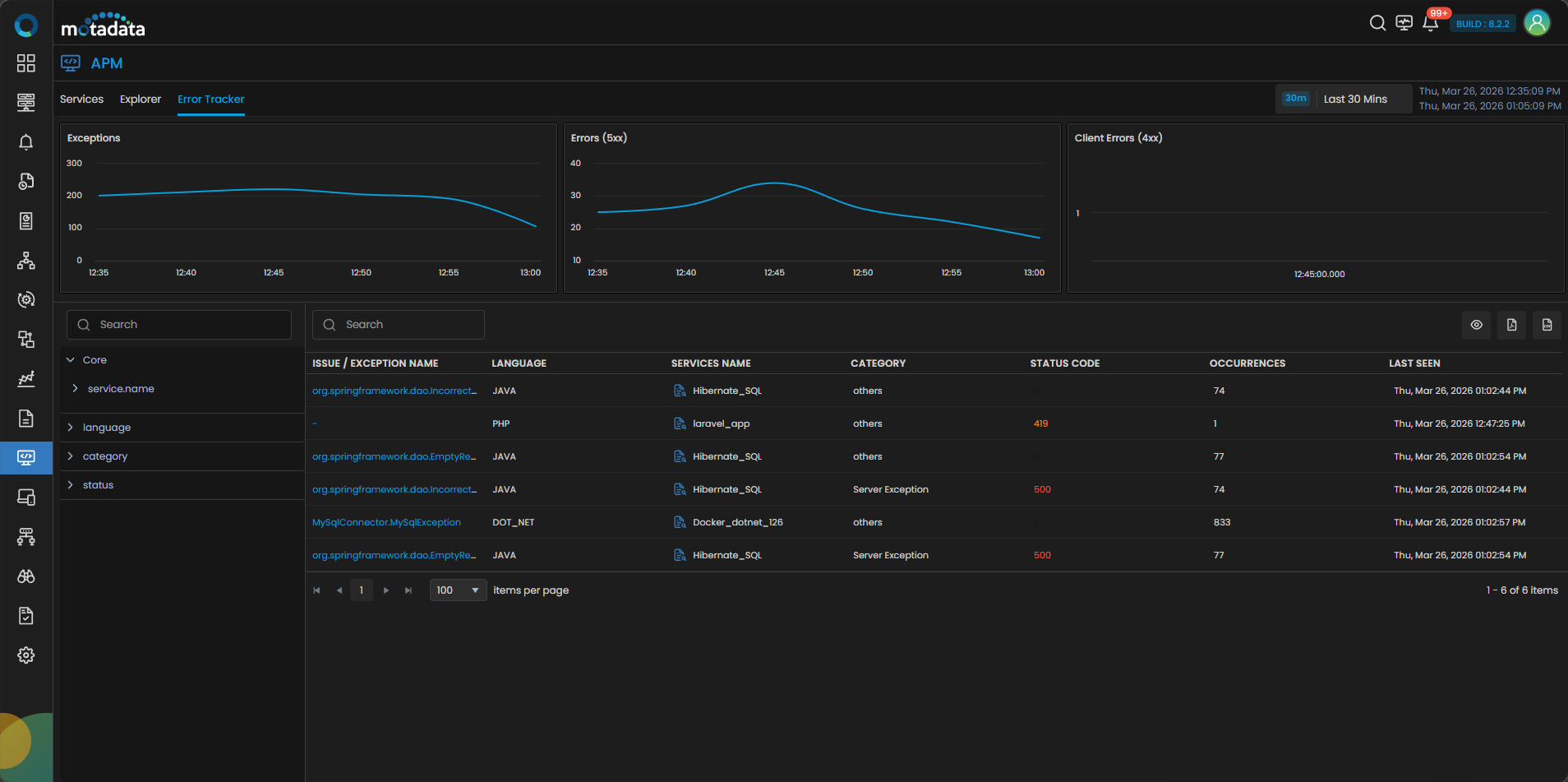
At the top of the screen, the Error Tracker displays three trend charts to help you quickly assess system health:
- Exceptions: Shows the trend of application-level exceptions over time.
- Errors (5xx): Displays server-side failures indicating backend or service issues.
- Client Errors (4xx): Represents client-side issues such as invalid requests.
These charts help you identify spikes, anomalies, and patterns without deep investigation.
Global Filters and Search
The Error Tracker provides flexible filtering options to narrow down analysis:
Left Panel Filters
You can filter errors using structured attributes:
- service.name: Filter by specific service
- language: Java, .NET, PHP, NodeJS, etc.
- category: Exception / Server Exception / Others
- status: HTTP status classification
Search Bar
You can use the search bar to quickly locate specific exceptions, services, or patterns within the dataset.
All charts and tables dynamically update based on applied filters, enabling focused troubleshooting.
Error Table
The main section displays a consolidated list of all detected issues:
| Field | Description |
|---|---|
| Issue / Exception Name | Name of the exception or error (clickable for drilldown). |
| Language | Technology stack where the issue occurred. |
| Services Name | Service associated with the error. |
| Category | Type of issue (e.g., Server Exception, Others). |
| Status Code | HTTP response code (e.g., 500, 419). |
| Occurrences | Number of times the issue has occurred. |
| Last Seen | Timestamp of the most recent occurrence. |
The table provides a quick way to identify:
- High-frequency issues
- Critical failures (e.g., repeated 5xx errors)
- Recently active errors
Issue-Level Drilldown
Clicking on an Issue / Exception Name opens a detailed view of that specific error.
This view provides:
- Occurrence Trend Chart: Shows how the error frequency changes over time.
- Span-Level Occurrences: Lists all spans where the error was captured.
Trace Table
You can view all traces impacted by the selected issue:
| Field | Description |
|---|---|
| Trace Name | Name of the trace where the error occurred. |
| Start Time | Timestamp when the trace started. |
| Duration | Total execution time of the trace. |
| Span | Span in which the error occurred. |
| Entities | Associated services or infrastructure entities. |
This allows you to move from issue → trace-level impact in a single flow.
Trace-Level Deep Dive
Clicking on an individual Trace provides a complete, correlated view of telemetry data across the stack.
The deep-dive view includes multiple tabs:
- Info: Overview of trace execution and flow
- Exception: Detailed exception message and stack trace
- JVM: JVM metrics (for Java-based services)
- Network: Network latency and communication insights
- Host: Host-level performance metrics
- Metrics: Application performance metrics
- Database: Database queries and execution details
- Logs: Correlated logs for the trace
- Container: Container-level insights (if applicable)
This enables full-stack root cause analysis without switching tools.
Key Capabilities
- Centralized Error Visibility: View all application errors in a single screen.
- Trend-Based Analysis: Understand how errors evolve over time.
- Error Categorization: Clear separation of Exceptions, 4xx, and 5xx.
- Dynamic Filtering: Refine data across services, languages, and status codes.
- End-to-End Drilldown: Navigate from issue → trace → infrastructure.
- Faster RCA: Reduce investigation time with correlated insights.
The Error Tracker transforms fragmented error analysis into a streamlined workflow. By consolidating error data and enabling deep correlation, it helps teams detect issues faster, reduce downtime, and maintain application reliability at scale.