Merge Control Logic - Merge Node
The Merge Node synchronizes and consolidates multiple workflow paths, enhancing control and efficiency in complex automation.
The Merge node consolidates multiple incoming workflow paths (from conditional branches) into a single, unified continuation point. This is essential for synchronizing all preceding tasks before the workflow can proceed.
Purpose: To control the flow's progression effectively, especially in complex routing scenarios where multiple paths need to converge before further actions can be taken. It ensures that the workflow doesn't proceed prematurely, maintaining data integrity and logical sequence.
Key Configuration:
Multiple Incoming Paths: The node can receive multiple incoming connections from any number of preceding nodes.
Single Outgoing Path: Only one outgoing connection is permitted, directing the workflow to a unified next step. A fallback node can also be configured if a timeout is set.
Merge Type (Mandatory): Defines the logic used to determine when the node should proceed:
Wait for All: Proceed only when all incoming branches are completed.Wait for Any: Proceed as soon as any one incoming branch completes. When this option is chosen, a multi-select dropdown listing all inputs connected to the Merge node appears. The node proceeds once all selected inputs are completed. If no specific inputs are selected, the node proceeds upon completion of any single input.- Select Branches to Merge: (Visible when "Wait for Any" is selected) This multi-select dropdown lists all incoming branches, allowing you to specify which ones must complete for the node to proceed. If no specific branches are selected, the node proceeds upon completion of any single input.
Maximum Timeout (Non-Mandatory, Duration Field): This field allows you to define the maximum duration to wait for required inputs. You can specify whether this duration is based on "Calendar Hours" or "Business Hours," and set a specific "Maximum Wait Duration" (e.g., 1 day). If the merge condition is not met within this duration.
Output Nodes:
- Success Path: This path is triggered when the defined Merge Type condition is satisfied.
- Timeout Path (Visible only if Timeout is defined): This path is triggered when the timeout is reached before the required number of inputs are completed. Used to fail the flow gracefully or take alternative actions like notifications or fallback execution.
Example Use Case: Automated Incident Assignment and Notification
Scenario: When an incident is created, if its priority is 'High', assign it to the 'Critical Incident Response' Technician Group. Otherwise, assign it to the 'General Support' Technician Group. After assigning, wait for one hour for both paths to complete, and if successful, send an email notification to the assigned Technician Group.
Configuration:
Trigger: "Incident is created."
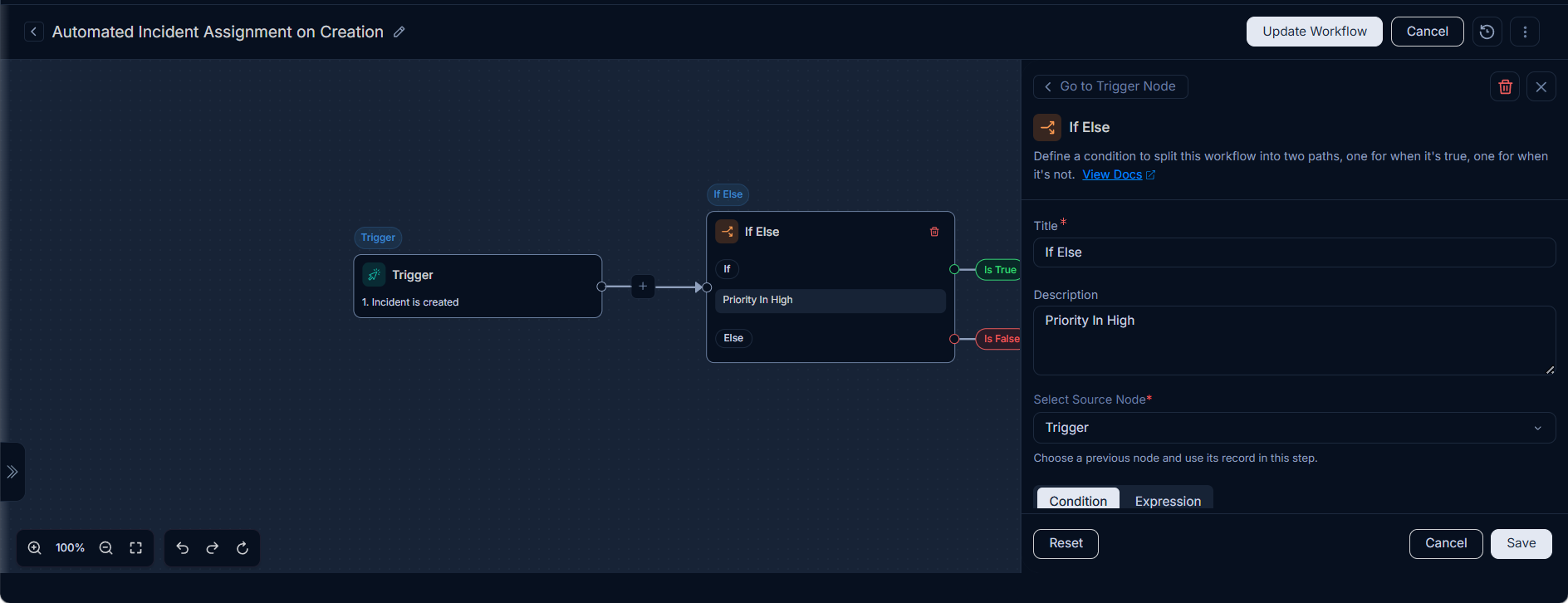
If/Else Node:
- Condition:
PriorityisHigh.
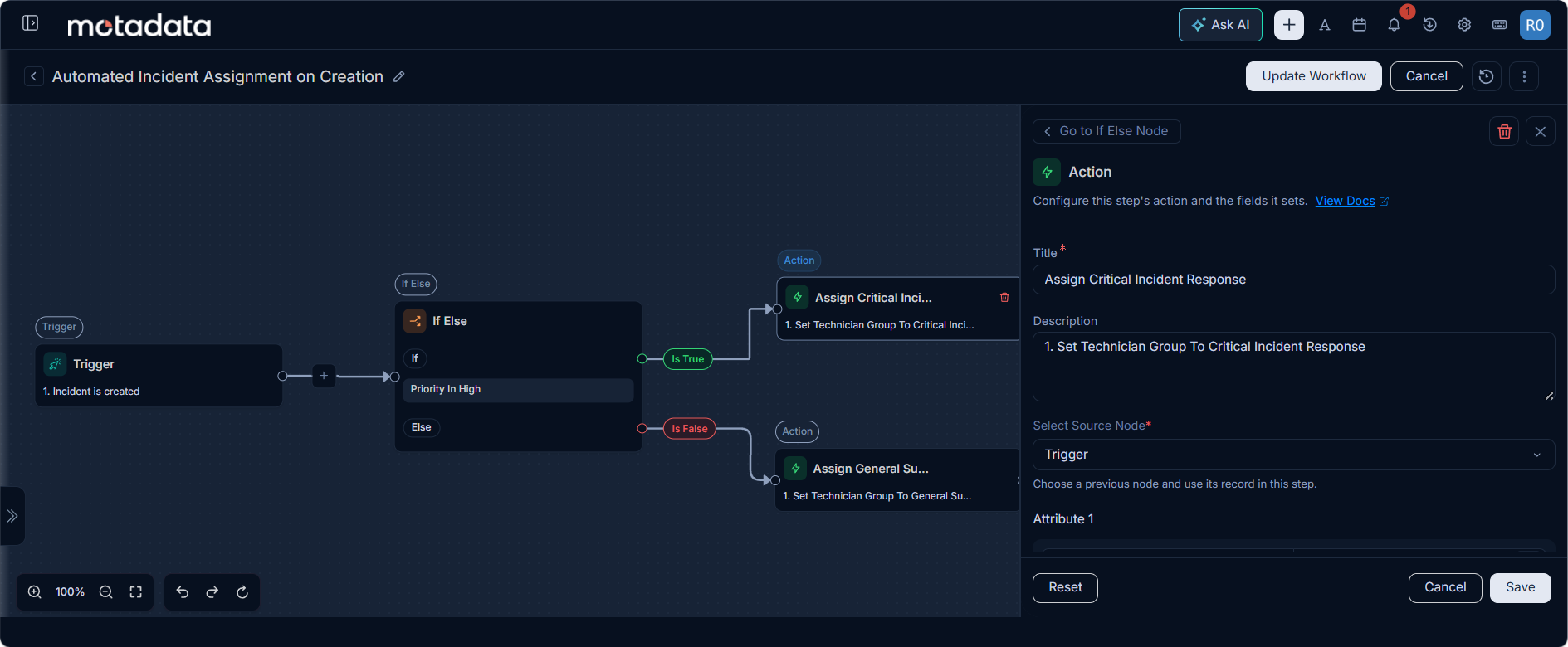
- True Path Action (Assign Critical Incident Response): Set
Technician Groupto "Critical Incident Response".
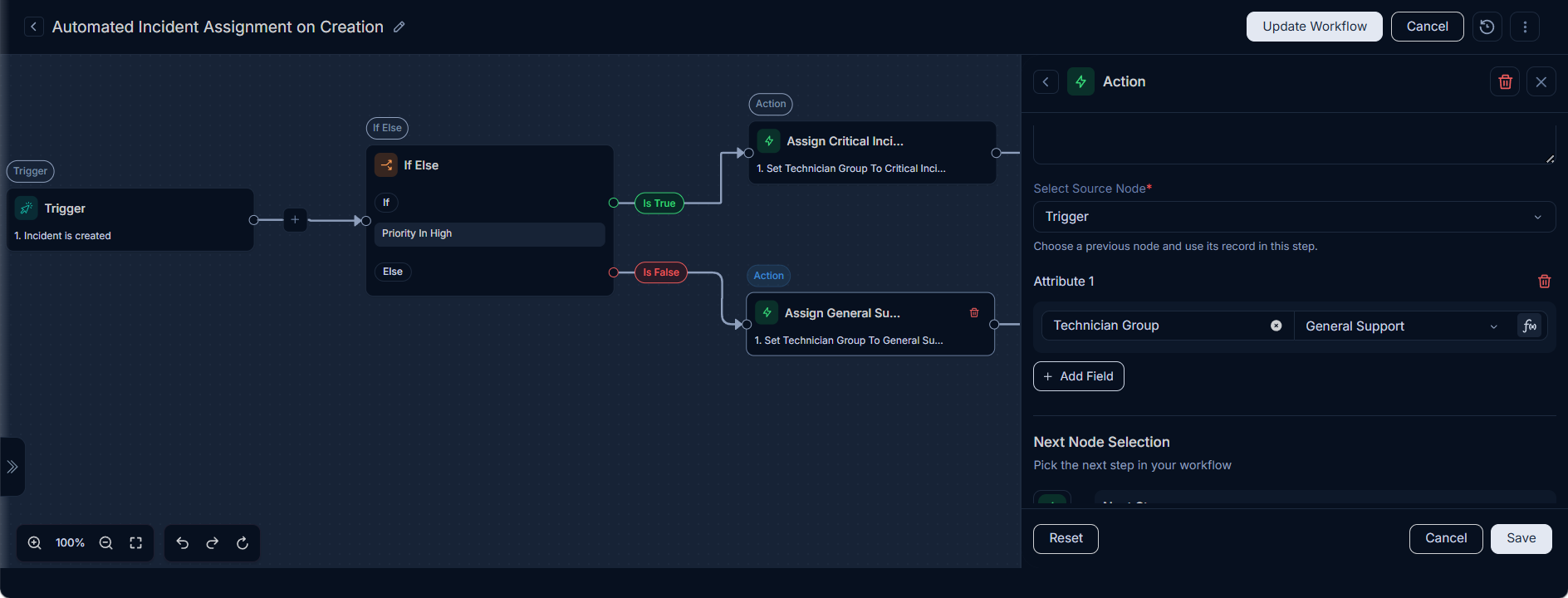
- False Path Action (Assign General Support Group): Set
Technician Groupto "General Support".
- Condition:
Merge Node:
- Merge Type:
Wait for All. - Select Branches to Merge: "Assign Critical Incident Response" and "Assign General Support" as shown below:
- Maximum Wait Based On: Calendar Hours.
- Maximum Wait Duration: 1 Hour.
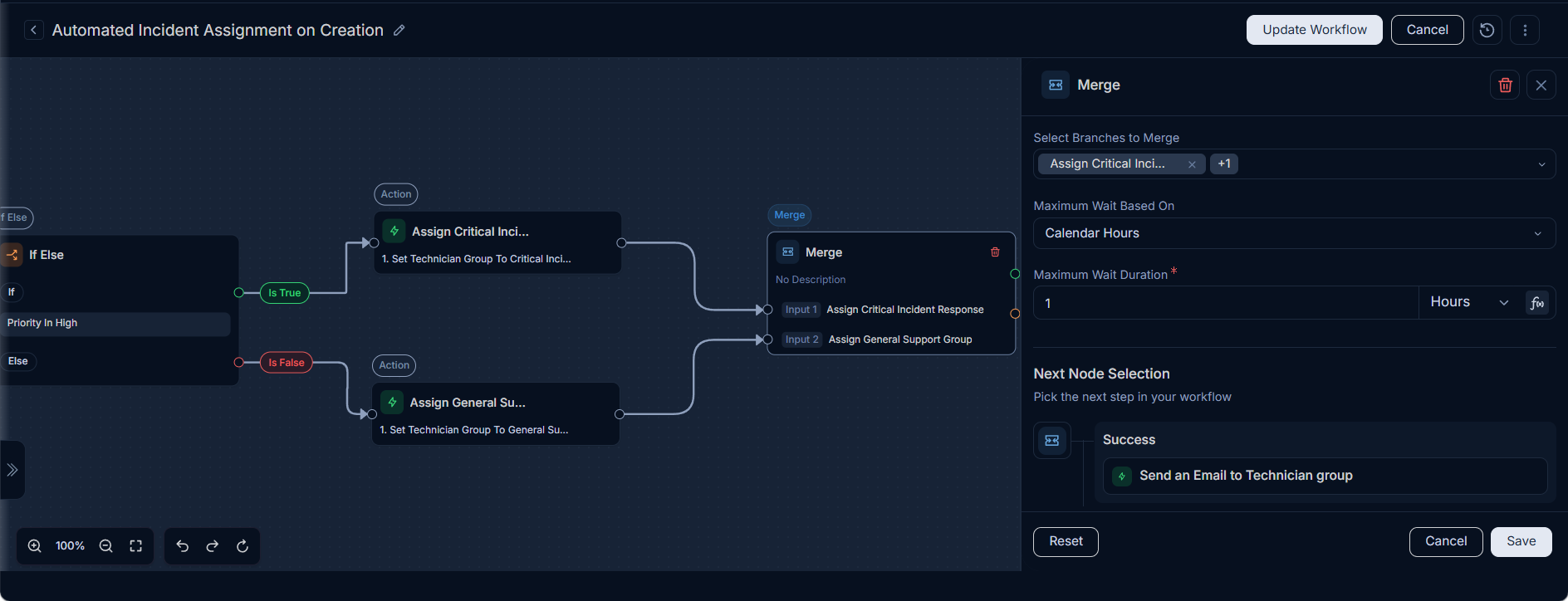
- Success Path: Send an Email to Technician group.
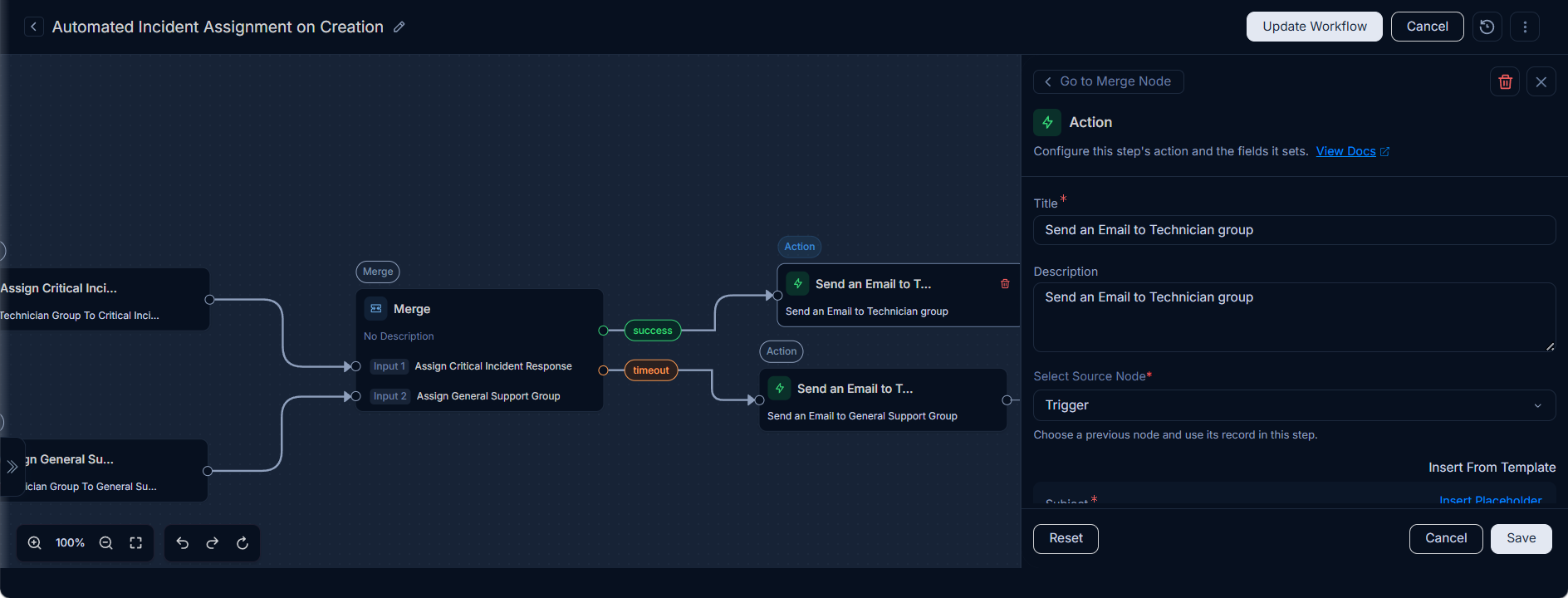
- Timeout Path: This path is triggered when the timeout is reached before the required number of inputs are completed. Used to take alternative actions like notifications.
- Merge Type:
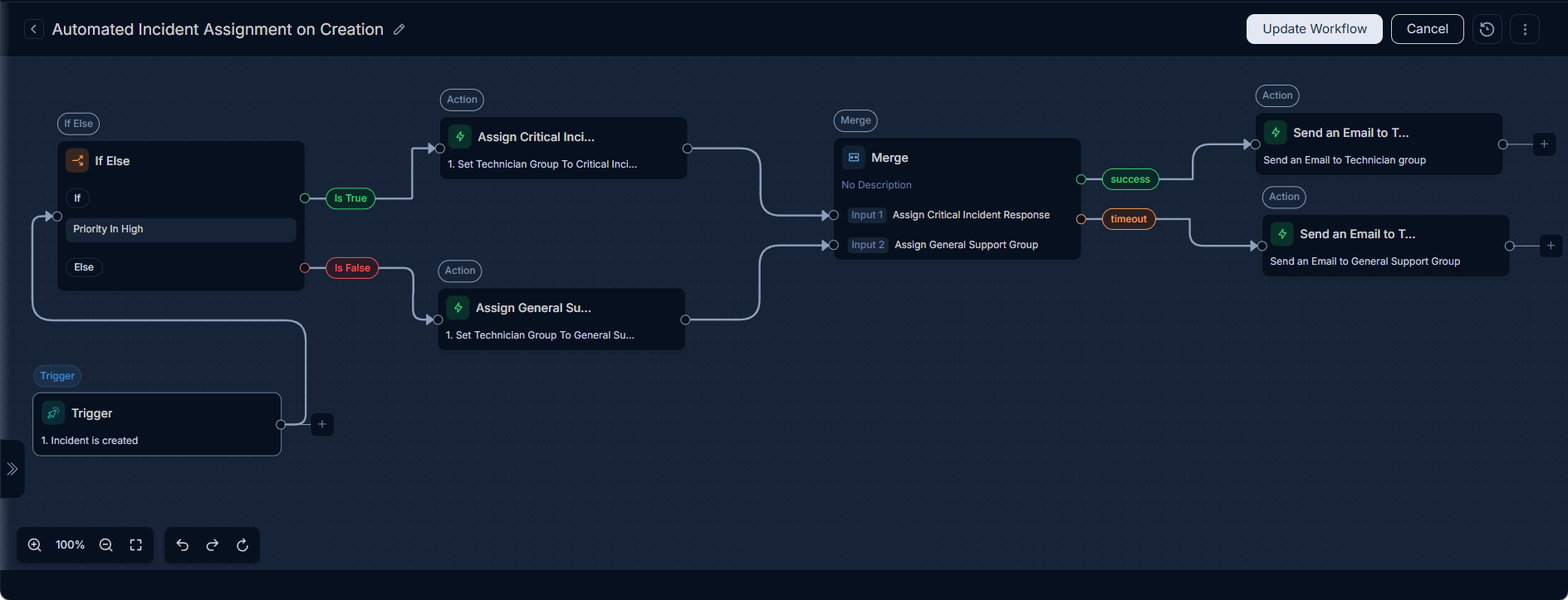
The entire workflow configuration will look like below:
Once the workflow is ready, save, and publish it by clicking the Publish button and ensure it is active (enabled) mode.
How it Works
When a new incident is created, the workflow is triggered. The If/Else node checks the incident's priority:
- If the Priority is "High," the incident is assigned to the "Critical Incident Response" team.
- If the Priority is not "High," the incident is assigned to the "General Support" team.
Both paths then converge at the Merge node, which waits for both assignments to complete or for one hour to pass. If the merge condition is met within the timeout, an email notification is sent to the assigned Technician Group, informing stakeholders of the assignment. This ensures that incidents are properly routed and stakeholders are notified in a timely manner.