Knowledge Collections
Knowledge Collections are the curated information sources that AI agents draw from to answer questions, resolve tickets, and guide users in ServiceOps.
Without a knowledge collection attached, an AI agent relies only on its general training. With one, it can reference your organization's specific documentation, procedures, and knowledge base - delivering accurate, context-aware responses.
How It Works
Knowledge Collections follow a three-level hierarchy. You must complete each level in order:
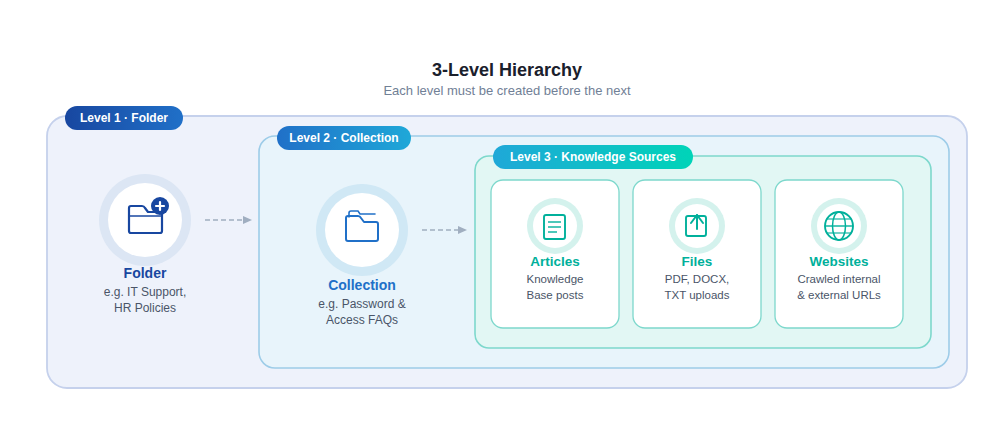
- Create a Folder: The top-level container. Organize folders by domain, department, or team (e.g.,
IT Support,HR Policies). - Create a Collection: Lives inside a folder. Each collection groups related knowledge sources for a specific purpose (e.g.,
Password & Access FAQs). - Add Knowledge Sources: Attach content to the collection from three source types:
- Articles: Published articles from your ServiceOps Knowledge Base.
- Files: Uploaded documents (PDF, DOCX, TXT).
- Websites: Crawled pages from internal or external URLs.
- Test the Collection: Validate retrieval accuracy before attaching the collection to an agent.
- Attach to an AI Agent: In AI Studio, assign the collection to an agent so it can reference the knowledge during conversations.
tip
Start small. Create one focused collection for your highest-volume request type, test it thoroughly, then expand.
Prerequisites
Before creating your first knowledge collection, ensure:
- You have Manage AI Studio permissions under Admin > User > Roles > Admin Module.
- Knowledge base articles you plan to add are in Published status, draft articles are not indexed.
- Attach the collection to AI agents in AI Studio. See AI Studio Overview.
In This Section
| Page | What You'll Do |
|---|---|
| Managing Knowledge Folders | Create and organize top-level folders; set access levels |
| Creating a Knowledge Collection | Create a named collection inside a folder |
| Adding Knowledge Sources | Add articles, files, and websites to a collection |
| Testing a Collection | Validate retrieval accuracy before attaching to an agent |
| Best Practices | Structure and maintain collections for optimal AI performance |