SNMP Walk: Full OID Subtree Retrieval in ObserveOps
SNMP Walk retrieves the complete OID subtree from a target device directly in ObserveOps (formerly known as AIOps). Use it to inspect raw SNMP data, verify MIB availability, or troubleshoot metric collection issues without switching to an external SNMP tool.
Prerequisites
- You must have the Admin or NOC role.
- The target device must have SNMP enabled.
- A valid SNMP credential profile must be configured in ObserveOps, or you can create one directly from this screen.
- The Collector must have access to UDP port
161on the target device.
How It Works
ObserveOps sends SNMP GETNEXT requests from the Collector, starting at the OID you specify and walking the entire subtree beneath it. The Collector collects all returned OID-value pairs and streams the output back to the platform. Large result sets display in a paginated or scrollable view.
Navigation
Go to Main Menu > Settings > Utility > SNMP Walk.
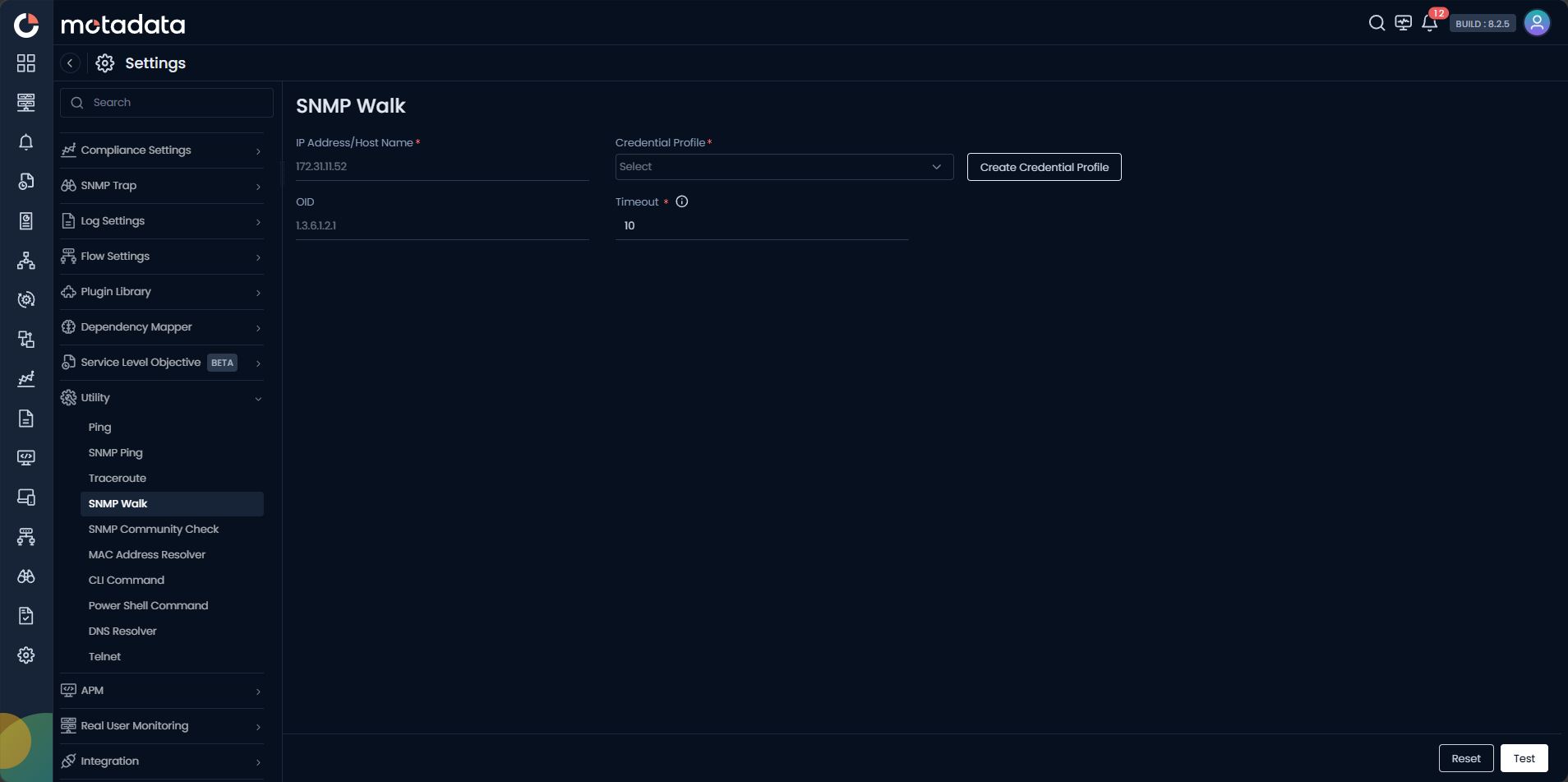
Running an SNMP Walk
| Field | Description |
|---|---|
| IP Address / Host Name | Enter the IPv4 address, IPv6 address, or FQDN of the target device. |
| Credential Profile | Select the SNMP credential profile to use. Click Create Credential Profile to create one inline. |
| OID | Enter the starting OID for the walk. Defaults to 1.3.6.1.2.1 (MIB-II root). |
| Timeout | Time in seconds to wait for an SNMP response before aborting the walk. |
Click Test to start the walk. Click Reset to clear the form.
Creating a Credential Profile
Click Create Credential Profile to open the credential dialog without leaving the screen.
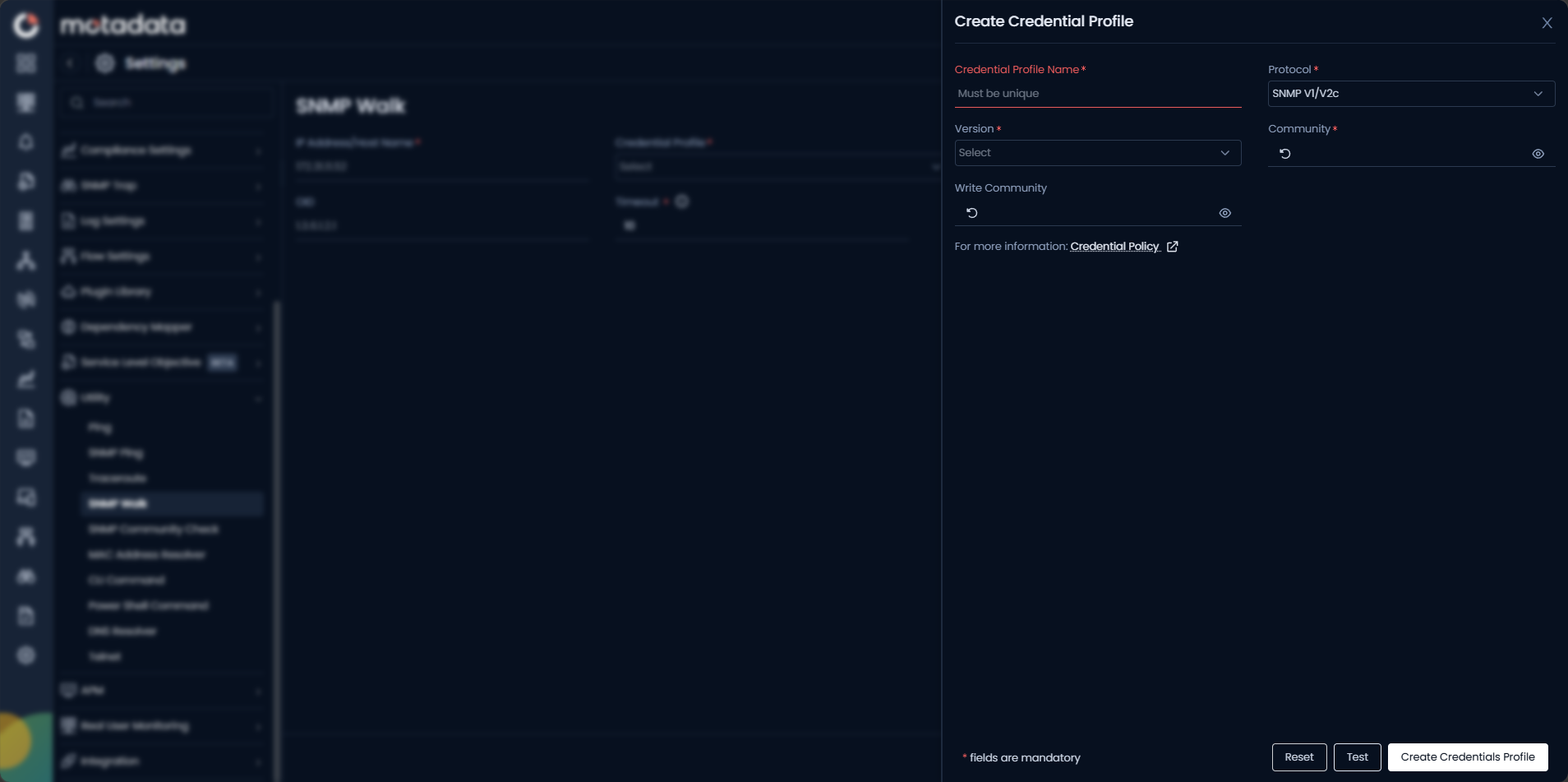
| Field | Description |
|---|---|
| Credential Profile Name | Enter a unique name to identify this profile. |
| Protocol | Select SNMP V1/V2c for community-based SNMP. |
| Version | Select v1 or v2c to match the device configuration. |
| Community | Enter the read community string. |
| Write Community | Enter the write community string, if applicable. |
Click Create Credentials Profile to save.
Start with a specific OID branch rather than the full MIB root. Walking 1.3.6.1.2.1.2 (interfaces table) returns far less data than walking 1.3.6.1 and loads results faster.
Example
A monitoring engineer notices that interface utilization metrics are not populating for a new Cisco switch. They open Utility > SNMP Walk, enter the switch IP, select the v2c credential profile, and walk OID 1.3.6.1.2.1.2.2 (interfaces table). The walk returns all interface OIDs and confirms the metrics exist on the device. The engineer identifies the correct OID and adds it to the metric template.
Troubleshooting
| Issue | Cause | Fix |
|---|---|---|
| Walk returns zero results | The OID does not exist on this device, or the device does not support the requested MIB. | Try walking 1.3.6.1.2.1.1 (system group) to confirm basic MIB-II availability. |
| Walk runs and never completes | The subtree is very large and the timeout is too low. | Increase the timeout, or narrow the starting OID to a smaller subtree. |
| Authentication failure | The credential profile community string does not match the device. | Run SNMP Ping first to verify credentials before walking. |