Poller Installation
The Poller service is a crucial component for enabling automated asset discovery and data collection from both your local network and remote office locations.
This guide provides comprehensive instructions for installing the Poller service, a key part of the ServiceOps ecosystem. It is intended for IT Administrators and Implementation Consultants responsible for deploying and managing the ServiceOps infrastructure to build a complete and accurate Configuration Management Database (CMDB).
What is the Poller Service?
The Poller Service is a lightweight software component that you install within a local network to discover assets behind a firewall. It acts as a local proxy, running scans on your subnets to find and collect data from your devices, and then securely transmitting that information back to your central ServiceOps instance.
This is essential for organizations with distributed networks, such as those with multiple office branches or segregated security zones, as it allows for comprehensive asset discovery without exposing devices directly to the internet or requiring complex firewall rules.
Key Capabilities
- Multi-Platform Discovery: Identifies a wide range of devices, including Windows, Linux, SNMP-enabled hardware, and VMware environments.
- Agentless & Agent-based Scanning: Provides the flexibility to discover assets with or without an agent installed, using network scans or credentials.
- Secure Communication: Securely sends discovered asset data to the main ServiceOps server using an activation code and secure authentication key.
- Distributed Network Support: Specifically designed to work in multi-site scenarios, enabling a single ServiceOps instance to manage assets across geographically separate locations.
Architecture
For on-premises deployments with multiple sites (e.g., a main office and several branch offices), the Poller service is installed in each remote branch. Each Poller discovers assets in its local network and sends the data back to the central ServiceOps application server at the main site.
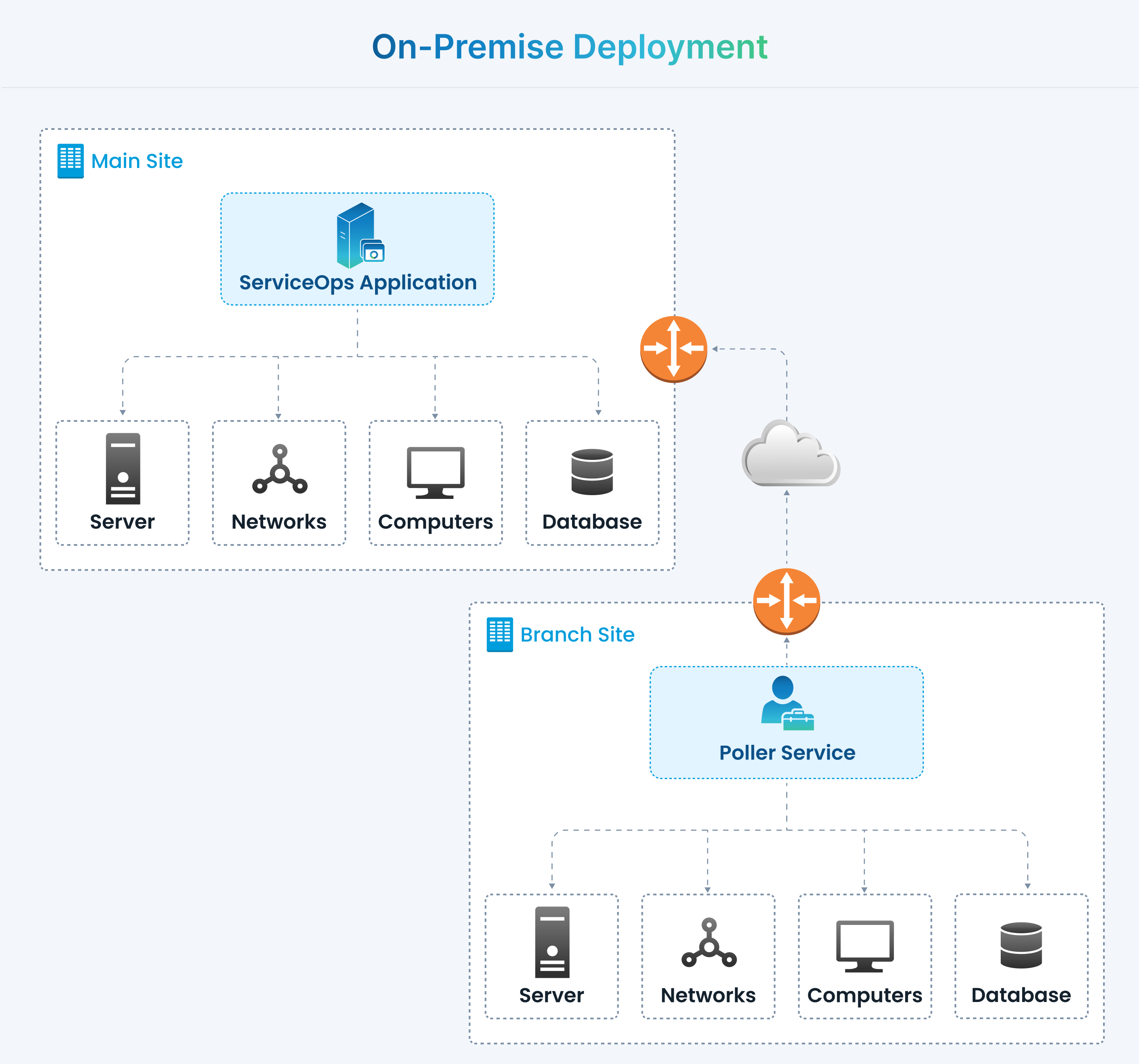
How It Works
- Installation: The Poller service is installed on a dedicated Windows or Linux machine within the target subnet.
- Configuration: During setup, you provide the URL of your ServiceOps portal and security credentials (Activation Code, Secure Auth Key).
- Discovery: The Poller runs scheduled discovery scans (configured within ServiceOps) to identify and gather information from assets in its local network segment.
- Communication: The Poller securely transmits the discovered asset data to the central ServiceOps server.
- Synchronization: The discovered assets appear in the ServiceOps CMDB under Hardware Assets, ready for management.
Installation Guides
Please select the appropriate guide for your target operating system to begin the installation:
- For Windows: Windows Poller Installation
- For Linux: Linux Poller Installation
Related Topics
- CMDB Overview: Learn how the Poller service populates and maintains your Configuration Management Database.
- Asset Management: Understand how poller-based discovery fits into the broader asset management lifecycle.
- Agent Deployment: Explore an alternative method for asset discovery by deploying agents directly onto your devices.