SMS Gateway Configuration
Configure your SMS gateway once so event alerts can be delivered reliably via SMS.
SMS Gateway Configuration
Use this tab to configure the SMS gateway. The gateway is used to send SMS notifications.
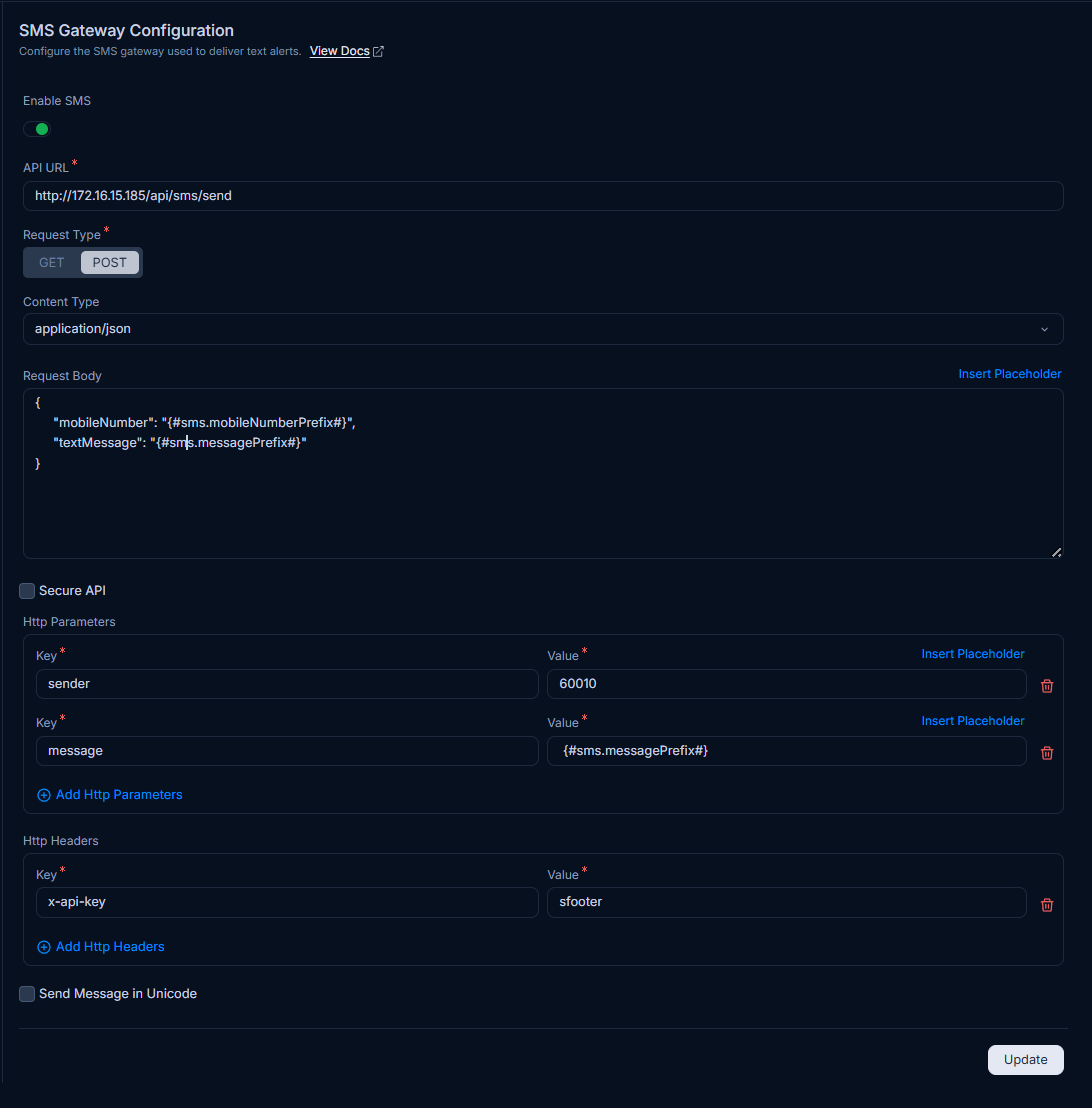
The parameters are:
| Parameter | Description |
|---|---|
| Enable SMS | Enable this option to send SMS notifications. If disabled, SMS notifications are not sent. |
| API URL | Enter the URL of the API to access the gateway. |
| Request Type | Select the request type: GET or POST. |
| Content Type | Enter the content type (For example, application/json). |
| Request Body | Enter the request body for the POST request. You can also add placeholders using the Insert Placeholder link in the API URL field. |
| Secure API | Select this option if the gateway uses a secure URL. If selected, enter the Username and Password. |
| HTTP Parameters | Add the keys and values required for successful requests. You can select multiple placeholders. |
| HTTP Headers | Add the keys and values required for successful requests. You can select multiple placeholders. |
| Send Message in Unicode | Enable this option to send the message in Unicode format. |
After you finish configuring the settings, click Update.