Registering a RUM Application
Overview
To start monitoring frontend performance using Real User Monitoring (RUM) in Motadata, you must register your web application and embed a snippet provided by the platform. This snippet collects Web Vitals, session events, user actions, errors, and network activity, enabling it for end-to-end visibility of the user journey.
Prerequisites
Ensure the following requirements are met before proceeding:
- Motadata ObserveOps (formerly known as AIOps) has a valid RUM license.
- Ensure that TCP port 9477 is open in the Motadata ObserveOps application with bidirectional access. To know more about each ports and its dependencies Click Here
- The application service you want to register has to be running.
- An active internet connection is required during the initial installation of the SDK package.
Navigation
Navigate to Settings from the main menu and go to Real User Monitoring, then select the Application Registration option. The screen displays a grid view displaying application details.
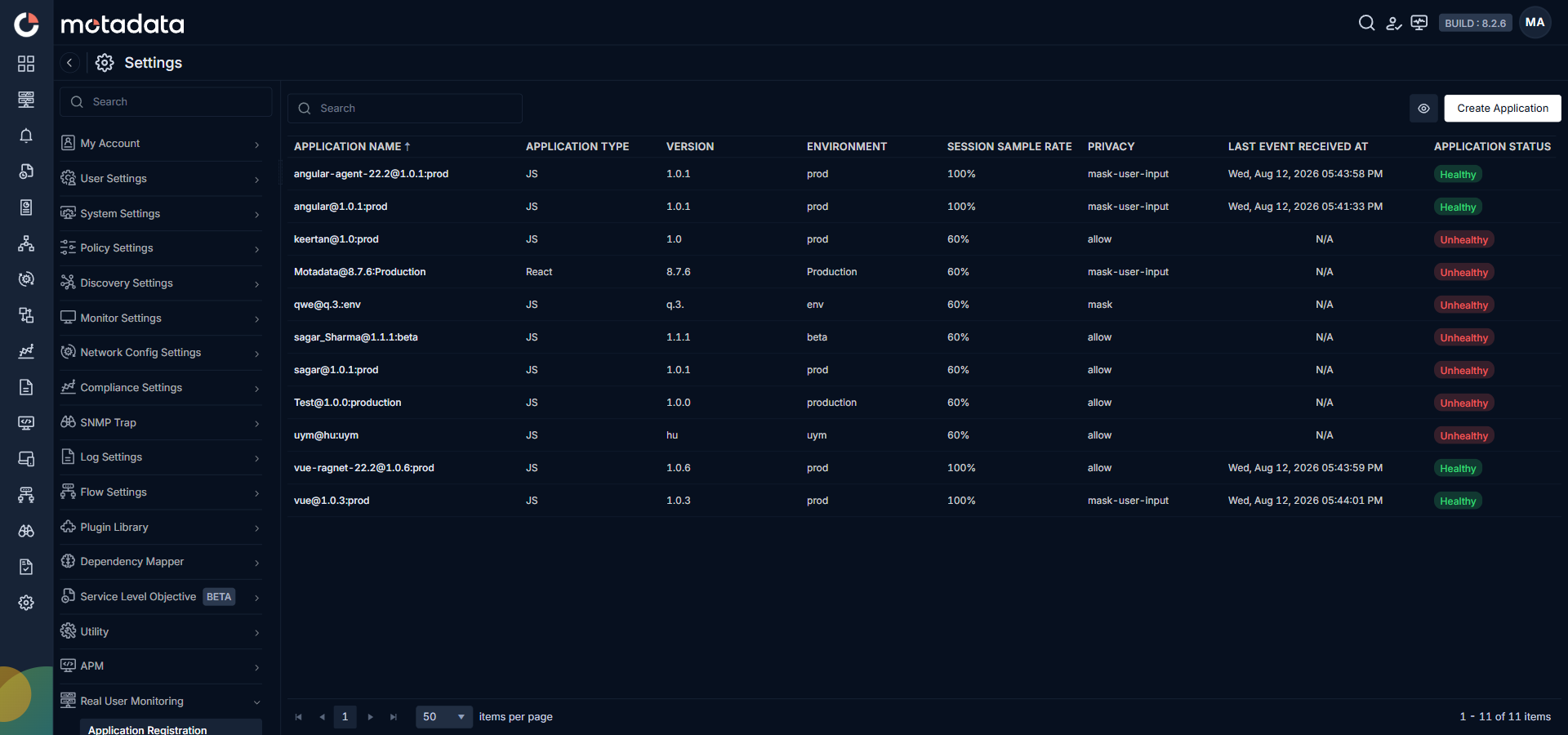
| Field | Description |
|---|---|
| Application Name | Displays the unique name you have provided while registering the application. |
| Application Type | The application type you have registered. |
| Version | Displays application version (e.g., 1.0.0). |
| Environment | Displays the information about the deployment environment. |
| Session Sample Rate (%) | Percentage of total sessions to monitor. |
| Tags | Displays the tags assigned to the application. |
| Privacy | Displays the privacy configured for your application. |
| Last Event Received At | Shows the timestamp of last event. |
| Application Status | Displays the application is whether Healthy or Unhealthy. |
| Action | Allows you to select actions available for your registered application. Selecting Delete RUM Application you can delete the specific application. |
You can select eye icon to configure what to display in the grid. Clicking the Create Application button, you can register the application.
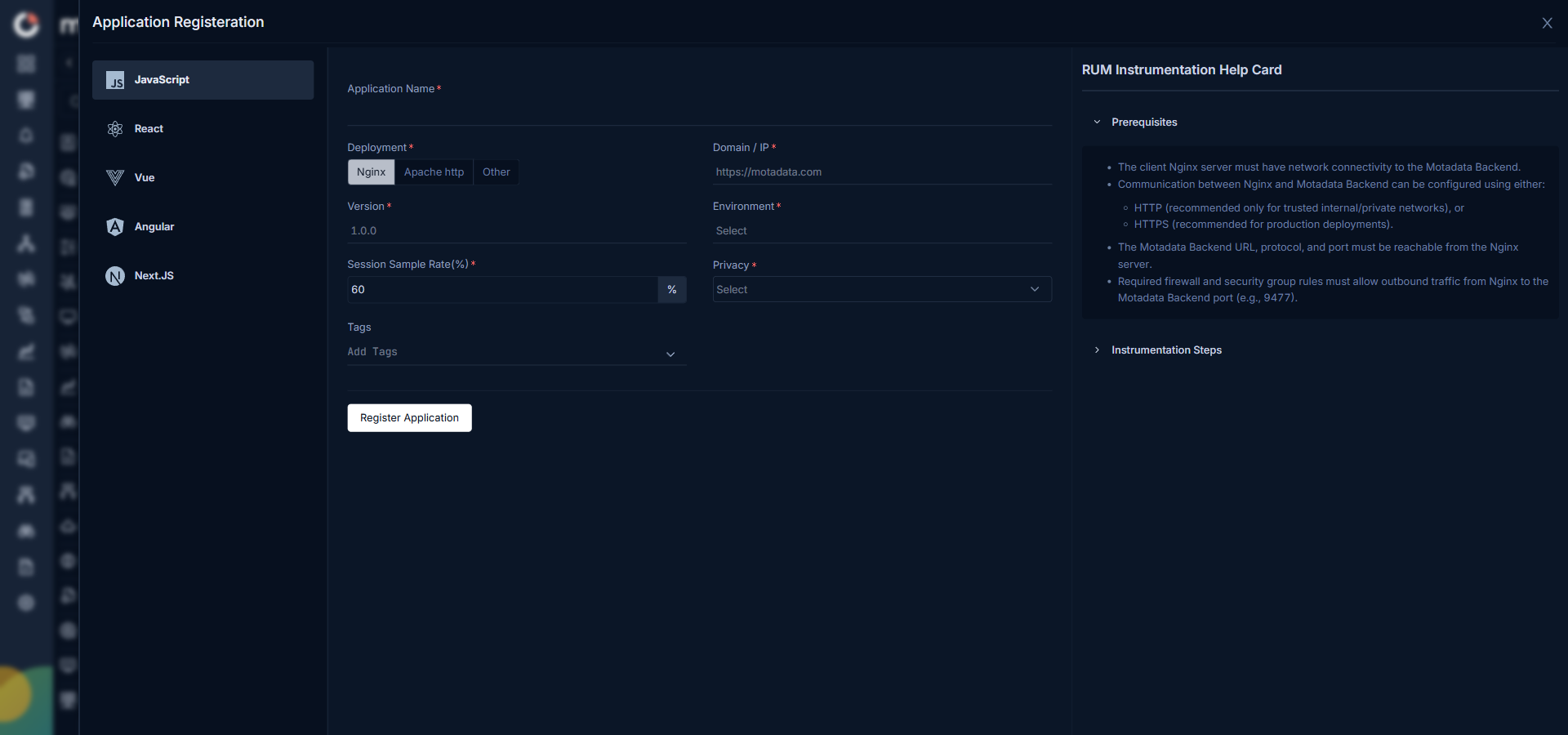
You need to configure the following details to register the application.
| Field | Description |
|---|---|
| Application Name | Enter a unique name to identify your application within Motadata. |
| Application Type | Select the application type for your application from the drop-down. i.e., JS, React, Vue, Angular, and Next.js. |
| Deployment | Select deployment type for application. i.e., Nginx, Apache http, and other. |
The application you are registering can be following any networking concept like http, https, ip or FQDN.
| Field | Description |
|---|---|
| HTTP | HTTP (Hypertext Transfer Protocol) is the basic way your browser talks to a website.i.e., http://example.com |
| HTTPS | HTTPS (Hypertext Transfer Protocol Secure) is the secure version of HTTP.i.e., https://172.16.9.11:443 |
| IP | An IP address (Internet Protocol address) is a unique number used to identify a device on a network.i.e., https://172.16.9.11:8080 |
| FQDN | FQDN stands for Fully Qualified Domain Name. It is the complete and exact name of a device or service on the internet.i.e., https://motadata.com |
According to the application type you need to select the deployment and provide the required details, so that the connection between your application and Motadata ObserveOps can be established.
- Nginx
- Apache http
- Other
| Field | Description |
|---|---|
| Domain/ IP | Enter the Domain/ IP of your application. |
| Version | Enter the application version you need to monitor (e.g., 1.0.0). |
| Environment | Provide the deployment environment such as Development, Staging, or Production. |
| Session Sample Rate (%) | Provide percentage of total sessions to monitor (Recommended: 100%). |
| Privacy | Define privacy for collected data from the drop-down menu. Select the below from the list. - All Text available by default: Displays the text as it is available. - All user input masked by default: All the user input fields' text get masked and all other text gets displayed as it is. i.e., on login page if user is giving credentials it gets masked but at the same time other default page information remains as it is available. - Fully Masked: All the text get masked and nothing gets displayed as it is. |
| Tags | This option allows you to assign Tag(s). You can create new tag(s) or select tag(s) from the drop-down. |
Click the Reset button to reset the configurations you have done. Click the Register Application button to register the application.
Once you click the Register Application button, it displays two code snippets. You need to copy these snippets.
You need to paste the first snippet to your Java script file and the second one to the Nginx configuration file. Once these snippets are pasted, RUM data will automatically be forwarded to Motadata ObserveOps.
The onboarded application will appear in the Rum Explorer, displaying live user insights and performance diagnostics.
| Field | Description |
|---|---|
| Domain/ IP | Enter the Domain/ IP of your application. |
| Version | Enter the application version you need to monitor (e.g., 1.0.0). |
| Environment | Provide the deployment environment such as Development, Staging, or Production. |
| Session Sample Rate (%) | Provide percentage of total sessions to monitor (Recommended: 100%). |
| Privacy | Define privacy for collected data from the drop-down menu. Select the below from the list. - All Text available by default: Displays the text as it is available. - All user input masked by default: All the user input fields' text get masked and all other text gets displayed as it is. i.e., on login page if user is giving credentials it gets masked but at the same time other default page information remains as it is available. - Fully Masked: All the text get masked and nothing gets displayed as it is. |
| Tags | This option allows you to assign Tag(s). You can create new tag(s) or select tag(s) from the drop-down. |
Click the Reset button to reset the configurations you have done. Click the Register Application button to register the application.
Once you click the Register Application button, it displays two code snippets. You need to copy these snippets.
You need to paste the first snippet to your Java script file and the second one to the Apache configuration file. Once these snippets are pasted, RUM data will automatically be forwarded to Motadata ObserveOps.
The onboarded application will appear in the Rum Explorer, displaying live user insights and performance diagnostics.
| Field | Description |
|---|---|
| Version | Enter the application version you need to monitor (e.g., 1.0.0). |
| Environment | Provide the deployment environment such as Development, Staging, or Production. |
| Session Sample Rate (%) | Provide percentage of total sessions to monitor (Recommended: 100%). |
| Privacy | Define privacy for collected data from the drop-down menu. Select the below from the list. - All Text available by default: Displays the text as it is available. - All user input masked by default: All the user input fields' text get masked and all other text gets displayed as it is. i.e., on login page if user is giving credentials it gets masked but at the same time other default page information remains as it is available. - Fully Masked: All the text get masked and nothing gets displayed as it is. |
| Tags | Provide the tags from the drop-down if required. |
Click the Reset button to reset the configurations you have done. Click the Register Application button to register the application.
Once you click the Register Application button, it displays a code snippet. You need to copy it and paste to your Java script file. Once the snippets is pasted, RUM data will automatically be forwarded to Motadata ObserveOps.
The onboarded application will appear in the Rum Explorer, displaying live user insights and performance diagnostics.