Purchase Custom Rules
The Purchase Custom Rules page allows administrators to configure compliance checks that govern how purchase orders are processed and closed. By defining these rules, organizations can ensure that all necessary financial and logistical information is captured before a purchase is approved or finalized.
These rules act as safeguards to enforce procurement policies, maintain data integrity for auditing, and align purchasing workflows with organizational best practices.
To view the Purchase Custom Rules page, navigate to Admin > Purchase Management > Purchase Custom Rules.
The page is organized into multiple rule categories, each accessible from the left-hand panel:
Sent for Approval Rules
This tab allows administrators to define validation checks that must be met before a purchase order is sent for approval. These rules ensure that all critical information is present before the request enters the approval workflow.

1. Mandatory Field
Specifies fields that must be completed before the purchase order can be sent for approval.
- Owner: Ensures a responsible owner is assigned to the purchase order.
- Cost Center: Requires specifying the cost center for budget allocation.
- GL Code: The General Ledger code for accounting must be provided.
- Signing Authorities: The required signing authorities must be identified.
Close Rules
This tab allows administrators to define validation checks that must be met before a purchase order can be closed. These rules ensure that all fulfillment and payment details are recorded.
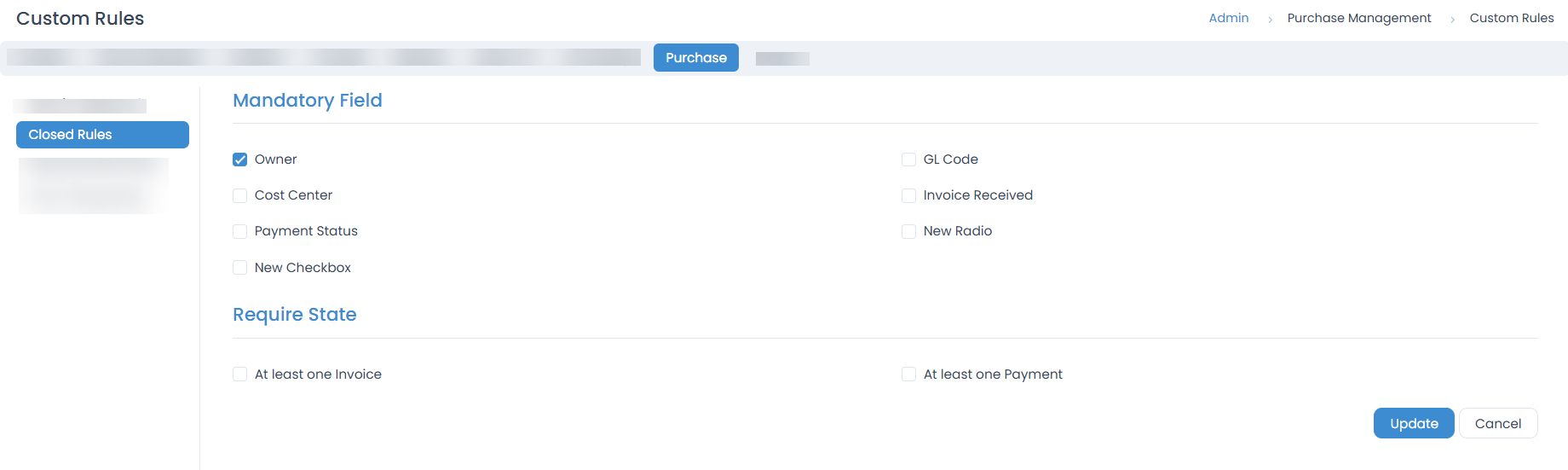
1. Mandatory Field
Specifies fields that must be completed before the purchase order is closed.
- Owner: Ensures a responsible owner is assigned.
- Cost Center: Requires specifying the cost center.
- Payment Status: The final payment status must be updated.
- GL Code: The General Ledger code must be present.
- Invoice Received: Confirms that the invoice has been received.
2. Require State
Defines dependencies that must be satisfied before closure.
- At least one Invoice: Prevents closure if no invoice has been logged against the purchase order.
- At least one Payment: Prevents closure if no payment has been logged.
Required Note Rules
The Required Note Rules section allows administrators to enforce that technicians add mandatory notes whenever specific actions or field changes occur on a purchase order.

1. User Interaction
- Purchase Order Closure: Enforces that a note must be added when closing a purchase order.
- Purchase Order Cancellation: Requires a note when a purchase order is cancelled.
2. Purchase Updated
Specifies which field changes require the user to provide a note.
- Owner: A note must be added when changing the owner.
- Cost Center: Requires a note when the cost center is updated.
- GL Code: Requires a note when the GL code is changed.
Show Dialog Rules
The Show Dialog Rules section allows administrators to configure confirmation prompts that appear when certain key fields of a purchase order are updated.

1. Purchase Updated
- Owner: Show a dialog when the owner is reassigned.
- Cost Center: Display confirmation when the cost center is updated.
- GL Code: Confirm changes to the GL Code.
Example Scenario: You cannot close a Purchase Order until an Owner is assigned to it.
