Flow Analytics
Flow Analytics enables you to analyze and visualize flow data across all devices sending flow to the Motadata ObserveOps (formerly known as AIOps) server. It provides a structured and drill-down view of traffic patterns, helping you understand network behavior, identify bottlenecks, and optimize infrastructure performance.
With Flow Analytics, you can gain insights into traffic distribution, interface utilization, application usage, and communication patterns across your network.
Navigation
Go to Menu, Select Flow Explorer  . After that, Select Flow Analytics. The Flow Analytics screen is now displayed.
How to use Flow Analytics?
Viewing Flow Sources
When you open the Flow Analytics tab, you will see a list of all devices sending flow data to the Motadata ObserveOps server.
Each entry provides a summary of the flow data associated with the device.
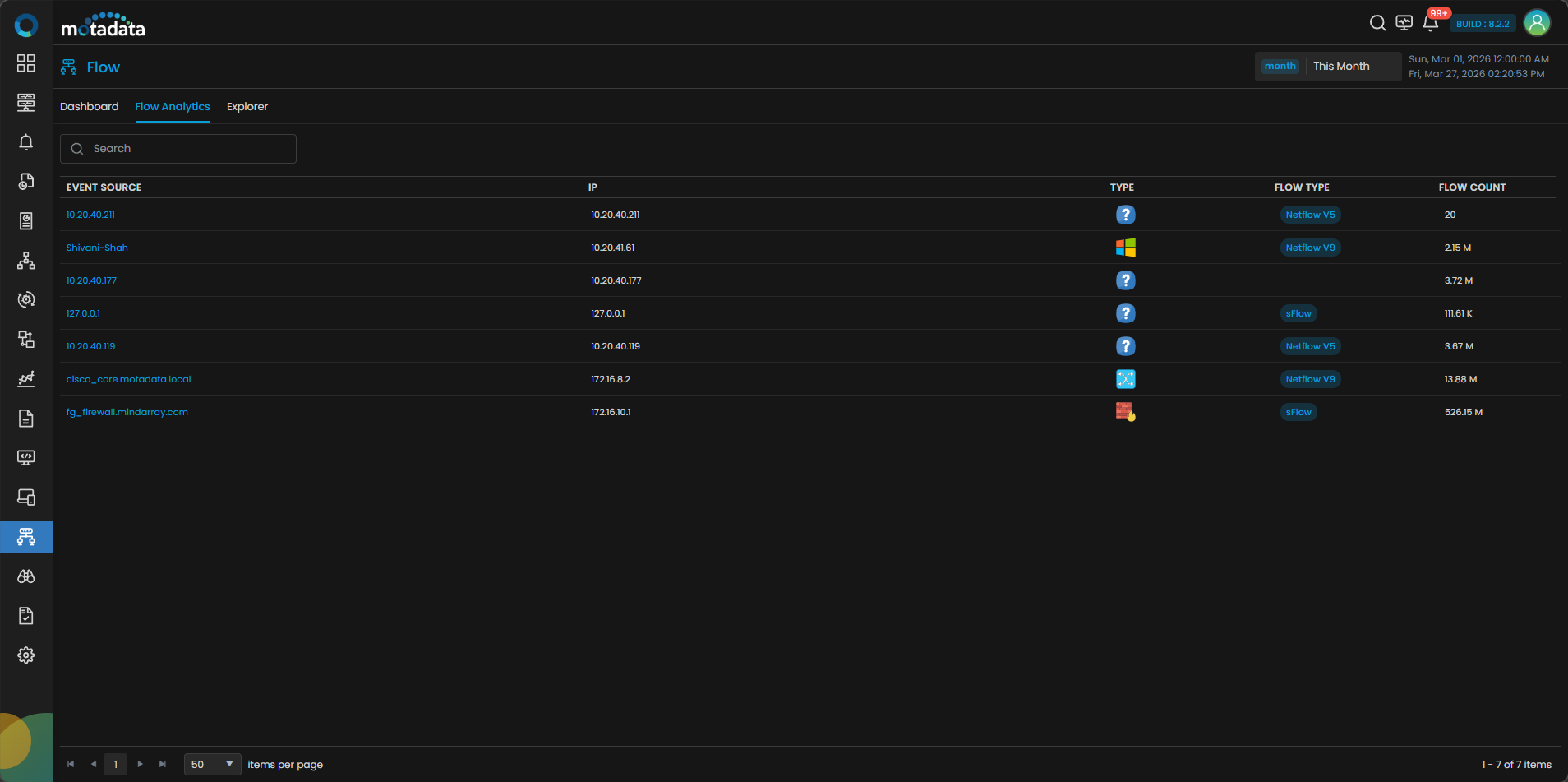
| Option | Description |
|---|---|
| Event Source | Displays the name of the device sending flow data. |
| IP | Shows the IP address of the device. |
| Type | Indicates the device type or classification. |
| Flow Type | Displays the type of flow protocol used (for example, NetFlow or sFlow). |
| Flow Count | Represents the total number of flows received from the device. |
Viewing Flow Details
Click on any Event Source to open detailed flow analytics for that device.
The Flow Analytics screen consists of multiple tabs that help you analyze traffic from different perspectives.
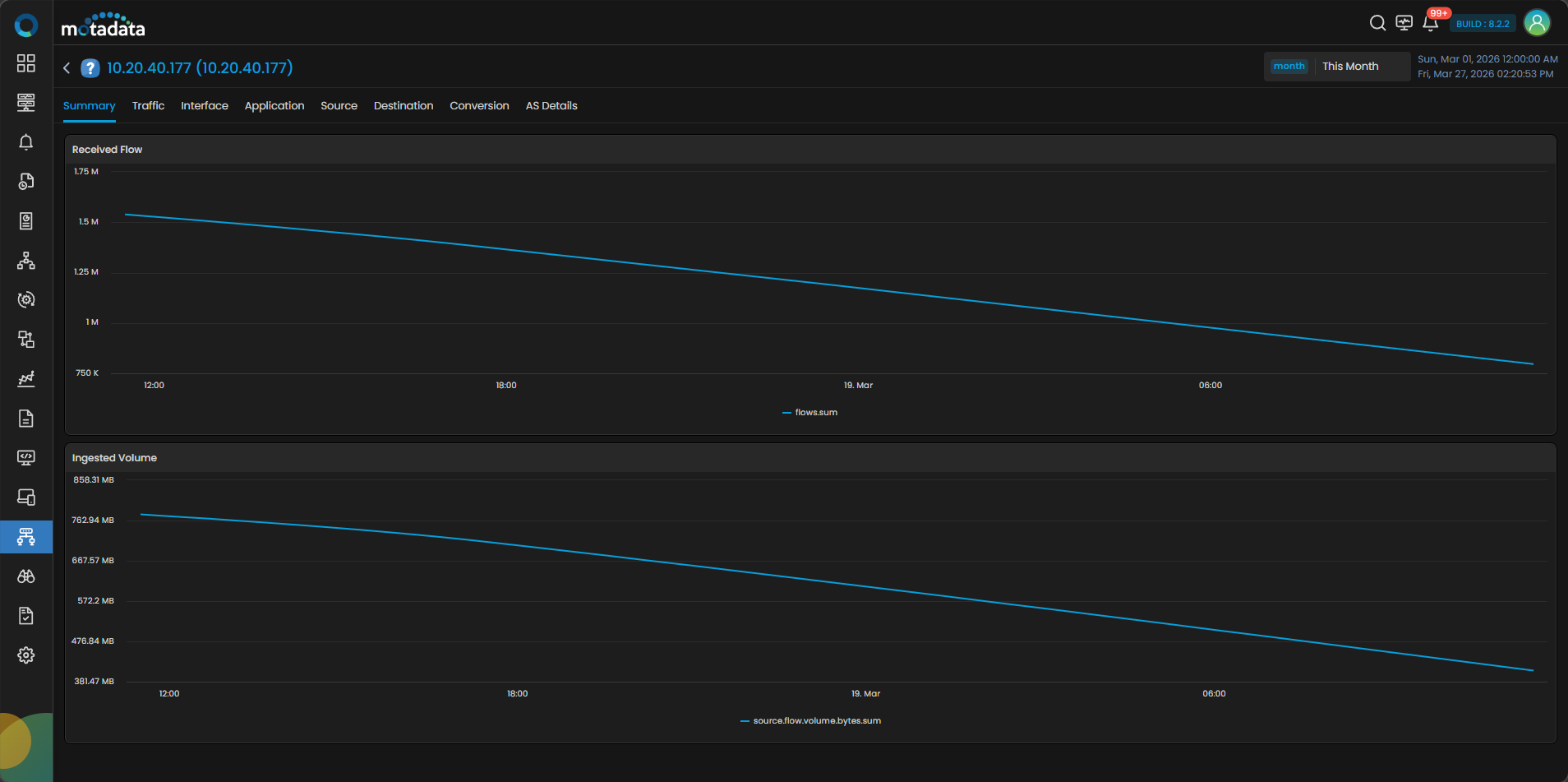
Flow Analytics Tabs
Summary
The Summary tab is selected by default.
This tab provides an overview of the flow data:
- Received Flow Trend shows the trend of incoming flow data over time.
- Ingested Volume displays the total volume of flow data processed.
Traffic
The Traffic tab provides detailed insights into traffic patterns.
It includes:
- Traffic Trend showing ingress and egress traffic.
- Volume Trend representing data volume over time.
- Traffic Summary displaying:
- Minimum Speed
- Maximum Speed
- Average Speed
- Total Volume
Interface
The Interface tab provides interface-level visibility into traffic.
- Displays traffic trends for each interface.
- Provides a summary of interface-wise traffic.
Additional Actions
- Click on any Interface Name to open the interface side panel.
- The side panel displays flow analytics specific to that interface.
- By default, the Summary tab is selected in the side panel.
Additional Field
It displays the timestamp at which the last flow was received from the interface.|
Application
The Application tab helps you analyze traffic distribution based on applications.
- Displays incoming and outgoing traffic per application.
- Provides a summarized view of application usage.
Source
The Source tab shows where the traffic is originating from.
It includes:
- Traffic grouped by source IP
- Network-level traffic distribution
- Geolocation-based traffic insights
Destination
The Destination tab shows where the traffic is going.
It includes:
- Traffic grouped by destination IP
- Network-level distribution
- Geolocation-based mapping
Conversion
The Conversion tab provides protocol-level insights.
- Displays traffic distribution by protocol
- Shows DSCP-based traffic classification
AS Details
The AS Details tab provides Autonomous System-level visibility.
- Displays AS Name and AS Number
- Shows organization details
- Provides traffic distribution per AS
Interface Side Panel – Flow Analytics
The Flow Analytics tab is also available in the interface side panel.
- Opened by clicking an Interface Name
- Displays flow data specific to that interface
- Summary tab is selected by default
- All tabs follow the same structure as the main Flow Analytics view
Actions available on Flow Analytics
Search flow sources
Use the search bar to quickly locate specific devices.
View detailed flow insights
Click on any event source to drill down into traffic analytics.
Switch between tabs
Navigate between Summary, Traffic, Interface, and other tabs for deeper analysis.
Analyze interface-level flow
Click on interface names to view interface-specific flow behavior.
Benefits of Flow Analytics
- Provides centralized visibility of all flow-enabled devices
- Enables deep traffic analysis across multiple dimensions
- Helps identify traffic patterns and anomalies
- Supports better capacity planning and network optimization