NCCM Compliance
The Compliance tab in Motadata ObserveOps (formerly known as AIOps) provides a centralized view of compliance posture across all NCCM-managed devices. It enables administrators to monitor rule evaluation results, identify violations, and analyze compliance trends over time.
This view helps in quickly understanding how well the infrastructure aligns with defined compliance policies and benchmarks.
Navigation
Go to Menu. Select NCCM  . After that, select the tab Compliance.
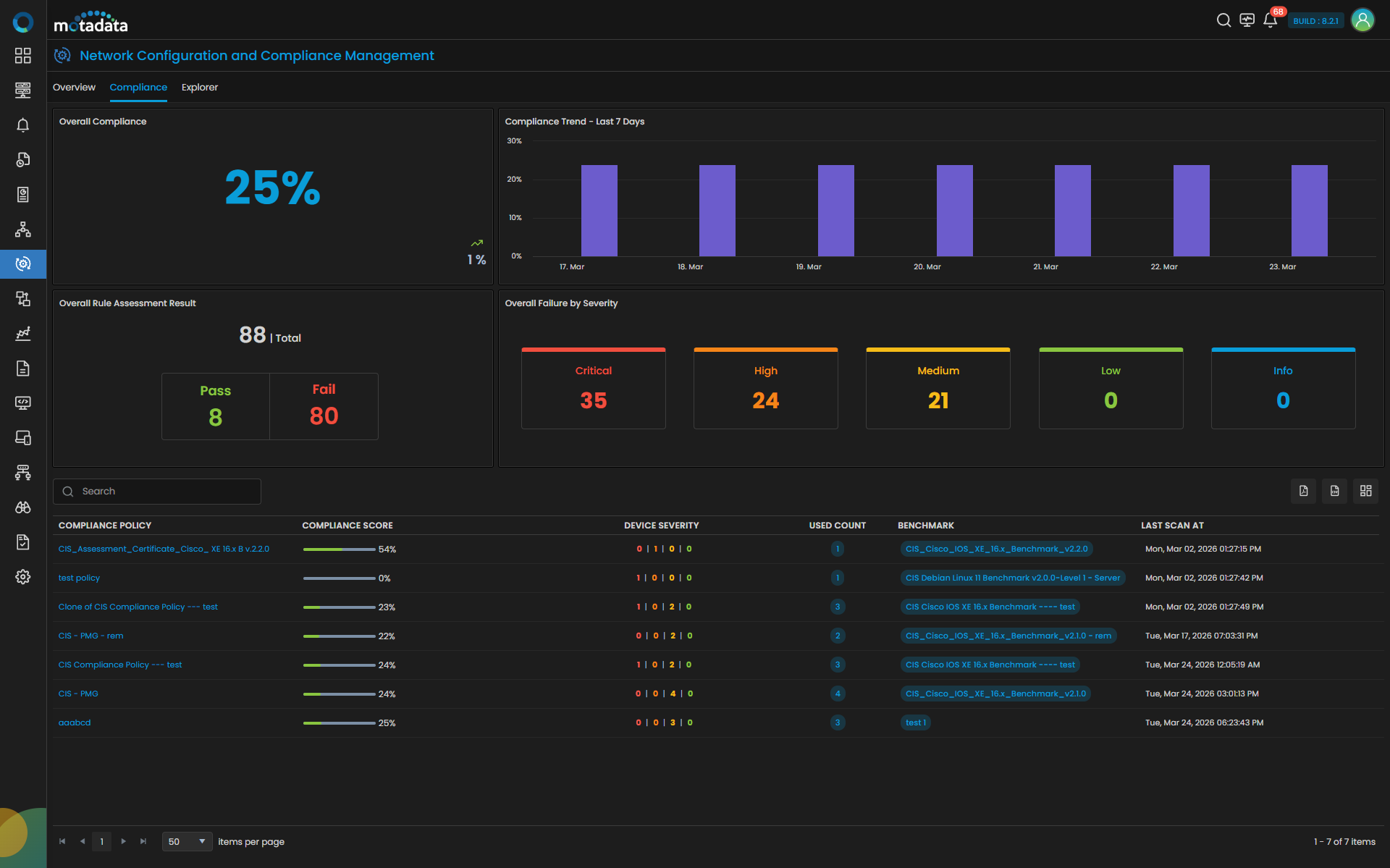
Compliance Overview
The Compliance screen is divided into multiple sections that provide both summary-level and detailed insights.
Overall Compliance
Displays the aggregated compliance percentage across all executed compliance policies.
- Represents overall compliance posture
- Calculated based on rule evaluation results
- Helps track improvement or degradation over time
Compliance Trend
Displays a time-based trend of compliance scores.
- Visual representation of compliance over recent days
- Helps identify patterns and deviations
- Useful for auditing and reporting
Overall Rule Assessment Result
Provides a summary of total rules evaluated across all policies.
- Total Rules: Total number of rules executed
- Pass: Number of rules successfully compliant
- Fail: Number of rules that violated compliance
Drill-down Behavior
- Selecting Pass opens a detailed view of all rules that passed
- Selecting Fail opens a detailed view of all rules that failed
The drill-down view includes:
| Field | Description |
|---|---|
| Rule | Name of the compliance rule evaluated |
| Device Scanned | Number of devices on which the rule was evaluated |
This allows administrators to quickly identify which rules are compliant and which require attention.
Overall Failure by Severity
Displays rule violations categorized by severity levels:
- Critical
- High
- Medium
- Low
- Info
Each severity tile represents the number of failed rules in that category.
Drill-down Behavior
- Selecting any severity (e.g., Critical) opens a detailed list of failed rules under that severity
The drill-down includes:
| Field | Description |
|---|---|
| Rule | Name of the rule that failed |
| Device Scanned | Number of affected devices |
This helps prioritize remediation efforts based on severity.
Compliance Policy Summary Table
The lower section of the screen displays all executed compliance policies.
| Field | Description |
|---|---|
| Compliance Policy | Name of the compliance policy executed |
| Compliance Score | Percentage score based on rule evaluation |
| Device Severity | Distribution of severity levels across evaluated devices |
| Used Count | Number of devices where the policy is applied |
| Benchmark | Associated compliance benchmark |
| Last Scan At | Timestamp of last policy execution |
This table provides a quick overview of compliance performance across different policies.
Key Capabilities
- Centralized compliance visibility across devices
- Rule-level and severity-level analysis
- Drill-down insights for faster troubleshooting
- Historical trend tracking for audit readiness
The Compliance tab acts as the analytical layer of NCCM, transforming rule execution data into actionable insights. It enables administrators to identify violations, prioritize remediation, and continuously improve compliance posture across the network infrastructure.