Viewing Announcements
Stay informed about important organizational updates, system maintenance, and upcoming activities through the announcements displayed on your Support Portal dashboard.
Announcements are formal communications from your IT administrators that provide important information about system updates, maintenance schedules, policy changes, and other organizational news. These messages appear on your Support Portal dashboard and help you stay informed about matters that may affect your work or access to services. They serve several purposes like:
- System Maintenance Notifications
- Policy Updates
- Service Updates
- Emergency Notifications
- Planned Downtime: Inform about scheduled maintenance windows
- System Updates: Software or infrastructure updates
- Performance Notifications: System performance issues or improvements
- Security Updates: Changes to security policies or procedures
- Process Changes: Updates to request or approval workflows
- Access Changes: Modifications to user permissions or access rights
- New Features: Introduction of new portal features or capabilities
- Service Changes: Updates to existing services or applications
- Training Opportunities: Information about new training sessions or resources
- Critical Issues: Urgent system problems or security alerts
- Immediate Actions: Required actions from users
- Emergency Contacts: Important contact information during emergencies
Announcements are only visible when they are active and running.
Access Methods
Dashboard Display
Announcements appear prominently on your Support Portal home page in the Announcements section. This section typically displays:
- Up to 4 announcements at a time on the main dashboard
- Announcement subject and brief preview
- Date information showing when the announcement was posted
- Visual indicators for different types of announcements
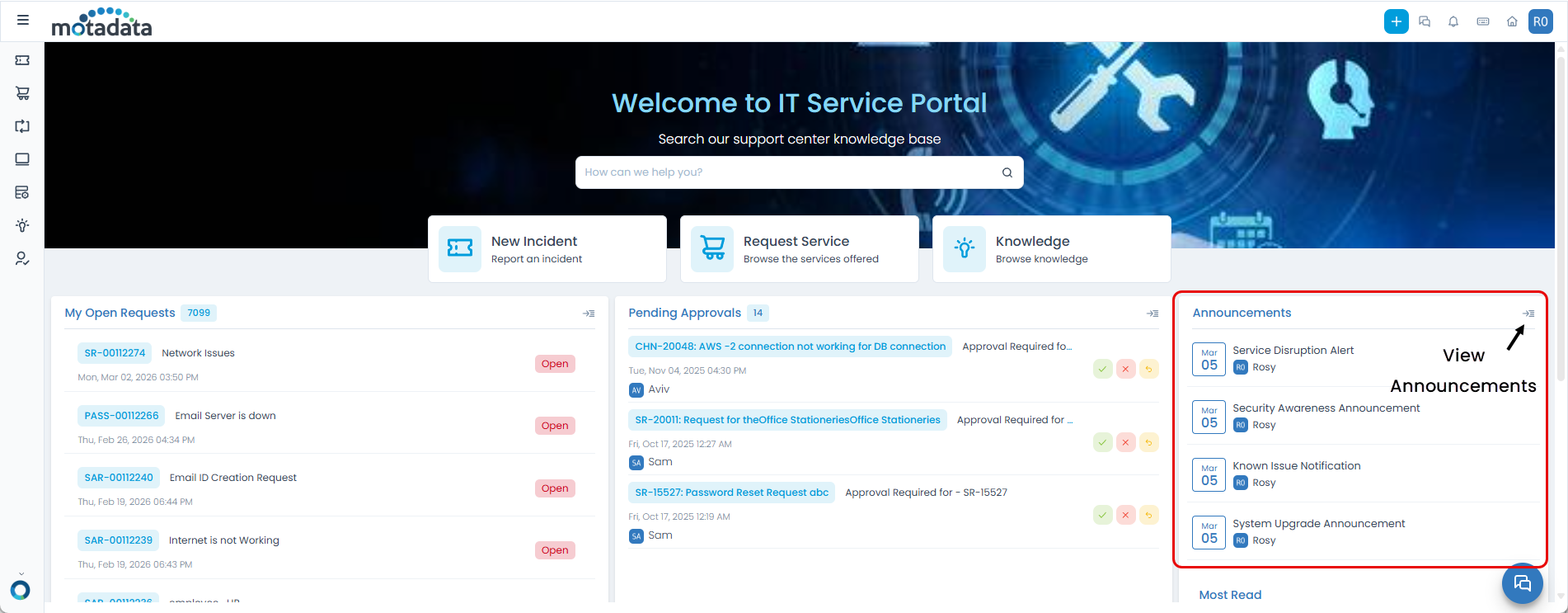
Announcement Section Layout
The announcements section on your dashboard includes:
- Announcement Cards: Each announcement appears as a card with the subject and preview
- View All Button: Click to see all available announcements if more than 4 are active
- Announcement Icon: Click the announcement icon to access the full announcements list
Viewing Details
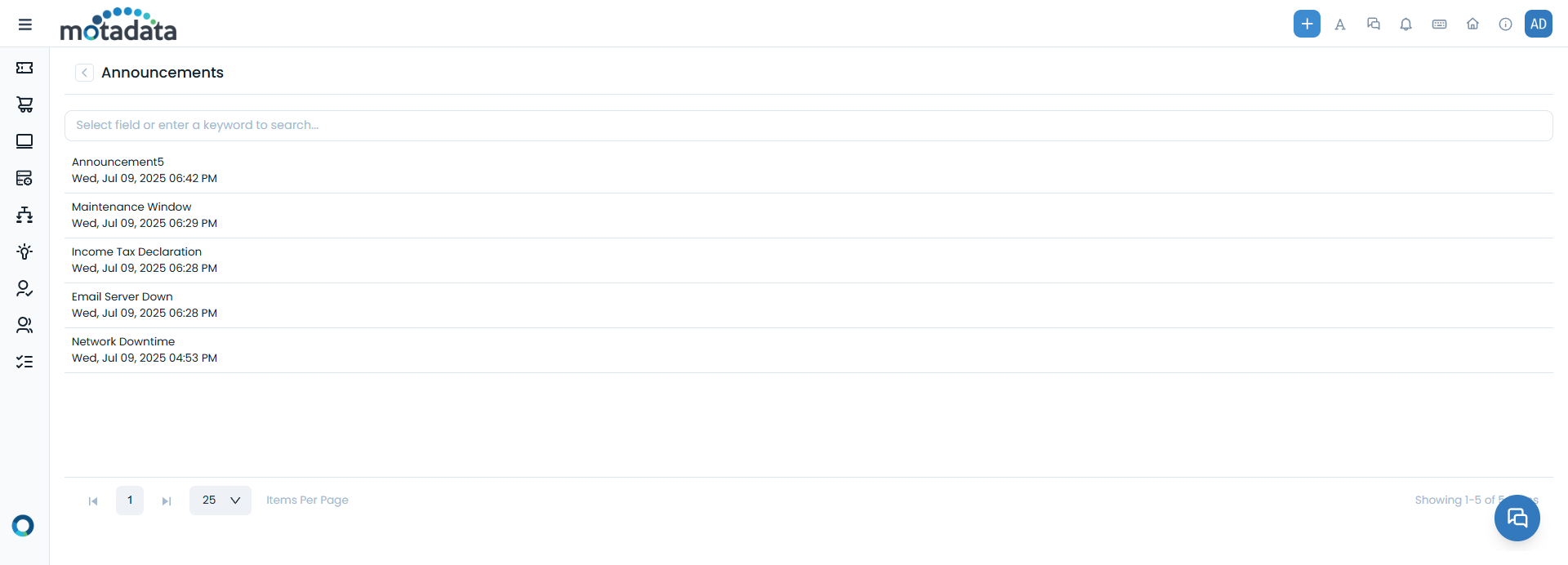
Step 1: Click the announcement icon in the header or dashboard
Step 2: View the announcements list showing all active announcements
Step 3: Click on any announcement to read the full details
The announcement icon is typically located in the header navigation or within the announcements section for easy access to all active announcements.
Permissions and Access
The announcements you can see depend on your user permissions and the administrator's configuration:
- Public Announcements
- User-Specific Announcements
- Visible to everyone accessing the Support Portal
- No login required to view these announcements
- General information that applies to all users
- Visible only to logged-in users with appropriate permissions
- Targeted information for specific user groups or departments
- Role-based announcements relevant to your position or department
Best Practices
- Regular Check-ins
- Understanding Priority
- Taking Action When Needed
- Check announcements daily when you log into the Support Portal
- Review new announcements before starting your work
- Stay updated on any changes that might affect your workflow
- Read all announcements but pay special attention to urgent ones
- Look for action items that require your response or attention
- Note any deadlines or time-sensitive information
- Follow instructions provided in announcements
- Contact support if you need clarification on announcement content
- Report issues if you encounter problems mentioned in announcements
Troubleshooting
Common Issues
| Problem | Solution |
|---|---|
| No Announcements Visible | Check with administrator, verify permissions, contact IT support |
| Cannot Access Details | Refresh page, clear cache, contact support |
| Missing Important Announcements | Contact administrator, check permissions, ask about recent announcements |
Getting Help
If you need assistance with announcements:
Step 1: Contact Your Administrator - For questions about announcement content or access
Step 2: IT Support - For technical issues with viewing announcements
Step 3: Knowledge Base - Search for articles about announcement features
Step 4: Chat Support - Get immediate help through the chat feature