Inbuilt Runbooks
Inbuilt runbooks are ready-to-run automations that ship with ObserveOps. Each one addresses a common operational task so the NOC team can run a first check or a first fix from the Runbook screen, without logging in to the server.
Inbuilt runbooks are grouped by Runbook Category on the Runbook screen. The categories cover diagnostics, performance monitoring, troubleshooting, system management, log collection, network configuration, and integrations.
Prerequisites
- A monitor of the type the runbook targets (Windows, Linux, Solaris, SNMP device, VMware host, Cisco or Juniper device).
- The credential profile saved on the monitor must have the access the runbook needs (WinRM for Windows, SSH for Linux and Solaris, SNMP community or v3 for SNMP, API credentials for VMware or cloud sources).
- Reachability from the ObserveOps server to the monitor over the port the runbook uses.
Navigation
Go to Settings  , open Plugin Library
 , and select Runbook. The Runbook screen lists every inbuilt runbook along with any custom runbooks created in this instance.
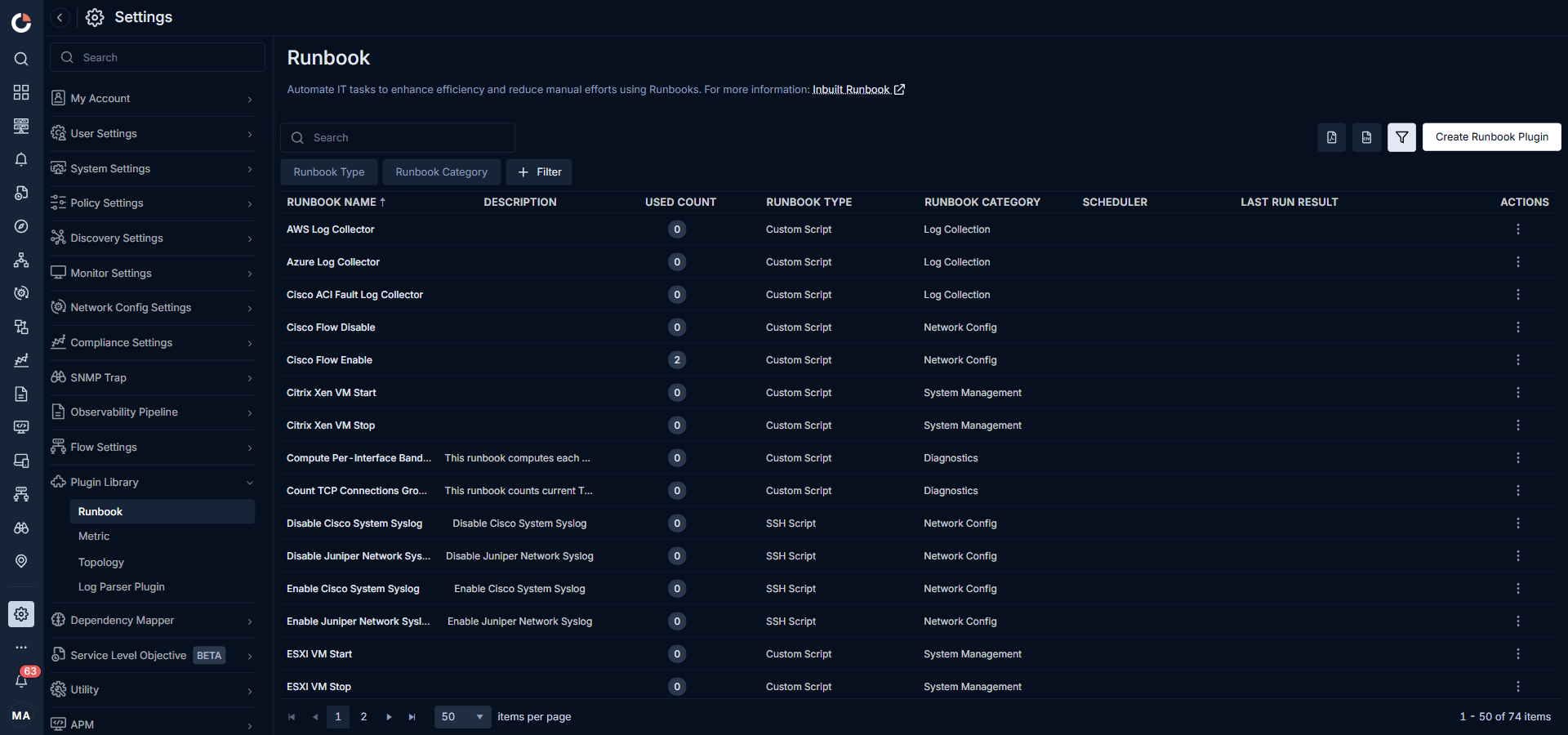
Runbook Screen Columns
The grid shows the following details for every runbook.
| Column | Description |
|---|---|
| Runbook Name | The ready-made name of the runbook. Inbuilt runbook names cannot be edited. |
| Description | A short line on what the runbook returns or does. |
| Used Count | How many monitors currently have this runbook assigned. |
| Runbook Type | The protocol or script engine the runbook uses: - Custom Script for GO or shell scripts the ObserveOps agent runs. - SSH Script for commands sent over SSH. - Powershell for Windows PowerShell scripts. - SNMP for SNMP walks and gets. - Ping and Trace Route for the built-in network checks. - MAC Scanner for the ARP sweep. |
| Runbook Category | The functional group the runbook belongs to: Diagnostics, Performance Monitoring, Troubleshooting, System Management, Log Collection, Network Config, or Integration. |
| Scheduler | The schedule assigned to the runbook, if any. Blank for runbooks that only run on demand. |
| Last Run Result | The outcome of the most recent execution: Succeeded or Failed. |
| Actions | The row has two inline controls: - Run (play icon) runs the runbook once against its assigned monitors. Shown only when the runbook has at least one assigned monitor. - Actions menu (three-dot icon) opens the action list for an inbuilt runbook: - Assign Monitor attaches the runbook to one or more monitors. - Remove Assigned Monitor detaches it from a monitor. - Schedule Runbook runs it at a fixed time or interval. |
Inbuilt runbooks are read-only. The row menu exposes only Assign Monitor, Remove Assigned Monitor, and Schedule Runbook. Clone Runbook, Edit Runbook, and Delete Runbook appear only on the row menu of user-created runbooks. The view page keeps every field disabled and shows only a Test button.
Viewing an Inbuilt Runbook
Click a runbook name to open its view page. The page shows the name, description, category, script language, the script source, any script variables, and a Test button at the bottom.
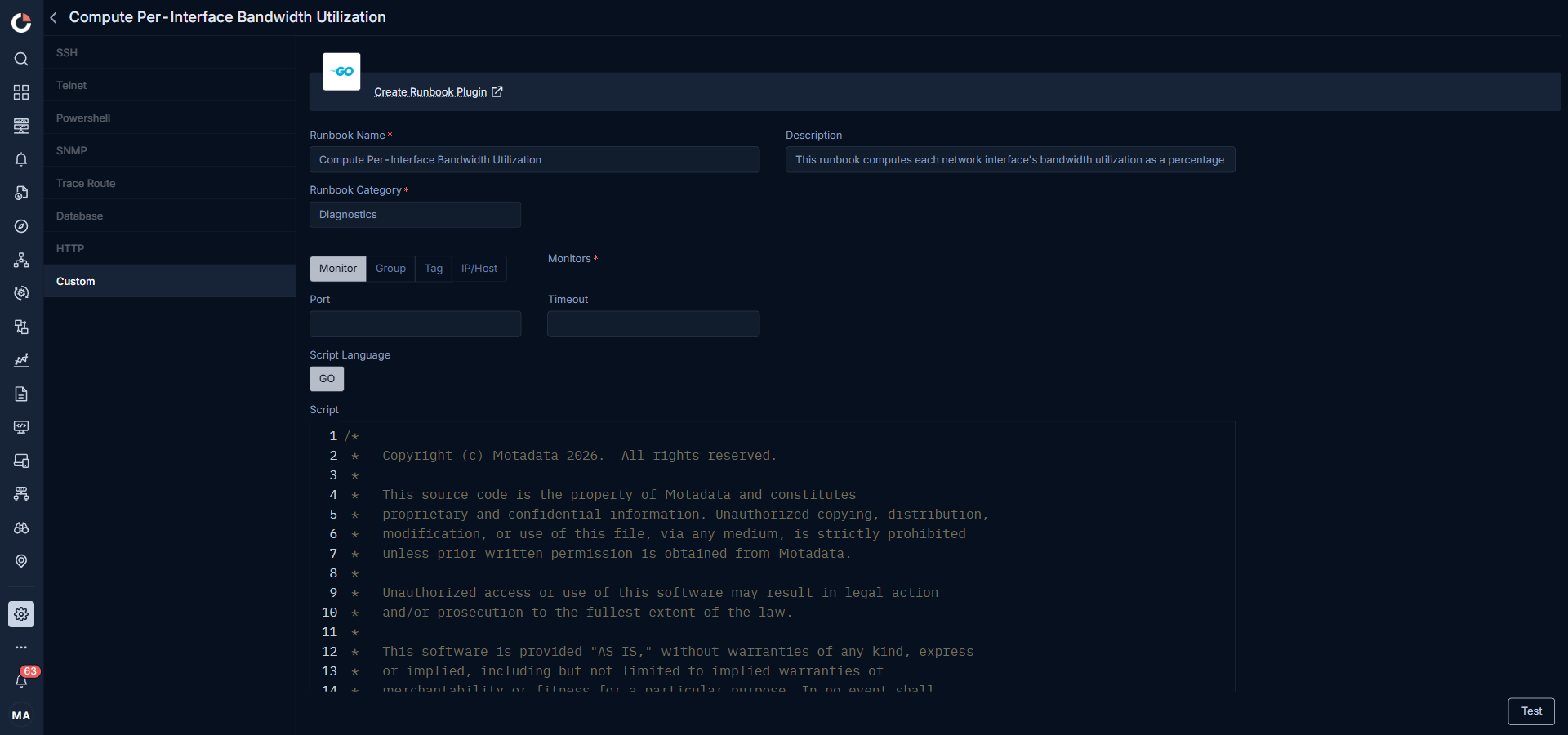
The variable placeholder format used in inbuilt scripts is $$$variable.name$$$. The same placeholder must appear in the script wherever the value is read.
Inbuilt Runbooks by Category
Diagnostics (25)
Diagnostic runbooks read state from a host or device and return it. They do not change the server.
| Runbook | Description |
|---|---|
| Compute Per-Interface Bandwidth Utilization | Returns each network interface's bandwidth utilization as a percentage of its current link speed. |
| Count TCP Connections Grouped By State | Counts current TCP connections grouped by connection state. |
| List Automatic-Start Services That Are Stopped | Lists Windows services set to start automatically that are currently stopped. |
| List Top 5 CPU-Consuming Processes | Returns the top 5 processes by cumulative CPU time in seconds. |
| List UDP Endpoints With Owning Process | Lists open UDP endpoints on the host along with each endpoint's owning process. |
| MAC Scanner | Scans the network for MAC addresses and returns the IP-to-MAC map. |
| Ping | Tests reachability of a host by sending ICMP echo requests and reports round-trip time. |
| Show TCP Global Settings And Tuning State | Reads the active TCP settings (autotuning, congestion provider, scaling, dynamic port range) for every TCP setting template on the host. |
| SNMP Next Hop | Retrieves the next hop in a routing path over SNMP. |
| Trace Route | Returns the hops a packet takes to reach a destination. |
| Windows Active Power Plan Query | Reads the active Windows power scheme and returns its GUID and friendly name. |
| Windows Commit Charge Utilization | Reads the total committed memory and the percentage of the commit limit currently in use. |
| Windows Configured DNS Server Addresses | Reads the IPv4 DNS server addresses configured on every interface that has them, per interface. |
| Windows CPU Privileged Time | Reads the percentage of total CPU time spent in privileged kernel mode. |
| Windows Listening TCP Ports | Lists every listening TCP endpoint with its local address, port, process id, and process name. |
| Windows Network Adapter Errors And Discards | Reads cumulative byte, packet error, and discard counters for every network adapter, per adapter. |
| Windows Network Adapter Status And Link Speed | Reads operational status, media connection state, and link speed for every adapter, with a count of adapters that are enabled but disconnected. |
| Windows NTFS And Disk Error Events | Reads the most recent NTFS, disk, and volume-manager error and critical events from the System event log. |
| Windows Page File Size And Usage | Reads allocated size, current usage, and peak usage of every configured page file. |
| Windows Physical Disk Health Status | Reads SMART-derived health status, operational status, media type, and size of every physical disk, with a count of disks reporting anything other than healthy. |
| Windows Recent Event Log Errors | Reads the last 40 Error or Critical events from a named Windows event log, defaulting to System. |
| Windows Top Processes By Handle Count | Returns the top 5 processes by handle count, with process id, name, handle count, and thread count. |
| Windows Top Processes By Working Set | Returns the top 5 processes by working set, with process id, name, working set, and private bytes in megabytes. |
| Windows Unexpected Shutdown Events | Returns the last 20 System log events recording an unexpected shutdown, a dirty power-loss reboot, or a shutdown/restart reason, with a count of unexpected versus planned events. |
| Windows Volume Health And Operational Status | Reads health and operational status for every volume, including drive type, filesystem type, and free space. |
System Management (17)
System management runbooks change state on the target: start or stop a VM, delete temp files, stop a service, shut down a host. They need confirmation before they run.
| Runbook | Description |
|---|---|
| Citrix Xen VM Start | Starts a virtual machine on the Citrix Xen platform. |
| Citrix Xen VM Stop | Stops a virtual machine on the Citrix Xen platform. |
| ESXI VM Start | Starts a virtual machine on an ESXi host. |
| ESXI VM Stop | Stops a virtual machine on an ESXi host. |
| HyperV VM Start | Starts a virtual machine on a Hyper-V host. |
| HyperV VM Stop | Stops a virtual machine on a Hyper-V host. |
| VMWare Reset VM | Hard-resets a VMware virtual machine (equivalent of a power cycle). |
| VMWare Shutdown Guest OS | Issues a guest-OS shutdown through VMware Tools. |
| VMWare Snapshot VM | Takes a snapshot of a VMware virtual machine. |
| VMWare Stand by Guest OS | Puts the guest OS into standby through VMware Tools. |
| VMWare Start VM | Powers on a VMware virtual machine. |
| VMWare Stop VM | Powers off a VMware virtual machine. |
| VMWare Suspend VM | Suspends a VMware virtual machine. |
| Windows Delete Old Files From The Temp Folder | Deletes files older than one day under C:\Windows\Temp, recursively, and returns how many files were removed. |
| Windows Delete Rotated CBS Component-Store Logs | Deletes rotated CBS component-store log and cab archive files under C:\Windows\Logs\CBS, keeping the active CBS.log, and returns how many files were removed. |
| Windows Shutdown System | Shuts down the Windows host. |
| Windows Stop Service | Stops the Windows service passed as a parameter. |
Troubleshooting (7)
Troubleshooting runbooks act on a running problem: terminate a stuck process, restart a service, reboot a host.
| Runbook | Description |
|---|---|
| Linux Process Kill | Terminates a Linux process by name or PID. |
| VMWare Reboot Guest OS | Issues a guest-OS reboot through VMware Tools. |
| VMWare Refresh Data Store | Refreshes a VMware data store. |
| Windows Process Kill | Terminates a Windows process by PID. |
| Windows Reboot System | Reboots the Windows host. |
| Windows Service Restart | Stops and starts the Windows service passed as a parameter. |
| Windows Start Service | Starts the Windows service passed as a parameter. |
Performance Monitoring (7)
Performance runbooks return the top resource consumers on the host.
| Runbook | Description |
|---|---|
| Linux Top 10 Processes | Returns the top 10 CPU-consuming processes on a Linux host. |
| Linux Top 10 Processes By Memory | Returns the top 10 memory-consuming processes on a Linux host. |
| Solaris Top 10 Processes | Returns the top 10 CPU-consuming processes on a Solaris host. |
| Solaris Top 10 Processes By Memory | Returns the top 10 memory-consuming processes on a Solaris host. |
| Windows Active Services | Lists all services currently in a Running state on the Windows host. |
| Windows Top 10 Processes | Returns the top 10 CPU-consuming processes on a Windows host. |
| Windows Top 10 Processes by Memory | Returns the top 10 memory-consuming processes on a Windows host. |
Log Collection (8)
Log collectors pull logs from an external source and feed them into ObserveOps log management.
| Runbook | Description |
|---|---|
| AWS Log Collector | Collects logs from AWS services into ObserveOps. |
| Azure Log Collector | Collects logs from Azure services into ObserveOps. |
| Cisco ACI Fault Log Collector | Collects fault logs from Cisco ACI. |
| O365 Exchange Log Collector | Collects audit logs from O365 Exchange. |
| O365 General Log Collector | Collects general audit logs from O365. |
| O365 SharePoint Log Collector | Collects audit logs from O365 SharePoint. |
| VMware vCenter Task Log Collector | Collects task events from VMware vCenter. |
| Windows Event Log Collector | Collects Windows event logs over WinRM. |
Network Config (7)
Network config runbooks change device-side settings on Cisco, Juniper, or Windows network stacks.
| Runbook | Description |
|---|---|
| Cisco Flow Disable | Disables NetFlow export on a Cisco device. |
| Cisco Flow Enable | Enables NetFlow export on a Cisco device. |
| Disable Cisco System Syslog | Disables system syslog on a Cisco device. |
| Disable Juniper Network Syslog | Disables network syslog on a Juniper device. |
| Enable Cisco System Syslog | Enables system syslog on a Cisco device. |
| Enable Juniper Network Syslog | Enables network syslog on a Juniper device. |
| Windows Set High Performance Power Plan | Sets the active Windows power scheme to High performance and returns the resulting scheme with whether the host was changed. |
Integration (3)
Integration runbooks forward alerts and messages to external chat and messaging platforms.
| Runbook | Description |
|---|---|
| Google Chat Integration | Posts an alert or message to a Google Chat space over the incoming webhook. |
| Telegram Integration | Posts an alert or message to a Telegram chat through the bot API. |
| WhatsApp Integration | Posts an alert or message to a WhatsApp number through the configured gateway. |
Running an Inbuilt Runbook
- Open the row menu on the runbook and click Assign Monitor.
- In the Assign Monitor panel, select one or more monitors from the list (columns: Severity, Monitor, IP, Type, Groups, Tags) and save.
- Back on the runbook row, click the Run (play) icon. The runbook fires against every assigned monitor.
- If the runbook has an input variable (a drive letter, a port, a service name, a PID, or a path), ObserveOps prompts for it before the run.
- Open the View Result link in the Last Run Result column. The Result For {Runbook Name} drawer opens on the right with one row per run: Monitor, IP, Type, Action Status (Succeeded or Failed), Timestamp, Executed By, and a per-run View Result link.
- Click a row's View Result to open the Action Result drawer, which shows the runbook, description, timestamp, action status, executed by, and the Action Execution Output panel with the raw script output.
A result of Succeeded means the runbook ran, not that the server is healthy. For example, Windows Process Kill on a process that is not running returns Succeeded with the message "is not running".
Failed means the runbook could not run. The reason is shown on the result screen: WinRM connection failed, an input was missing or invalid, or the Windows error text was returned.
Troubleshooting
| Issue | Cause | Fix |
|---|---|---|
| Runbook fails with "WinRM connection failed" | The ObserveOps server cannot reach the Windows host on the WinRM port, or the saved Windows credential is invalid. | Verify the WinRM port in the monitor profile (default 5985 HTTP, 5986 HTTPS), test the credential from the monitor's Test Credential button, and confirm firewall rules. |
| A fix runbook shows the confirmation on the wrong monitor | The runbook was assigned to multiple monitors and the selection carried over. | Cancel the confirmation. Re-open the runbook from the correct monitor's Runbook tab and run it from there. |
| Clone Runbook, Edit, and Delete are missing from the row menu | The row is an inbuilt runbook. Those actions appear only on user-created runbooks. | Create a new runbook from scratch using Create Runbook Plugin and copy the inbuilt script source from its view page as a starting point. |
| Scheduled run does not fire | The monitor is down, the scheduler is paused, or the credential expired. | Open Scheduler on the runbook and confirm the next run time. Check the monitor status and refresh the credential. |