HTTP Runbook
An HTTP runbook issues an HTTP or HTTPS request to a URL, parses the response, and shows the parsed values on the result screen.
When to Use
Use HTTP for REST API checks, web endpoint availability, webhook validation, token refresh calls, and any task that is already exposed over HTTP.
Fields
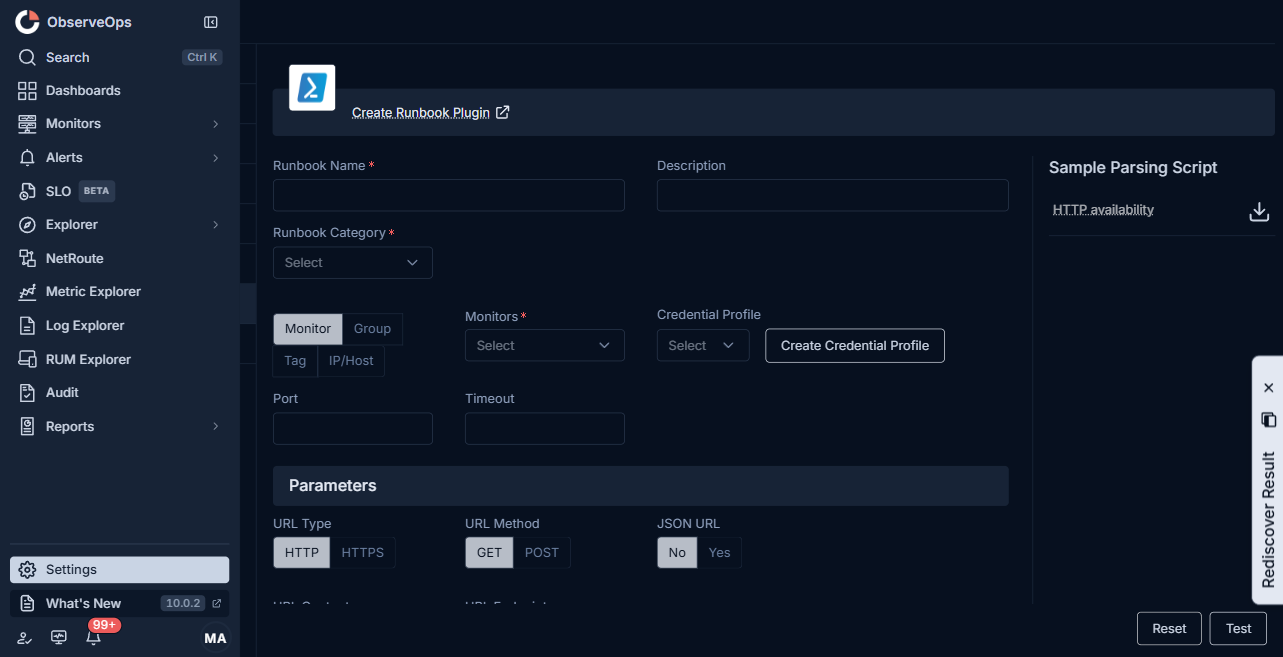
| Field | What to enter |
|---|---|
| Runbook Name | A short, unique name. |
| Description | One line on what the runbook returns. |
| Runbook Category | Diagnostics, Performance Monitoring, Troubleshooting, System Management, Log Collection, Network Config, or Integration. |
| Monitor | Pick by Group, Tag, IP/Host, or Monitors. |
| Credential Profile | The HTTP credential (Basic, Bearer, or custom header set). Click Create Credential Profile if none fits. |
| Port | HTTP or HTTPS port. Defaults to 80 or 443. |
| Timeout | Seconds to wait before marking the run Failed. |
| URL Type | HTTP or HTTPS. |
| URL Method | GET or POST. |
| JSON URL | No or Yes. Yes sends the body as JSON. |
| URL Content | The request body. Shown when URL Method is POST. |
| URL Endpoint | The path portion of the URL that is appended to the monitor's host. |
| Parameters | Query string parameters. Click Add Parameter to add a row of key and value. |
| Headers | Request headers. Click Add Header to add a row of name and value. |
| Script Language | GO or Python, for the parsing script. |
| Parsing Script | Turns the HTTP response into the result values. |
| Add Variable | Prompts the user for a value at run time. Reference it as $$$variable.name$$$ in the parsing script and in URL Endpoint, URL Content, parameters, or headers. |
The right-side Sample Parsing Script > HTTP availability panel shows a working parser you can copy and adjust.
Steps
- Open Settings > Plugin Library > Runbook and click Create Runbook Plugin.
- Pick HTTP from the top menu.
- Pick URL Type and URL Method, and fill URL Endpoint.
- Add Parameters and Headers if the endpoint needs them.
- Fill the parsing script.
- Click Test to issue the request once and show the response and parsed values.
- Click Save.