How to Configure HA Proxy in DMZ
This how-to guides IT Admins and Implementation Consultants to securely deploy ServiceOps using HAProxy in a DMZ, protecting core application and database servers while supporting DR.
In this pattern, an HAProxy in the DMZ accepts public HTTPS traffic and forwards it to the internal Application server, which communicates with the Database server. This minimizes the attack surface and centralizes TLS and access controls at the edge.
Prerequisites
Before starting, review and satisfy the following:
Hardware Requirements
- Application & Database: Split current memory provision equally between App and DB servers.
- HA Proxy: 4 Core CPU, 4 GB RAM, 100 GB Disk.
Port Requirements
| Port | Component(s) | Direction | Purpose |
|---|---|---|---|
| 443 | HA Proxy | Inbound | HTTPS for ServiceOps UI (public) |
| 80 | Application | From HA Proxy | HTTP to Application (if SSL terminates at HAProxy) |
| 443 | Application (optional) | From HA Proxy | HTTPS to Application (if re-encrypting to backend) |
| 5432 | Application ↔ Database | Internal only | Database connectivity |
Choose either HTTP 80 or HTTPS 443 for the backend based on your security policy.
Firewall Configuration Snippets
For Ubuntu (UFW):
sudo ufw allow 443/tcp
sudo ufw allow 5432/tcp
For RHEL/CentOS (firewalld):
sudo firewall-cmd --zone=public --add-port=443/tcp --permanent
sudo firewall-cmd --zone=public --add-port=5432/tcp --permanent
sudo firewall-cmd --reload
Deployment Scenarios for ServiceOps with HAProxy in DMZ
This guide details three common architectural patterns for deploying ServiceOps using HAProxy in a DMZ. Each scenario offers different trade-offs regarding security, performance, and complexity, allowing you to choose the best fit for your organizational needs and compliance requirements.
Before proceeding, review the quick selection guide to identify the most suitable scenario for your deployment.
Quick Selection Guide
- Need fastest proxy→app path, OK hosting app in DMZ? → Scenario 1
- Max security, simplest DMZ footprint (proxy only), App+DB together? → Scenario 2
- Enterprise scale, independent App/DB scaling, strict least-privilege? → Scenario 3
- Scenario 1
- Scenario 2
- Scenario 3
Scenario 1 — HAProxy and ServiceOps App in DMZ; DB in Secured Network
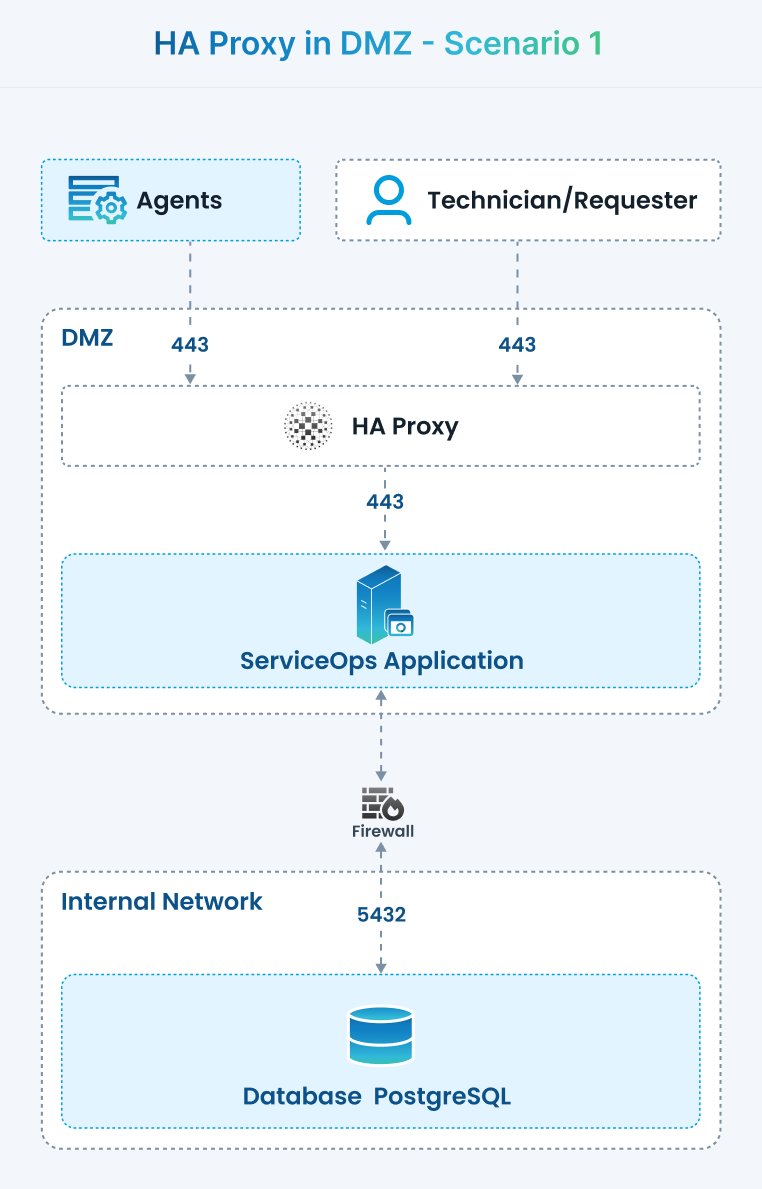 Figure 1: Scenario 1 - HAProxy and ServiceOps App in DMZ; DB in Secured Network
Architecture
- DMZ:
- HAProxy (TLS termination, WAF-like rules, rate limiting)
- ServiceOps App (one or more nodes)
- Secured Network:
- Database Server (ServiceOps DB)
Components & Roles
- HAProxy (DMZ)
- Public entry point on 443, terminates TLS, forwards to ServiceOps App.
- Optional: mTLS for agents/integrations, WAF rules, IP allow/deny lists.
- ServiceOps App (DMZ)
- Hosts the web UI + APIs.
- Initiates outbound DB connections to the secured network.
- Database (Secured)
- Stores all data; not internet-reachable.
- Only the App can reach DB.
Use Cases
- Internet-facing access is required, and you want lower latency between proxy and app.
- Small/medium deployments where hardening the app host in DMZ is acceptable.
Benefits
- Fast path (proxy→app) stays in DMZ.
- DB remains protected inside the secure network.
- Simple to scale app nodes horizontally in DMZ.
Configuration
Firewall / Ports
- Internet → HAProxy (DMZ): 443 (TCP)
- HAProxy (DMZ) → App (DMZ): 80/443 (TCP) (prefer 443)
- App (DMZ) → DB (Secured): DB port (e.g., 5432 for PostgreSQL / 1433 for MS SQL)
- Secured → DMZ (optional): Monitoring/SSH/Ansible as per ops policy
HAProxy (example)
- Place this configuration snippet in
/etc/haproxy/haproxy.cfgto define the frontend and backend for Scenario 1. Adjust IP addresses and certificate paths as per your environment.
# /etc/haproxy/haproxy.cfg
global
  log /dev/log local0
  maxconn 5000

defaults
  log global
  mode http
  timeout connect 5s
  timeout client  60s
  timeout server  60s
  option  httplog

frontend fe_serviceops_https
  bind :443 ssl crt /etc/haproxy/certs/serviceops.pem alpn h2,http/1.1
  http-response set-header Strict-Transport-Security "max-age=31536000"
  acl healthcheck path -i /healthz
  use_backend be_health if healthcheck
  default_backend be_serviceops_app

backend be_serviceops_app
  option httpchk GET /healthz
  http-check expect status 200
  balance leastconn
  # DMZ app nodes
  server app1 10.10.10.21:443 ssl verify none check
  server app2 10.10.10.22:443 ssl verify none check
  # If the app uses in-memory sessions, enable stickiness:
  # cookie SRV insert indirect nocache
  # server app1 10.10.10.21:443 ssl verify none check cookie A
  # server app2 10.10.10.22:443 ssl verify none check cookie B

backend be_health
mode http- Place this configuration snippet in
ServiceOps App
- Configure the ServiceOps Application to connect to the secured network Database host using its hostname/IP, port, and credentials.
- Enforce TLS for the database connection if supported by your database (e.g.,
sslmode=requirefor PostgreSQL).
Notes
- Harden the App hosts in DMZ (OS CIS hardening, minimal packages, auto-patching).
- No direct DMZ → DB exposure from public; traffic goes App→DB only.
- Consider IDS/IPS between DMZ and Secure LAN.
Scenario 2 — HAProxy in DMZ; ServiceOps App + DB together in Secured Network
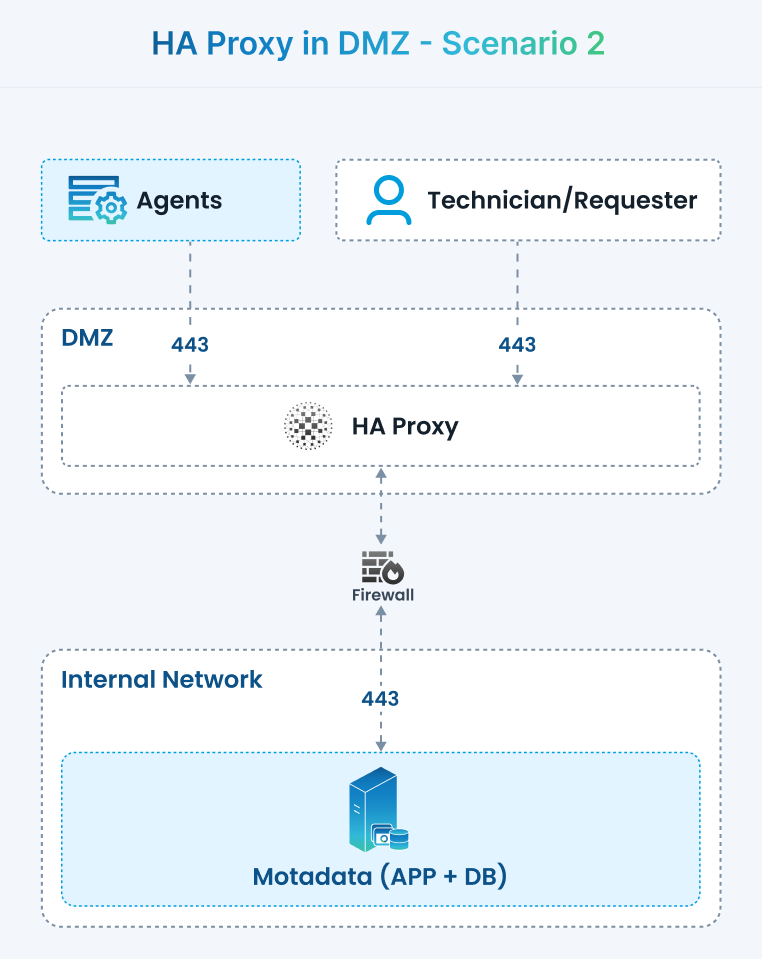 Figure 2: Scenario 2 - HAProxy in DMZ; ServiceOps App + DB together in Secured Network
Architecture
- DMZ: HAProxy (public endpoint)
- Secured Network: ServiceOps App (App + DB on same server or same subnet)
Components & Roles
- HAProxy (DMZ)
- Single entry point; TLS termination (or TLS passthrough if you prefer to terminate inside).
- Health checks to the App VIP in the secure network.
- ServiceOps (App + DB) (Secured)
- App connects locally to DB (socket/localhost or same subnet).
- Not reachable from the internet.
Use Cases
- Maximum security footprint reduction in DMZ.
- Compliance-sensitive environments (App and DB never leave the secure LAN).
- Medium/large orgs with stricter segmentation.
Benefits
- Smallest attack surface in DMZ (only HAProxy exposed).
- Simplified backup/DR of App+DB together.
- Easier compliance and audit boundaries.
Configuration
Firewall / Ports
- Internet → HAProxy (DMZ): 443 (TCP)
- HAProxy (DMZ) → App (Secured): 443 (TCP) (or 80 if TLS ends at app)
- App ↔ DB (Secured): local or LAN DB port only (no DMZ path)
- Block any direct DMZ → DB traffic.
HAProxy (example)
- Place this configuration snippet in
/etc/haproxy/haproxy.cfgto define the frontend and backend for Scenario 2. Adjust IP addresses and certificate paths as per your environment.
  frontend fe_serviceops_https
    bind :443 ssl crt /etc/haproxy/certs/serviceops.pem alpn h2,http/1.1
    option forwardfor header X-Forwarded-For
    default_backend be_serviceops_inside

  backend be_serviceops_inside
    option httpchk GET /healthz
    http-check expect status 200
    balance roundrobin
    # Internal VIP or node(s) in the secured network
server appvip 172.16.20.10:443 ssl verify none check send-proxy- Place this configuration snippet in
If the App needs real client IPs, enable PROXY protocol on App side (web server must accept
send-proxy).ServiceOps App
- If terminating TLS at the Application, use a certificate for the internal FQDN and add HAProxy as a trusted source for
X-Forwarded-*headers. - For local DB connections, harden authentication, rotate credentials, and enable TLS if supported.
- If terminating TLS at the Application, use a certificate for the internal FQDN and add HAProxy as a trusted source for
Notes
- The health check path
/healthz(or equivalent) must be allowed through the firewall. - Use split-horizon DNS if the internal FQDN differs from the public FQDN.
Scenario 3 — HAProxy in DMZ; ServiceOps App and DB on separate servers in Secured Network
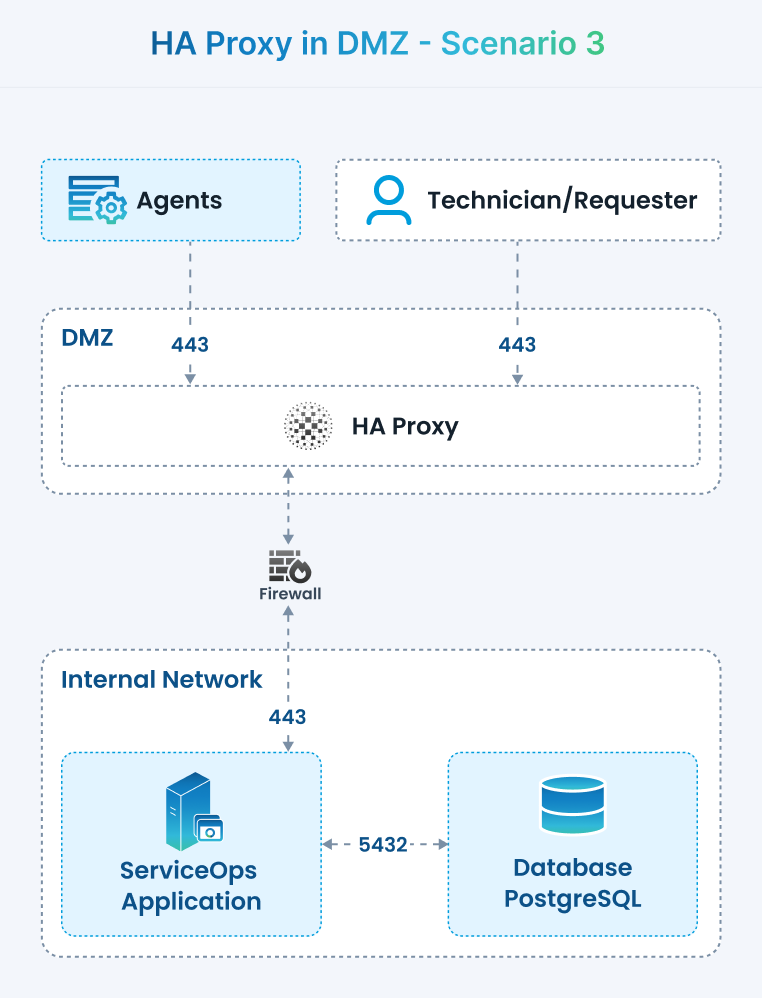 Figure 3: Scenario 3 - HAProxy in DMZ; ServiceOps App and DB on separate servers in Secured Network
Architecture
- DMZ: HAProxy
- Secured Network: ServiceOps App (one or more servers) and separate DB server/cluster
Components & Roles
- HAProxy (DMZ)
- Public TLS endpoint; load-balances to multiple App servers (secured network).
- Optional: per-path routing (e.g.,
/api,/ui) if you split services.
- ServiceOps App (Secured)
- Stateless or sticky-session web/app tier.
- Connects to DB on a separate secured host/cluster.
- Database (Secured, separate)
- Dedicated DB server or HA cluster (e.g., PostgreSQL/Patroni, MS SQL Always On).
- Accessible only from App tier.
Use Cases
- Scale-out: independent sizing of App vs DB.
- High availability on both tiers (App pool + DB cluster).
- Enterprise deployments expecting growth and DR.
Benefits
- Clear separation of concerns and failure domains.
- Horizontal app scaling behind HAProxy; vertical/horizontal DB scaling separately.
- Least-privilege networking: DMZ never talks to DB.
Configuration
Firewall / Ports
- Internet → HAProxy (DMZ): 443 (TCP)
- HAProxy (DMZ) → App (Secured): 443 (TCP)
- App (Secured) → DB (Secured): DB port only (e.g., 5432/1433)
- No DMZ → DB rules.
HAProxy (example)
- Place this configuration snippet in
/etc/haproxy/haproxy.cfgto define the frontend and backend for Scenario 3. Adjust IP addresses and certificate paths as per your environment.
  frontend fe_serviceops_https
    bind :443 ssl crt /etc/haproxy/certs/serviceops.pem alpn h2,http/1.1
    http-response set-header Content-Security-Policy "frame-ancestors 'self'"
    default_backend be_apps

  backend be_apps
    option httpchk GET /healthz
    http-check expect status 200
    balance leastconn
    # Multiple app nodes in the secure LAN
    server app1 172.16.30.21:443 ssl verify none check
    server app2 172.16.30.22:443 ssl verify none check
server app3 172.16.30.23:443 ssl verify none check- Place this configuration snippet in
ServiceOps App
- Configure the Database host to the secured DB cluster VIP (preferred) with TLS enabled.
- If sessions are in memory, enable sticky sessions in HAProxy (cookie-based) or switch to DB/Redis-backed sessions.
Database
- Allow inbound connections only from the Application security group/subnet.
- Enable TLS, auditing, backups, and replication as per policy.
Common Notes (All Scenarios)
This section provides general notes and considerations applicable across all HAProxy deployment scenarios for ServiceOps.
- Certificates & TLS
- Use strong ciphers, TLS 1.2+; keep certificates on HAProxy if you terminate TLS there.
- HSTS should be enabled on the public entry point.
- Consider mTLS for agents/integrations that post data to ServiceOps for enhanced security.
- Observability
- Export HAProxy logs to a SIEM (Security Information and Event Management) system for centralized monitoring and analysis.
- Enable a dedicated Application health endpoint (e.g.,
/healthzor/status) for load balancer checks. - Implement synthetic checks (external) to validate end-to-end application availability and performance.
- Hardening
- Lock down management ports (SSH, RDP) to bastion/jump hosts only.
- Apply OS and package hardening guidelines (e.g., CIS benchmarks), and ensure auto-patching is configured where safe and appropriate.
- Implement rate limiting for login APIs and enable bot/DoS mitigation at the HAProxy layer.
- DNS
- The Public FQDN (Fully Qualified Domain Name) should resolve to the HAProxy in the DMZ.
- Consider split-horizon DNS if internal FQDNs for Application and Database servers differ from their public counterparts.
Example Minimal "Getting Started" Steps (any scenario)
This section provides a minimal set of steps to get started with any of the HAProxy deployment scenarios.
- Install HAProxy on the DMZ host and place your certificate (e.g., combined
.pemfile) at/etc/haproxy/certs/serviceops.pem. - Create a health endpoint on the ServiceOps Application (e.g.,
/healthzreturning a 200 HTTP status code) for HAProxy health checks. - Configure
haproxy.cfgusing the matching backend example above for your chosen scenario, then reload or restart HAProxy (systemctl restart haproxy). - Open firewalls exactly as listed in the chosen scenario's "Firewall / Ports" section; deny all other inbound traffic by default.
- Set the ServiceOps base URL to the public FQDN (the domain behind HAProxy).
- Test critical paths: external browser access via FQDN, internal Application to Database connectivity, and failover between application nodes (if clustered).
- Enable logging/metrics for HAProxy and ServiceOps, and set up alerts on health status, 5xx error rates, and latency thresholds.
Verification Checklist
To ensure successful deployment and operation, verify the following:
HAProxy Configuration: Validate the syntax of
/etc/haproxy/haproxy.cfgto ensure no errors.haproxy -c -f /etc/haproxy/haproxy.cfgHAProxy Service Status: Confirm the HAProxy service is running and check its logs for any issues.
systemctl status haproxy | cat
journalctl -u haproxy -e | tail -n 100
Public Connectivity: Test access to your application through the public DNS/VIP to ensure it's reachable.
curl -kI https://your-domain.example.com/SSL Certificate Inspection (Optional): Verify the presented SSL certificate details for correctness and validity.
openssl s_client -connect your-domain.example.com:443 -servername your-domain.example.com </dev/null 2>/dev/null | openssl x509 -noout -subject -issuer -datesApplication to Database Connectivity: Ensure the Application server can reach the Database on port 5432 and that firewall rules permit this internal communication.
ss -lntp | grep -E '(\:443|\:5432)'
Operational Notes & Best Practices
This section provides important operational considerations and best practices for maintaining your HAProxy and ServiceOps deployment.
- Use a full certificate chain on HAProxy and ensure timely renewal to prevent service interruptions.
- Restrict access to HAProxy statistics (
/haproxy?stats) or other management endpoints via ACLs or basic authentication. - Ensure log rotation is configured for HAProxy to prevent excessive disk growth due to log accumulation.
- Document all critical IPs, DNS entries, and certificate locations for effective disaster recovery and reproducibility.
Troubleshooting
This section provides common troubleshooting steps for issues that may arise during or after deployment.
- Page does not load through VIP/DNS: validate HAProxy bind IPs and certificate paths; run
haproxy -c -f ...to check configuration syntax. - Backend health checks failing: confirm the Application server is reachable on the configured port from HAProxy; review firewall rules between DMZ and internal network.
- TLS errors: ensure the PEM file includes the full certificate chain and that file permissions are
600withroot:rootownership for sensitive certificate files.
Rollback Procedure
In case of issues or undesirable behavior after changes, follow this procedure to revert to a previous working configuration.
# Create timestamped backup of current HAProxy configuration
cp /etc/haproxy/haproxy.cfg /etc/haproxy/haproxy.cfg.bak.$(date +%F)

# After changes, to revert to a specific backup (replace YYYY-MM-DD with the backup date)
mv /etc/haproxy/haproxy.cfg.bak.YYYY-MM-DD /etc/haproxy/haproxy.cfg
systemctl restart haproxy
Related FAQ
This section addresses frequently asked questions related to HAProxy deployment in a DMZ.
Q: Why can't we host the Application server directly in the DMZ?
A: Hosting the Application server directly in the DMZ exposes it to public traffic, significantly increasing the attack surface. Using HA Proxy ensures that only the proxy is exposed, while the Application and Database servers remain protected in the internal network, reducing potential security risks.
Next Steps
After successfully deploying HAProxy and ServiceOps, consider these next steps for advanced configuration and maintenance:
- Review the HA deployment guide’s verification and operational best practices for advanced scenarios.
- If re-encrypting to the backend, align certificate management between HAProxy and Application nodes to ensure seamless and secure communication.
- Consider adding HAProxy stats authentication and robust network ACLs (Access Control Lists) before going live with your production environment.