Overview
SSH Runbooks in Motadata ObserveOps (formerly known as AIOps) serve as a tool to execute specific actions on monitors, leveraging the Secure Shell (SSH) protocol for secure access. Primarily utilized for Linux and Network devices, SSH Runbooks facilitate the execution of tasks remotely, ensuring secure and authenticated communications between two hosts.
Navigation
Go to Menu, Select Settings  . After that, Go to Plugin Library
  . Select Runbook. The Runbook screen is now displayed.
Select  to start creating a Runbook. SSH Runbook is selected by default.
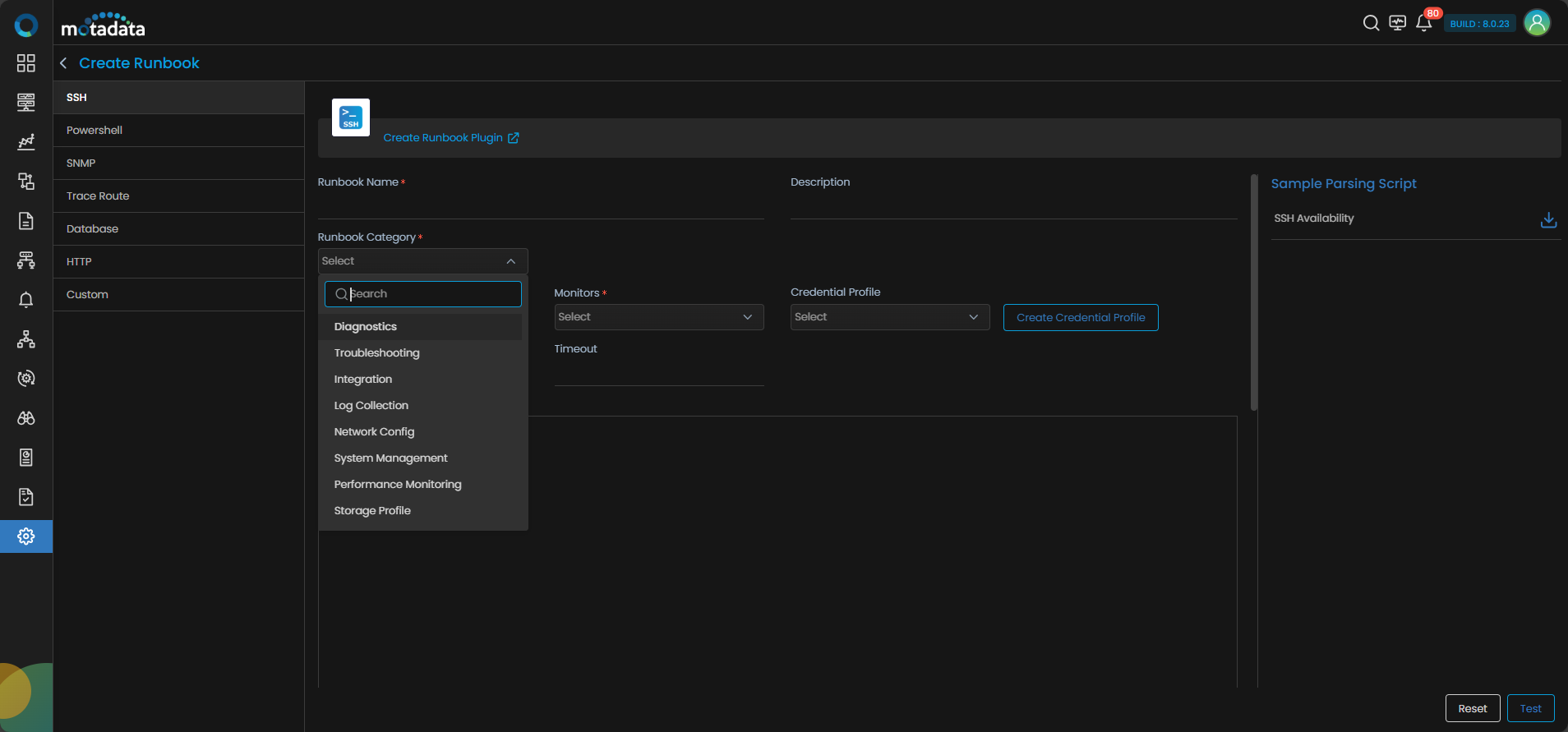
SSH Runbook Configuration
The SSH Runbook creation screen presents various parameters to define the runbook's functionality and assign it to monitors or groups. Below is a detailed breakdown of each category:
- Diagnostics
- Troubleshooting
- Integration
- Log Collection
- Network Config
- System Management
- Performance Monitoring
- Storage Profile
- Ansible Playbook
- Other
| Field | Description |
|---|
| Runbook Name | Assign a logical and unique name that identifies the task performed by the runbook. |
| Description | Provide a description of the Runbook. |
| Monitor/Group/IP-Host | Select Monitor, Group, or IP/Host based on the device(s) to which you want to assign the runbook. |
| Monitors | Select desired monitor from the 'Monitors' dropdown if you want to assign the Runbook to an individual monitor. This option is available when you select Monitor in the previous field. |
| Groups | Select desired group from the 'Groups' dropdown if you want to assign the Runbook to a group of monitors. This option is available when you select Group in the previous field. |
| IP/Host | Specify the IP/Host if you want to assign the Runbook to a device that is not discovered in Motadata ObserveOps as a Monitor. This option is available when you select IP/Host in the previous field. |
| Credential Profile | This field is optional. You can select a credential profile if needed; otherwise, the profile used during discovery will be applied automatically. |
| Create Credential Profile | Select this option if you need to create a new credential profile. |
| Port | Specify the port number in this field. In case you select a credential profile, the port number specified in the credential profile will be used. You can override the port number from the credential profile by specifying a port number in this field. |
| Timeout | Specify the timeout in this field. In case you select a credential profile, the timeout specified in the credential profile will be used. You can override the timeout from the credential profile by specifying a timeout in this field. |
| SSH Script | Write the script detailing the task that you wish to execute using the Runbook. |
| Script Language | Specify the language(Go or Python) you want use to write the parsing script. |
| Parsing Script | Write the script to parse the output derived post SSH script execution. |
| Add Variable | Add a variable if required in the parsing script. |
| Field | Description |
|---|
| Runbook Name | Assign a logical and unique name that identifies the task performed by the runbook. |
| Description | Provide a description of the Runbook. |
| Monitor/Group/IP-Host | Select Monitor, Group, or IP/Host based on the device(s) to which you want to assign the runbook. |
| Monitor | Select desired monitor from the 'Monitors' dropdown if you want to assign the Runbook to an individual monitor. This option is available when you select Monitor in the previous field. |
| Select Group | Select desired group from the 'Groups' dropdown if you want to assign the Runbook to a group of monitors. This option is available when you select Group in the previous field. |
| Select IP/Host | Specify the IP/Host if you want to assign the Runbook to a device that is not discovered in Motadata ObserveOps as a Monitor. This option is available when you select IP/Host in the previous field. |
| Credential Profile | Select the credential profile from the dropdown to enable the Runbook to access and perform tasks on the monitor securely. |
| Create Credential Profile | Select this option if you need to create a new credential profile. |
| Port | Specify the port number in this field. In case you select a credential profile, the port number specified in the credential profile will be used. You can override the port number from the credential profile by specifying a port number in this field. |
| Timeout | Specify the timeout in this field. In case you select a credential profile, the timeout specified in the credential profile will be used. You can override the timeout from the credential profile by specifying a timeout in this field. |
| SSH Script | Write the script detailing the task that you wish to execute using the Runbook. |
| Script Language | Specify the language(Go or Python) you want use to write the parsing script. |
| Parsing Script | Write the script to parse the output derived post SSH script execution. |
| Add Variable | Add a variable if required in the parsing script. |
| Field | Description |
|---|
| Runbook Name | Assign a logical and unique name that identifies the task performed by the runbook. |
| Description | Provide a description of the Runbook. |
| Monitor/Group/IP-Host | Select Monitor, Group, or IP/Host based on the device(s) to which you want to assign the runbook. |
| Monitors | Select desired monitor from the 'Monitors' dropdown if you want to assign the Runbook to an individual monitor. This option is available when you select Monitor in the previous field. |
| Groups | Select desired group from the 'Groups' dropdown if you want to assign the Runbook to a group of monitors. This option is available when you select Group in the previous field. |
| IP/Host | Specify the IP/Host if you want to assign the Runbook to a device that is not discovered in Motadata ObserveOps as a Monitor. This option is available when you select IP/Host in the previous field. |
| Credential Profile | This field is optional. You can select a credential profile if needed; otherwise, the profile used during discovery will be applied automatically. |
| Create Credential Profile | Select this option if you need to create a new credential profile. |
| Port | Specify the port number in this field. In case you select a credential profile, the port number specified in the credential profile will be used. You can override the port number from the credential profile by specifying a port number in this field. |
| Timeout | Specify the timeout in this field. In case you select a credential profile, the timeout specified in the credential profile will be used. You can override the timeout from the credential profile by specifying a timeout in this field. |
| SSH Script | Write the script detailing the task that you wish to execute using the Runbook. |
| Script Language | Specify the language(Go or Python) you want use to write the parsing script. |
| Parsing Script | Write the script to parse the output derived post SSH script execution. |
| Add Variable | Add a variable if required in the parsing script. |
| Field | Description |
|---|
| Runbook Name | Assign a logical and unique name that identifies the task performed by the runbook. |
| Description | Provide a description of the Runbook. |
| Monitor/Group/IP-Host | Select Monitor, Group, or IP/Host based on the device(s) to which you want to assign the runbook. |
| Monitors | Select desired monitor from the 'Monitors' dropdown if you want to assign the Runbook to an individual monitor. This option is available when you select Monitor in the previous field. |
| Groups | Select desired group from the 'Groups' dropdown if you want to assign the Runbook to a group of monitors. This option is available when you select Group in the previous field. |
| IP/Host | Specify the IP/Host if you want to assign the Runbook to a device that is not discovered in Motadata ObserveOps as a Monitor. This option is available when you select IP/Host in the previous field. |
| Credential Profile | This field is optional. You can select a credential profile if needed; otherwise, the profile used during discovery will be applied automatically. |
| Create Credential Profile | Select this option if you need to create a new credential profile. |
| Port | Specify the port number in this field. In case you select a credential profile, the port number specified in the credential profile will be used. You can override the port number from the credential profile by specifying a port number in this field. |
| Timeout | Specify the timeout in this field. In case you select a credential profile, the timeout specified in the credential profile will be used. You can override the timeout from the credential profile by specifying a timeout in this field. |
| SSH Script | Write the script detailing the task that you wish to execute using the Runbook. |
| Script Language | Specify the language(Go or Python) you want use to write the parsing script. |
| Parsing Script | Write the script to parse the output derived post SSH script execution. |
| Add Variable | Add a variable if required in the parsing script. |
| Field | Description |
|---|
| Runbook Name | Assign a logical and unique name that identifies the task performed by the runbook. |
| Description | Provide a description of the Runbook. |
| Monitor/Group/IP-Host | Select Monitor, Group, or IP/Host based on the device(s) to which you want to assign the runbook. |
| Monitors | Select desired monitor from the 'Monitors' dropdown if you want to assign the Runbook to an individual monitor. This option is available when you select Monitor in the previous field. |
| Groups | Select desired group from the 'Groups' dropdown if you want to assign the Runbook to a group of monitors. This option is available when you select Group in the previous field. |
| IP/Host | Specify the IP/Host if you want to assign the Runbook to a device that is not discovered in Motadata ObserveOps as a Monitor. This option is available when you select IP/Host in the previous field. |
| Credential Profile | This field is optional. You can select a credential profile if needed; otherwise, the profile used during discovery will be applied automatically. |
| Create Credential Profile | Select this option if you need to create a new credential profile. |
| Port | Specify the port number in this field. In case you select a credential profile, the port number specified in the credential profile will be used. You can override the port number from the credential profile by specifying a port number in this field. |
| Timeout | Specify the timeout in this field. In case you select a credential profile, the timeout specified in the credential profile will be used. You can override the timeout from the credential profile by specifying a timeout in this field. |
| Vendor | Specify the vendor of the device for which you are creating the runbook. |
| SSH Script | Write the script detailing the task that you wish to execute using the Runbook. |
| Script Language | Specify the language(Go or Python) you want use to write the parsing script. |
| Parsing Script | Write the script to parse the output derived post SSH script execution. |
| Add Variable | Add a variable if required in the parsing script. |
| Field | Description |
|---|
| Runbook Name | Assign a logical and unique name that identifies the task performed by the runbook. |
| Description | Provide a description of the Runbook. |
| Monitor/Group/IP-Host | Select Monitor, Group, or IP/Host based on the device(s) to which you want to assign the runbook. |
| Monitors | Select desired monitor from the 'Monitors' dropdown if you want to assign the Runbook to an individual monitor. This option is available when you select Monitor in the previous field. |
| Groups | Select desired group from the 'Groups' dropdown if you want to assign the Runbook to a group of monitors. This option is available when you select Group in the previous field. |
| IP/Host | Specify the IP/Host if you want to assign the Runbook to a device that is not discovered in Motadata ObserveOps as a Monitor. This option is available when you select IP/Host in the previous field. |
| Credential Profile | This field is optional. You can select a credential profile if needed; otherwise, the profile used during discovery will be applied automatically. |
| Create Credential Profile | Select this option if you need to create a new credential profile. |
| Port | Specify the port number in this field. In case you select a credential profile, the port number specified in the credential profile will be used. You can override the port number from the credential profile by specifying a port number in this field. |
| Timeout | Specify the timeout in this field. In case you select a credential profile, the timeout specified in the credential profile will be used. You can override the timeout from the credential profile by specifying a timeout in this field. |
| SSH Script | Write the script detailing the task that you wish to execute using the Runbook. |
| Script Language | Specify the language(Go or Python) you want use to write the parsing script. |
| Parsing Script | Write the script to parse the output derived post SSH script execution. |
| Add Variable | Add a variable if required in the parsing script. |
| Field | Description |
|---|
| Runbook Name | Assign a logical and unique name that identifies the task performed by the runbook. |
| Description | Provide a description of the Runbook. |
| Monitor/Group/IP-Host | Select Monitor, Group, or IP/Host based on the device(s) to which you want to assign the runbook. |
| Monitors | Select desired monitor from the 'Monitors' dropdown if you want to assign the Runbook to an individual monitor. This option is available when you select Monitor in the previous field. |
| Groups | Select desired group from the 'Groups' dropdown if you want to assign the Runbook to a group of monitors. This option is available when you select Group in the previous field. |
| IP/Host | Specify the IP/Host if you want to assign the Runbook to a device that is not discovered in Motadata ObserveOps as a Monitor. This option is available when you select IP/Host in the previous field. |
| Credential Profile | This field is optional. You can select a credential profile if needed; otherwise, the profile used during discovery will be applied automatically. |
| Create Credential Profile | Select this option if you need to create a new credential profile. |
| Port | Specify the port number in this field. In case you select a credential profile, the port number specified in the credential profile will be used. You can override the port number from the credential profile by specifying a port number in this field. |
| Timeout | Specify the timeout in this field. In case you select a credential profile, the timeout specified in the credential profile will be used. You can override the timeout from the credential profile by specifying a timeout in this field. |
| SSH Script | Write the script detailing the task that you wish to execute using the Runbook. |
| Script Language | Specify the language(Go or Python) you want use to write the parsing script. |
| Parsing Script | Write the script to parse the output derived post SSH script execution. |
| Add Variable | Add a variable if required in the parsing script. |
| Field | Description |
|---|
| Runbook Name | Assign a logical and unique name that identifies the task performed by the runbook. |
| Description | Provide a description of the Runbook. |
| Monitor/Group/IP-Host | Select Monitor, Group, or IP/Host based on the device(s) to which you want to assign the runbook. |
| Monitors | Select desired monitor from the 'Monitors' dropdown if you want to assign the Runbook to an individual monitor. This option is available when you select Monitor in the previous field. |
| Groups | Select desired group from the 'Groups' dropdown if you want to assign the Runbook to a group of monitors. This option is available when you select Group in the previous field. |
| IP/Host | Specify the IP/Host if you want to assign the Runbook to a device that is not discovered in Motadata ObserveOps as a Monitor. This option is available when you select IP/Host in the previous field. |
| Credential Profile | This field is optional. You can select a credential profile if needed; otherwise, the profile used during discovery will be applied automatically. |
| Create Credential Profile | Select this option if you need to create a new credential profile. |
| Port | Specify the port number in this field. In case you select a credential profile, the port number specified in the credential profile will be used. You can override the port number from the credential profile by specifying a port number in this field. |
| Timeout | Specify the timeout in this field. In case you select a credential profile, the timeout specified in the credential profile will be used. You can override the timeout from the credential profile by specifying a timeout in this field. |
| SSH Script | Write the script detailing the task that you wish to execute using the Runbook. |
| Script Language | Specify the language(Go or Python) you want use to write the parsing script. |
| Parsing Script | Write the script to parse the output derived post SSH script execution. |
| Add Variable | Add a variable if required in the parsing script. |
| Field | Description |
|---|
| Runbook Name | Assign a logical and unique name that identifies the task performed by the runbook. |
| Description | Provide a description of the Runbook. |
| Monitor/Group/IP-Host | Select Monitor, Group, or IP/Host based on the device(s) to which you want to assign the runbook. |
| Monitors | Select desired monitor from the 'Monitors' dropdown if you want to assign the Runbook to an individual monitor. This option is available when you select Monitor in the previous field. |
| Ansible Control Node IP/Host | Specify the IP/Host if you want to assign the Runbook to a device that is not discovered in Motadata ObserveOps as a Monitor. This option is available when you select IP/Host in the previous field. |
| Credential Profile | Select the credential profile from the dropdown to enable the Runbook to access and perform tasks on the monitor securely. |
| Create Credential Profile | Select this option if you need to create a new credential profile. |
| Port | Specify the port number in this field. In case you select a credential profile, the port number specified in the credential profile will be used. You can override the port number from the credential profile by specifying a port number in this field. |
| Timeout | Specify the timeout in this field. In case you select a credential profile, the timeout specified in the credential profile will be used. You can override the timeout from the credential profile by specifying a timeout in this field. |
| Playbook Directory Path | Provide the directory path comprising all Playbooks. |
| Fetch Playbooks | Select this option once you have provided the directory path for Playbooks to fetch a list of them. |
| Playbook | Use the dropdown to choose a fetched Playbook. |
| Command-Line Arguments | You can provide any command-line arguments for Playbooks in this section. |
| Field | Description |
|---|
| Runbook Name | Assign a logical and unique name that identifies the task performed by the runbook. |
| Description | Provide a description of the Runbook. |
| Monitor/Group/IP-Host | Select Monitor, Group, or IP/Host based on the device(s) to which you want to assign the runbook. |
| Monitors | Select desired monitor from the 'Monitors' dropdown if you want to assign the Runbook to an individual monitor. This option is available when you select Monitor in the previous field. |
| Groups | Select desired group from the 'Groups' dropdown if you want to assign the Runbook to a group of monitors. This option is available when you select Group in the previous field. |
| IP/Host | Specify the IP/Host if you want to assign the Runbook to a device that is not discovered in Motadata ObserveOps as a Monitor. This option is available when you select IP/Host in the previous field. |
| Credential Profile | This field is optional. You can select a credential profile if needed; otherwise, the profile used during discovery will be applied automatically. |
| Create Credential Profile | Select this option if you need to create a new credential profile. |
| Port | Specify the port number in this field. In case you select a credential profile, the port number specified in the credential profile will be used. You can override the port number from the credential profile by specifying a port number in this field. |
| Timeout | Specify the timeout in this field. In case you select a credential profile, the timeout specified in the credential profile will be used. You can override the timeout from the credential profile by specifying a timeout in this field. |
| SSH Script | Write the script detailing the task that you wish to execute using the Runbook. |
| Script Language | Specify the language(Go or Python) you want use to write the parsing script. |
| Parsing Script | Write the script to parse the output derived post SSH script execution. |
| Add Variable | Add a variable if required in the parsing script. |
Click on Test to verify the script and reachability of the selected monitor(s).
Click on the Create Runbook Plugin to create the Runbook ensuring all parameters are defined as per your requirements. Note that this option becomes available only after successful testing.
Click on the Reset option to clear all input fields.