Introduction to On-Premises Installation
Your comprehensive guide to deploying, configuring, and managing a robust ServiceOps environment on your own infrastructure.
This guide provides detailed, step-by-step instructions for installing Motadata ServiceOps on-premises. It is designed for IT Administrators and Implementation Consultants who are responsible for setting up and maintaining the ServiceOps platform. Here, you will find everything you need to know, from initial requirements to server configuration and post-installation procedures.
ServiceOps Architecture
Before you begin the installation, it is important to understand the architecture of ServiceOps. The platform is designed with a layered approach to ensure scalability, security, and flexibility.
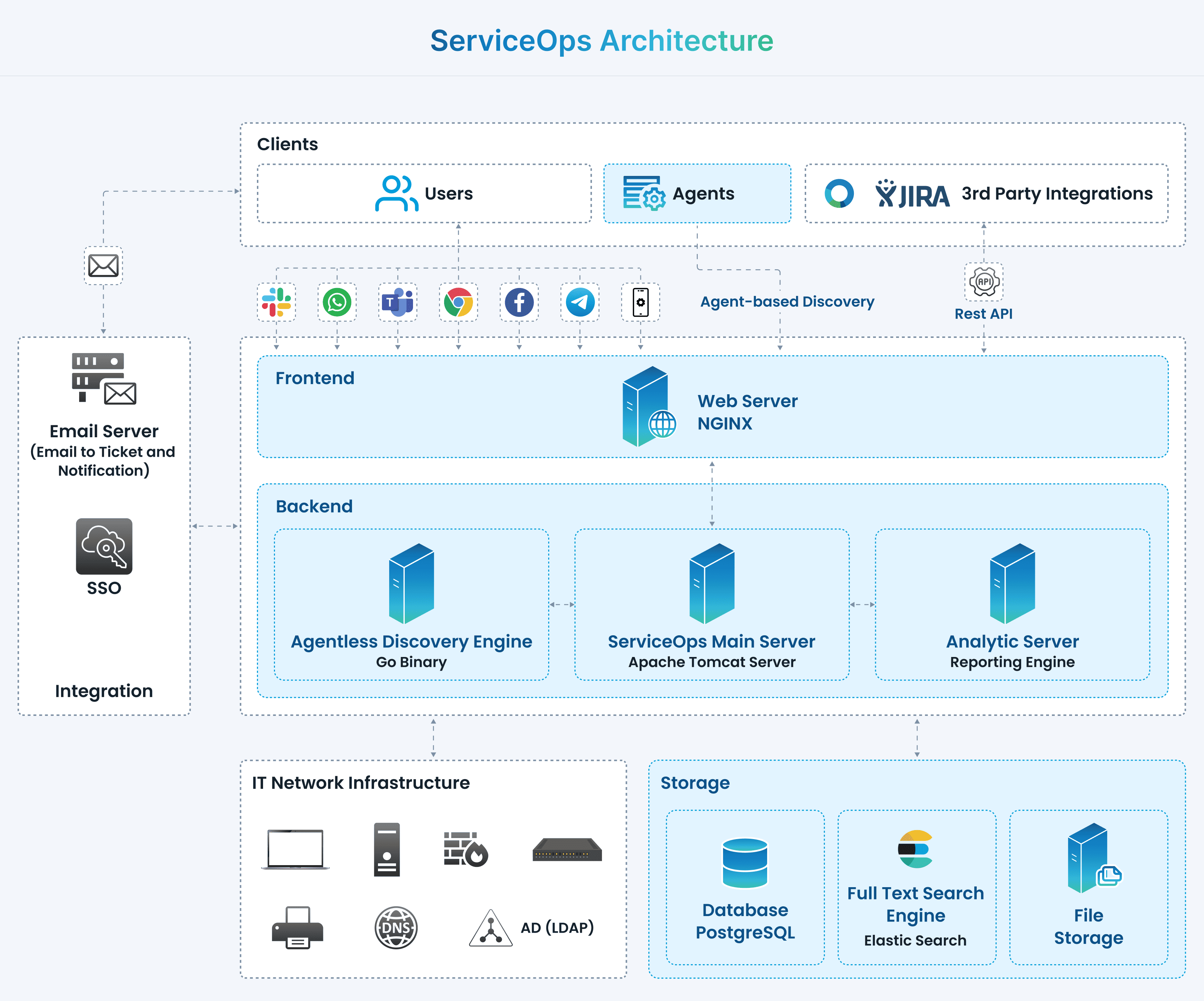
The architecture consists of the following key layers:
- Product Platform: The core layer that includes the ServiceOps Main Server, Agentless Discovery Engine, Analytic Server, Database, and Full-Text Search Engine.
- Front-End: The NGINX web server, which serves as the access point for end-users and third-party applications via web browsers or REST APIs.
- Assets: This layer encompasses your IT environment, including agents, network infrastructure, mail servers, Active Directory, and DNS.
- Integrations and Users: The top layer, representing third-party applications that can be integrated with ServiceOps and the end-users who interact with the system.
Understanding this architecture will help you prepare your environment and make informed decisions during the installation process.
Installation Guides
This section contains all the necessary guides for a successful on-premises installation. We recommend following them in the order listed below.
- System Requirements: Details on the hardware and software prerequisites for all ServiceOps components.
- Pre-installation Checklist: A comprehensive checklist to ensure your environment is ready for installation.
- Download Links: Access the necessary installer files for the ServiceOps platform.
- ServiceOps Server Installation: Step-by-step instructions for installing the main application server.
- Plugin Server Installation: Guide for setting up the Plugin Server to extend ServiceOps capabilities.
- Poller Installation: Instructions for deploying Poller services for data collection.
- File Server Installation: How to set up the dedicated file server for attachments and reports.
- DMZ Server Installation: Guide for securely deploying a server in a Demilitarized Zone.
- RDP Server Installation: Instructions for setting up the Remote Desktop Protocol server.
- Agent Deployment: How to deploy agents to your assets for discovery and management.
- Backup and Restore: Procedures for backing up and restoring your ServiceOps instance.
- Upgrade Guides: Information on how to upgrade your ServiceOps platform to the latest version.