Motadata ServiceOps Release Version 8.7.4.02
Release Date: June 02, 2026
What's New?
Request Management
Portal-Based Print Template Visibility
Print templates in Request Management, previously available only in the Technician Portal, have now been extended to the Support Portal as well. A new tab structure under Admin > Request Management > Print Template allows you to manage templates separately for each portal. Use the Template Visibility field on each template to control which portal it appears in. Placeholders not supported in the selected portal render as blank in the printed output.
Bulk Update Support for the Diagnosis Field
Technicians can now perform Bulk Update on the Diagnosis field from the Request list view, in addition to the existing bulk actions. The Insert from Template option is also available when performing bulk Diagnosis updates.
Change Management
Stage-wise Approval Details in Change Management V1 API
The Change Management V1 API now returns approval details grouped by stage when fetching a Change record. Each stage includes the approver information, approval status, and approval comments, enabling external systems such as Jira to retrieve the full approval hierarchy for a Change Request.
Release Management
V1 API Support for Release Management
Release Management now has a full set of V1 API endpoints for integration with external systems such as Jira. The following APIs are available:
- GET Release: Retrieves all system and custom fields, plus Impact, Rollout Plan, Backout Plan, Build Plan, and Test Plan with attachments.
- POST Create Release: Creates a release record with all system and custom fields.
- PATCH Update a Release: Updates any system or custom field, including planning fields.
- DELETE Release: Deletes a release record by Release ID.
- POST Search Release: Searches by Release ID, requester name or email, or any system or custom field value.
- GET Attachment: Retrieves an uploaded attachment by reference filename.
- POST Relate Asset/CI: Links assets or CIs to a release.
- GET Release by Logon Name or Email: Returns all release records associated with a user.
- Conversation APIs: Create, retrieve, update, search, and delete Note and Collaborate entries on a release record.
Both bearer token and API key authentication are supported.
Asset Management
Agent-Based Discovery Support for Windows 7 and Windows Server 2008
ServiceOps now supports agent-based Asset Discovery for Windows 7 and Windows Server 2008 devices. Organisations running legacy Windows environments can now include these machines in their discovery scope without requiring alternative discovery methods.
Support for Alma Linux 9.7, 10.1 and Rocky Linux 9.7, 10.1
Asset Discovery now support Alma Linux 9.7, Alma Linux 10.1, Rocky Linux 9.7, and Rocky Linux 10.1.
Financial Details Placeholder in Non-IT Asset Print Templates
The Financial Details placeholder is now supported in Non-IT Asset Print Templates, enabling financial information to appear in printed asset documents.
Patch Management
Patch JSON Download History
Every Patch JSON download is now captured in the centralised Downloads log alongside report and other module download events. Each entry records Reference ID, Name, Module (shown as "Patch"), Status, Event Start Time, Event End Time, and available Actions. Status transitions from In Progress to Completed or Failed.
Automation: Workflow Enhancements
Reference Value Support in Run Webhook Header Placeholder
The Run Webhook action now supports selecting output values from previous workflow nodes as dynamic values in the Header Value field. Administrators can map string-type reference values from upstream nodes into webhook headers, enabling fully dynamic header construction during workflow execution. Existing placeholder selection behaviour is unchanged, and all existing workflows remain backward compatible.
Print Templates
Worklog Placeholder in Print Templates, Event Notifications, and Workflows
The Worklog placeholder is now available in the Insert Placeholder menu for:
- Workflow email actions (Problem, Change, Release)
- Event Notifications (Problem, Change, Release, Project)
- Print Templates (Change)
When inserted, the placeholder renders a structured table of the record's worklog entries, showing Technician, Start Date, End Date, Time Taken, and Description. Up to 15 of the most recent entries are displayed.
Reports and Analytics
Scoped Visibility for Reports and Dashboards
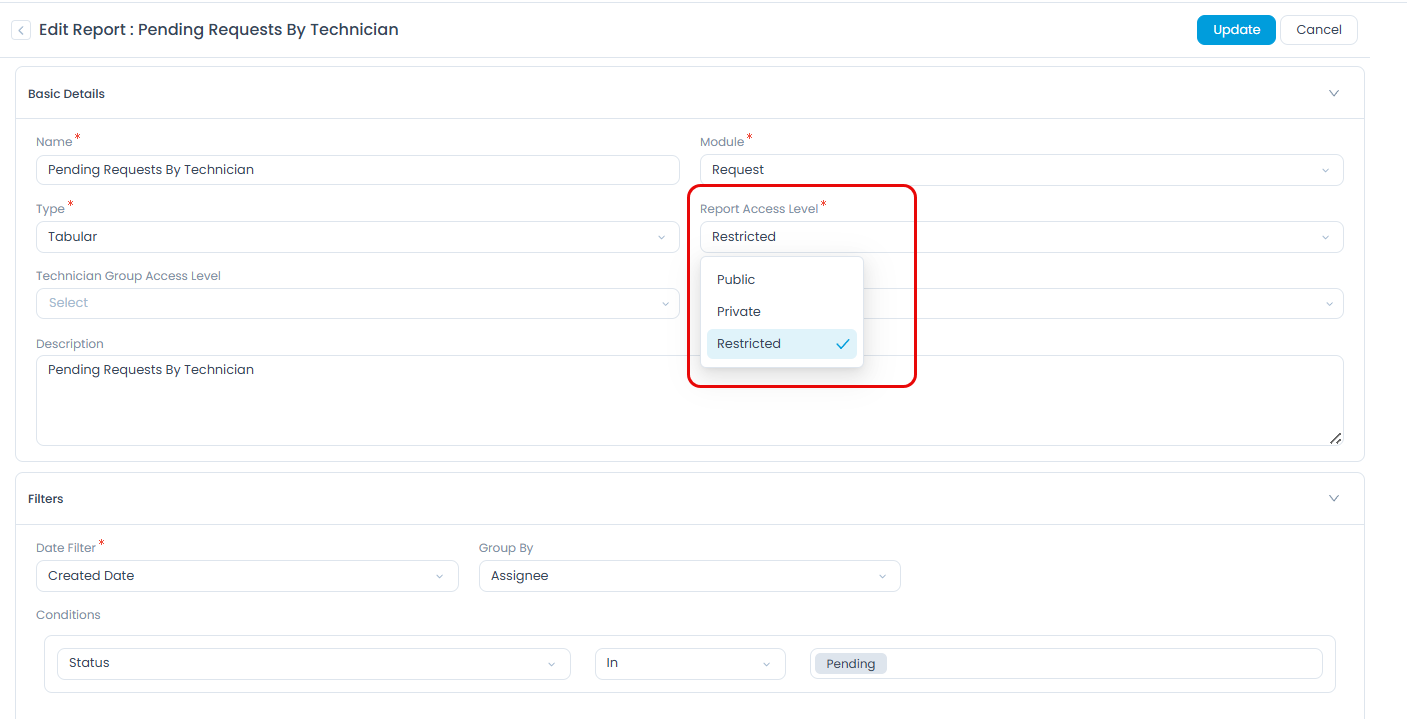
Report and Dashboard creation forms now include a Report Access Level and Dashboard Access Level dropdown with three options: Public, Private, and Restricted. New reports and dashboards default to Private, so they are not visible to other users unless explicitly shared. When Restricted is selected, the Technician Group Access Level and Technician Access Level fields appear, allowing targeted sharing. Existing reports and dashboards retain their previous access configuration after upgrade.
Miscellaneous
User Field Mapping via Form Rules
User Field Mapping, previously available only for Request Management, is now extended to Problem and Change modules via Form Rules. Administrators can configure mappings using the structure Set Value > Target Field > From > Requester Field, covering system fields such as contact number, email, manager, department, and location, as well as compatible custom fields. Field type compatibility is enforced at configuration time, so only structurally compatible source fields appear in the selection list.
Enhanced Approval Experience with Ticket Updates
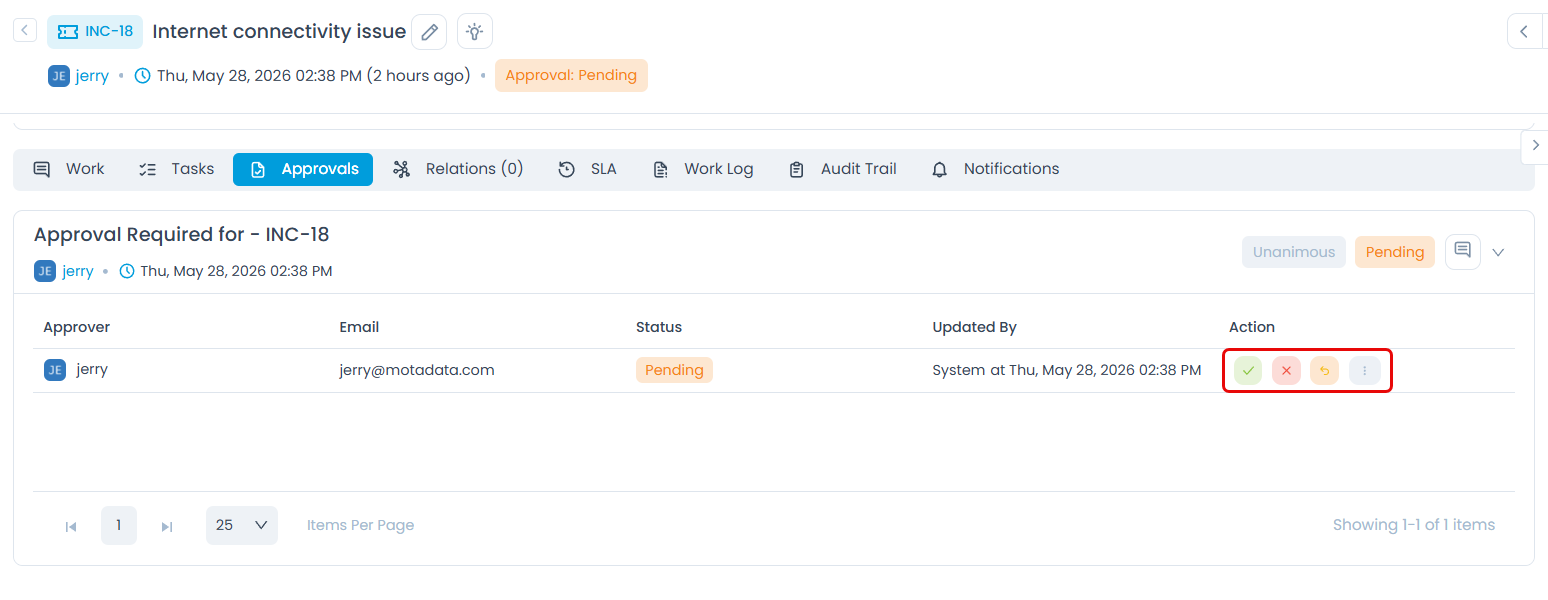
Approvers can now take approval actions directly from the ticket without navigating to My Approvals. When the logged-in user is an approver, the Approve, Reject, and Refer action buttons are now displayed directly on the Details > Approval tab. This applies to Technician Portal and Support Portal approvers across the following modules: Requests, Problems, Changes, Releases, Assets, and Knowledge.