Deployment Topologies
Understand the various on-premise, high-availability, and disaster recovery deployment models to select the optimal architecture for your ServiceOps installation.
Overview
ServiceOps offers a flexible architecture that can be deployed in various configurations to meet diverse organizational needs for scalability, resilience, and performance. This guide outlines the standard deployment topologies, from simple standalone setups to complex, highly available, and geo-redundant environments. Understanding these models is crucial for IT Administrators and Implementation Consultants to design and implement a robust and efficient ServiceOps platform.
Each topology has distinct advantages and is suited for different operational requirements. Whether you are deploying on a single server, distributing components across a network, or ensuring business continuity with high-availability and disaster recovery, this document provides the foundational knowledge to guide your deployment strategy.
- Standalone
- Distributed
- Multi-Site
- High Availability
- Disaster Recovery
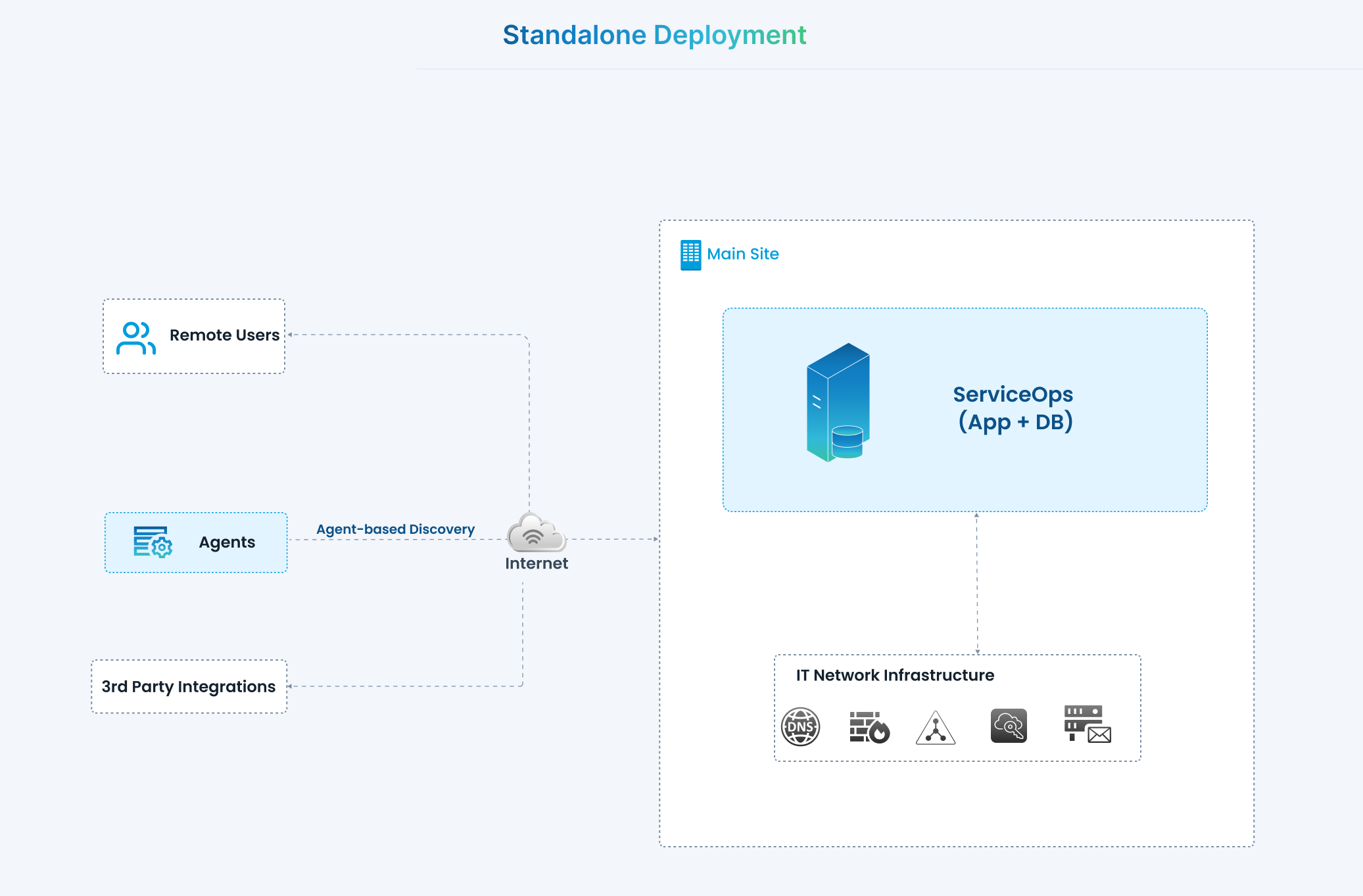
A standalone deployment consolidates all ServiceOps components onto a single server, including application, database, and analytics services. This is the simplest model, designed for evaluation, proof-of-concept, and small-scale production environments with minimal concurrency requirements.
Architecture
- ServiceOps (App + DB): At the core of the architecture, ServiceOps hosts both its application and database in a single environment. This central deployment acts as the control hub for IT service management operations.
- Remote Users: End-users (employees, technicians, admins) connect to ServiceOps through the internet. This allows them to raise requests, access services, and manage incidents remotely without requiring direct access to the internal IT infrastructure.
- Agents (Agent-based Discovery): Discovery agents are deployed across endpoints or networks to gather asset and configuration data. They communicate securely with the ServiceOps instance via the internet. This ensures IT assets (on-premises or remote) are continuously discovered and updated in the system.
- 3rd Party Integrations: ServiceOps integrates with external applications and services (such as monitoring tools, collaboration apps, or external ticketing systems). These integrations connect over the internet to push or pull data into ServiceOps.
- IT Network Infrastructure: Within the main site, ServiceOps interacts with the organization's core IT services such as DNS, Active Directory, email servers, cloud services, and monitoring systems. This ensures seamless authentication, notifications, and operational data exchange.
Components & Roles
Main Site
- ServiceOps (App + DB): Unified server hosting both the application and database.
- IT Network Infrastructure: Internal enterprise services including:
- DNS
- Active Directory / LDAP
- Cloud services
- Monitoring/alerting tools
- Email servers
External Components
- Remote Users: Access ServiceOps for service requests, incident tracking, approvals, and reporting.
- Agents: Perform agent-based discovery to identify assets and feed information into ServiceOps.
- 3rd Party Integrations: External systems that integrate with ServiceOps for extended functionality.
Connectivity Layer
- Internet: Acts as the communication channel for remote users, agents, and integrations to interact with ServiceOps.
Use Cases
- Small organizations (Less than 100 users)
- Training/demo environments
- Development labs
Benefits
- Simplified installation and maintenance
- Low infra cost (single VM/server)
- Quick setup
Configuration
Configure Motadata ServiceOps Application and DB on a single server as per the Standalone Deployment scenario from the Installation Guide.
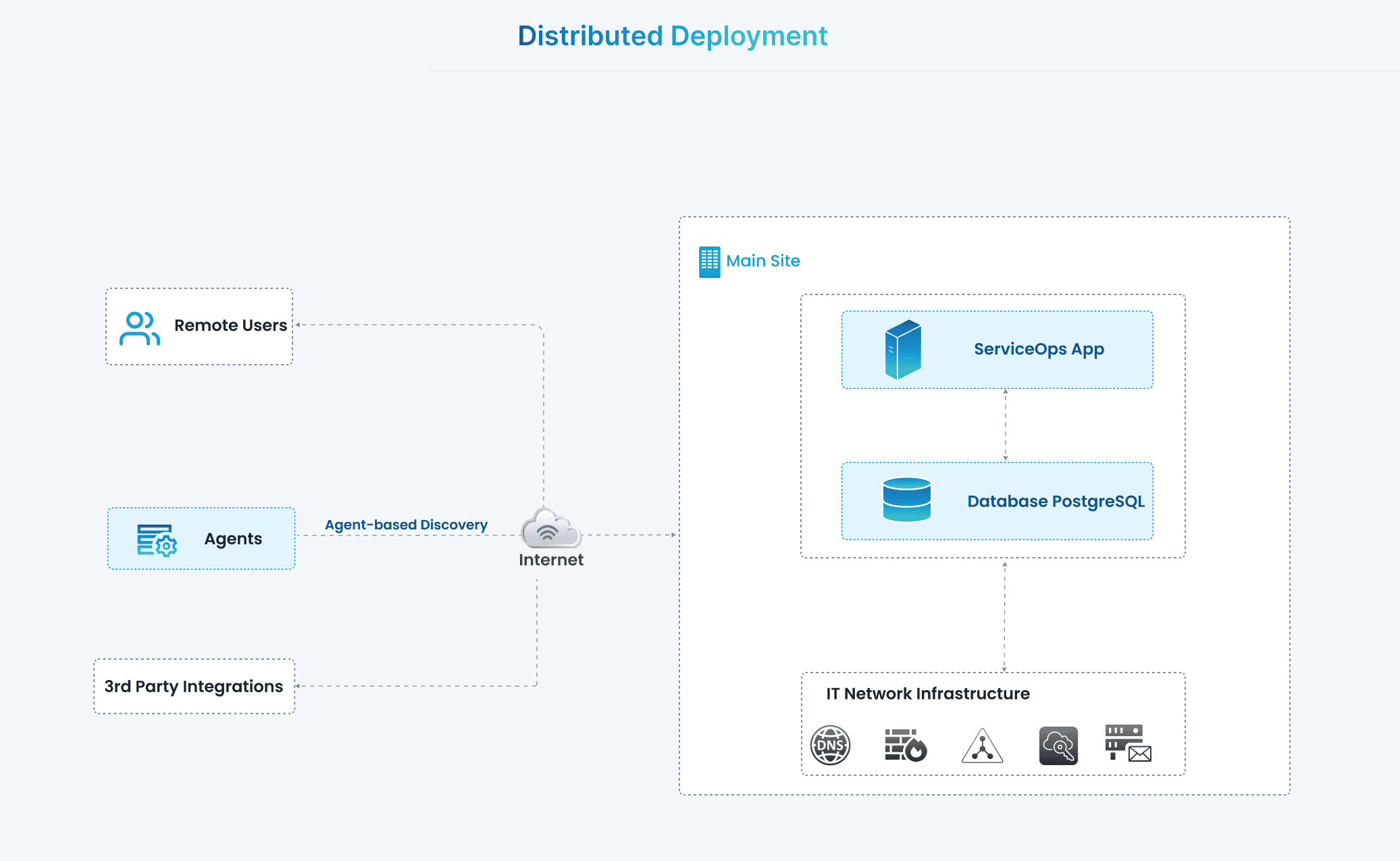
A distributed deployment separates ServiceOps components across multiple servers for improved scalability, performance, and reliability. Unlike standalone, where everything is on a single host, distributed deployment allocates application, database, analytics, and search to dedicated servers. This model is designed for medium to large organizations with higher workloads and the need to scale components independently.
Architecture
- ServiceOps Application Server: Handles all business logic, user requests, integrations, workflows, and service management processes. It acts as the main interface for technicians, admins, and end-users.
- Database Server (PostgreSQL): Dedicated to storing all configuration, asset, ticketing, knowledge base, and historical data. Separating the database from the application ensures better performance, easier scaling, and more secure data management.
- Remote Users: Access ServiceOps over the internet for submitting service requests, tracking incidents, approvals, and collaboration.
- Agents (Agent-based Discovery): Installed on endpoints or servers, agents continuously collect asset and configuration data. They communicate securely with the application server via the internet.
- 3rd Party Integrations: External systems (e.g., monitoring tools, collaboration platforms, or automation systems) connect with the ServiceOps app over the internet to extend functionality and enable seamless IT ecosystem integration.
- IT Network Infrastructure: Internal enterprise infrastructure (DNS, directory services, mail servers, cloud platforms, and monitoring systems) is integrated with ServiceOps for authentication, notifications, monitoring, and operational continuity.
Components & Roles
1. Main Site
- ServiceOps App
- Executes business logic and workflows
- Provides the user interface for technicians, admins, and requesters
- Manages integrations with external tools
- Database (PostgreSQL)
- Stores all service data, configurations, and historical records
- Ensures data integrity and supports reporting/analytics
- IT Network Infrastructure
- DNS: Name resolution and routing for ServiceOps components
- Directory Services (Active Directory/LDAP): Authentication and user identity management
- Cloud Services: Extends integration with external SaaS/IaaS platforms
- Monitoring & Alerting: Tracks system health and performance
- Email Server: Notification and communication backbone
2. External Components
- Remote Users
- End-users accessing ServiceOps to raise and track tickets
- Technicians managing IT operations remotely
- Agents
- Perform agent-based asset and configuration discovery
- Keep CMDB and asset inventory up-to-date
- 3rd Party Integrations
- Connect external applications for ITSM/automation use cases
- Enable interoperability with other enterprise systems
Use Cases
- Medium to large organizations (>500 users)
- Production environments requiring performance isolation
- Enterprises with higher reporting and analytics workloads
Benefits
- Improved performance through role separation
- Independent scaling of application, DB, and analytics tiers
- Better fault isolation compared to standalone
Configuration
Configure Motadata ServiceOps Application and DB on separate servers as per the Distributed Deployment scenario from the Installation Guide.
A Multi-Site deployment is designed for organizations with geographically dispersed offices, providing centralized management of IT services while optimizing performance and bandwidth usage at remote locations. In this model, a central ServiceOps server manages the primary operations, while remote sites use Distribution Servers to cache and deploy patches and software packages locally.
Architecture
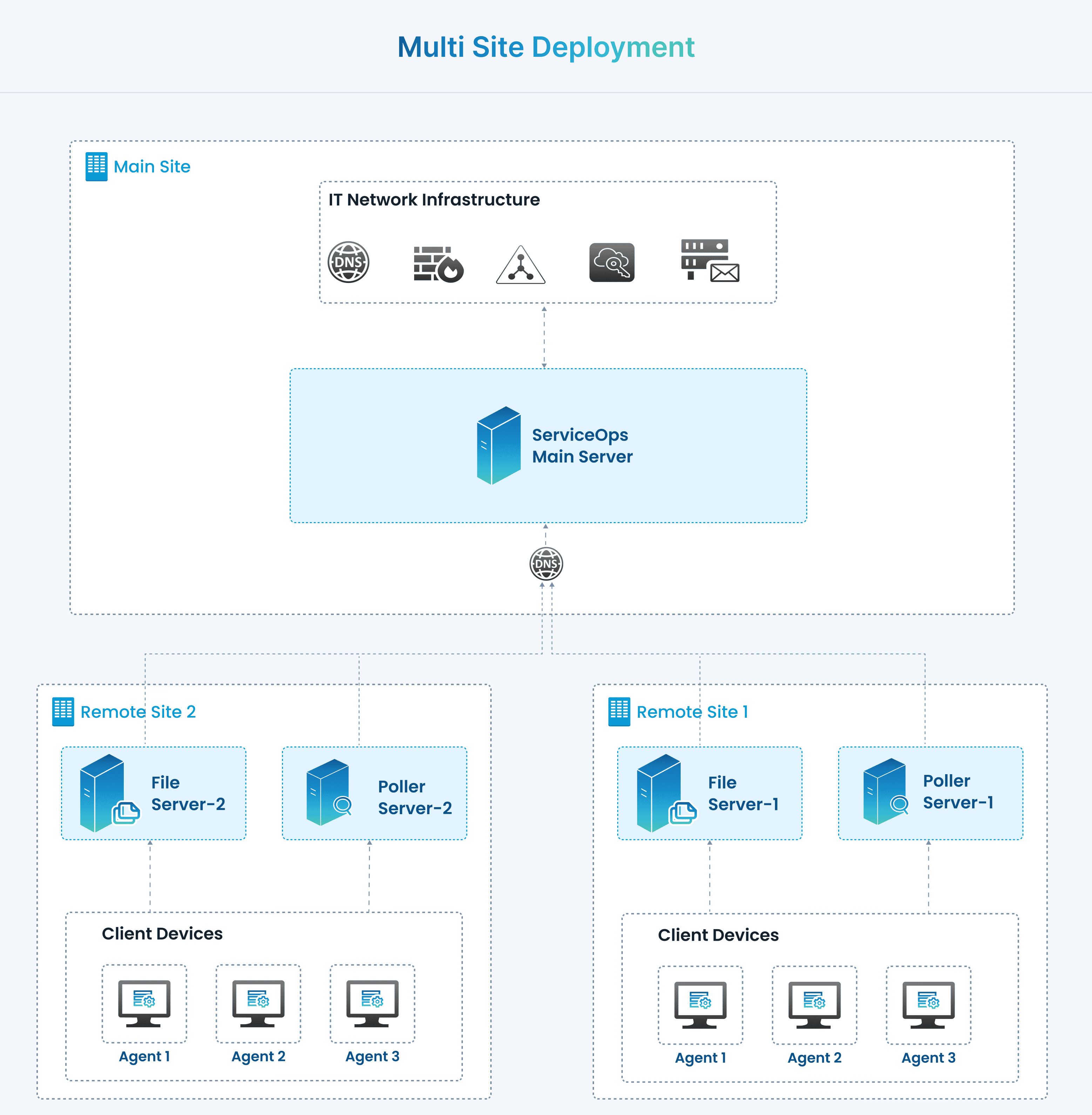
In this deployment model, the ServiceOps Main Server is hosted at the Main Site, while additional Remote Sites (Remote Site 1, Remote Site 2, etc.) host their own File Servers and Poller Servers to support distributed client devices.
The Main Site contains the ServiceOps Main Server, which is connected to the enterprise IT infrastructure (DNS, firewalls, directory services, mail servers, and cloud connectors).
The Remote Sites extend ServiceOps capabilities by hosting localized servers to handle workloads closer to client devices:
- File Server: Manages storage and retrieval of attachments, software packages, and patches.
- Poller Server: Handles discovery, monitoring, and job distribution locally to reduce WAN dependency.
Agents are installed on client devices within each remote site. They interact with the local Poller/File Servers for efficiency while maintaining synchronization with the Main Server.
This architecture ensures that all sites remain connected under a centralized ServiceOps platform while distributing file storage and data collection for performance optimization.
Components & Roles
Main Site
ServiceOps Main Server
- Central brain of the system.
- Hosts core modules (Service Desk, Asset, Patch, CMDB, Knowledge, etc.).
- Manages global policies, workflows, ticketing, and reporting.
- Interfaces with IT infrastructure (DNS, AD/LDAP, Mail, etc.).
Remote Sites (1, 2, …)
File Server
- Stores attachments, patches, installers, and other files.
- Offloads file management from the main server.
- Reduces WAN dependency by serving files locally to remote devices.
Poller Server
- Conducts network scans, discovery, and monitoring for its site.
- Executes scheduled tasks such as patch deployment or asset data collection.
- Relays results back to the main server.
Client Devices (Agents)
- Installed on endpoints.
- Report hardware/software inventory, receive patches, and execute tasks.
- Communicate with local Poller/File Servers for faster response.
Use Cases
Distributed Patch Deployment
- Patch files are stored in the remote File Server.
- Remote Poller coordinates with local agents to deploy patches without pulling data over WAN.
Asset Discovery & Monitoring
- Poller Servers discover devices and monitor their status in remote sites.
- Results are sent back to the Main Server for centralized visibility.
Ticket Attachments & Downloads
- When a user uploads a file to a ticket, the Main Server can offload storage to the nearest File Server.
- Requesters and technicians download files from the local File Server for speed.
Scalable Multi-Site IT Operations
- New branch/remote offices can be added by simply deploying File/Poller servers and registering them in ServiceOps.
Benefits
- Performance Optimization: Local servers reduce bandwidth load and latency by serving files and executing jobs within the site.
- Scalability: Supports multi-branch organizations by adding remote servers as needed.
- Centralized Management with Local Execution: Main Server manages policies and reporting, while Remote Servers execute site-specific tasks.
- Reduced WAN Dependency: Critical tasks (patching, discovery) run locally, ensuring continuity even with limited WAN connectivity.
- Resilience: Distributed deployment reduces single-point-of-failure risk.
Configuration
Configure the ServiceOps Application and Database at the Main Site, and set up the File Server and Poller at the Remote Site as per the Multi-Site Installation Guide.
High Availability (HA) ensures that the ServiceOps platform remains continuously accessible, even in the event of hardware or software failures. By running synchronized servers in an active–passive setup (Master and Slave), HA minimizes downtime, maintains data consistency, and provides seamless service continuity for end users and technicians.
This is achieved by running the entire ServiceOps application and database on two synchronized servers (Master and Slave). This model offers a straightforward path to achieving high uptime by providing automatic failover without the complexity of a distributed architecture. It is ideal for organizations that require fault tolerance but do not need to scale individual components separately.
Standard High Availability Deployment
Architecture
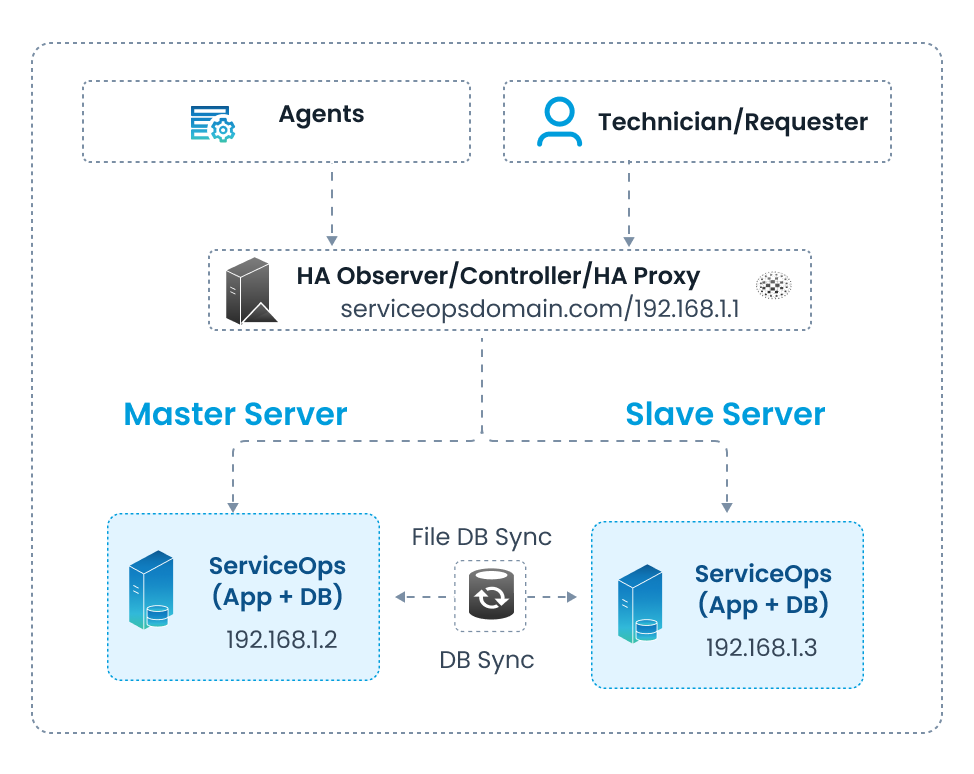
- HA Proxy / Controller: Acts as the entry point (serviceopsdomain.com / 192.168.1.1), routing traffic to the active server (Master or Slave).
- Master Server (192.168.1.2): Hosts ServiceOps application and database.
- Slave Server (192.168.1.3): Passive standby server with ServiceOps application and database synchronized with the master.
- Synchronization:
- DB Sync ensures both servers have the same transactional data.
- File DB Sync replicates attachments, patches, and logs between servers.
- Failover: If the master server goes down, the HA Proxy automatically routes requests to the slave server.
- Clients (Agents, Technicians, Requesters) connect only via the HA Proxy endpoint — never directly to the servers.
Components & Roles
- HA Proxy / Controller: Provides a single domain/IP for clients, manages failover between master and slave.
- Master Server (App + DB): Active server running ServiceOps application and database.
- Slave Server (App + DB): Standby server kept in sync with master for immediate takeover.
- DB Sync: Keeps PostgreSQL databases identical across master and slave.
- File DB Sync: Synchronizes files (attachments, patches, packages, logs).
Use Cases
- Enterprises with strict uptime requirements (e.g., BFSI, healthcare).
- Production environments where downtime directly impacts business operations.
- Medium to large organizations with 500+ users and mission-critical ITSM workloads.
Benefits
- Automatic failover in case of master server failure.
- High availability ensures minimal downtime.
- Data consistency maintained via continuous DB and file sync.
- Transparent access for users via single HA Proxy endpoint.
Configuration
Configure High Availability by following the instructions in the Installation Guide.
Disaster Recovery (DR) is a business continuity strategy that ensures organizational resilience by replicating the entire ServiceOps environment to a geographically separate data center. The DR site remains on standby and is activated only if the primary Data Center (DC) experiences a complete outage. This model protects against catastrophic events and ensures that IT operations can be restored with minimal data loss.
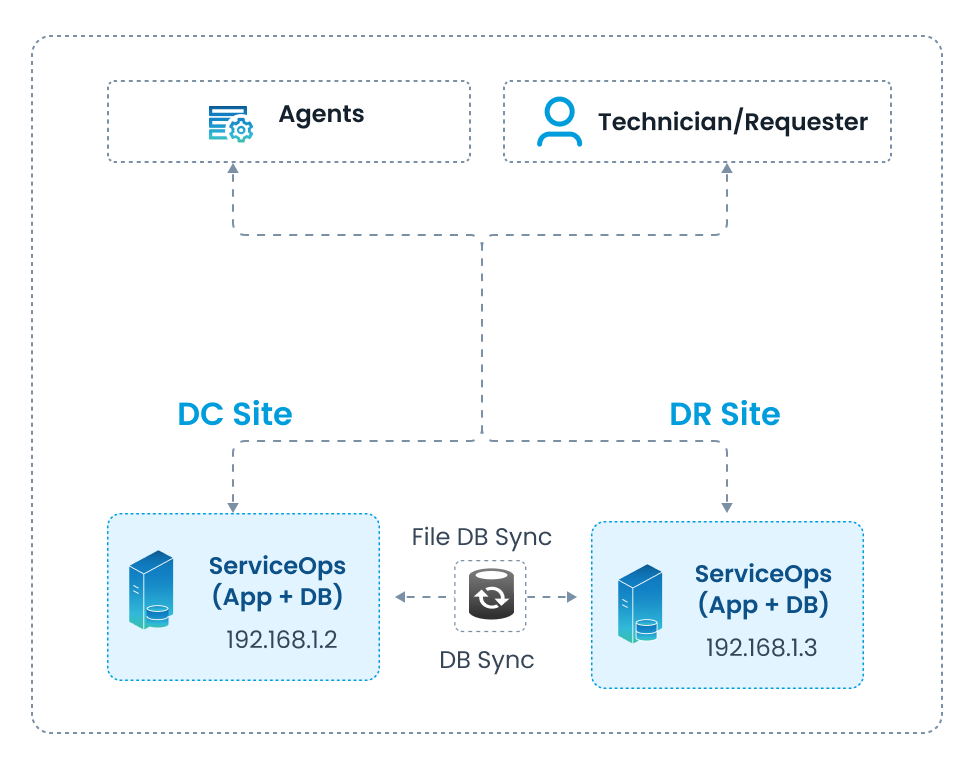
A Standalone Deployment with Disaster Recovery involves replicating a single-server ServiceOps instance to a secondary server at a remote DR site. This approach ensures business continuity by providing a complete failover environment without the complexity of a distributed architecture.
Architecture
DC Site (192.168.1.2): Hosts the active ServiceOps application and database on a single server. All users and agents connect here during normal operations.
DR Site (192.168.1.3): Hosts a passive, standby ServiceOps application and database. It is kept in sync with the DC site via continuous replication.
Data Synchronization:
- DB Sync: The database at the DR site is continuously updated with data from the DC site’s database.
- File DB Sync: Attachments, logs, and other files are replicated from the DC to the DR site to maintain consistency.
Failover: In the event of a DC site failure, the DR site is manually activated, and DNS is updated to redirect all traffic to the DR server.
Components & Roles
- DC Site Server (App + DB): The primary production server.
- DR Site Server (App + DB): The standby server for disaster recovery.
- DB Sync: Ensures transactional data is replicated to the DR site.
- File DB Sync: Ensures all non-database files are replicated.
Use Cases
- Organizations requiring a cost-effective disaster recovery solution.
- Environments where minimal data loss is critical, but immediate, automatic failover is not a strict requirement.
Benefits
- Protects against complete site failure.
- Ensures business continuity with a readily available standby environment.
- Maintains data consistency through continuous replication.
Configuration
Configure Disaster Recovery by following the instructions in the Installation Guide.