Vulnerability Management
Vulnerability Management is the continuous process of detecting, assessing, and tracking security weaknesses across your endpoints. Your IT team can then prioritize and resolve threats before attackers exploit them.
In an IT environment, unpatched software is one of the most common entry points for attacks. ServiceOps automatically compares installed software on enrolled Windows endpoints against a maintained CVE database. It assigns severity ratings to every finding and gives your team the context to act, without leaving your ITSM platform. Findings from Vulnerability Management feed directly into Patch Management for remediation, completing the detect-to-fix lifecycle.
Benefits of Vulnerability Management
ServiceOps Vulnerability Management delivers these security and operational outcomes across your IT environment.
- Reduced Attack Surface: Continuous detection identifies newly published CVEs on your endpoints within 24 hours of a database sync. This closes the exposure window before attackers can act.
- Compliance Readiness: Exportable vulnerability audit reports provide the evidence needed for regulatory audits without manual data gathering.
- Unified Workflow: Vulnerability detection and ITSM operations run inside the same platform. This eliminates tool-switching and keeps security findings connected to asset and CI records.
- Actionable Prioritization: Exploit status and patch availability let teams distinguish between CVEs that need immediate action and those that can wait. This avoids alert fatigue.
When Should You Use Vulnerability Management?
These are the most common scenarios where teams rely on Vulnerability Management in ServiceOps.
- Quarterly Security Reviews: Enroll all managed Windows servers, run a scan, and export the Vulnerability Audit report to satisfy compliance audit requirements.
- Rapid Response to Vendor Advisories: When a vendor publishes a critical security bulletin, filter the Vulnerabilities list by CVE ID. You'll see exactly which endpoints the CVE affects and whether a patch exists.
- Ongoing Endpoint Health Monitoring: Use the Vulnerability Dashboard in team stand-ups to track week-on-week changes in active and critical CVE counts across your environment.
The Vulnerability Management Lifecycle
The vulnerability management lifecycle in ServiceOps is a structured, continuous process. Each stage builds on the previous one, from one-time administrator setup through ongoing detection, prioritization, and remediation verification.
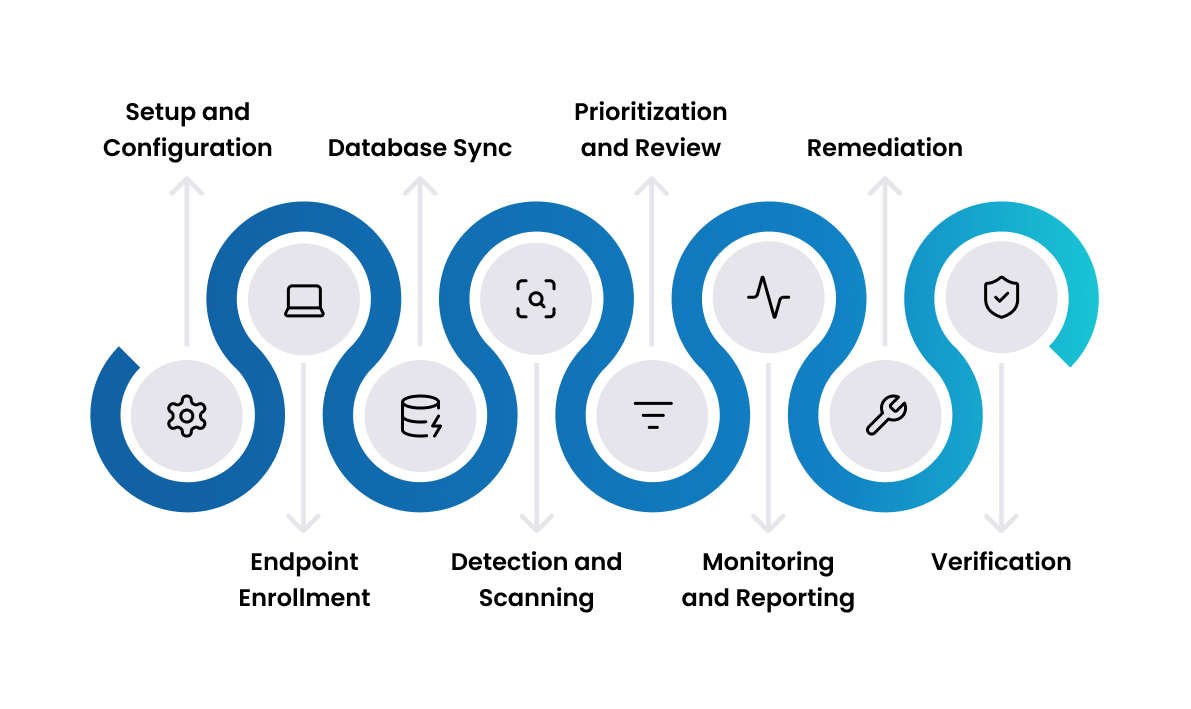
1. Setup and Configuration
An administrator activates the Vulnerability license, which is available as a standalone license. They configure the database update schedule, notification recipients, and technician roles (Vulnerability Manager or Vulnerability Specialist). The administrator completes this stage once and revisits it only when requirements change.
2. Endpoint Enrollment
The administrator defines which computers ServiceOps should monitor for vulnerabilities. Endpoints can be added in two ways:
- Manually through the Endpoint Scopes tab, where you add individual computers directly.
- Automatically using the Scope Policies tab, which applies defined conditions to bring machines into scope.
Navigate to Admin > Discovery and Agents > Endpoint Management to manage enrollment. Currently, only Windows OS is supported.
3. Database Sync
ServiceOps connects to the Motadata central vulnerability repository and downloads the latest CVE and patch data into a local database. Each sync is incremental: ServiceOps fetches only new or missing records since the last sync, not the full dataset. This sync runs automatically on a daily schedule or on demand via the Update Now control in Vulnerability Settings. ServiceOps logs every sync event in the Vulnerability Audit page. Each entry includes a timestamp, user, and IP address.
4. Detection and Scanning
ServiceOps compares the software inventory collected from each enrolled endpoint against the local CVE database. Every match between an installed software version and a known CVE produces a vulnerability record automatically. The record includes the CVE ID, description, severity, exploit status, patch availability, and the count of impacted endpoints. Four events trigger a scan: a database update, endpoint enrollment, new discovery data, or an endpoint configuration change.
5. Prioritization and Review
Technicians review findings in the Vulnerabilities list and Detected CVEs list. Three signals determine priority: severity (Critical, High, Medium, or Low), exploit status, and patch availability. Exploit status shows whether the CVE faces active exploitation in real-world attacks; patch availability shows whether a fix exists. A Critical CVE with Exploit Status = Yes and Patch Availability = Yes is the highest-priority combination. Use the built-in filters, Critical Vulnerabilities, Exploited Vulnerabilities, and Fixable Vulnerabilities, to act on the most urgent findings first.
6. Monitoring and Reporting
The Vulnerability Dashboard provides a real-time view of security posture through six out-of-the-box KPI cards. These cover Total Vulnerabilities, Active Vulnerabilities, Critical Vulnerabilities, Fixable Vulnerabilities, Vulnerable Endpoints, and Vulnerabilities Discovered in Last 7 Days. Three pre-configured chart widgets show severity breakdown, weekly detection trends, and endpoint impact distribution. You can create custom KPI cards and widgets using the standard ServiceOps dashboard builder. Alongside the dashboard, Vulnerability Reports let you generate tabular, summary, and matrix views of CVE and endpoint exposure data. Use these reports to share findings with stakeholders or compile evidence for compliance audits.
7. Remediation
Technicians hand off vulnerabilities with Patch Availability = Yes to Patch Management for deployment. Technicians open the vulnerability's detail page and review the impacted endpoint list under the Endpoint tab. They then pass those endpoints to the patch team as targets for a patch deployment job. You can also download patches directly to a file server from the vulnerability detail page for offline distribution. CVE findings from this stage become the input for patch deployment decisions, connecting the vulnerability lifecycle to the patch lifecycle.
8. Verification
After the patch team deploys patches, open the affected endpoint's detail page and click Scan Now to trigger an on-demand scan. If remediation was successful, the CVE count for that endpoint drops in the scan results, confirming closure. The Vulnerability Audit log provides an exportable record of all activity for compliance packages.
How Does ServiceOps Automate the Lifecycle?
ServiceOps handles several lifecycle steps automatically, reducing the manual work your security team needs to do.
- Automatic Scan Triggers: ServiceOps triggers scans on a database update, new endpoint enrollment, new discovery data, or an endpoint configuration change. Routine detection needs no manual scheduling.
- Daily Database Sync: The vulnerability database updates on a configurable daily schedule, keeping CVE data current without administrator intervention.
- Email Notifications: Configured technicians receive an email each time the database updates, whether manually or on schedule. This keeps your security team aware of fresh CVE data.
- Audit Logging: ServiceOps writes every database update to the Vulnerability Audit log with a timestamp, user, event description, and IP address. The log is exportable as PDF or Excel for compliance audits.
- Out-of-the-Box Dashboard: The Vulnerability Dashboard activates automatically when you enable the Vulnerability license. You get immediate security visibility without any manual widget configuration.
Key Capabilities
These features make up the core detection and visibility capabilities of the Vulnerability Management module.
Detection & Prioritization
- Automatic CVE Detection: ServiceOps continuously compares installed software on enrolled endpoints against the Motadata central vulnerability repository. You don't need to trigger scans manually.
- Severity and Exploit-Based Prioritization: ServiceOps assigns each finding a severity rating (Critical, High, Medium, or Low) and an exploit status indicator. Teams can focus on the highest-risk CVEs first.
- Out-of-the-Box Dashboard: Six pre-configured KPI cards and three chart widgets show active, critical, and fixable vulnerabilities across your environment.
- Per-Asset Vulnerability View: Detected CVEs appear on the Vulnerability tab of any enrolled Windows endpoint record in Asset Management or CMDB. You never have to leave the asset view.
- Exportable Audit Logs: ServiceOps logs all database update activity with timestamps and exports it as PDF or Excel for compliance audits.
Best Practices
Follow these practices to get consistent, reliable results from Vulnerability Management.
Setup & Configuration
- Scope endpoints deliberately: Only enroll endpoints you actively manage. Enrolling everything inflates your license count and adds noise from systems outside your responsibility.
- Schedule the database sync outside business hours: A daily sync at off-peak times, such as 2:00 AM, ensures fresh CVE data is available each morning. It runs without affecting endpoint performance during the day.
Prioritization & Remediation
- Prioritize by severity and exploit status together: A High-severity CVE with confirmed active exploitation is more urgent than a Critical one with no known exploits.
- Start with fixable vulnerabilities: Filtering by Patch Availability = Yes gives your team actionable work immediately rather than findings your team cannot yet remediate.
- Use the audit log proactively: Export the Vulnerability Audit report before compliance audits rather than after a request arrives, so you have the evidence ready.
Related Topics
- Patch Management: Deploy patches to resolve fixable vulnerabilities that the Vulnerability Management module identifies. This is the next step after review and prioritization.
- Package Deployment: Distribute and install software packages across endpoints alongside patch deployments.
- Asset Management: ServiceOps draws Vulnerability Endpoints from enrolled computer assets. Accurate asset inventory ensures complete vulnerability coverage.
- CMDB: Vulnerability findings appear on CI detail pages for enrolled Windows computers.
- Vulnerabilities: CVE list grouped by patch, with severity, exploit status, and impacted endpoint count.
- Detected CVEs: Individual CVE records with CVSS scores and impacted system counts.
- Vulnerability Endpoints: Device-level view with Scan Now and vulnerability counts per endpoint.
- Vulnerability Dashboard: Real-time KPI cards and charts for active, critical, and fixable vulnerabilities.
- Vulnerability Reports: Generate tabular, summary, and matrix reports on CVE and endpoint exposure data.
- Vulnerability Settings: Configure the database update schedule, proxy server, and notification preferences.