Release Management
Release Management provides a structured framework to plan, coordinate, and deploy software, hardware, and infrastructure changes into the production environment safely and efficiently, minimizing risk and service disruption.
A release is a collection of authorized changes deployed together. It can range from a minor patch to a major version upgrade. The goal is to ensure that all deployments are well-planned, tested, and communicated, providing a holistic view of a set of changes and their combined impact.
Benefits of Release Management
- Reduced Deployment Risk: By bundling changes, testing them collectively, and following a structured process, organizations can significantly lower the risk of production failures.
- Improved Speed and Agility: A well-defined process, especially when combined with automation, allows for faster and more frequent delivery of features and fixes to the business.
- Increased Visibility and Coordination: A centralized release plan provides a single source of truth for all stakeholders, improving coordination between development, QA, and operations teams.
- Enhanced User Experience: Releases are planned and communicated, which minimizes unexpected disruptions and ensures users are prepared for new features or changes.
The Release Management Lifecycle
The lifecycle provides a controlled, end-to-end process for managing releases from planning to deployment and review.
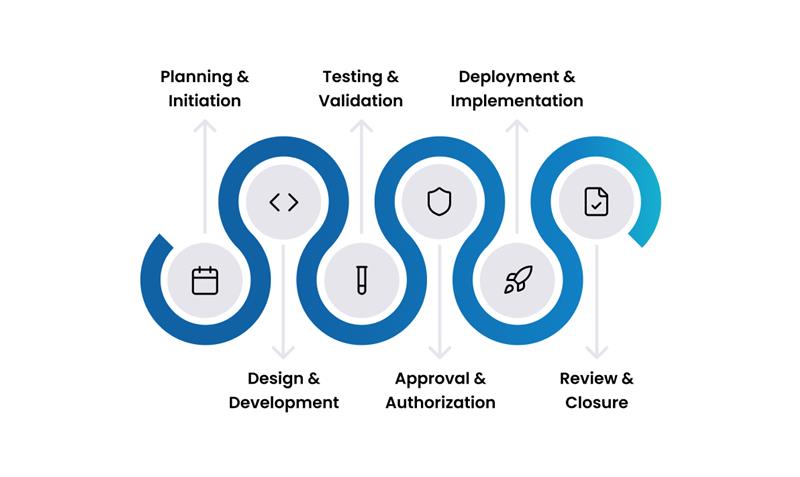
1. Planning & Initiation
The release process begins with comprehensive planning. This stage involves defining the release's scope, objectives, timeline, and resource requirements. A risk assessment is performed, and a communication plan is established to keep all stakeholders aligned.
2. Design & Development
Once the plan is in place, the technical teams design and build the release package. This phase includes all coding, configuration, and build automation required to prepare the release for the testing phase.
3. Testing & Validation
The release undergoes rigorous testing to ensure it meets quality standards and is fit for purpose. This includes a variety of testing methods, such as unit, integration, performance, security, and User Acceptance Testing (UAT), to validate that the changes work as expected and don't negatively impact existing services.
4. Approval & Authorization
Before deployment, the release must be formally approved. The results from the testing phase are reviewed by business stakeholders and the Change Advisory Board (CAB) to confirm that the release is ready and that robust rollback plans are in place.
5. Deployment & Implementation
The approved release package is deployed to the production environment according to the implementation plan. This stage includes pre-deployment checks, the execution of the change, and post-deployment verification to ensure a stable and successful rollout.
Common strategies include Blue-Green Deployment (switching traffic between two identical environments) and Canary Release (releasing to a small subset of users first) to minimize risk.
6. Review & Closure
After the deployment is complete, a post-release review is conducted to assess the success of the release, gather user feedback, and document any issues or lessons learned. The release record is then formally closed.
Common Use Cases
- Scenario 1: Minor Release
- Scenario 2: Major Release
Release: A bi-weekly release of a web application containing several approved bug fixes and a minor UI enhancement.
- Planning: The Release Manager bundles three approved changes into the release package. The timeline is standard (two weeks).
- Build & Test: The build is automatically generated and deployed to the staging environment. Automated regression tests run successfully.
- Approval: As this is a standard minor release, it is pre-approved by the CAB, provided all tests pass.
- Deployment: The release is deployed during a scheduled low-traffic maintenance window.
- Review & Closure: Automated monitoring confirms the application is healthy, and the release is closed.
Release: A major version upgrade of the company's core ERP system.
- Planning: A cross-functional team plans the release over several months, defining scope, creating a detailed project plan, and developing a comprehensive communication strategy for all end-users.
- Build & Test: The new version is deployed to a dedicated UAT environment. A formal UAT phase is conducted with business users over several weeks to validate functionality.
- Approval: The CAB and executive sponsors conduct a final review of the UAT results, the deployment plan, and the rollback plan before giving final authorization.
- Deployment: The deployment is a major project, scheduled over a weekend, involving multiple teams.
- Review & Closure: A post-release review is held to discuss what went well, what could be improved, and to formally close the release.
Roles and Responsibilities
- Release Manager: Owns the Release Management process. They are responsible for planning, scheduling, and coordinating all releases, ensuring the process is followed.
- Release Team: The group of technical staff (e.g., developers, system admins, QA testers) responsible for building, testing, and deploying the release.
- Business Stakeholders / Product Owners: Represent the business and are responsible for approving the release from a functional perspective and confirming it meets business needs.
Key Capabilities
Release Planning and Coordination
Centralized Planning: Create, plan, and schedule releases from a single console, linking multiple approved changes to a single release package.
Status Tracking: Monitor releases through a structured lifecycle with customizable states (e.g., Planning → Testing → Awaiting Approval → Deployment → Closed).
Release Calendar: Use the integrated calendar to schedule releases, avoid conflicts with other changes or business events, and manage maintenance windows.
Automation and Deployment
Automated Workflows: Use templates and rules to standardize the release process, automatically assign tasks, and route approvals.
Task Management: Create and manage detailed task lists and dependencies for each release, assign them to technicians, and track their progress.
DevOps Toolchain Integration: Integrate with version control systems (e.g., Git), build automation tools (e.g., Jenkins), and monitoring platforms to create a seamless, automated deployment pipeline.
Measuring Success: Key Metrics (KPIs)
Key Performance Indicators for Release Management
- Release Success Rate: The percentage of releases deployed without causing major incidents or requiring a rollback.
- Deployment Frequency: How often releases are deployed to production. An increase in frequency can be an indicator of improved process maturity and agility.
- Change Failure Rate: Of the changes deployed in a release, what percentage resulted in a degradation of service? This is a key DevOps metric.
- Mean Time to Recover (MTTR): When a release fails, how long does it take to restore service (e.g., by executing a rollback)?
Best Practices & Integrations
Best Practices
Plan Ahead and Communicate: Start planning early and involve all stakeholders. Proactive communication to business and technical teams is essential for a smooth release.
Test Rigorously: Ensure comprehensive testing across all relevant environments (integration, performance, security) to minimize the risk of production failures.
Always Have a Rollback Plan: A well-tested rollback plan is essential for quickly recovering from a failed deployment.
Automate Deployment: Use automation for build and deployment processes (CI/CD) to ensure consistency, reduce human error, and increase speed.
Integrations
Release Management is tightly connected to other key ITSM processes.
- Request Management: New features and enhancements delivered in a release frequently originate from user service requests, ensuring that deployments are aligned with business needs.
- Problem Management: A release is often the mechanism used to deploy a permanent fix for a root cause identified by Problem Management, closing the loop on recurring issues.
- Change Management: Every release is composed of one or more changes. Integration ensures that all changes within a release follow the proper approval and documentation process.
- Release Management: In complex environments, one release may be dependent on another. Integration ensures that release schedules are coordinated to prevent conflicts and manage dependencies between different product or service releases.
- Knowledge Management: Release notes, deployment guides, and updated user documentation should be published in the Knowledge Base to support the release and enable users and support teams.
- Asset & CMDB: Link releases to the specific applications, servers, or other CIs being updated to provide a clear audit trail and understand dependencies.