Incident Management
Incident Management enables organizations to quickly restore normal service operations and minimize business impact from unplanned disruptions.
Incident Management is a core IT Service Management (ITSM) process focused on restoring normal service operation as quickly as possible after an unplanned interruption or a reduction in the quality of an IT service. The primary goal is to minimize the adverse impact on business operations, ensuring that the best possible levels of service quality and availability are maintained.
Benefits of Incident Management
- Rapid Service Restoration: Minimize the disruption to business operations by resolving incidents as quickly as possible.
- Minimize Business Impact: Prioritize incidents based on their impact and urgency to address critical issues first.
- Maintain Service Quality: Ensure that service levels are maintained and that user satisfaction remains high.
- Centralized Logging: Log and manage all incidents in a single system to ensure visibility, tracking, and accurate reporting.
In ServiceOps, an "incident" refers to any event that disrupts, or could disrupt, a service. This could range from a complete service failure (e.g., "Email server is down") to a minor degradation in performance. Each incident is logged as a ticket, which serves as the central record for all related communication and activities from creation to resolution.
Common Use Cases
- Scenario 1: Minor Incident
- Scenario 2: Major Incident
- Scenario 3: Recurring Incident
Incident: A user reports that a specific feature in a business application is not working correctly.
- Logging: The user submits a ticket through the self-service portal.
- Categorization & Assignment: The ticket is automatically categorized as a software issue and assigned to the L1 Service Desk team.
- Resolution: An L1 analyst finds a matching solution in the knowledge base, provides the workaround to the user, and confirms that the feature is now working.
- Closure: The incident is resolved and closed within the SLA.
Incident: Monitoring tools create an automated, high-priority ticket because the company's external website is down.
- Declaration: The Service Desk declares a major incident, triggering an automated workflow.
- Coordination: The Incident Manager is notified and assembles a dedicated response team (web ops, network, security).
- Communication: Proactive communications are sent to business stakeholders and posted on a status page.
- Resolution: The team identifies a failed server and restores service by failing over to a redundant system.
- Review: A post-incident review is scheduled to determine the root cause, which transitions into the Problem Management process.
Incident: Over a week, several users report intermittent connectivity issues with the VPN.
- Logging & Linking: The Service Desk logs each report as a separate incident but links them together as they notice a pattern.
- Investigation: While each incident is resolved individually (e.g., by asking the user to reconnect), the pattern indicates a deeper issue.
- Escalation to Problem: After the fifth related incident, the Service Desk team creates a formal problem record to trigger a root cause analysis by the network team, preventing further occurrences.
The Incident Management Lifecycle
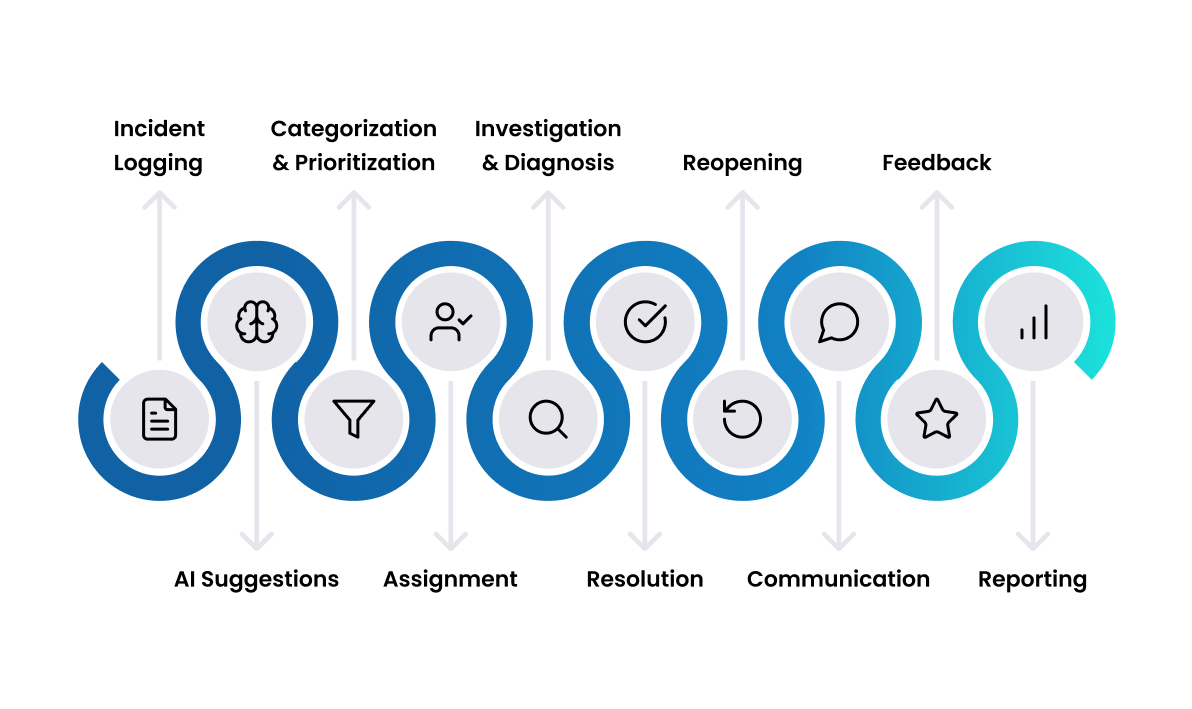
The Incident Management process in ServiceOps follows a structured lifecycle to ensure incidents are handled efficiently and effectively.
Phase 1: Detection and Recording
Incident Logging: Incidents can be created through multiple channels:
- Technician Portal: Technicians can create incidents on behalf of users.
- Support Portal: End-users can log their own incidents.
- Email: Sending an email to a configured helpdesk address automatically creates an incident.
- Chatbot: Incidents can be logged through interactions with a chatbot.
- Virtual Agent: Incidents can be logged through interactions with a third-party integrated Virtual Agent.
AI-Powered Suggestions: When creating an incident, AI-powered similarity checks can suggest existing knowledge base articles or similar tickets to help resolve the issue even before the ticket is created.
Phase 2: Investigation and Diagnosis
Categorization and Prioritization: Once logged, incidents are categorized based on their area (e.g., hardware, software, network) and prioritized based on their impact and urgency. A priority matrix can be configured to automatically assign a priority, which helps technicians identify which incidents to address first.
Assignment: Incidents are automatically or manually assigned to the appropriate technician or technician group with the right skills to resolve the issue.
Investigation and Diagnosis: The assigned technician investigates the incident to diagnose the root cause. This may involve gathering more information from the user, analyzing system logs, or using diagnostic tools.
Phase 3: Resolution and Closure
Resolution: Once a solution is found, the technician implements it and confirms with the user that the service has been restored. The status is changed to 'Resolved' after the fix has been applied.
Reopening: If the issue persists, the user or technician can reopen the incident, which returns it to an 'Open' state for further investigation.
Communication: Throughout the lifecycle, stakeholders are kept informed via automated email notifications for events like creation, assignment, resolution, and closure.
Feedback: After an incident is resolved, feedback is collected from the end-user to measure satisfaction and identify areas for improvement.
Reporting: Reports and dashboards provide insights into incident trends, technician performance, and overall service quality, helping drive continuous improvement.
Roles and Responsibilities in Incident Management
- End-User: The individual who experiences a disruption and reports an incident. Their primary responsibility is to provide accurate information about the issue and confirm when it has been resolved.
- Service Desk Analyst (L1 Support): The first point of contact for all incidents. They are responsible for logging incidents, providing initial support and diagnosis, and resolving incidents at the first level whenever possible. If they cannot resolve an incident, they escalate it to the appropriate team.
- Incident Manager: This role oversees the entire Incident Management process, especially during major incidents. They are responsible for coordination, communication, and ensuring that SLAs are met. They also play a key role in post-incident reviews.
Key Features in ServiceOps
- SLA Management: Service Level Agreements (SLAs) can be applied to incidents to ensure they are resolved within an agreed-upon timeframe.
- Task Management: Technicians can create and assign tasks within an incident ticket to break down complex work or involve other teams.
- Merging and Splitting: Similar incidents can be merged into a single parent ticket to avoid redundant work. A single ticket with multiple issues can also be split into separate incidents.
- Asset and CI Linking: Incidents can be linked to a specific asset or Configuration Items (CIs) from the CMDB, providing valuable context for investigation.tip
Linking incidents to assets and CIs gives technicians a complete history of past issues and changes related to the affected item, which can significantly speed up the diagnosis and resolution process.
- Audit Trail: Every action performed on an incident is logged in an audit trail for full visibility and traceability.
- Work Logs and Conversations: Technicians can log their work and communicate with users and other technicians within the ticket.
Incident Management vs. Other Processes
It's important to understand how Incident Management relates to other ITSM processes.
How does Incident Management differ from Problem Management?
A: Incident Management prioritizes restoring services swiftly, often using temporary solutions. In contrast, Problem Management seeks to identify the underlying causes of incidents to implement permanent fixes and prevent future issues. The goal of an incident is to "get the user working again," while the goal of a problem is to "find out why it broke and fix it for good."
What is the difference between Incident Management and Change Management?
A: Incident Management deals with restoring normal service operations after unplanned disruptions. Change Management, on the other hand, focuses on handling planned changes to IT services and infrastructure in a controlled manner to minimize risk. Incident Management is reactive, whereas Change Management is proactive.
How is an Incident different from a Service Request?
A: An Incident is an unplanned interruption or reduction in service quality (e.g., "the email server is down"). Its goal is to fix something that is broken. A Service Request, on the other hand, is a formal request for something new or a pre-approved, standard change (e.g., "install new software" or "request a password reset"). Service Requests are about fulfilling a user's need, not fixing a disruption.
Best Practices for Incident Management
Incident Management Best Practices
- Define and Use a Priority Matrix: Classify incidents based on their business impact and urgency to ensure that the most critical issues are addressed first. This helps focus resources where they are needed most.
- Leverage a Knowledge Base: Encourage technicians to document solutions to new incidents and use the knowledge base to resolve recurring issues faster. A robust knowledge base empowers L1 support and promotes consistent solutions.
- Establish a Major Incident Process: Define a separate, more urgent process for handling high-impact incidents. This should include clear escalation paths, defined roles (like a Major Incident Manager), and proactive communication channels to keep stakeholders informed.
- Communicate Proactively: Keep end-users and business stakeholders informed about the status of their incidents, especially for widespread issues. Clear communication manages expectations and reduces follow-up inquiries.
- Conduct Post-Incident Reviews: For major incidents, conduct a review to analyze the cause, the response, and the outcome. The goal is not to assign blame but to identify lessons learned and create improvement actions, often feeding into the Problem Management process.