Change Management
Change Management provides a structured process to manage modifications to IT services and infrastructure, ensuring that changes are implemented with minimal risk and disruption to business operations.
A change is any planned addition, modification, or removal of anything that could have an effect on IT services. Change Management controls how changes happen, not whether they happen. It gives teams the structure to move fast without putting IT services at risk.
Benefits of Change Management
- Reduced Risk and Disruption: A formal assessment and approval process minimizes the likelihood of failed changes, service outages, and negative business impact.
- Improved Visibility and Communication: All stakeholders are kept informed about upcoming changes, which reduces surprises and helps manage expectations.
- Increased Compliance and Auditability: A complete, unalterable record of every change provides a full audit trail, which is essential for meeting regulatory and compliance requirements.
- Faster and More Successful Changes: By standardizing processes and pre-approving low-risk changes, organizations can accelerate change implementation without sacrificing stability.
Change Types and Lifecycles
Changes are categorized by risk and impact, and each type follows a tailored lifecycle to ensure the right level of oversight is applied.
- Standard Change
- Normal Change
- Emergency Change
A Standard Change is a low-risk, pre-approved change that is common and follows a standard procedure (e.g., a memory upgrade or a new user account creation). The lifecycle is streamlined for maximum efficiency.
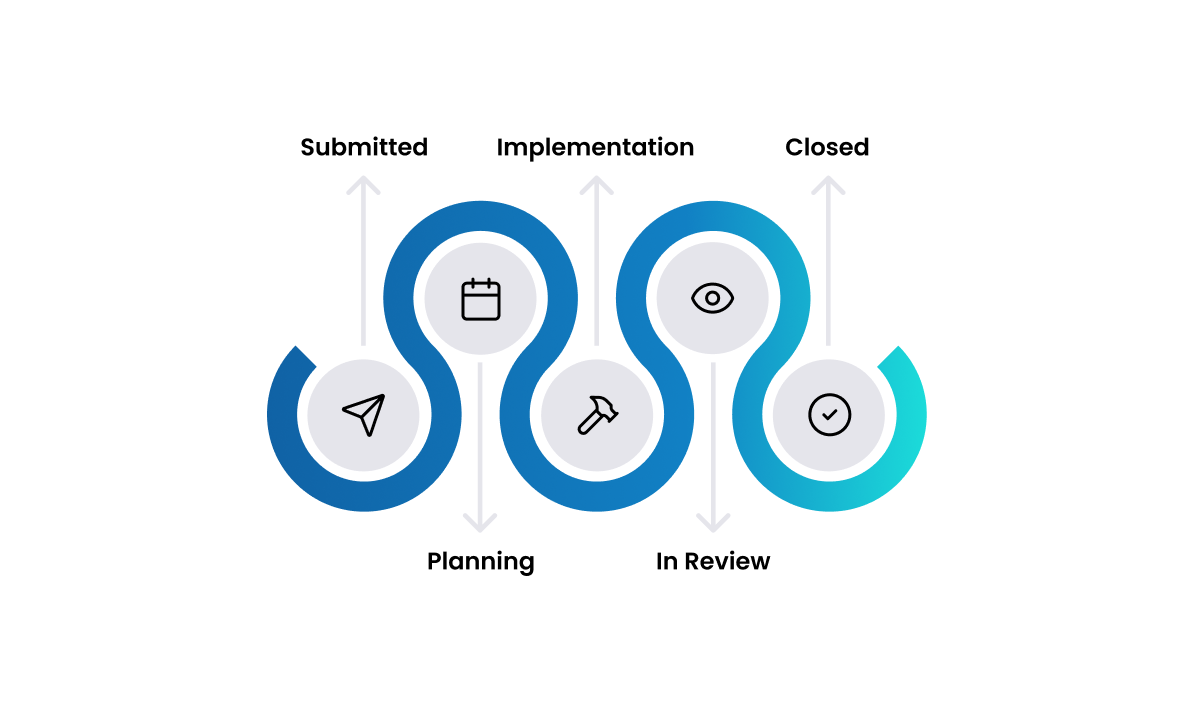
- Submission & Planning: A request is initiated, often from a service catalog item. The process is pre-approved, so planning is minimal and focuses on scheduling, including impact analysis and resource allocation to ensure a smooth deployment.
- Implementation: The change is executed according to the defined, repeatable procedure. This may involve automated scripts or manual tasks, with close attention to minimizing user disruption.
- Review & Closure: A quick verification confirms success, and the change record is automatically closed. This step includes checking logs and confirming that the service is functioning as expected post-change.
A Normal Change is a non-standard change that requires a full assessment and authorization process (e.g., a server upgrade or a new software deployment).
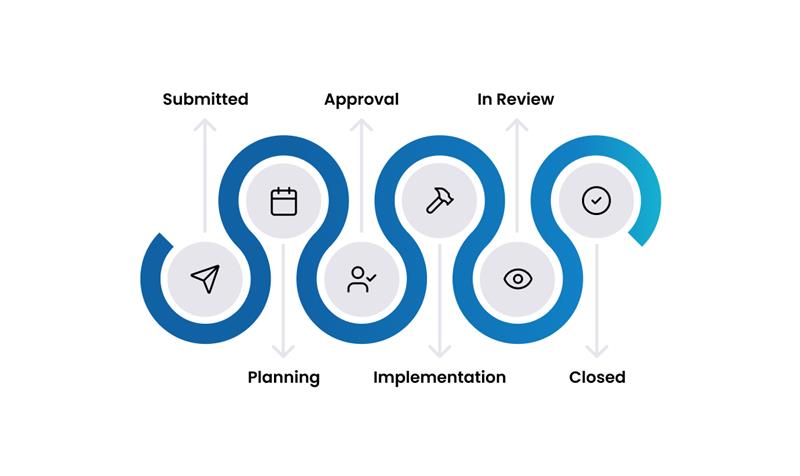
- Submission & Planning: A detailed Request for Change (RFC) is submitted, outlining the justification, potential impact, implementation plan, communication strategy, and a comprehensive backout plan to revert the change if issues arise.
- Approval: The RFC is reviewed by the Change Advisory Board (CAB) to assess risk, feasibility, and resource requirements. Approval from relevant stakeholders is required before proceeding, ensuring all concerns are addressed.
- Implementation: The approved change is executed. Progress is carefully monitored, and the backout plan is kept ready for immediate use in case of unexpected problems. All activities are documented in detail.
- Review & Closure: A Post-Implementation Review (PIR) is conducted to evaluate the change's success, confirm that objectives were met, and identify any lessons learned. The record is then formally closed, providing an audit trail.
An Emergency Change must be implemented immediately to resolve a critical issue, such as a major incident. The process is expedited to restore service quickly.
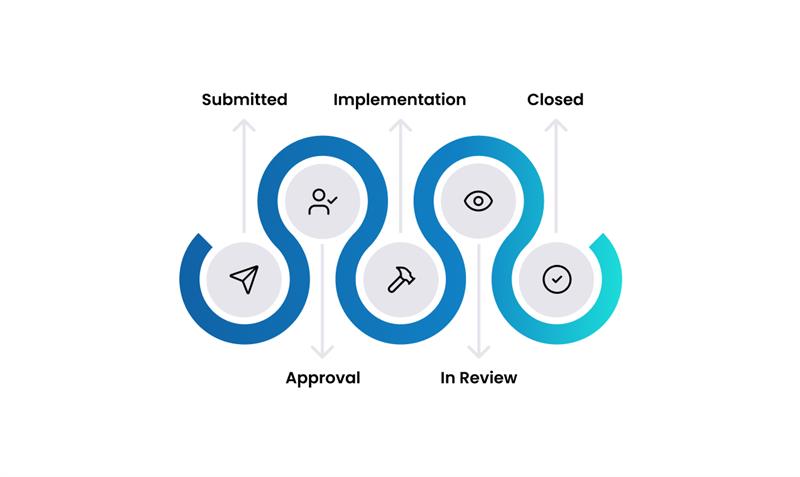
- Submission & Approval: An emergency request is raised with minimal initial documentation, focusing on the immediate problem and proposed solution. Approval is expedited, often by a small emergency CAB (ECAB) or a single authorized individual, to ensure rapid response to critical issues.
- Implementation: The change is implemented urgently to resolve the issue, with a strong emphasis on restoring service as quickly as possible. Close monitoring is essential during this phase.
- Review & Closure: A full retrospective review is conducted after implementation to ensure proper documentation of the emergency, identify root causes, learn from the event, and confirm that no adverse side effects occurred. The record is then formally closed.
Common Use Cases
- Scenario 1: Standard Change
- Scenario 2: Normal Change
- Scenario 3: Emergency Change
Change: A user requests additional RAM for their virtual machine via the service catalog.
- Submission: The user submits the pre-approved "VM RAM Upgrade" request.
- Implementation: An automated script runs, allocates the additional RAM to the VM, and reboots it during a scheduled maintenance window.
- Closure: The system verifies the new RAM allocation and automatically closes the change record, notifying the user.
Change: The networking team needs to apply a security patch to a core router.
- Submission & Planning: The team submits a detailed RFC, including risk analysis, test results from a staging environment, an implementation plan for after-hours, and a backout plan.
- Approval: The CAB reviews the RFC in their weekly meeting. They approve the change, noting the successful testing and robust backout plan.
- Implementation: The team executes the change as planned.
- Review & Closure: The next morning, they conduct a PIR, confirm that network performance is stable, and formally close the change.
Change: A critical vulnerability is discovered in the company's external web server, and a patch must be applied immediately.
- Submission & Approval: The security team raises an emergency change. The on-call IT Director reviews the urgency and grants immediate approval (acting as the ECAB).
- Implementation: The patch is deployed immediately.
- Review: The following day, the ECAB convenes to retrospectively review the change, complete the documentation, and confirm that no adverse side effects occurred. The change is then formally closed.
Roles and Responsibilities
- Change Requester: Any individual who submits a Request for Change (RFC).
- Change Manager: Governs the Change Management process, facilitates CAB meetings, and ensures procedures are followed.
- Change Advisory Board (CAB): A group of stakeholders (from IT, security, business departments) who assess, prioritize, and authorize normal changes.
- Technical Implementer: The individual or team responsible for planning and executing the change.
Key Capabilities
Change Planning and Scheduling
Customizable Templates: Use templates to standardize the submission of RFCs, ensuring all necessary information (risk, impact, backout plan) is captured.
Lifecycle Tracking: Monitor changes through structured workflows tailored to each change type.
Change Calendar: Schedule changes on a shared calendar to visualize upcoming activities, detect potential conflicts, and plan around business events or maintenance windows.
Risk, Approval, and Communication
Risk Assessment: Use built-in tools to assess the risk and impact of a change on business services.
CAB Management: Schedule CAB meetings, automatically distribute agendas with RFCs for review, and record decisions directly within the system.
Automated Notifications: Keep all stakeholders, from technicians to end-users, informed throughout the change lifecycle.
No change, especially a normal or emergency one, should be implemented without a tested plan to revert it if things go wrong. This is a critical component of risk mitigation.
Measuring Success: Key Metrics (KPIs)
Key Performance Indicators for Change Management
- Change Success Rate: The percentage of changes implemented without causing an incident. This is the primary measure of the process's effectiveness.
- Number of Unauthorized / Emergency Changes: A high number may indicate that the standard process is too slow or cumbersome. The goal is to minimize emergency changes over time.
- Change Lead Time: The average time taken to implement a change from submission to closure. This helps identify bottlenecks in the planning and approval stages.
- Backlog of Changes: The number of open RFCs waiting for assessment or approval.
Best Practices & Integrations
Best Practices
- Define Clear Roles: Ensure everyone understands their responsibilities, especially the roles of the Change Manager and the CAB.
- Right-Size the Process: Don't use a one-size-fits-all approach. Tailor the process based on the type and risk of the change (e.g., lightweight for standard changes, rigorous for normal changes).
- Always Have a Backout Plan: A well-tested plan to revert a change is essential for risk management.
- Communicate Effectively: Proactive communication is key to managing expectations and minimizing user disruption.
- Learn from Experience: Conduct Post-Implementation Reviews to learn from both successful and failed changes to continuously improve the process.
Integrations
- Incident & Problem Management: Changes are often the result of fixing the root cause of incidents and problems. Integration ensures a seamless handover.
- Release Management: Changes are typically deployed in batches as part of a release. Close coordination ensures that releases are safe and successful.
- Asset & CMDB: Linking changes to the CMDB is critical for understanding the potential impact on services and for maintaining an accurate record of your IT environment.
- Project Management: Larger changes often align with project goals, and integration allows changes to be tracked as part of a project timeline.
Security & Compliance
- Secure by Design: Integrate security checks into the change approval process to ensure changes don't introduce new vulnerabilities.
- Full Audit Trail: Maintain an immutable record of every change, from request to closure, to meet compliance requirements.
- Role-Based Access: Use permissions to control who can request, approve, and implement changes.