Patch Management
Patch Management is the systematic process of identifying, testing, and deploying software updates (patches) to computers and servers to fix bugs and improve performance.
A patch is a piece of code applied to a software program after its initial installation. Effective patch management is a cornerstone of cybersecurity and IT operational stability. ServiceOps provides a centralized and automated solution to manage the entire patch lifecycle across Windows, macOS, and Linux endpoints, as well as third-party applications.
Benefits of Patch Management
- Enhanced Security: Patches fix vulnerabilities that could be exploited by attackers, significantly reducing the risk of cyberattacks and data breaches.
- Improved System Stability & Performance: Regular patching resolves bugs and performance issues, leading to more reliable and efficient systems.
- Compliance with Regulations: Many industry standards and regulations (e.g., HIPAA, PCI DSS) require organizations to maintain up-to-date systems through effective patch management.
- Access to New Features: Patches often include new features and enhancements, allowing organizations to leverage the latest software capabilities.
Common Use Cases
- Operating System Updates: Regularly applying patches to Windows, macOS, and Linux servers and workstations.
- Third-Party Application Patches: Updating widely used software like web browsers, office suites, and specialized business applications.
- Firmware Updates: Patching device firmware for hardware components to address vulnerabilities and improve performance.
- Emergency Patches: Rapid deployment of critical security patches in response to newly discovered, actively exploited vulnerabilities.
Patch Types
Patches are categorized based on their purpose to help administrators prioritize deployment.
- Security Patches: The most critical type. These patches fix identified security vulnerabilities that could be exploited by attackers.
- Critical Updates: A broadly distributed fix for a specific, critical, non-security-related bug.
- Definition Updates: Frequent updates that add to a product's definition database, often used for antivirus or anti-malware software.
- Bug Fixes: Resolve functional issues or errors in the software that affect performance or user experience.
- Feature Updates: Add new functionality or enhance existing features.
- Update Rollups: A cumulative set of hotfixes, security updates, critical updates, and other updates that are packaged together for easy deployment.
- Service Packs: A cumulative collection of security patches, bug fixes, and feature updates bundled into a single, installable package.
- Hotfix: A single, cumulative package that includes information to address a specific problem in a software product.
- Tools: Utilities or features that help complete a task or set of tasks.
- Updates: A broadly distributed fix for a specific problem. An update is not critical and does not address security-related issues.
The Patch Management Lifecycle
A structured lifecycle ensures that patching is done in a controlled, effective, and low-risk manner. The process can be broken down into six key stages:
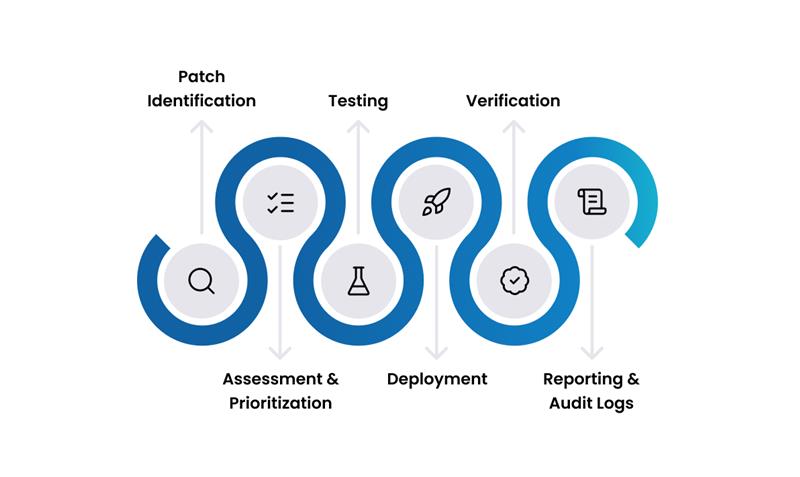
1. Patch Identification This foundational stage involves proactively identifying available patches and updates from various sources. This includes scanning systems to detect missing patches for operating systems, applications, and firmware, and monitoring vendor releases and security advisories.
2. Assessment and Prioritization Once patches are identified, they are assessed for relevance and potential impact on the IT environment. This involves evaluating the criticality of the vulnerability (if a security patch), the stability of the patch, and its compatibility with existing systems and applications. Patches are then prioritized based on factors like severity, business impact, and regulatory compliance requirements.
3. Testing To mitigate risks and prevent disruptions, patches are deployed in a controlled test environment before widespread rollout. This stage involves rigorous testing to ensure compatibility with various systems, applications, and configurations. Any potential issues or conflicts are identified and resolved during this phase to maintain system stability and functionality.
4. Deployment After successful testing and approval, patches are deployed to production systems. This can be done through automated deployment tools, which schedule and distribute patches across the network, or via manual methods for specific, sensitive systems. The goal is to ensure consistent and efficient application of updates with minimal disruption to users and services.
5. Verification Post-deployment, it's crucial to verify that patches have been successfully installed and are functioning as expected. This involves confirming the patch installation status on target systems, checking for any new issues or performance degradation, and ensuring that system functionality remains intact. Verification helps confirm the effectiveness of the patching process.
6. Reporting & Audit Logs This final stage involves documenting the entire patch management process. Comprehensive reports are generated to show patch status, success/failure rates, and compliance with security policies and regulatory standards. Maintaining detailed audit logs provides an immutable record of all patching activities, essential for compliance, incident response, and continuous improvement of the patch management strategy.
Key Capabilities
Discovery & Assessment
- Automated Scanning: Schedule regular scans to automatically detect missing patches across all managed endpoints.
- Comprehensive Dashboard: Get a centralized view of your network's patch health, with severity ratings and detailed information for every missing patch.
- Multi-Platform Support: Discover patches for Windows, macOS, and various Linux distributions.
- Third-Party Application Support: Manage patches for a wide range of common third-party applications, such as Adobe, Java, and popular web browsers.
Deployment & Control
- Flexible Deployment Policies: Create highly granular policies to control when and how patches are deployed, including scheduling, user notifications, and reboot options.
- Automated & Manual Deployment: Configure fully automated workflows for routine patches or use manual deployment for more sensitive systems.
- Test & Approve Workflow: Mitigate risk by enforcing a testing and approval process before any patch is deployed to production systems.
- Rollback Capabilities: In the event of a problematic patch, you can uninstall it from the affected endpoints.
Architecture
- Centralized Patch Repository: A cloud-based repository is continuously updated with the latest patches from all supported vendors.
- Distribution Points: For organizations with multiple locations, on-premise file servers can act as distribution points. This optimizes bandwidth by allowing endpoints at a remote office to download patches from a local server instead of across the WAN.
- Secure Communication: All patch files are verified for integrity using checksums (SHA-256) and digital signatures to prevent tampering.
Best Practices
Planning & Preparation
- Maintain an Accurate Inventory: You can't patch what you don't know you have. Start with a complete and accurate inventory of all hardware and software assets.
- Prioritize Based on Risk: Focus your efforts on patching the most critical vulnerabilities first. Use severity ratings (Critical, Important) and CVSS scores to guide your priorities.
- Establish a Test Group: Always deploy patches to a dedicated test group that represents the different types of systems in your production environment before a full rollout.
- Define Maintenance Windows: Work with business units to establish regular maintenance windows when patching and reboots can occur with minimal disruption.
Deployment & Execution
- Automate as Much as Possible: Use automated deployment policies for routine and low-risk patches to ensure consistency and speed.
- Communicate with Users: Inform users about upcoming patch deployments and potential reboots to manage expectations and reduce help desk calls.
- Integrate with Change Management: For high-risk patches, especially on critical servers, integrate the deployment with your formal change management process for proper approval and documentation.
- Monitor and Report Continuously: Regularly review your patch compliance dashboards and reports to identify and address any gaps in your coverage.