Configuration Items (CIs)
A Configuration Item (CI) is a fundamental record in the CMDB representing any component that needs to be managed to deliver an IT service. CIs and their relationships form the core of your service map.
While an asset record tracks the financial and contractual details of an item (what you own), a CI record tracks its functional role in the IT environment (what it does). A single asset, like a physical server, can be represented as multiple CIs. For example, the server itself, its operating system, the applications running on it, and the databases it hosts are all separate CIs.
CI Types and Classification
ServiceOps uses a hierarchical classification system to organize CIs into a logical structure that mirrors your IT environment. Standard high-level CI types include Hardware, Software, Service, and Network. You can create up to five levels of custom sub-types for greater precision, for example, Hardware > Servers > Web Servers. Each CI type has its own form with custom fields, validation rules, and suggested relationships.
The CI Status
CIs have a defined lifecycle that reflects their operational status, which you can synchronise with the corresponding asset status. This includes statuses such as Operational (the CI is active and delivering a service), Non-Operational (the CI is not currently in use but is available), In Maintenance (the CI is temporarily offline for planned maintenance or updates), and Retired (the CI has been decommissioned and is no longer part of the operational environment).
CI Lifecycle
The CI lifecycle defines the essential stages that a Configuration Item progresses through, from its initial discovery and creation to its eventual retirement and archiving. This structured approach ensures that CIs are consistently managed, accurately maintained, and remain relevant to the IT services they support throughout their entire lifespan.
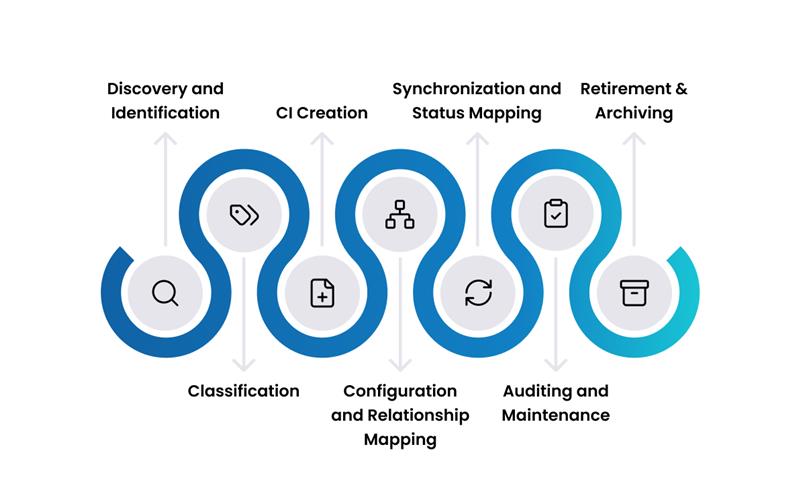
- Discovery and Identification: ServiceOps scans your IT environment using agent-based or agentless methods to find hardware, software, network devices, and other components and builds a foundational inventory.
- Classification: ServiceOps identifies and categorises the attributes of each discovered device, including OS, kernel version, hardware specs, installed software, and network configuration, so each CI lands in the right category.
- CI Creation: You add CIs to the CMDB through manual entry, automated discovery, or sync rules that create CIs directly from matching asset records.
- Configuration and Relationship Mapping: You define the relationships and dependencies between CIs. For example, an application CI links to the server CI it runs on, which links to a storage CI. These connections drive impact analysis.
- Synchronisation and Status Mapping: You link the lifecycle of each asset to its CI so that status changes in one automatically update the other, giving a unified view of both financial and operational data.
- Auditing and Maintenance: You regularly audit CI records to confirm they reflect the current state of your environment, update configurations, and refine sync rules and discovery preferences as your infrastructure evolves.
- Retirement and Archiving: When a CI is decommissioned, you update its status to Retired and archive the record for historical reference, compliance, and audit trail purposes.
Key Capabilities
CI Creation & Population
- Automated Discovery: The most effective way to populate your CMDB is through automated discovery. Use agent-based or agentless methods to scan your environment and create CIs automatically.
- Asset Sync: Keep Assets and CIs in sync automatically. Whenever an asset is created or updated, the corresponding CI is created or updated based on configured rules. This keeps attributes, key details, and lifecycle statuses consistent across both records.
- Manual & Bulk Creation: Manually create individual CIs or use the bulk import feature to load a large number of CIs from a CSV file.
CI Properties
- Comprehensive Details: Each CI record stores vital information, including a unique ID, name, type, status, business impact, location, and ownership details.
- Type-Specific Attributes: Capture detailed hardware specifications (manufacturer, model, serial number), software versions, license information, and more, depending on the CI type.
- Custom Fields: Add custom fields to CI forms to capture any additional information your organization needs for operational or compliance purposes.
Process Integration
- Incident Management: When an incident occurs, link it to the affected CI to speed up diagnosis and resolution by providing support teams with immediate context.
- Change Management: Associate change requests with the CIs they will affect. This is crucial for performing impact analysis and understanding the risk of a change.
- Problem Management: Use CI relationship data to trace the root cause of recurring incidents.
- Asset Management: Maintain a bi-directional sync between an asset record and its CI, keeping financial and operational data consistent.
CI Relationships
The true power of a CMDB comes from understanding the relationships between CIs.
- Dependency Mapping: Define how CIs depend on each other. For example, a "Runs on" relationship shows an application CI runs on a server CI.
- Impact Analysis: The relationship map allows you to instantly see the downstream impact of a CI failure or change. If a server goes down, you know exactly which applications and business services will be affected.
- Visualization: Use the relationship graph to get a clear, visual representation of your service dependencies, which is invaluable for troubleshooting and planning.
For more details, see CI Relationships and Dependencies.
Best Practices
Data Quality
- Start Small: Don't try to track everything. Begin by mapping the CIs for one or two critical business services.
- Use Automation: Rely on automated discovery to populate and maintain your CMDB. Manual data entry is the primary source of errors and outdated information.
- Establish Governance: Define clear ownership and processes for creating, updating, and retiring CIs. A CMDB without governance quickly becomes unreliable.
- Regularly Audit: Schedule regular reviews to verify the accuracy of your CMDB data and prune any stale or incorrect records.
Relationship Management
- Focus on Key Dependencies: Document the most critical relationships first, especially those that support key business services.
- Use Suggested Relationships: Configure suggested relationship types for your CIs to guide users and ensure consistency.
- Validate Relationships: During change reviews and post-incident analysis, validate that the relationships in the CMDB reflect reality.