CI Relationships and Dependencies
CI Relationships are the connections that link Configuration Items together, forming a dynamic map of your IT environment. This map is essential for understanding dependencies, performing impact analysis, and managing change effectively.
While CIs are the individual nodes in your CMDB, relationships are the lines that connect them, turning a simple inventory into a powerful service-aware model. They show how components depend on and interact with each other, providing the context needed to manage a complex IT ecosystem.
Relationship Types
ServiceOps uses a bidirectional model to define relationships, meaning every connection has a Direct and an Inverse type.
- A Direct Relationship shows a dependency from a source CI to a target CI.
- An Inverse Relationship shows the same connection from the perspective of the target CI.
For example:
- Direct:
WebApp-01(Source) --Runs on-->Server-01(Target) - Inverse:
Server-01(Source) --Hosts-->WebApp-01(Target)
The system includes a rich set of default relationship types (e.g., Connected to, Depends on, Installed on) and allows you to create custom types to fit your specific needs.
Visualizing Relationships
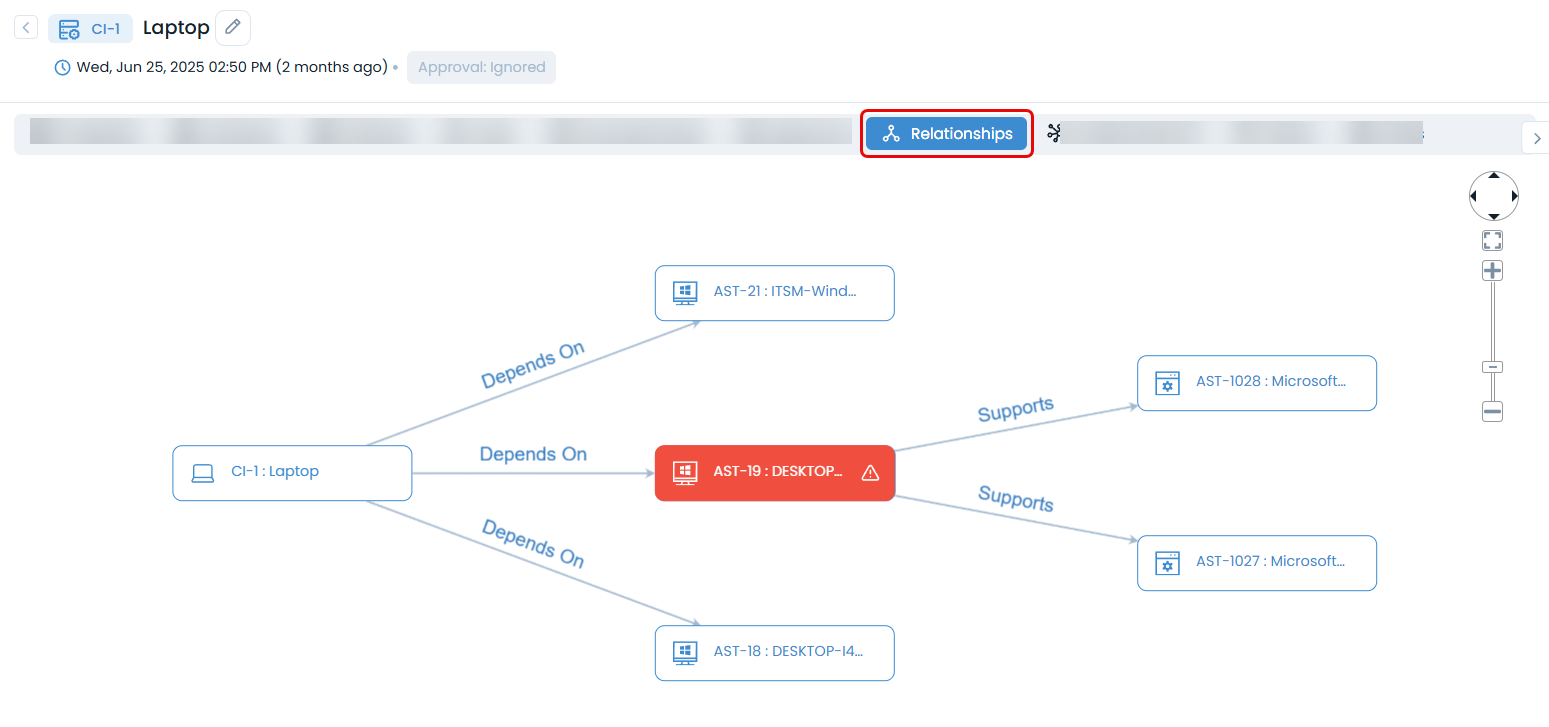
The most powerful way to understand CI relationships is through the Relationship Graph. This interactive diagram visualizes your CIs as nodes and their relationships as connecting lines, allowing you to:
- See the full dependency chain for a business service.
- Trace the potential impact of a change or failure.
- Easily identify upstream and downstream CIs.
Key Capabilities
Relationship Creation
- Automated Discovery: Automatically discover and map relationships during network or agent-based discovery. For example, the system can automatically create a "Connected to" relationship between a server and the switch port it's plugged into.
- Suggested Relationships: To ensure consistency, you can pre-configure "suggested" relationships for specific CI types. When a user manually links CIs, the system suggests the most logical relationship type, reducing errors.
- Manual Creation: Users can manually create, edit, or remove relationships between CIs as needed to reflect the real-world environment.
Impact Analysis
- Change Risk Assessment: Before implementing a change, use the relationship map to perform an impact analysis. By selecting a CI, you can instantly see all the upstream business services and downstream components that could be affected, allowing you to accurately assess risk.
- Incident Root Cause Analysis: During an outage, the relationship map helps support teams quickly trace dependencies to find the root cause. If a business service is down, you can follow the map to see which underlying CI is the source of the failure.
Process Integration
- Change Management: Impact analysis is a critical input for the Change Advisory Board (CAB), helping them make informed approval decisions.
- Incident Management: Automatically associate related CIs to an incident ticket based on the dependency map.
- Asset Management: Keep the operational view of the CMDB in sync with the financial view of your asset inventory.
Best Practices
- General
- Validation & Auditing
Related Topics
For detailed operational procedures and step-by-step guides, see the Product Guides: Technician Guide section.