Software Asset Management
Software Asset Management (SAM) is the practice of managing and optimizing the purchase, deployment, maintenance, utilization, and disposal of software applications within an organization.
Effective SAM is critical for maintaining license compliance, controlling costs, and mitigating security risks associated with shadow IT. ServiceOps provides a comprehensive SAM solution to discover, manage, and track all software assets across your entire IT environment, ensuring you get the most value from your software investments.
Benefits of Software Asset Management
- License Compliance & Cost Savings: Avoid costly legal penalties from vendor audits and significantly reduce spending by eliminating or reallocating unused software licenses.
- Enhanced Security: Mitigate cybersecurity risks by identifying and removing unauthorized, outdated, or vulnerable software from your network.
- Increased Productivity: Ensure employees have access to the right software tools for their roles while preventing the performance issues caused by bloatware.
- Better IT Forecasting: Make informed, data-driven decisions on contract renewals and new purchases based on accurate software usage data.
Common Use Cases
- Preparing for a Vendor Audit: Quickly generating comprehensive compliance reports for major vendors like Microsoft, Adobe, or Oracle.
- Optimizing Subscription Renewals: Analyzing usage data to right-size SaaS subscriptions and avoid overpaying for unused seats.
- Enforcing Software Policies: Automatically detecting and removing prohibited or unlicensed software to maintain a secure and standardized IT environment.
Visualizing Software Normalization
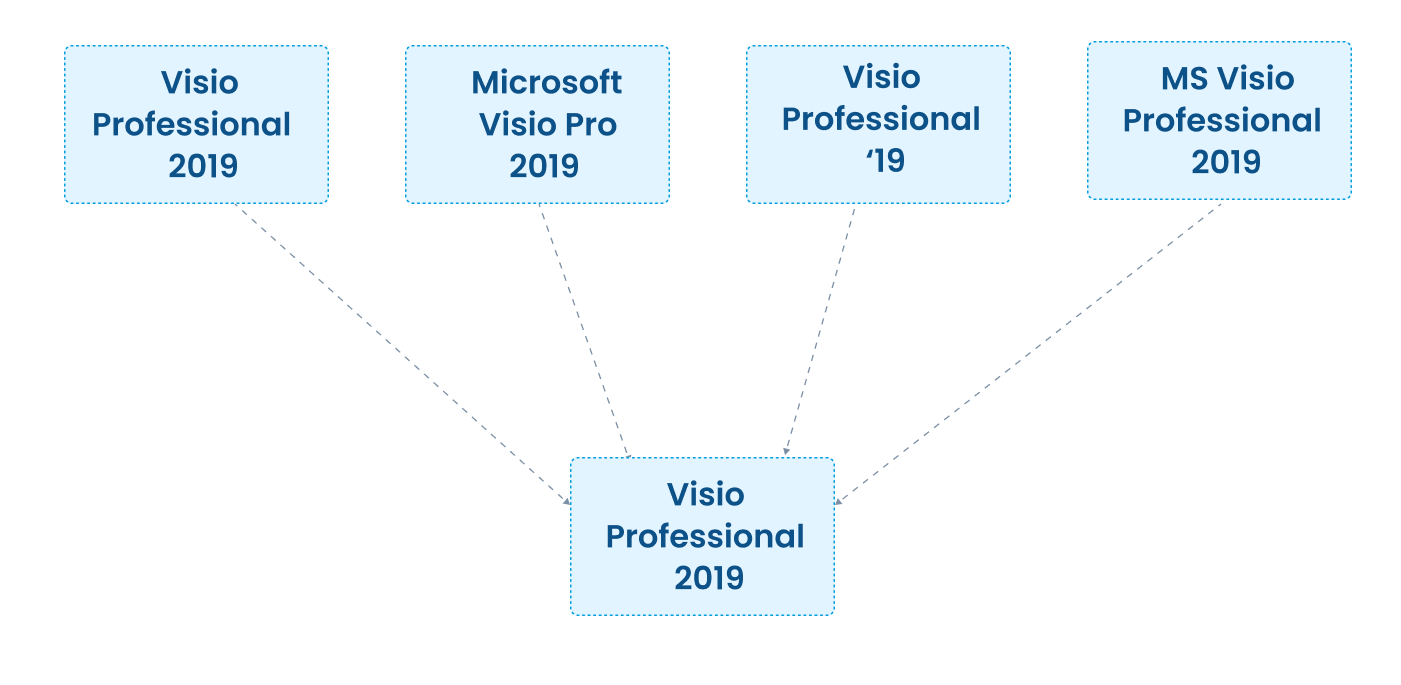
Software normalization is a core SAM process that cleans up and standardizes discovered software data. The diagram below illustrates how raw, inconsistent software titles are consolidated into a single, recognizable record, which is essential for accurate license counting.
Software States
ServiceOps tracks software through its lifecycle, from being In Stock (available for deployment) to In Use, and finally to Retired.
Software Classification
Categorize software to streamline management and apply the correct policies:
- Managed: Commercially licensed software that requires active tracking and compliance management.
- Freeware: Software that is free to use but still needs to be tracked for security and support purposes.
- Prohibited: Software that is banned from the organization due to security, policy, or legal reasons. ServiceOps can automatically detect and even uninstall prohibited software.
- Unidentified: Newly discovered software that needs to be reviewed and classified.
Key Capabilities
Discovery & Normalization
- Automated Discovery: Use agentless or agent-based approach to automatically scan and inventory all software installed on endpoints across your network.
- Software Normalization: Clean up your software inventory by automatically consolidating different versions and editions of the same application into a single, standardized record. This is crucial for accurate license counting. Example: "Adobe Reader 11.0", "Acrobat Reader XI", and "Adobe Reader v11.1" are all normalized to a single record: "Adobe Acrobat Reader DC".
- Suite Management: Intelligently group individual applications into their parent suites (e.g., automatically bundling Word, Excel, and PowerPoint into Microsoft Office) for easier license management. Example: Automatically bundle individual installations of Word, Excel, and PowerPoint into the "Microsoft Office Professional Plus 2021" suite.
License Compliance
- License Management: Track all your software licenses, including type (perpetual, subscription, volume), quantity, and renewal dates.
- Compliance Monitoring: Automatically compare the number of deployed software instances against the number of purchased licenses to identify compliance gaps.
- Compliance Settings: Configure under-utilization and over-utilization thresholds for licenses to receive alerts, helping you proactively manage compliance and optimize software usage.
- Prohibited Software Control: Create blacklists of unauthorized software. The system can alert you to new installations and automatically trigger uninstallation workflows.
- Audit Preparedness: Generate comprehensive compliance reports instantly to prepare for vendor audits and avoid true-up costs.
Usage & Optimization
- Software Metering: Track application usage to identify underutilized software. This data is essential for "license harvesting"-reallocating unused licenses to save costs. Example: Your organization pays for 500 licenses of a design tool, but metering shows only 150 employees have used it in the last six months. This data allows you to reduce your license count at the next renewal, generating significant savings.
- Usage Analytics: Gain insights into how software is being used, for how long, and by whom, enabling data-driven decisions for renewals and new purchases.
Getting Started with SAM in ServiceOps
Follow these steps to set up and populate your software asset management system:
- Run Initial Discovery: Use agent-based or agentless discovery to scan your environment and create a complete, accurate baseline of all installed software.
- Normalize and Classify: Review the discovered software, allow the system to normalize it, and classify applications as Managed, Freeware, or Prohibited based on your policies.
- Upload License Contracts: Import all your existing software licenses and contracts into the system to serve as the foundation for compliance tracking.
- Configure Compliance Alerts: Set up alerts for over- and under-utilization to stay ahead of compliance issues and identify cost-saving opportunities.
- Monitor and Optimize: Regularly review the SAM dashboard and reports to monitor your compliance status, track usage, and make data-driven decisions for renewals and optimization.
Best Practices
General
- Automate Everything: Rely on automated discovery and normalization to maintain an accurate and up-to-date software inventory. Manual tracking is prone to errors.
- Establish a Clear Policy: Define and communicate a clear software policy that outlines what is permitted, what is prohibited, and the process for requesting new software.
- Focus on High-Value Software: Prioritize your SAM efforts on high-cost, high-risk, and widely deployed software vendors (e.g., Microsoft, Adobe, Oracle) where the potential for savings and compliance risk is greatest.
- Regularly Review Compliance: Don't wait for an audit. Regularly review your license compliance position to address any gaps proactively.
Optimization
- Harvest Unused Licenses: Use software metering data to identify and reclaim licenses from users who are no longer using an application.
- Right-Size Renewals: Before renewing a software contract, analyze usage data to ensure you are only paying for the licenses you actually need.
- Consolidate Applications: Identify redundant applications with overlapping functionality and standardize on a single solution to reduce costs and support overhead.
Security
- Track and Remediate Vulnerabilities: Use your software inventory to quickly identify assets running outdated or vulnerable versions of software and prioritize patching.
- Identify and Remove Unauthorized Software: Leverage discovery data to detect and uninstall prohibited or non-standard software that could pose a security risk.
- Ensure Approved Sources: Enforce policies to ensure that all software is installed from company-approved, secure sources to prevent malware.