Consumable Asset Management
Consumable Asset Management involves tracking and controlling expendable resources-such as office supplies, printer toner, or IT accessories-to ensure availability, manage costs, and optimize inventory levels.
Consumable assets are items that are used up and not individually tracked after being allocated. Unlike standard assets, they are managed by quantity rather than as individual units. ServiceOps provides a dedicated system for managing the lifecycle of these bulk items, from procurement to allocation and replenishment.
Benefits of Consumable Management
Effective consumable management offers significant advantages:
- Cost Savings: Minimize waste, prevent overstocking, and leverage bulk purchasing opportunities to reduce overall spending.
- Improved Availability: Ensure that essential supplies are always in stock, preventing costly downtime and work interruptions.
- Increased Efficiency: Automate reordering, streamline allocation requests, and reduce the administrative burden of manual tracking.
- Better Budgeting: Gain clear visibility into consumption patterns by department or location for more accurate financial planning and chargebacks.
Common Use Cases
Consumable asset management can be applied in various scenarios across an organization:
- IT Accessories: Tracking and managing the stock of keyboards, mice, cables, and other peripherals for new hires and replacements.
- Office Supplies: Controlling the inventory of printer toner, paper, stationery, and other common office items.
- Specialized Inventory: Monitoring critical, time-sensitive supplies, such as perishable lab materials, dated medical equipment, or manufacturing components.
The Consumable Asset Management Lifecycle
The management of consumables follows a cyclical process designed to ensure continuous availability while minimizing waste and controlling costs. The diagram below illustrates this flow, from initial purchase to final consumption and reordering.
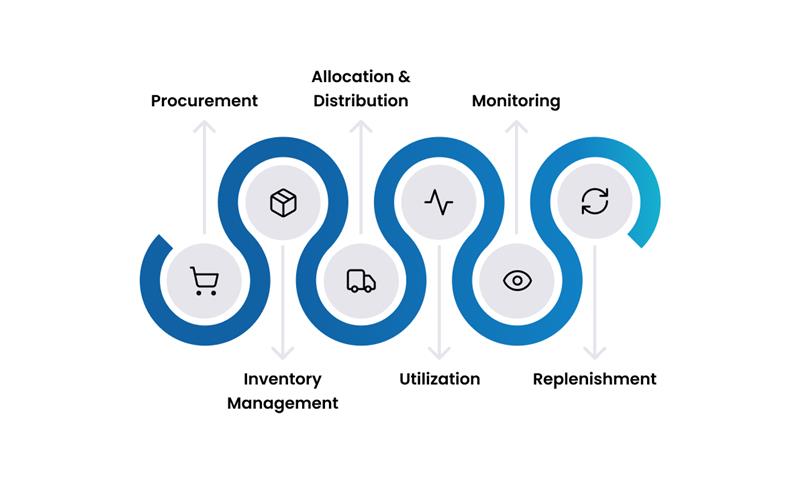
Managing consumables effectively means tracking their journey through the organization.
- Procurement: This initial stage involves identifying the need for consumables, creating purchase orders, and receiving the items from vendors. Once received, they are officially added to the organization's central inventory, ensuring that all incoming supplies are accounted for.
- Inventory Management: After procurement, consumables are cataloged and stored in designated locations. This stage focuses on accurately tracking stock levels, managing storage across different sites, and maintaining a clear record of where each item is located.
- Allocation & Distribution: When a user or department needs a consumable, a request is made, and the item is allocated from the existing inventory. This process involves distributing the item to the recipient and updating the stock count to reflect the reduction in quantity.
- Utilization: In this stage, the consumable is used by the recipient for its intended purpose. This is the core of the lifecycle, where the asset provides value to the organization.
- Monitoring: To prevent stockouts, inventory levels are continuously monitored in real-time. Predefined minimum quantity thresholds are set, and the system automatically tracks consumption patterns against these levels.
- Replenishment: When monitoring reveals that stock has dropped below the minimum threshold, the replenishment process is triggered. This often involves automatically generating a purchase request to reorder the item, thus ensuring a continuous supply and completing the cycle.
Key Capabilities
Inventory & Allocation
- Quantity-Based Tracking: Manage assets by the total quantity in stock, rather than as individual items. Example: Instead of tracking 100 individual pens, you track one entry for "Blue Pen" with a quantity of 100.
- Centralized Catalog: Maintain a catalog of all consumable asset types, including office supplies, IT accessories (keyboards, mice), and printer consumables.
- Stock Management: Track inventory across multiple locations, set minimum quantity thresholds, and receive automatic low-stock alerts. Example: Set a minimum threshold of 20 toner cartridges to automatically trigger a reorder notification when the stock level drops.
- Bulk Allocation: Easily allocate multiple units of a consumable to users or departments in a single action. Example: Allocate 50 notebooks to the Marketing department in a single transaction.
- Allocation History: Keep a complete audit trail of who received what, when, and how much. Example: View a log showing that John Smith received a new keyboard on September 25, 2025.
Financial Management
- Cost Tracking: Record the purchase cost per unit and track the total value of your consumable inventory. Example: If you have 50 toner cartridges purchased at $100 each, the total inventory value is $5,000.
- Budget Management: Assign consumable costs to the appropriate departments or cost centers for accurate budgeting and chargebacks. Example: Allocate the cost of 20 printer paper reams to the Finance department's budget.
- Vendor Management: Track which vendors you purchase consumables from to analyze spending and consolidate suppliers. Example: Identify that 80% of your office supplies come from a single vendor, creating an opportunity to negotiate better pricing.
- Expiry Monitoring: For perishable items, track expiration dates to minimize waste. Example: Receive an alert 30 days before a batch of medical supplies expires, ensuring they are used in time.
Reporting & Analytics
- Inventory Reports: Generate real-time reports on current stock levels, available quantities, and locations. Example: Instantly pull a report showing you have 15 keyboards in the main office and 5 in the branch office.
- Usage & Consumption Reports: Analyze consumption patterns to understand which departments or users are the biggest consumers. Example: Discover that the Engineering department uses twice as many whiteboard markers as any other department.
- Cost Analysis: Report on spending trends to identify opportunities for cost savings. Example: A quarterly report shows a 20% increase in paper costs, prompting a review of printing policies.
- Forecasting: Use historical data to forecast future demand and optimize reordering. Example: Predict that you will need to order 500 pens before the start of the next fiscal year based on past usage.
Getting Started with Consumable Management
- Define Your Catalog: Identify and create a standardized catalog of all the consumable items your organization needs to track.
- Conduct an Initial Count: Perform a physical inventory count of your current consumable stock and record the initial quantities in ServiceOps.
- Set Reorder Thresholds: For each item in your catalog, establish a minimum quantity level that will trigger a reorder notification.
- Establish Allocation Process: Define a clear process for how users or departments can request consumables and how those requests are fulfilled and tracked.
- Monitor and Adjust: Regularly review consumption reports to adjust reorder points and optimize purchasing decisions based on actual usage data.
Best Practices
Inventory & Process
- Set Reorder Points: For each consumable, define a minimum quantity threshold that automatically triggers a reorder notification. This prevents stockouts.
- Conduct Regular Stock Audits: Periodically perform a physical count of your consumables to reconcile with the system's data and ensure accuracy.
- Implement an Approval Process: For high-cost consumables, implement a simple approval workflow to control allocation and prevent misuse.
- Standardize Your Catalog: Maintain a clean and standardized catalog of consumables to avoid duplicate entries and make it easy for users to find what they need.
Financial
- Leverage Bulk Purchasing: Analyze consumption trends to identify opportunities for bulk purchasing, which can significantly reduce unit costs.
- Track Departmental Usage: Monitor which departments are consuming the most and use this data for accurate budget allocation.
- Consolidate Vendors: Review your spending across different vendors and consolidate your purchasing with preferred suppliers to gain better pricing and terms.