Create ManageEngine ServiceDesk Plus Integration Profile in ObserveOps
Overview
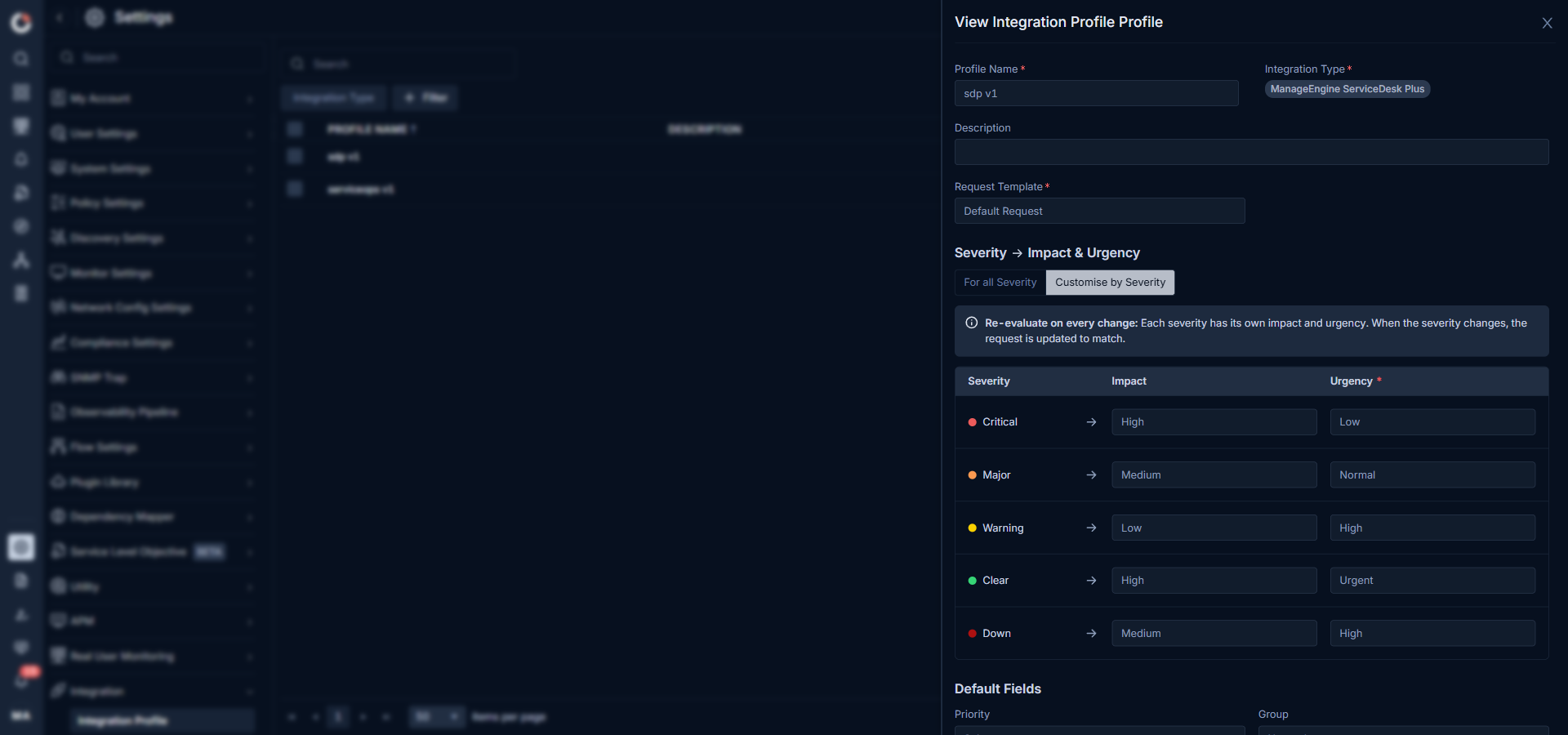
The Integration Profile defines how an ObserveOps alert is translated into a ManageEngine ServiceDesk Plus (SDP) request. You pick the Request Template in SDP, and the profile loads the fields configured on that template, including severity-to-impact-and-urgency mapping, group, technician, category, service category, item, custom fields, and auto-close behavior.
Navigation
Select Settings  . After that, go to Integration
 and select Integration Profile. The Integration Profile screen is displayed.
Integration Profile Screen
The screen lists every configured integration profile across all integration types.
| Field | Description |
|---|---|
| Profile Name | Name of the integration profile. |
| Description | Description of the integration profile. |
| Integration Type | Integration type selected for the profile. |
| Used Count | Number of policies that currently use the profile. |
| Actions | View, edit, clone, or delete the profile. |
To create a new profile, select the Create Integration Profile button.
Integration Profile Parameters
Configure the following fields on the Create Integration Profile screen. The template-driven fields appear only after you select the Request Template, and their values are fetched from the SDP server.
Basic Details
| Field | Description |
|---|---|
| Profile Name | Enter a unique name for the profile. |
| Integration Type | Select ManageEngine ServiceDesk Plus from the dropdown. |
| Description | Enter a description for the profile, if required. |
| Request Template | Select the SDP request template to use. The fields visible below depend on the template configuration in SDP. |
Severity, Impact, and Urgency
Choose how ObserveOps severities are mapped to SDP Impact and Urgency:
- For all Severity: Applies the same Impact and Urgency to every ObserveOps severity.
- Customise by Severity: Lets you set a different Impact and Urgency for each severity. When the severity of an alert changes, the mapped request is updated to match.
The severities available for mapping are Critical, Major, Warning, Clear, and Down.
Default Fields
The following fields are loaded from the selected request template. The exact set and the mandatory fields depend on the SDP template configuration.
| Field | Description |
|---|---|
| Priority | Select the priority to set on the SDP request. |
| Group | Select the support group that owns the request. The list is fetched from SDP. |
| Technician | Select the technician assigned to the request. The list is filtered based on the selected Group. |
| Category | Select the request category. |
| Subcategory | Select the subcategory. The list is filtered based on the selected Category. |
| Service Category | Select the service category, if the template uses one. |
| Item | Select the item. The list is filtered based on the selected Subcategory. |
| Mode | Select the mode of the request (for example, Email, Phone, Mobile App). |
| Request Type | Select the request type, if the template exposes it. |
| Status | Select the initial status for the request, if the template exposes it. |
| Impact Details | Short free text that captures the business impact of the alert. |
Custom Fields
Any custom fields defined on the SDP request template appear below the default fields. ObserveOps supports the following custom field types from SDP: single line text, multi-line text, numeric, decimal, pick list, pick list reference, multi select, multi select reference, radio, radio reference, date time, checkbox, and checkbox reference.
Two placeholder-style custom fields are available for enrichment:
- Group Field: Pick a custom field that will be filled with the monitor's groups on each request.
- Tag Field: Pick a custom field that will be filled with the monitor's tags on each request.
Auto Close
| Field | Description |
|---|---|
| Auto Close Ticket | Toggle on to automatically move the mapped SDP request to Closed or Resolved when the alert clears in ObserveOps. |
| Ticket Status | Available only when Auto Close Ticket is on. Select Closed or Resolved as the terminal status for cleared alerts. |
Request Content
| Field | Description |
|---|---|
| Incident Subject | Subject line used when the request is created in SDP. Pre-filled with variables such as $$policy.name$$ $$object.name$$($$object.ip$$) $$counter$$, which are replaced with the real values at the time the alert triggers. |
| Incident Description | Body of the request. Pre-filled with alert variables such as Object Name, IP / Host, Object Type, Metric, Metric Value, Severity, Policy Name, Policy Type, and Message. |
Select the Reset button to clear the current field values.
Select the Create Integration Profile button to save the profile.