Motadata Release Notes Version 8.2.6
Release Date: June 23, 2026
What's New?
eBPF/OBI-Based Instrumentation Support Added in APM
With this release, APM supports eBPF/OBI-based instrumentation, enabling automatic discovery and monitoring of services without code-level changes. Service-to-service communication, request count, latency, error rate, and trace/span data are collected and surfaced in existing APM views such as service list, service map, traces, and errors.
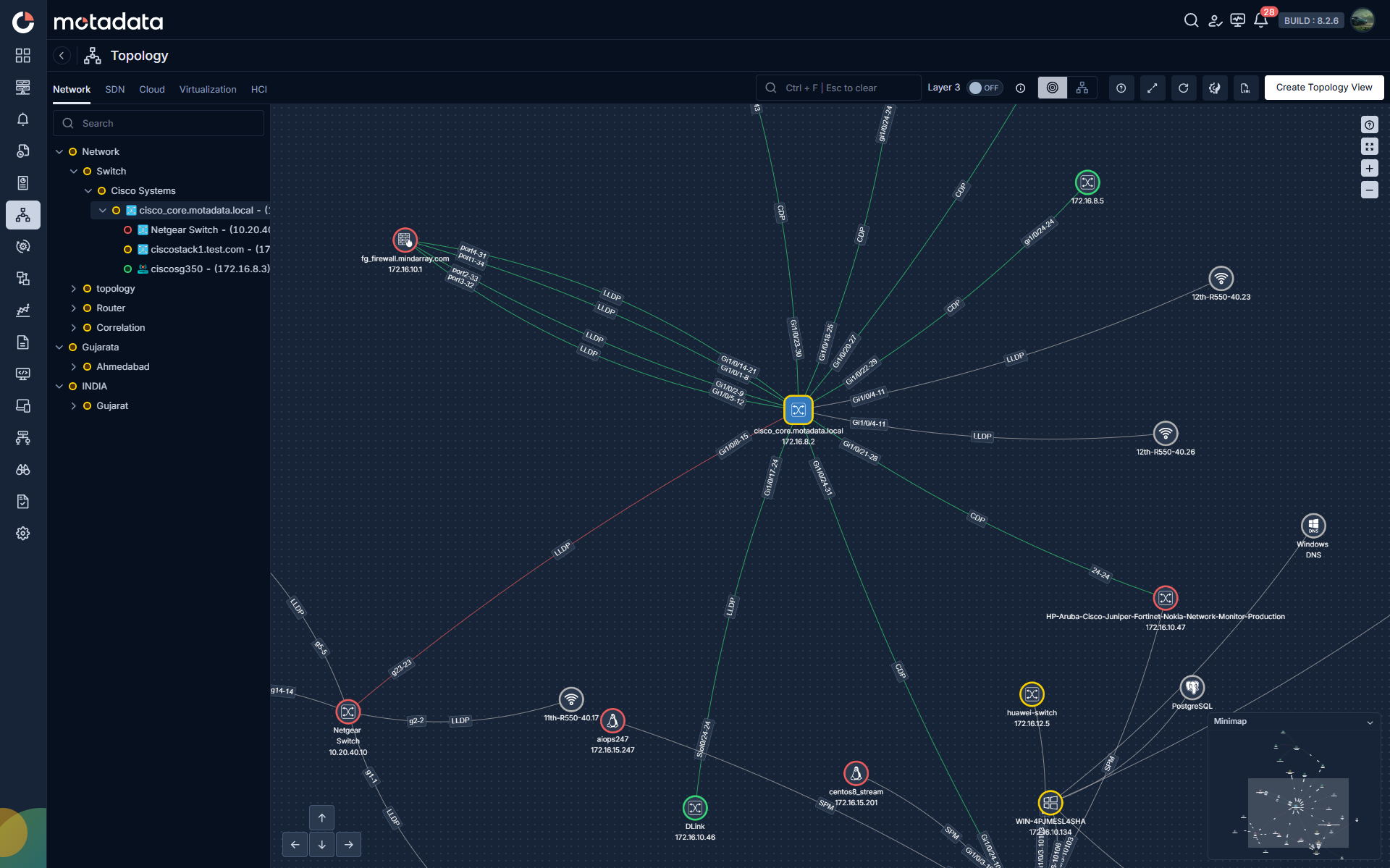
Enhanced Topology Visualization with IP, Link Protocol, and Interface Overlays
With this release, the Topology Advanced Configuration drawer includes a new Overlays section with three independent toggles such as Show Node IP, Show Link Protocol, and Show Interface Names that surface additional context directly on the canvas without opening side panels. Show Node IP, Show Link Protocol labels each link with its discovery protocol (CDP, LLDP, SPM, ISIS, OSPF, BGP, or Manual); Show Interface Names shows the source and destination interface identifiers at each end of a link. Toggle states are saved per user, persist across sessions, and default to off on upgrade.
ServiceOps Ticket Priority Behavior Based on Alert Severity Now Configurable
ServiceOps integration profiles now support two ticket priority modes: Lock on First Trigger fixes Priority, Impact, and Urgency at initial ticket creation and ignores subsequent severity changes; Update on Every Flap lets users map each ObserveOps severity (Critical, Major, Warning, Clear, Down) to ServiceOps Impact and Urgency values so that ticket priority updates automatically whenever alert severity changes.
APM, NetRoute, and RUM Performance SLO with Multi-Metric Support Added
With this release, Motadata ObserveOps brings dedicated tabs for APM, RUM, and NetRoute are added. This allows users to create Service Level Objectives against their respective monitored entities using relevant metrics such as APM Trace Metrics, RUM metrics, and latency, packet loss, for NetRoute.
Bulk Alert Operations Across Alert Modules Added
With this release, operators can select multiple alerts across Metric, Log, Flow, Trap, NetRoute, APM, Network Config, and RUM modules and act on them from a bottom action panel. Supported bulk operations include Clear Alert, Add Note, Suppress Alert, and Acknowledge, with a select-all option and live selection count. Bulk actions are scoped per module: Metric, NetRoute (Source to Destination), APM (Trace Metrics), and RUM (Metrics) support all four operations; remaining modules support Suppress Alert.
Introducing Motadata ObserveOps Mobile Application
With this release, Motadata ObserveOps introduces a native mobile application on the Google Play Store and Apple App Store. The app can also be downloaded via the Download Mobile App option in the user icon dropdown, which opens a QR code popup for quick download.
Extreme Wireless Controller Monitoring Support Added
Motadata ObserveOps now supports discovery and monitoring of Extreme Wireless Controllers through the Wireless Discovery Profile using SNMP (V1, V2, V3). Extreme Wireless Controller devices are included in topology views for networks sharing the same infrastructure.
WhatsApp, Telegram, and Google Chat Notifications via Runbooks
Runbook-based alert notifications are now supported for WhatsApp, Telegram, and Google Chat, extending real-time alert delivery across all three channels.
Physical Disk Read and Write Latency Counters for Windows and Linux Servers Added
With this release, Motadata ObserveOps adds system.physical.disk.io.avg.read.latency.ms and system.physical.disk.io.avg.write.latency.ms counters for Windows and Linux servers across both agentless and agent-based collection modes. Values are computed as delta read/write time divided by delta operation count and stored in milliseconds, keeping latency separate from existing throughput metrics. These counters are available in templates, dashboards, alerts, reports, and widgets.
PostgreSQL and MariaDB Monitoring Enhanced
PostgreSQL monitoring now includes replication lag (bytes and time-based), WAL sender and receiver status, backup success/failure status, and archiver process state. MariaDB templates gain master-slave replication status and replication lag metrics, and the mariadb.connections metric aggregation is corrected from sum to last/avg for accurate connection count reporting.
Introducing Assignment of Bulk Tag via CSV Upload for Monitor Settings
With this release, Motadata ObserveOps brings Apply Tags Using CSV in Monitor Settings that lets operators upload a CSV file containing Monitor Name, IP, and tag values to assign static key-value or standalone tags across multiple monitors in one operation.
Bulk SNMP Trap Profile Creation via CSV Upload Added
With this release, a CSV Upload option is available to Create SNMP Trap Profile, allowing users to create multiple SNMP Trap Profiles in a single operation.
Custom SNMP Catalogue and Metric Plugin Management Enhanced
With this release, SNMP Metric Plugins derived from device catalogues are visible under Plugins > Metrics with new Vendor, Model, and Type columns. Assigned Metric Plugins are now editable users can update OID mappings and replace incorrect OIDs without recreating the plugin.
Maintenance Mode and Scheduled Maintenance for Health Agent Added
With this release, the Motadata ObserveOps Health Agent supports immediate and scheduled maintenance mode on both Windows and Linux.
NCCM Configuration Backup Files Structured on External Storage Added
NCCM configuration backups transferred to an external storage server are now organized into a structured folder and file naming format. Files are grouped by device in a monitor-name_ip folder, subdivided into running_config and startup_config directories, and named using the convention monitor-name_ip_<config-type>_v<version>_<YYYY-MM-DD_hh-mm-ss_AM/PM>.cfg. The same naming convention applies when users download configuration files from the UI.
Copy Action for Log Event Attributes Added
Log Search event details now display a copy icon on each attribute row, letting operators copy individual attribute values such as event source, severity, facility, or event category directly to the clipboard.
Hyphen Character Support in Usernames Added
Usernames can now include the hyphen (-) character alongside the existing alphanumeric, underscore, and dot characters. This supports enterprise naming conventions such as john-doe or ops-admin-01 and improves compatibility with LDAP/SSO sync flows and external identity providers.
Default Landing Dashboard Assignment During Creation and Edit Added
With this release, the Create Dashboard and Edit Dashboard flows include a Default Landing Dashboard section. Users can enable a toggle and choose to set the dashboard as default for Public and Private.